Business Intelligence
Top AI Business Analytics Platforms That Anyone Can Use
Compare five AI analytics platforms that let non-technical users get instant, auditable insights, plus pricing, deployment, and security notes.

AI-powered analytics tools are now making data insights accessible to everyone, not just technical experts. With platforms like Querio, ThoughtSpot, Microsoft Power BI, Domo, and Sisense, users can ask questions in plain English and instantly get actionable insights. These tools simplify data analysis, integrate with various data sources, and offer flexible pricing to fit different team sizes and needs. Here's what you need to know:
- Querio: Converts plain English into SQL/Python for precise, auditable results using natural language to SQL tools. A free plan and no per-seat pricing.
- ThoughtSpot: Offers real-time and cached queries, focusing on large enterprises. Pricing starts at $95/user/month.
- Microsoft Power BI: Affordable and integrates with Microsoft tools. Starts free, with Pro at $10/user/month.
- Domo: Provides real-time dashboards and pre-built connectors. Pricing starts at $300/month.
- Sisense: Combines NLP with generative AI for advanced analytics. Custom pricing tailored to business needs.
Quick Comparison
| Platform | Ease of Use | Pricing | Key AI Feature | Best For | Deployment Options |
|---|---|---|---|---|---|
| Querio | High (Natural language to SQL) | Free plan; Core $2,499/mo | Inspectable AI-generated SQL/Python | Teams needing governed insights | Cloud, on-prem (Enterprise add-on) |
| ThoughtSpot | Very High (search-driven) | $95/user/month | Sage Search & Spotter AI Agent | Large enterprises with hybrid environments | Cloud-native, mobile access |
| Microsoft Power BI | Moderate (Copilot assistance) | Free, Pro: $10/user/month | Copilot (Generative AI) | Budget-conscious, Microsoft-centric users | Cloud, on-premises, hybrid |
| Domo | Moderate (Drag-and-drop) | $300/month | Real-time dashboards (Domo.AI) | Executives needing live insights | Cloud-based |
| Sisense | Moderate (AI Assistant) | Custom pricing | AI-driven query generation | Embedding analytics in SaaS products | Managed cloud, self-hosted |
These platforms are transforming how businesses interact with data, enabling faster decisions without technical expertise. Whether you're a small team or a large enterprise, there's a platform that fits your needs.
1. Querio
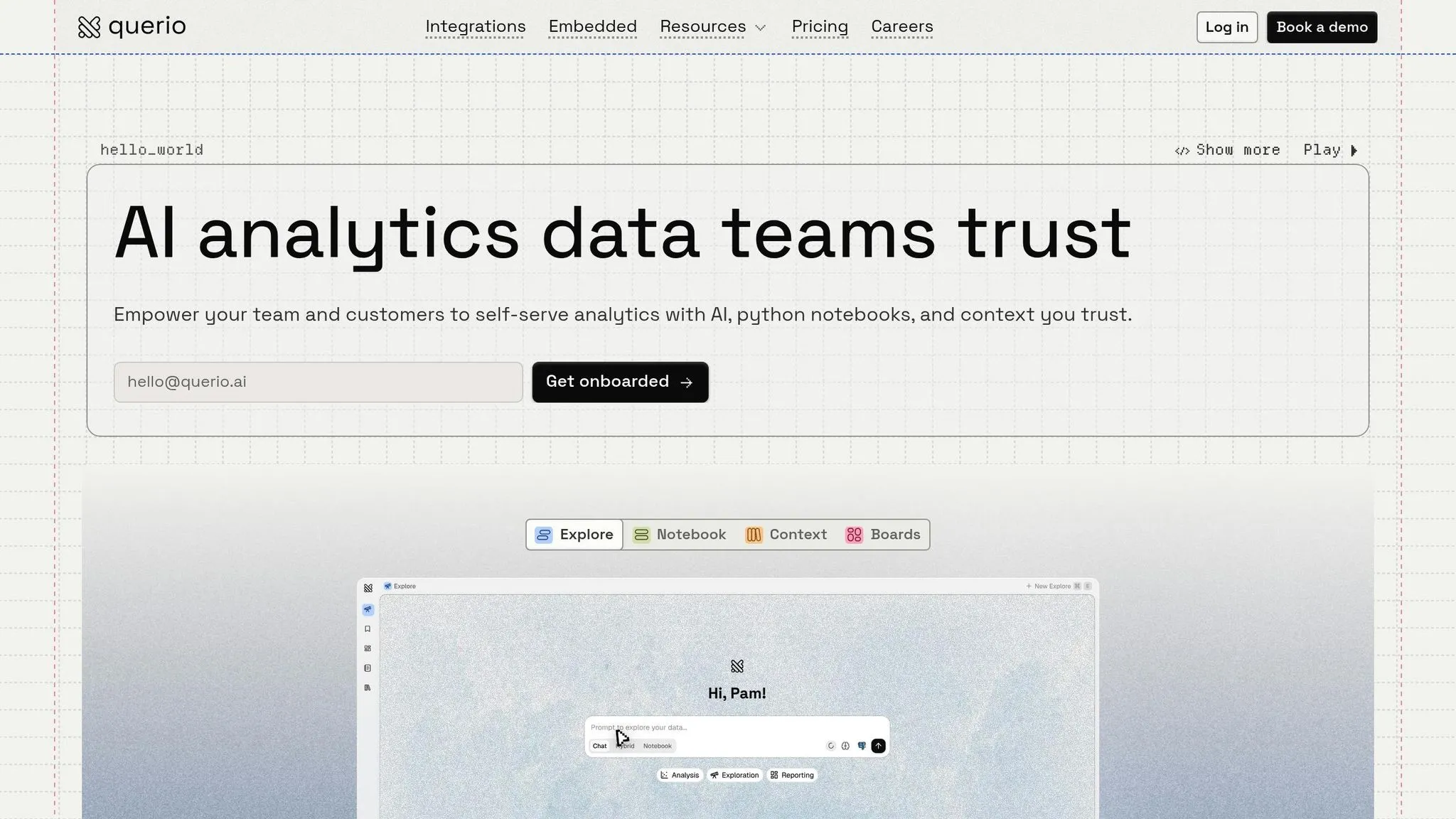
Querio bridges the gap between plain English queries and complex data analysis by converting everyday questions into precise SQL and Python code. It connects directly to your data warehouse, empowering teams to ask questions like, “What’s our revenue by region this quarter?” and receive instant, data-backed answers.
Here’s how Querio simplifies analytics with natural language processing uses in BI, seamless integration, advanced security, and a pricing model that works for teams of all sizes.
Natural Language Query Support
Querio’s AI transforms simple questions into SQL queries that pull directly from your data warehouse. This ensures answers are transparent and traceable, rather than relying on a black-box process. Data teams can review the generated code, building trust while giving business users the autonomy to find insights on their own.
The results? Teams using Querio save an average of 10 hours per week on repetitive data analysis tasks[1]. This extra time allows analysts to focus on strategic projects rather than routine queries. It’s a win-win for productivity and collaboration.
Data Integration Capabilities
Querio integrates seamlessly with major data warehouses like Snowflake, BigQuery, Amazon Redshift, ClickHouse, and MotherDuck, as well as relational databases such as PostgreSQL, MySQL, MariaDB, and SQL Server[2]. By using encrypted, read-only credentials, Querio eliminates the need for data duplication or extracts during setup.
Its shared context layer defines joins, metrics, and terminology, ensuring everyone on the team works with consistent data. This unified approach not only simplifies analysis but also lays the groundwork for enterprise-grade security.
Governance and Security Features
Designed with enterprise needs in mind, Querio includes role-based access controls (RBAC), data encryption (both at rest and in transit), audit logs, and row-level security to safeguard sensitive information[3][4]. The platform complies with standards like SOC 2 Type II and GDPR, making it a trusted choice for teams managing customer data, financial records, or healthcare information.
Administrators can also implement policies like query limits or data masking, ensuring sensitive information stays protected. These features give teams the confidence to act on real-time insights without compromising security.
Pricing Flexibility
Querio’s pricing is designed to adapt to teams of any size. There is no per-seat pricing: every plan includes unlimited users and unlimited data connections, making it simple to scale. You can start on the free plan, which includes 500 AI credits a month.
Dashboards are included on every plan. Core is $2,499 a month (or $25,000 a year billed annually) with 10,000 AI credits a month, SSO and API access. AI usage past the included credits is billed per credit, and admins can set usage alerts and a spending cap, so teams can grow without overspending.
2. ThoughtSpot
ThoughtSpot provides two flexible ways to query data: real-time live queries and scheduled cached datasets. With live queries, the platform connects directly to cloud data warehouses using a "zero-copy" approach, meaning your data remains in its original location while being queried in real time. On the other hand, cached datasets allow you to schedule snapshots, reducing the load on your source systems and improving performance.
Natural Language Query Support
ThoughtSpot's AI makes querying data simple by converting conversational questions into queries that run against your data warehouse or cached extracts. It uses a human-in-the-loop system to refine these queries, incorporating industry-specific terminology over time. This ensures that the results become more aligned with your organization's unique language and needs.
Data Integration Capabilities
The platform supports a wide range of data sources, including databases, data warehouses, and data lakes, and flat files like CSV and Excel. Its Analyst Studio workspace allows data teams to merge information from various sources, such as cloud warehouses and Google Sheets, using SQL, Python, or R. Additionally, ThoughtSpot integrates seamlessly with SaaS applications like Salesforce and ServiceNow via APIs. It also works alongside existing ETL/ELT tools and data warehouses and communication platforms like Slack and Microsoft Teams.
Here’s a quick comparison of live queries and cached datasets:
| Feature | Live Query | Cached Datasets |
|---|---|---|
| Data Freshness | Real-time | Scheduled refreshes |
| Governance | Respects CDW policies | Managed within ThoughtSpot |
| Performance | Depends on CDW speed | Optimized for speed |
| Best Use Case | Production BI & Dashboards | Ad hoc exploration & testing |
Pricing Flexibility
ThoughtSpot has adopted a usage-based pricing model, offering options like consumption-based or builder-based pricing. This ensures organizations only pay for what they use, avoiding the need for fixed seat licenses. Pricing details, however, depend on factors like deployment size and the specific features required[5].
3. Microsoft Power BI
Microsoft Power BI brings enterprise-level analytics to the table while integrating seamlessly with other Microsoft tools. Despite its robust capabilities, it remains user-friendly enough for non-technical users. With the ability to connect to over 100 data sources - including cloud platforms like Azure and Salesforce, as well as local files like Excel and CSV - it’s an excellent choice for organizations already invested in the Microsoft ecosystem [12,14]. Here’s a closer look at its standout features.
Natural Language Query Support
With Power BI's Q&A and Copilot features, users can interact with data in plain English. For instance, typing a question like "What were sales in the Northeast region last quarter?" instantly generates a visualization. Copilot goes a step further, assisting in creating reports, generating DAX calculations, and summarizing data models - all through conversational prompts [13,18,19].
Data Integration Capabilities
The Power Query Editor simplifies the process of transforming and cleaning data before loading it into the system [10]. For those working with large datasets, Direct Lake mode allows data to be queried directly from OneLake without the need for importing or caching, which improves performance [8]. On-premises data gateways ensure secure, live connections to local databases [7], and PBIDS files can be auto-generated to standardize data connections across teams [6]. A real-world example? At Lumen, Microsoft-powered automation eliminated nearly 10,000 hours of manual work in just one year [9].
Governance and Security Features
Power BI leverages Azure’s security infrastructure and integrates with Microsoft 365 compliance tools, offering advanced controls like Row-Level Security (RLS) and Object-Level Security (OLS) [12,16]. It also works with Microsoft Purview to automate data discovery and sensitivity labeling across an organization’s data estate [13,17]. Data at rest is encrypted, and Premium users can opt for a "Bring Your Own Key" (BYOK) option for even greater security. Plus, with over 3,500 engineers dedicated to strengthening its security framework, users can rely on continuous improvements [11].
Pricing Flexibility
Power BI offers a free version for individual use, making it easy to get started. For more advanced features and collaboration tools, Power BI Pro is available at $14.00 per user per month (billed annually). For enterprise-level capabilities, the Power BI Premium Per User plan costs $24.00 per user per month [13,14,17]. Organizations using Microsoft Fabric can also opt for capacity-based pricing (F-SKUs), which provides greater flexibility for scaling larger deployments [13,17].
4. Domo
Domo describes itself as a BI-led decision intelligence platform, known for its real-time, customer-facing dashboards and a wide array of data connectors [12]. It consolidates organizational data into one unified view, enabling users to take immediate action. With its emphasis on real-time insights, Domo allows teams to monitor key metrics as they occur, eliminating reliance on outdated reports. Let’s dive into some of its standout features.
Data Integration Capabilities
Domo excels in connecting to a variety of data sources without requiring extensive technical expertise. The platform includes pre-built connectors for popular tools like Salesforce, Google Analytics, and major cloud databases, significantly speeding up the setup process. Users can pull data from spreadsheets, APIs, and enterprise systems, then transform and visualize it - all within the same platform. This streamlined approach minimizes the need to juggle multiple tools, offering teams a single source of truth for their analytics. Even teams with limited technical skills can achieve self-service business intelligence and tap into real-time insights effortlessly.
Governance and Security Features
When it comes to data governance, Domo offers robust controls to help organizations manage access and maintain security. Administrators can set role-based permissions to ensure that sensitive data is only accessible to the right people. Additionally, the platform provides audit logs for tracking data usage and supports encryption for data both in transit and at rest. These features are especially critical for businesses handling customer data or operating in regulated environments, making Domo a dependable choice for balancing data accessibility with security.
Pricing Flexibility
Domo follows a custom pricing model, meaning costs are tailored to your organization’s size and specific needs. While this approach allows for tailored solutions, it can complicate budgeting - particularly for smaller businesses trying to compare options upfront. To get an accurate estimate, you’ll need to reach out to Domo’s sales team for a personalized quote.
5. Sisense
Sisense is a powerful, all-in-one platform designed for data integration, visualization, and AI-driven insights. It caters to organizations managing complex data by offering over 400 data connectors and adhering to strict security standards like SOC 2 Type II, ISO 27001, and ISO 27701. What sets Sisense apart is its dual approach to natural language queries, combining traditional NLP tools with cutting-edge generative AI features to meet advanced analytics needs [17][21][23].
Natural Language Query Support
Sisense simplifies the query process with two key tools. The Simply Ask feature leverages NLP and a Knowledge Graph to assist users in building queries effortlessly, even without SQL expertise. It includes helpful features like automatic suggestions and spellcheck [14]. Meanwhile, the AI Assistant enables users to create entire analytics workflows - from data modeling to dashboards - through conversational prompts [15][19]. Another standout feature, Smart Value Matching, translates informal inputs (e.g., "northeast" to "NE Region") for text columns with up to 250 unique values, making it easier to navigate datasets without requiring precise terminology [15].
"The exciting thing about Sisense Intelligence is the ease of use. It is already easy to create widgets and dashboards. It could shorten that lead time further and empower regular users. True self-service." - Hamza Jap Tjong, Head of Data & AI, Gerimedica [16]
Data Integration Capabilities
Sisense connects seamlessly with major databases like PostgreSQL, MySQL, SQL Server, Oracle, Amazon Redshift, Snowflake, Google BigQuery, and Salesforce [13][17]. It can either consolidate data from multiple sources or maintain live connections to data warehouses, handling intricate data models with over 25 tables and up to 500 GB of data per server [22].
For example, USA Swimming used Sisense to provide real-time, self-serve analytics to 400,000 users, delivering insights 20x faster to enhance coaching and athlete performance [18]. Similarly, Funraise leveraged Sisense to save 40 hours per week on reporting, resulting in a 7x increase in fundraising and a 12% improvement in donor retention for its nonprofit clients [18].
Governance and Security Features
Sisense prioritizes data privacy with a "no model training" policy, ensuring that customer data is never used to train AI models [20]. The platform employs tenant isolation with dedicated service instances for each deployment and uses a local-first architecture to transmit only essential data. Administrators can manage AI feature access at multiple levels - system-wide, data model, dashboard, and widget - offering precise control over governance [20][22].
"Sisense's AI capabilities allow us to quickly translate complex data into clear insights, identify trends and gaps, and make decisions faster during clinical trials - all while managing risk." - Tanya du Plessis, Chief Data Strategist and Solutions Officer, Bioforum [16]
Pricing Flexibility
Sisense uses subscription-based plans to provide predictable costs [22] and offers a 7-day free trial for new users [16]. Deployment options include managed cloud and self-hosted environments, with the added flexibility for customers to integrate their own LLM keys from providers like OpenAI or Azure for generative AI features [16][19]. For tailored pricing, organizations can contact Sisense's sales team directly.
Platform Comparison Table
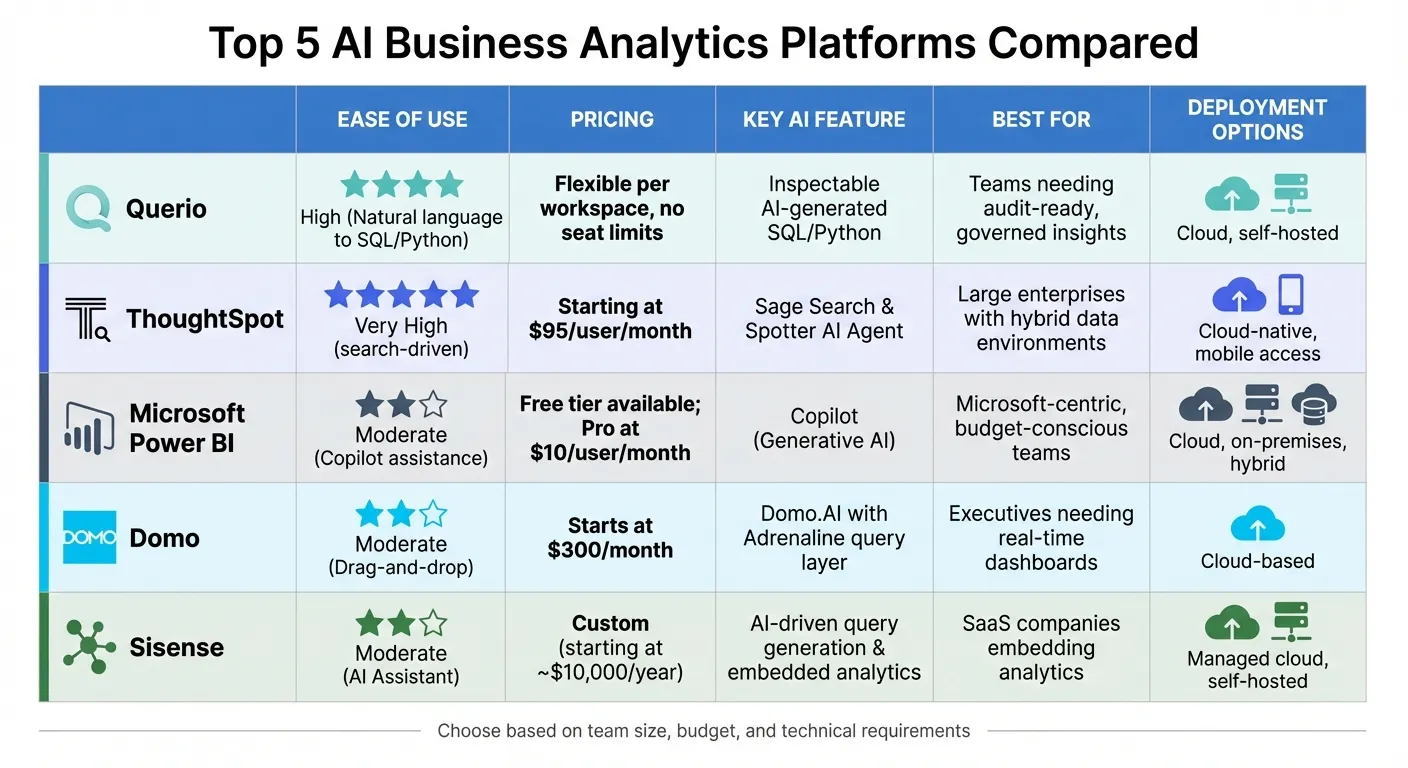
Selecting the right analytics platform depends on factors like team size, technical skills, budget, and business needs. The table below highlights key features of five popular platforms to help you make an informed choice. These platforms are designed to simplify analytics for non-technical users, enabling quicker insights. Here's how they compare:
| Platform | Ease of Use | Pricing | Key AI Feature | Best For | Deployment Options |
|---|---|---|---|---|---|
| Querio | High (Natural language to SQL/Python) | Free plan; Core $2,499/mo, no per-seat pricing | Inspectable AI-generated SQL/Python | Teams needing audit-ready, governed insights | Cloud, on-prem (Enterprise add-on) |
| ThoughtSpot | Very High (search-driven) | Starting at $95/user/month | Sage Search & Spotter AI Agent | Large enterprises with hybrid data environments | Cloud-native, mobile access |
| Microsoft Power BI | Moderate (Copilot assistance) | Free tier available; Pro at $10/user/month | Copilot (Generative AI) | Microsoft-centric, budget-conscious teams | Cloud, on-premises, hybrid |
| Domo | Moderate (Drag-and-drop) | Starts at $300/month | Domo.AI with Adrenaline query layer | Executives needing real-time dashboards | Cloud-based |
| Sisense | Moderate (AI Assistant) | Custom (starting at ~$10,000/year) | AI-driven query generation & embedded analytics | SaaS companies embedding analytics | Managed cloud, self-hosted |
Querio stands out for its transparency and scalability. Its inspectable AI-generated SQL and Python code ensures accuracy and auditability, making it ideal for teams that require governed, reusable analytics. Plus, its free plan and no per-seat pricing make it particularly appealing for growing teams.
Microsoft Power BI offers an affordable starting point, especially for teams already using Microsoft tools. Its free tier and $10/user/month Pro plan make it accessible for budget-conscious users, while its AI-powered Copilot enhances usability.
ThoughtSpot is geared toward large enterprises, offering a search-driven experience and advanced AI features like Sage Search. However, its premium pricing at $95/user/month reflects its focus on enterprise-grade capabilities.
Domo shines with its real-time dashboards powered by the Adrenaline query layer, making it a favorite for executives who need fast, visual insights. On the other hand, Sisense specializes in embedded analytics tools, providing developer-friendly features for SaaS companies looking to integrate analytics into their products.
For teams prioritizing transparency, scalability, and cost-efficiency, Querio remains a top contender with its inspectable AI code and flexible pricing model.
Conclusion
Querio's AI-powered analytics is changing the game for teams by making data more accessible than ever. Instead of waiting days - or even weeks - for IT to generate detailed reports, users can now ask questions in plain English and get answers in seconds. This AI self-serve analytics approach eliminates the technical hurdles that once made data insights hard to access.
In practice, this method significantly cuts down analysis time, allowing users to make quicker, well-informed decisions. Plus, the transparency of Querio’s insights builds trust, as users can easily verify and audit the data.
With inspectable AI-generated code, flexible pricing options, and strong security measures, Querio is a smart choice for teams looking for easy-to-use analytics tools. The output in SQL and Python ensures both accuracy and auditability, while its pricing has no per-seat fees, making it scalable for growing teams.
If you’re ready to simplify your analytics process and align with your team’s goals, Querio offers a solution that’s transparent, secure, and built for growth. Give it a try and see how it transforms the way you work with data.
FAQs
How do I know the AI’s answers are accurate?
To get accurate insights from AI tools like Querio, it's essential to focus on features that promote transparency and reliability. For instance, inspectable SQL and Python code allows users to review the logic behind the results, ensuring everything checks out. Features like audit trails, role-based access, and strong data security measures also play a key role in verifying the analysis process and safeguarding data integrity.
By combining these AI-driven insights with human expertise, you can make decisions that are both well-informed and trustworthy.
What data sources can I connect to without moving my data?
You can integrate with more than 50 data sources without needing to transfer your data. These sources include popular platforms like Facebook Ads, Google Ads, Google Analytics, and LinkedIn Ads. The setup is straightforward, thanks to real-time syncing and a no-code process, allowing you to connect your tools with ease.
How can I keep sensitive data secure with self-serve analytics?
To protect sensitive data in self-serve analytics, it's crucial to adopt strong security measures and governance practices. Tools like Querio come equipped with features such as audit trails, data access controls, and adherence to industry standards like SOC 2 Type II. Connecting with secure data warehouses ensures encryption and tightly managed access.
Beyond that, take additional steps like managing user permissions, enabling multi-factor authentication, and actively monitoring user activity. Staying compliant with privacy regulations, such as GDPR and CCPA, is another key aspect of safeguarding data and maintaining trust.