Business Intelligence
Why Your AI Gives Different Answers Every Time (And the Fix)
Check prompts, session context, SQL path, metadata, and permissions to stop AI BI answer drift and get repeatable results.

If your AI gives two different BI answers to the same question, the model usually is not the main problem. In most cases, the change comes from one of 4 places: the prompt, the context, the query path, or the user’s data access.
I’d boil the article down to this:
- Same data does not guarantee the same AI answer
- BI drift often comes from setup, not from the warehouse
- The fix is to lock down metric definitions, metadata, SQL paths, and permissions
- You should inspect SQL and test a small set of core business questions on repeat
A simple example: I can ask, “What was revenue last quarter?” on Monday, September 7, 2026 and again on Wednesday, September 9, 2026, and get two totals even if the warehouse data never changed. Why? Because “revenue,” “last quarter,” prior chat context, or row-level access may have changed the result.
Here’s the short version of what matters most:
- Ambiguous prompts change meaning
- Session history changes scope
- Different tools or routes change SQL logic
- Old metadata points the AI to the wrong fields
- User-level RBAC/RLS changes what each person can see
- Low temperature helps a bit, but it does not solve BI consistency on its own
What I’d do first: rerun the exact question in a clean session, compare the generated SQL to a trusted dashboard or saved query, and confirm which user identity ran the query.
| Check | What I’m looking for | What it tells me |
|---|---|---|
| Prompt/session | Same wording, no chat history | Whether context changed the answer |
| SQL output | Different joins, filters, dates, or metric logic | Whether query logic drifted |
| Semantic layer | Same metric definition every time | Whether business logic changed |
| Permissions | Same user scope, RBAC, and RLS | Whether access changed totals |
Bottom line: I don’t get steady BI answers from a “better” model alone. I get them from a steady analytics setup: fixed metric definitions, current metadata, inspectable SQL, live warehouse queries, and user-scoped permissions.
That’s the core point of the article.
What Happens When Your AI Agent Finds Two “Correct” Answers?
::: @iframe https://www.youtube.com/embed/1Wlg18fSOU0 :::
The root causes you can actually control
::: @figure 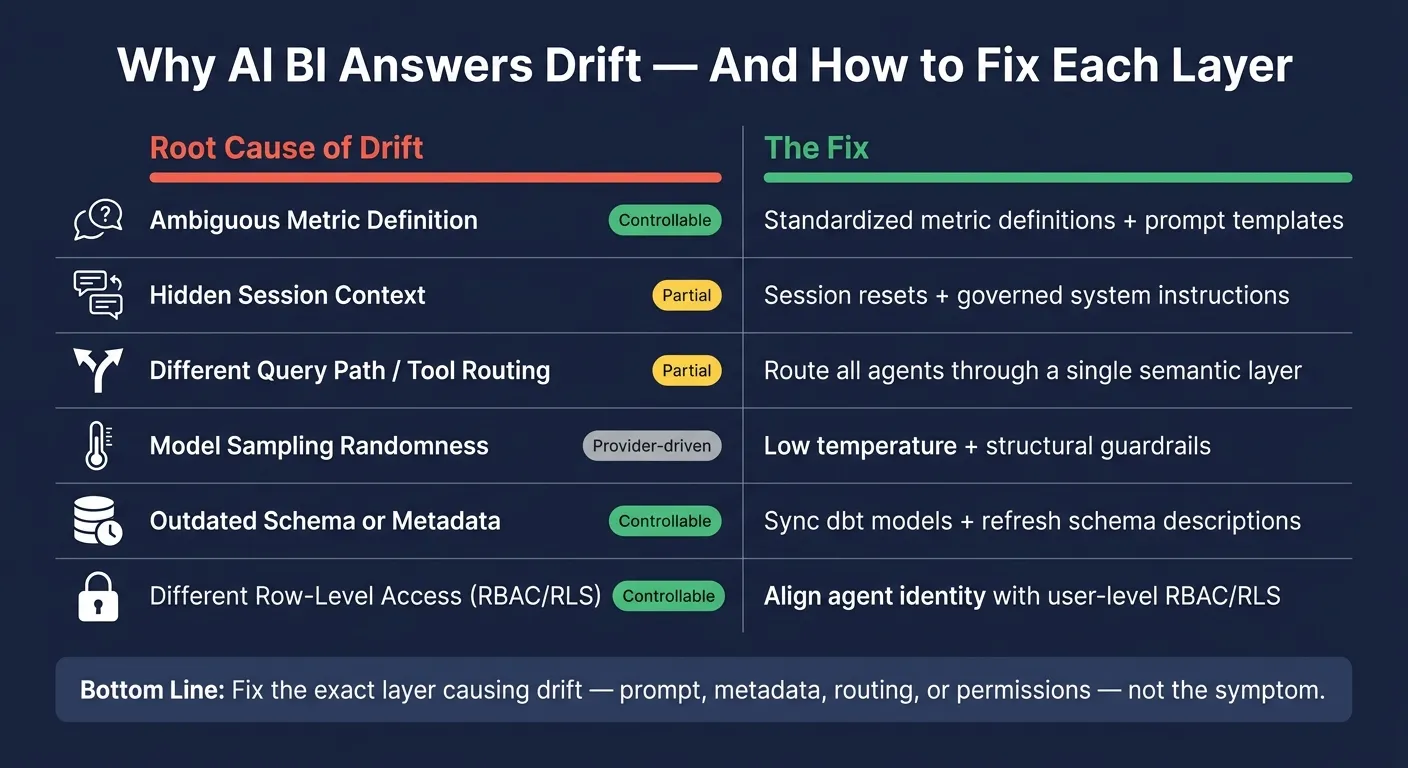 {AI BI Answer Drift: Root Causes vs. Fixes at a Glance}
:::
{AI BI Answer Drift: Root Causes vs. Fixes at a Glance}
:::
Most BI answer variance is explainable. It usually comes from a small set of concrete causes you can diagnose. And in many cases, your data team can fix or limit them directly.
If the same BI question gives you a different answer, these are the first control points to check.
| Cause of Variance | Controllability | Practical Lever |
|---|---|---|
| Unclear metric definition | Controllable by data team | Standardized metric definitions, prompt templates |
| Hidden session context | Partially controllable | Session resets, governed system instructions |
| Different query path | Partially controllable | Route agents through a single semantic layer |
| Sampled output variance | Provider/model-driven | Low temperature settings, structural guardrails |
| Outdated schema or metric definitions | Controllable by data team | Sync dbt models, refresh schema descriptions |
| Different row-level access | Controllable by data team | Align agent identity with user-level RBAC/RLS |
Ambiguous prompts and shifting context
Revenue last month sounds simple. But for an AI assistant, it can mean a few different things at once. Is it calendar month or fiscal month? Gross or net revenue? Booked revenue or revenue recognized under ASC 606? In SaaS and subscription businesses, those choices can change the number in a big way.
It gets messier when that same question moves across tools. In Slack or Microsoft Teams, the assistant may carry over earlier instructions from the conversation, like focus on the US market only. That silent carryover changes the result set. In a BI-embedded assistant, the active dashboard filter - say, Last 30 days - can shape the query in a different way than a direct warehouse connection. The words stay the same. The metric scope does not.
Tool-selection drift and model randomness
An AI agent connected to Snowflake, BigQuery, Redshift, or Postgres will not always use the same route to answer a question. One time, it may write SQL straight against a base table. Next time, it may call a Looker or dbt semantic layer API, or use a pre-built warehouse function.
That matters because each route carries its own logic: different filters, different metric definitions, and different aggregation rules. If routing is probabilistic instead of fixed, the same question can return different numbers even when the source data has not changed.
Model randomness is a separate issue, but it often shows up alongside routing drift. LLMs sample from a set of plausible outputs instead of computing one fixed response every time. Lower temperature can reduce variance, but it will not make BI answers fully repeatable. That’s why semantic layers and guardrails matter more than temperature tuning alone when you want repeatable BI outputs.
Stale metadata, semantic drift, and permission-scoped data
Sometimes the warehouse is right, but the metadata is old. Say a dbt model adds a net_revenue_usd field, but the semantic docs still describe revenue_usd as net of discounts. An AI assistant reading that stale description may query the wrong column. The data is fine. The map is outdated.
The same thing can happen with renamed fields, deprecated tables, or undocumented logic changes, like a new refund-handling rule. Over time, those gaps can pull answers apart.
Permission-scoped access can also change totals by design. An AI agent running under a broad service account might return $10.2M for US revenue last quarter. An analyst using a BI tool with row-level security applied might see $9.8M. Both can be right under their own access scope.
When agent identity is not aligned with user-level RBAC and row-level security policies, those differences can look like AI mistakes. In plain English: the issue is governance, not the model.
The next section shows how to isolate which layer changed.
A repeatable framework for diagnosing 'same question, different answer'
When an AI answer changes, check the prompt, tools, and permissions first before blaming the model. A simple two-step check usually gets you to the cause fast.
Step 1: Isolate the source of variance
Run the exact same question again in a clean session, with fixed wording and no earlier chat history. If the answer becomes stable, the change came from session context. If it still shifts, the issue runs deeper: tool routing, metadata, or permissions. At that point, move to SQL and access scope.
| Common Symptom | Likely Source of Drift | Diagnostic Step |
|---|---|---|
| Answer changes between sessions | Context or conversation carryover | Rerun in a clean session with fixed prompt wording |
| Two users get different results | Warehouse access rules or permission differences | Compare the user identity and access scope used to run each query |
| Answer disagrees with a Looker dashboard, dbt model, or saved SQL query | Metric-definition mismatch or query logic drift | Compare the generated SQL with the trusted dashboard, model, or query |
| Answer varies without any prompt change | Tool-selection drift or model randomness | Inspect which query path the agent used each time |
Step 2: Compare SQL, semantics, and permissions
Once you’ve ruled out session drift, inspect the generated SQL. Then compare it with the SQL behind the Looker dashboard, dbt model, or saved query your team trusts.
Focus on differences in query logic, metric definitions, and user scope. Also check which user identity ran the query, since RBAC or row-level security scope can change the result. If the SQL matches but the answer still differs, run the same query under both identities and compare what comes back.
The fix kit: making AI answers repeatable enough for reporting
Once you know whether the drift came from prompts, SQL, metadata, or permissions, fix that exact layer. Don’t patch the symptom somewhere else.
Stabilize prompts, context, and metric definitions
Use a fixed question template that locks down the metric name, date range, and filters before the AI touches the warehouse. That cuts down on ambiguity right away.
It also helps to define metrics in a governed semantic layer, so the same term always points to the same formula. If one person asks for “revenue” and another asks for “sales,” you don’t want the system guessing. Prompt structure and metric definitions are usually the fastest places to tighten up, so they’re a smart place to start.
Keep metadata and access controls in sync with the warehouse
Sync catalog metadata from the warehouse so the assistant is working from current tables, columns, and definitions, not stale references to missing columns or retired sources.
You also want queries to run as the requesting user. That way, results line up with that user’s RBAC and row-level security. In plain English: the answer stays tied to the same warehouse state and access rules your team already relies on.
Add guardrails, SQL inspection, and regression tests
Guardrails limit what the AI can query and return. In practice, that means a few simple checks:
- Restrict queries to trusted tables
- Reject queries that reference undefined metrics
- Set query cost limits to avoid expensive scans
For high-stakes workflows, reviewing the generated SQL before it runs is a fair checkpoint. It’s a little like glancing at a receipt before you pay. You’re making sure nothing odd slipped in.
Regression tests help you keep watch over time. Save a set of canonical questions with their expected SQL output or numeric result, then run that same set again whenever the model, schema, or semantic layer changes. This catches hidden drift: cases where the SQL runs fine, but the answer has quietly changed.
| Stabilization Tactic | What It Fixes |
|---|---|
| Prompt Templates | Ambiguity, missing filters, and inconsistent date formats |
| Semantic Layers | Metric drift and incorrect join logic |
| Metadata Sync | Invented or missing columns and use of deprecated sources |
| Warehouse RBAC/RLS | PII exposure and unauthorized data access |
| SQL Guardrails | Dialect errors, expensive scans, and bad aggregations |
| Regression Tests | Result drift and logic changes over time |
These controls work best together. One control might stop a bad query, but a stack of controls is what keeps reporting steady. With that setup in place, the next issue is how to stop drift from creeping back in.
How Querio addresses answer consistency in practice
These controls work best when the platform is built around them. Querio keeps the semantic layer, query logic, and warehouse access on one governed path.
Here’s how that plays out in a warehouse-native workflow.
Governed context and inspectable analysis cut down on drift
Querio stores metric definitions, join paths, and business terms as versioned SQL, Markdown, and Python alongside dbt in GitHub. That means terms like "revenue" and "ARR" stay tied to one definition across Slack, Teams, and notebooks.
Each answer comes with editable SQL or Python in a notebook. So when two answers don’t match, the team can inspect the exact SQL instead of playing a guessing game. Confidence tags label answers as "Extracted" or "Inferred", which helps users judge trust faster.
The context layer is version-controlled, and only a logged-in human can approve new definitions. That review step stops semantic drift from piling up quietly in the background.
Why does this matter so much? Because it removes the usual causes of drift:
- shifting context
- hidden SQL
- stale metadata
- mismatched permissions
The same setup also keeps query results tied to the requester’s warehouse access.
Live warehouse access and user-scoped permissions keep answers aligned
Querio queries Snowflake, BigQuery, Redshift, and Postgres directly through read-only connections. So late adjustments and backdated changes stay synced with the live warehouse.
Querio uses OAuth and role-based access, which means each query inherits the requester’s scope. Warehouse RLS and column masking apply on their own because the query runs as that user. Two people can ask the same question and still get different numbers if their access is different.
In practice, that affects four key areas: metric definition, freshness, visibility, and access.
| Dimension | Querio | Ungoverned AI BI |
|---|---|---|
| Metric definitions | Defined once in a context layer; version-controlled with dbt | Inferred by an LLM per query from column names |
| Freshness | Live queries against the warehouse | Cached extracts or stale CSV exports |
| Visibility | Inspectable, editable SQL or Python in a notebook | Hidden or absent query logic |
| Repeatability | Same logic across Slack, Teams, and notebooks | Higher risk of metric drift between users |
| Access control | Respects warehouse RLS, column masking, and OAuth | Often relies on broad service accounts and misses user-level RLS |
That’s the core idea: the answer doesn’t come from a black box. It comes from live data, clear logic, and the same permission rules your warehouse already uses.
Conclusion: Consistent AI answers come from a stable analytics harness, not a better model
There’s one main takeaway here: inconsistent AI answers usually don’t mean you need a smarter model. They usually mean the setup around the model isn’t steady enough. If prompts, metadata, routing, or permissions shift, the answers will shift too.
The goal isn’t to get the exact same SQL text every time. BI teams should aim for correct results based on the right metric definition and the right access scope, not identical SQL on every run.
The first place to set that standard is the metric layer. Start with the 10–15 metrics that show up in board decks and executive dashboards most often. Lock those definitions into a version-controlled semantic layer. In practice, that does more for answer consistency than prompt engineering on its own.
What makes AI answers solid enough to use isn’t the model by itself. It’s the system around it: governed context, inspectable SQL and Python, live warehouse access, and scoped permissions. That’s the control point.
FAQs
::: faq
Why do two users get different AI answers to the same BI question?
Usually, the AI doesn't have a governed source of truth. So it has to guess metric definitions, join paths, or filters.
That's where things start to drift.
Without an explicit semantic layer, the model may read net revenue one way in one query and another way in the next. It might pull from different tables. It might also use mismatched time windows without making that choice clear.
The problem gets worse when the AI acts like a black box and doesn't show the SQL. At that point, it's tough to see what's going on under the hood. A small prompt change, stale metadata, or a slow shift in how the model reads a term can all change the result - and spotting the cause isn't easy. :::
::: faq
How can I tell whether answer drift came from the prompt, SQL, or permissions?
Inspect the full execution trace and compare it with your governed definitions.
Start with the generated SQL. If the syntax runs but the logic is off, the problem usually points back to the prompt or missing business context. If the query calls tables, columns, or other objects that don't exist, your schema context was likely wrong.
If the results seem incomplete, check permissions like row-level security or column masking. After that, run the SQL directly in Snowflake, BigQuery, or Postgres and compare the output against your golden sets. :::
::: faq
What should I lock down first to make AI answers reliable for reporting?
Lock down the semantic/metrics context first: set canonical metric formulas, make table joins and grain rules explicit, and keep a controlled business glossary. That gives AI approved definitions to work from instead of leaving it to guess.
Then enforce those definitions in the warehouse. Use live warehouse connections with inspectable SQL/Python, and add validation gates before reporting: schema checks, EXPLAIN dry runs, row-count checks, and human review for high-risk queries.
:::