Business Intelligence
What Is a Semantic Layer (and Why AI Analytics Needs One)?
A governed semantic layer eliminates KPI drift by enforcing shared metrics, joins, and inspectable SQL so AI gives trusted analytics.

If AI reads your raw warehouse data, it can give you the wrong KPI without showing an error. That’s the core issue. A semantic layer fixes it by defining metrics, joins, filters, time rules, and business terms once, then reusing them across dashboards, SQL, notebooks, and AI tools.
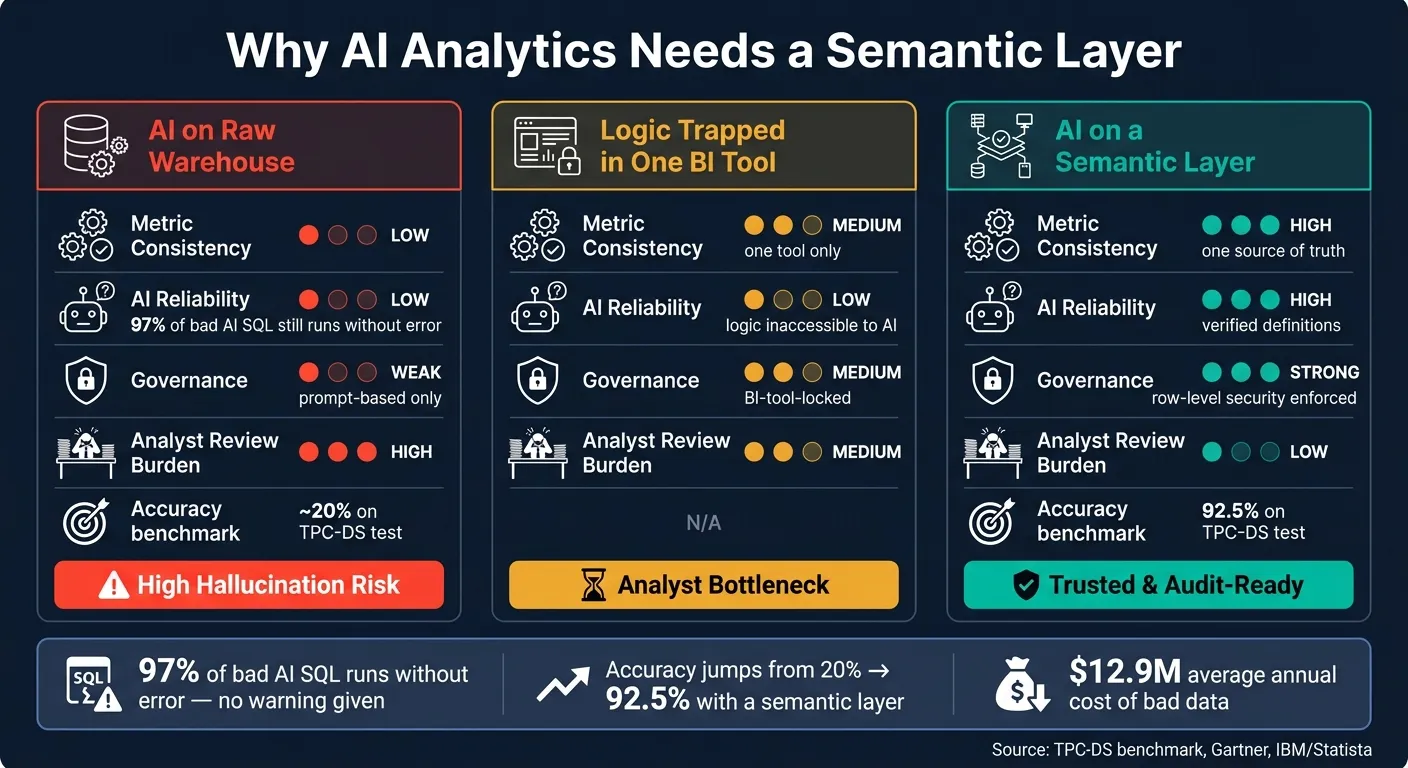
I’d sum it up like this: if your team wants AI answers you can check, a semantic layer is the control point. It cuts down metric drift, keeps “revenue” and “active users” stable across tools, and gives AI the same business rules your analysts use. That matters when 97% of bad AI SQL can still run, when teams report 53% less manual reconciliation with governed definitions, and when bad data costs companies about $12.9 million per year.
Here’s the article in plain English:
- What a semantic layer is: a shared business logic layer between raw warehouse tables and analysis tools
- What it holds: metrics, entities, approved joins, filters, time rules, and access controls
- Why AI needs it: raw schemas don’t explain business meaning, so AI has to guess
- What goes wrong without it: KPI mismatches, bad joins, row inflation, and answers that look fine but are off
- What good setup looks like: one governed model used by BI, notebooks, and AI, with context-aware SQL or Python
- How to start: define a small set of high-stakes metrics first, such as revenue, churn, conversion rate, and active users
A short comparison makes the point clear:
| Approach | Metric consistency | AI answer quality | Review workload |
|---|---|---|---|
| AI on raw warehouse tables | Low | Low | High |
| BI logic stuck in one tool | Medium | Low | Medium |
| AI on a semantic layer | High | High | Low |
So if I had to put it in one sentence: a semantic layer gives AI business meaning, not just table names.
What a semantic layer is in a warehouse-native analytics stack
A semantic layer turns warehouse tables into business terms your team can query the same way every time. It sits on top of Snowflake, BigQuery, Redshift, or Postgres and standardizes metrics, dimensions, entities, join paths, and business rules. Those pieces are what make business metrics repeatable across BI, notebooks, and AI.
"The semantic layer is the platform layer that holds the meaning of data, separate from the data itself." - Dremio [1]
dbt models raw data. The semantic layer adds reusable business meaning on top.
What a semantic layer actually contains
A semantic layer is made up of a few core parts that define how data is interpreted. Metrics are shared calculations like MRR, ARR, conversion rate, and churn rate. Entities are the business objects those metrics describe, such as accounts, users, and subscriptions.
It also includes approved join paths that control how tables connect, so people don't combine tables in ways that inflate row counts. Time logic and filters store common business rules in the layer, which keeps windows like MTD, QTD, and last 30 days consistent whether the query comes from a dashboard, a notebook, or an AI assistant.
Here's a simple example: your revenue metric gets defined once, then reused in a Looker dashboard, a notebook, and an AI-generated answer in Querio. No need to rewrite the same SQL in each tool.
How it differs from raw tables, ad hoc SQL, and logic trapped in one BI tool
Raw tables in Snowflake, BigQuery, Redshift, or Postgres are built for storage, not business interpretation. Ad hoc SQL can patch that for a while, but the logic stays stuck in individual query files. When five analysts each write their own version of "active users", you don't get one answer. You get five slightly different ones.
Logic trapped in one BI tool, like LookML in Looker, is better than that. But the definitions still live inside that tool. A notebook or an AI assistant can't reach them. That's where metric drift creeps in.
A semantic layer changes the setup. It works as shared infrastructure, not just a feature inside one tool. The same governed definitions serve BI tools, notebooks, and AI agents at the same time. That's what AI needs next: one set of definitions, not tool-specific guesses.
| Raw Tables | Logic in One BI Tool | Semantic Layer | |
|---|---|---|---|
| Logic location | Technical schema | Inside one BI tool | Centralized middleware |
| Reusability | Low | Limited to one tool | High - BI, notebooks, AI |
| Consistency | Poor | Tool-specific | Universal source of truth |
| AI-ready | No | No | Yes |
How Querio applies a governed semantic and context layer
Querio's shared context layer is where data teams define joins, metrics, and business terms once, then use those definitions across ad hoc analysis, reactive notebooks, dashboards, and AI-generated answers. In plain English, AI gets the same metric model your team uses. So revenue, active users, and churn mean the same thing no matter where the question gets asked.
Because every query runs against the live warehouse, and the SQL or Python is inspectable and editable, teams can trust the result and fix issues fast when needed.
Why AI analytics needs a semantic layer
Once metrics and joins are set, the next issue is simple: can AI use them safely?
LLMs can write SQL. That's not the hard part. The hard part is writing SQL that matches your business logic, not just your database syntax. Without governed context, AI starts guessing. It guesses which joins to use, which filters belong, and what a metric means.
What goes wrong when AI queries the raw schema directly
Raw schemas were not made to explain intent. A column like amount doesn't tell AI if it's gross or net, stored in dollars or cents, or adjusted for refunds. So the model leans on column names and table layout. That guess can shift based on how someone phrases the question. That's metric drift, right at the query level.
There's another problem: bad SQL often still runs. So the answer can look fine even when it's wrong. In fact, 97% of incorrect AI-generated SQL queries produce no execution error [6]. Joins make this worse. AI might connect two tables because they share a foreign key, even if they were never meant to be joined that way. The result can be inflated row counts or data pulled from an experimental table instead of the production one. Without approved join paths, there isn't much stopping that.
"The agent isn't failing at reasoning. It's failing at business comprehension. It doesn't know what 'active customer' means in your company." - Miha Pavlinek, Director of Data Science and Engineering, Databox [4]
The answer isn't better prompting. It's governed business logic.
How a semantic layer improves answer quality and trust
When AI works from a governed semantic layer instead of raw columns, those failure points get much smaller. Revenue gets defined once and then reused across dashboards, notebooks, and AI answers. People and AI are working from the same source of truth.
The jump in accuracy is hard to ignore. In a 40-question TPC-DS test, accuracy went from 20% to 92.5% when queries used a semantic layer instead of raw schemas [6][5]. Gartner also projects that 60% of agentic analytics projects will fail by 2028 if they depend on LLMs without a consistent semantic layer [2].
For data teams, this cuts down review cycles. Business users can get started faster because they don't have to guess which table to trust. It also means less time spent arguing over KPI mismatches before executive reviews.
Governed answers still need visible execution.
Why inspectable SQL and Python matter for governed AI analytics
A semantic layer makes results consistent. Inspectable execution shows how those results were produced. That's a big deal in finance and board reporting, where people still need to review the logic by hand. A black-box answer, even if it's right, won't cut it when the number is headed into a board deck.
Data teams need to see the SQL or Python behind the result, check that it matches the intended logic, and fix it if something looks off.
In Querio, every AI-generated answer shows the underlying SQL or Python. Teams can inspect it, edit it, and reuse it. That makes AI analytics audit-friendly for decision-critical reporting.
The core parts of an effective semantic layer
Once the layer’s job is clear, the next step is simple: what has to be inside it so both people and AI can trust it? At the core, a semantic layer needs a few parts: metrics, entities, joins, rules, and governance. Start with the metrics that drive decisions, then use those same definitions everywhere. That’s what keeps AI from making up joins, filters, or metric logic on the fly.
Metrics, entities, and approved join paths
Begin with your core entities: Accounts, Users, Subscriptions, Invoices, and Product Events [8][7]. Then define approved join paths. This matters more than it may seem. If the same data can be joined in two different ways, you can end up with two different answers from the same source. The fix is to declare one approved path per relationship, and only one [1][7].
From there, add your metric definitions: ARR, MRR, churn rate, conversion rate, 30-day active users. Each one needs three things:
- A formula
- A filter set
- A grain
The key idea is simple: put the rule inside the metric itself, not in a dashboard filter someone tacks on later.
Metrics only hold up when the logic behind them is fixed, not left hanging on dashboard filters.
Business rules, time logic, and governance controls
Business rules are often where semantic layers start to wobble. Exclusions, fiscal calendars, and access rules need to be built into the layer so they apply the same way everywhere [7].
Time logic needs that same level of care. If your fiscal calendar doesn’t match the calendar year, or you use rolling 7-day and 30-day windows, or cohort-based periods, those definitions need to live in one place. That way, “Q1” means the same thing to your Finance director and to your AI assistant [3][2].
For U.S. SaaS teams, governance controls also include row-level security and sensitive field controls. If AI is querying the semantic layer, it should follow the same permissions a person would [4][7].
Practices that keep the semantic layer usable over time
The long-term problem is semantic dust: stale metrics and deprecated entities that still return answers [6]. Semantic layers don’t stay clean on their own. They drift unless they’re versioned, owned, and tested.
A common setup is to store definitions as code in Git and deploy them through CI/CD [9][7]. Teams often keep transformed models in dbt, then pass governed definitions downstream to tools like Looker, ThoughtSpot, Hex, and warehouse-native AI workflows.
It also helps to assign each metric an owner and a verified status, so people know which definition is canonical [4]. And before changing a metric or column, run impact analysis on the dashboards, notebooks, and AI queries that depend on it.
Once these definitions are stable, the next step is rolling them out to the few metrics that matter most.
How to roll out a semantic layer for AI-driven BI
Start with a small set of high-stakes metrics
Once your core definitions are set, roll out the layer where arguments happen most. The fastest way to show impact is to start small and tight.
Focus on the five metrics that create the most friction in leadership meetings: Revenue (gross vs. net), Active Users (the definition of active), Conversion Rate (numerator/denominator), Churn Rate (monthly vs. annual), and Average Deal Size [3]. These metrics usually get picked apart by different teams, so cleaning them up early makes the payoff easy to see.
For each metric, define five things [3]:
- The metric name
- A plain-English description
- The source tables
- What to exclude, such as test accounts, internal users, and refunds
- Approved slices
That’s enough to get moving. You do not need to map every dimension or every join path on day one.
Use one shared model across BI, notebooks, and AI
After those first metrics settle down, use the same definitions across every place people analyze data. The point is simple: one governed model, used everywhere, from the start.
Querio connects directly to Snowflake, BigQuery, Amazon Redshift, and PostgreSQL without copying logic into separate tools. And every AI-generated answer can be inspected as real SQL or Python.
"A semantic layer built only for dashboards is a BI feature. One built with approved definitions, lineage, and a machine-readable API is AI infrastructure." - Atlan [2]
Comparison table: raw-schema AI vs. semantic-layer AI vs. traditional BI
The table below makes the trade-offs plain. AI with governed definitions holds up far better than raw-schema access or BI logic trapped inside one tool.
| Approach | Metric Consistency | Governance & Security | AI Reliability | Analyst Review Burden | Speed for Business Users | Typical Fit |
|---|---|---|---|---|---|---|
| AI over Raw Warehouse | Low - inferred logic | Weak - prompt-based | Low - high hallucination risk | High | Fast but often wrong | Simple schemas only |
| Traditional BI (Siloed) | Medium - one tool only | Medium - BI-tool-locked | Low - logic inaccessible | Medium | Slow - analyst bottleneck | Legacy reporting teams |
| AI over Semantic Layer | High - one source of truth | Strong - row-level enforced | High - verified definitions | Low | Fast and trusted | Modern AI-driven SaaS teams |
For AI-driven BI, the target is one governed model that every tool can use without having to reinterpret the data.
FAQs
How is a semantic layer different from dbt?
A semantic layer is a governed business logic layer that turns warehouse data into consistent metrics and definitions. dbt, by contrast, is mainly a transformation tool used to clean and model raw data in the warehouse.
dbt can define metrics. But a semantic layer goes a step further: it enforces those definitions across downstream tools, including BI platforms, Python notebooks, and AI assistants. That helps teams avoid inconsistent logic and metric drift.
What metrics should we define first?
Start with the core metrics leadership uses to run the business, like revenue, active users, or churn rate. Put the biggest focus on the ones that cause the most friction or inconsistent reporting across teams.
Then map the supporting dimensions and relationships needed to break those metrics down the right way, such as customer, subscription, or region. That’s how you create a single source of truth people can use to get the same answer every time.
How do we keep a semantic layer accurate over time?
Treat metric definitions like governed infrastructure. That means giving each metric a clear owner, checking the definition, setting review dates, requiring approval before changes go live, and keeping lineage plus audit logs so you can explain why a number changed.
When schemas or business rules shift, document which version replaces the old one. Then push the updated metadata to every consumer at query time so everyone works from the same source of truth.
AI can help draft definitions and speed up the process. But before anything is deployed, people should review and approve it.