Business Intelligence
How to Use Claude Code with dbt: A Practical Guide
Use Claude Code safely in dbt: set CLAUDE.md rules, narrow tasks, run dbt compile/test, and review SQL and metrics.

If I want Claude Code to help with dbt without making a mess, I keep the job narrow: give it the repo, set rules in CLAUDE.md, let it draft SQL/YAML, run dbt compile and dbt test, then review joins, grain, metrics, and warehouse SQL myself.
That’s the whole playbook in one sentence.
Here’s the short version:
- I use Claude Code as a repo-aware helper, not as hands-off automation
- I point it to
dbt_project.yml,packages.yml,models/,schema.yml, sources, macros, and tests - I set team rules in
CLAUDE.mdfor naming, layers, docs, and what it must not change - I ask it for small tasks, like one staging model or one refactor
- I review grain, joins, null handling,
ref()/source()usage, and metric terms - I run
dbt compile, thendbt testin a dev or sandbox schema before merge - I treat compile errors, test failures, and warehouse runtime errors as three different problems
- I keep the loop simple: draft → test → review → PR
A few facts stand out from the guide: it calls out 3 access modes for Claude Code, 4 main dbt task areas where it helps, and 3 error types that need different debug paths. That structure makes day-to-day use much easier.
Claude Code Just Got Smarter for dbt Projects
::: @iframe https://www.youtube.com/embed/34RkoSPfpV4 :::
Quick comparison
| Area | Claude Code can help with | I still need to check |
|---|---|---|
| SQL | Staging models, simple transformation drafts, refactors | Join logic, grain, dialect behavior |
| Docs | schema.yml, column descriptions, test drafts |
KPI meaning, naming, business terms |
| Debugging | Reading logs, tracing refs, suggesting small fixes | Final fix, downstream impact |
| Testing | Generic tests like not_null and relationships |
Edge cases, business-rule tests |
The main point is simple: Claude Code can cut the repetitive parts of dbt work, but I still own correctness. With that in mind, the rest of the article walks through setup, drafting, testing, debugging, and a daily team workflow.
Set up Claude Code in a dbt project
Give Claude Code the repo context and permissions it needs before it starts working in dbt. It works best from the repo root, with a working local dbt setup and permission to run dbt build, dbt run, and dbt test.
Point Claude Code at the files that carry the most context
Start with dbt_project.yml. Then add packages.yml, the models/ tree, schema.yml files, source definitions, macros, and current tests.
That gives Claude Code a clear view of how the project already works. Instead of making rough guesses, it can follow the patterns your team already uses before it writes anything new.
Write a CLAUDE.md with naming, layering, and review rules
A CLAUDE.md file in the repo root gives Claude Code steady context about your team’s standards. Without it, the tool has to fill in the gaps on its own, and that often leads to extra cleanup later.
The file should spell out things like naming rules, such as stg_ for staging models and fct_ or dim_ for marts. It should also cover CTE style, required tests, and documentation rules.
Just as important, add hard limits. For example:
- No metric changes without approval
- Staging models are limited to renaming and casting
- Shared terms like
active userandchurnmust follow your warehouse definitions
This matters more than it may seem. If those terms aren’t defined up front, Claude Code may invent its own meaning instead of using the one your team already relies on [1][2].
Local, remote, and read-only access modes compared
Three access modes matter most:
| Access Mode | Speed | Context Depth | dbt Command Ability | Risk |
|---|---|---|---|---|
| Local repo access | High | Full (local files + Git history) | Full repo access; can run dbt build, dbt test, and dbt compile. |
Moderate |
| Remote project access | Medium | Full (entire repository) | Changes flow through CI/CD or approved jobs; no direct file edits. | Low |
| Read-only access | High | High (discovery only) | Can inspect and compile, but not edit. | Very low |
Use local repo access for day-to-day model work. Use remote access when every change needs to move through a pull request. Use read-only access when Claude Code only needs to inspect the project or explain how something works.
Write and refactor dbt models with Claude Code
Once your repo context is set, move from setup to one model task at a time. Use Claude Code to draft the SQL, then check the compiled output yourself before anything moves forward.
Generate a staging model from raw source tables
Before you write the prompt, point Claude Code to your sources.yml, dbt_project.yml, and one existing staging model. That gives it the context it needs to follow your project's naming, layer structure, and materialization rules instead of making them up.
A prompt that works well looks like this: "Using {{ source('stripe', 'charges') }}, write a staging model called stg_stripe__charges.sql. Use a base CTE for raw source columns and a final CTE for renamed and cast output. Cast all timestamps to UTC. Do not join any other tables."
Before you run it, check a few basics:
- The model grain matches the source table's primary key
- Null handling is explicit for nullable fields
- Timestamps are cast the same way across the model
- The
{{ source() }}macro is used instead of a hardcoded schema and table name
The same pattern works when you refactor marts too: one change, one validation pass.
Refactor a mart while preserving warehouse-specific SQL behavior
Refactoring goes better when you keep the scope tight. Ask Claude Code to split a long CTE chain, standardize column names, or remove repeated filter logic. Don't ask it to rewrite the whole model in one shot.
Also, name the warehouse dialect up front: Snowflake, BigQuery, Redshift, or Postgres. And tell it to flag any dialect-specific functions it changes. That small step can save you from a nasty surprise later.
| Task | What to Specify Upfront | What to Verify After |
|---|---|---|
| New model | Source macro, CTE structure, column naming rules, materialization | Grain, nulls, ref()/source() usage, no hardcoded paths |
| Refactoring existing SQL | Files to touch, behavior to preserve, warehouse dialect | Row count parity, column value parity, downstream ref() still resolves |
Review generated SQL before it reaches production
Read the generated SQL before it gets anywhere near production. Check that:
- Every model reference uses
ref()instead of a raw table name - The model grain hasn't changed
- No join is quietly fanning out rows
- Any metric or entity term matches the definition your team already uses in the warehouse, not just what Claude Code inferred from column names [1]
Use that same review loop for schema.yml files, failing tests, and runtime errors.
Write tests, documentation, and debugging fixes with Claude Code
Once the model SQL is stable, use the same repo context to draft docs, add tests, and debug failures.
Draft schema.yml documentation and basic tests
Claude Code can draft schema.yml descriptions, column docs, and basic tests from the model SQL and existing schema context. Before you prompt it, share the model's SQL file, existing schema.yml files, and source definitions. Also ask it to state the grain, active-record rule, and status interpretation before it drafts anything. That quick check helps spot mismatches early, before they end up in your docs.
| Type | What It Covers | Needs human review? |
|---|---|---|
| Documentation | Model descriptions, column definitions, tags | High - business terminology must match stakeholder expectations |
| Generic Tests | unique, not_null, accepted_values, relationships |
Low - can be automated from schema constraints and primary keys |
| Singular Tests | Complex business logic (e.g., "revenue cannot be negative") | High - requires domain knowledge to define the failure condition |
Run the drafted schema.yml and tests in a dev schema before merge.
Explain a failing test and trace the likely root cause
Use the failure output to narrow the issue before changing any SQL. Start by pasting the raw error log into Claude Code. Then share the model's SQL and the related schema.yml, and ask it to isolate the cause: a duplicate join, a grain mismatch, an unexpected null, or a broken `ref()``.
After that, ask it to draft the smallest safe fix, not a full model rewrite. Keeping the scope tight makes the change easier to review and the diff easier to merge.
Compile errors, test failures, and warehouse execution errors: different problems, different fixes
Different failure types need different fixes. Pick the fix path based on where the failure shows up.
| Error Type | Primary Cause | Files to Share with Claude | Debugging Path |
|---|---|---|---|
| Compile Error | Malformed YAML, broken ref(), Jinja syntax errors |
dbt_project.yml, model SQL, schema.yml |
Validate YAML structure and Jinja macros |
| Test Failure | Duplicates, nulls, bad joins, grain mismatch | dbt test logs, model SQL, upstream model SQL | Inspect joins for fan-out; check filters and grain |
| Warehouse Execution Error | Warehouse syntax, permission denied, resource limits | Compiled SQL, warehouse error codes, connection logs | Check warehouse-specific dialect and role permissions |
Runtime errors need warehouse context. Share the compiled SQL and the warehouse error code together so Claude Code can isolate dialect or permission issues. A query can compile cleanly in dbt and still fail in Snowflake, BigQuery, Redshift, or Postgres because each warehouse has its own SQL rules and access controls.
Claude Code can flag syntax and reference problems, but engineers still own metric drift, join logic, and business-rule validation.
Build a repeatable workflow your team can use every day
::: @figure 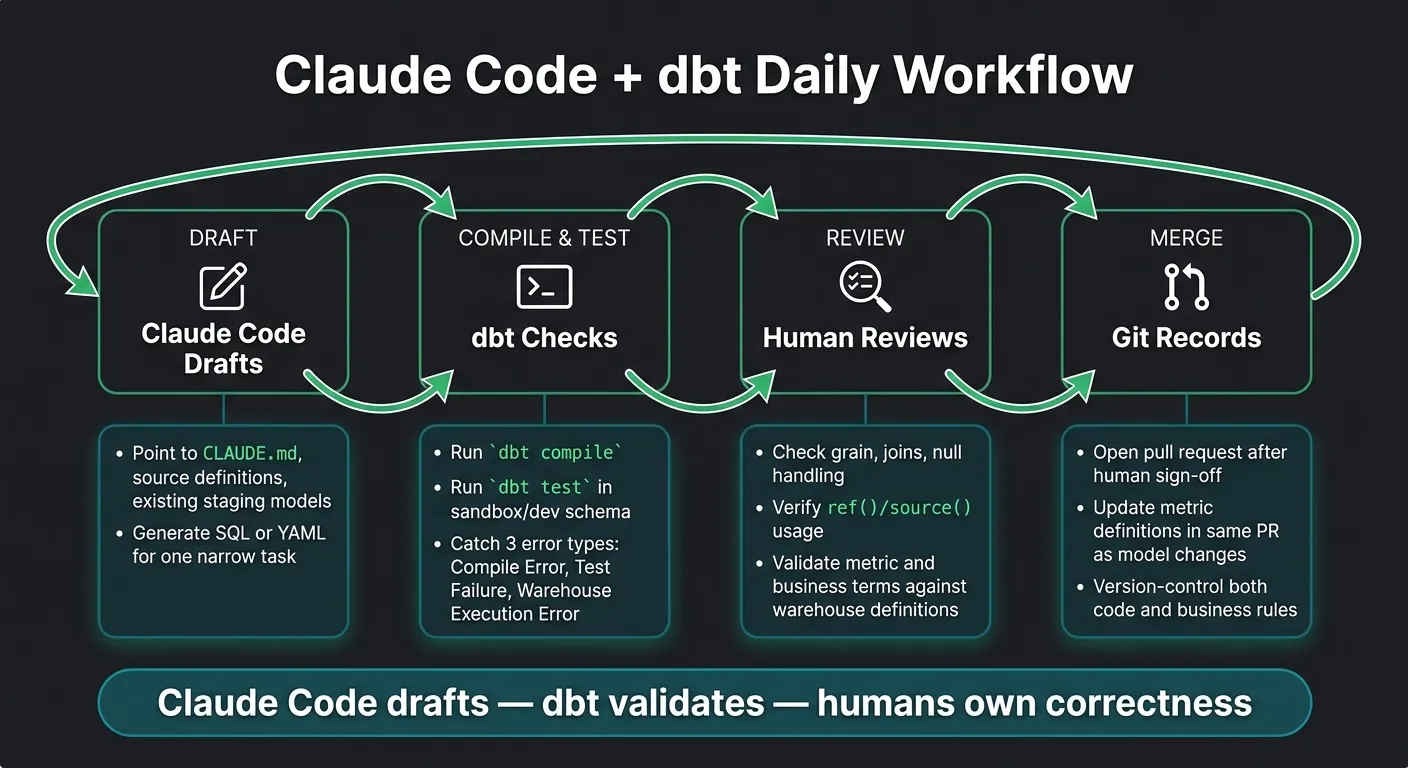 {Claude Code + dbt Daily Workflow: Draft, Test, Review, Merge}
:::
{Claude Code + dbt Daily Workflow: Draft, Test, Review, Merge}
:::
Once you've used Claude Code for models, docs, and debugging, the next step is simple: turn those one-off tasks into a workflow your team can run every day.
These examples only help if they fit into one repeatable loop: Claude Code drafts, dbt checks, humans review, and Git records the final change.
A daily loop for analytics engineers
Start small. Pick a narrow task, then point Claude Code to the files that matter: the source definition, an existing staging model, and your CLAUDE.md. From there, let it generate a draft.
Then move through the same loop each time:
- Run
dbt compile. - Run
dbt testin a sandbox schema. - Review the diff and test output together.
- Open a pull request after human sign-off.
That loop only works when the project's rules live in the repo right next to the models. In most cases, you'll go through a few test cycles before something is ready for review. The back-and-forth should happen before the PR, not inside the review itself.
How this fits with a governed analytics stack
Keep metric definitions and semantic layers, approved join logic, and edge cases in version-controlled SQL, YAML, or Markdown beside the dbt models. When a definition changes, update it in the same pull request as the model. Git then records both the code and the business rule behind it.
FAQs
::: faq
When should I use local, remote, or read-only access?
Use read-only access as the default for every agent connection. That helps prevent accidental data changes, whether the agent is running locally or in a remote setup.
Use local access for implementation, explanation, and testing when the developer already has the context they need. Use remote, warehouse-deployed access for schema discovery, SQL generation, and validation, where governed runtime controls offer a safer setup. :::
::: faq
What should be in CLAUDE.md for a dbt team?
For a dbt team, CLAUDE.md should spell out how Claude Code can work inside the project without putting your warehouse or business logic at risk.
Start by defining the project’s scope. Make it clear which dbt models, folders, and jobs Claude Code may touch, and which parts are out of bounds. If your team splits work across marts, staging models, or shared packages, say that plainly so there’s no guesswork.
Access rules should be strict: read-only access only. That means no DDL and no DML under any condition. Claude Code can inspect metadata, read SQL, and run read-only queries where allowed, but it must not create, alter, drop, insert, update, delete, merge, truncate, or backfill anything in the warehouse.
Document the schemas and tables Claude Code is allowed to read. Be specific. A short allowlist works better than vague notes like “analytics data only.” If some schemas contain restricted fields, call that out too.
Include rules for query tagging so every warehouse query is easy to trace. For example, require a standard tag format that includes the tool name, repo, task, and user or ticket reference. That way, if something looks off, your team can inspect it fast.
Business logic needs clear guardrails too. CLAUDE.md should point Claude Code to the governed definitions for:
- Metrics
- Joins
- Filters
If those rules live in dbt models, YAML, metric specs, or internal docs, name the source of truth directly. Claude Code should use those definitions as written, not invent its own version of revenue, active users, attribution windows, or join paths. That’s where teams get burned.
You should also map the repo layout. Say where SQL, Markdown, and Python files live so edits stay in the right place. For example, note where staging models sit, where marts live, where docs are stored, and where helper scripts belong. A simple file map saves a lot of cleanup later.
Require output that stays inspectable. In practice, that means Claude Code should prefer plain SQL, small diffs, short explanations, and comments only where they help. Avoid hidden steps, opaque macros without explanation, or giant generated blobs that nobody wants to review.
Human review should be mandatory before anything is merged or run beyond safe inspection. Make that explicit. Claude Code can draft model changes, tests, docs, and analysis, but a person must review business logic, SQL correctness, naming, lineage impact, and warehouse cost risk.
Validation steps should be listed in the file, not left to memory. Keep them concrete. For example:
- Run dbt parse or compile
- Check model references and source names
- Review generated SQL for join logic and filters
- Confirm tests match governed rules
- Verify queries remain read-only
- Inspect cost and scan size before running warehouse queries
You’ll also want escalation rules. If Claude Code hits unclear metric logic, missing source data, conflicting join rules, permission issues, or anything tied to PII or financial reporting, it should stop and ask for human input instead of guessing.
Sensitive-data handling needs its own section. If a schema may contain PII, PHI, customer data, payroll data, or contract data, say so. State whether Claude Code may reference that data at all, whether fields must be masked or excluded, and when it must escalate. A good default is simple: if data sensitivity is unclear, treat it as restricted.
A solid CLAUDE.md for a dbt team is less about style and more about guardrails. It should tell Claude Code what it can read, what it must never change, where the source-of-truth logic lives, how to show its work, and when to stop and hand things back to a human. :::
::: faq
How do I know if Claude Code changed a model’s grain?
Compare the model’s grain before and after the change. Treat Claude Code’s output as a proposal, because updates to joins or filters can quietly change grain.
Check row counts and aggregate metrics against documented business definitions. Then run unit tests, schema tests, and linters.
If you can’t trace the SQL back to a trusted governed definition, send it for human review. :::