Business Intelligence
How to Give Claude Access to MongoDB Data
Safely connect Claude to MongoDB using a read-only connector, scoped roles, TLS, flattened views, and an optional governed bridge.

If I want Claude to use MongoDB safely, I should not connect it straight to raw data. The safest starting point is simple: I put a controlled connector in the middle, give Claude a read-only MongoDB user, limit access to approved collections or views, and add written context so query results make sense.
Here’s the short version:
- I create a dedicated read-only service account
- I limit access by database, collection, IP, and network path
- I use TLS 1.2+ and keep secrets in a vault or secrets manager
- I point Claude to views that strip PII/PHI and flatten nested documents
- I choose between:
- a direct MCP server for simple ad hoc analysis
- a governed bridge like Querio for shared metrics, audit trails, and team-wide consistency
- I define trusted metrics, field rules, and known data traps in a context file
- I test with narrow prompts, small samples like 500 documents, and read-only checks
A direct setup can work for one-off questions. But MongoDB data often has nested objects, arrays, and mixed field types, which can lead to wrong answers if I skip schema guidance. That’s why access control alone is not enough. Claude also needs context.
If I’m deciding between connection patterns, this is the fastest way to think about it:
| Option | Best for | Main tradeoff |
|---|---|---|
| Direct MongoDB MCP | Fast setup and one-off queries | No shared metric layer |
| Governed bridge (Querio) | Team reporting and controlled analytics | More setup at the start |
One more thing: if I leave raw collections open, even read-only access can still expose fields Claude should never see. That’s why approved views + scoped roles + context files are the minimum safe pattern.
How to Install the MongoDB Atlas MCP Server in Claude Code
::: @iframe https://www.youtube.com/embed/kIhuKVri0fU :::
Prepare MongoDB for read-only AI access
Before Claude reads MongoDB, put three guardrails in place: read-only access, tight network rules, and flat schemas. Start with the account. Then lock down the network. After that, clean up the data shape Claude will query.
Create a scoped read-only MongoDB user
Create a dedicated service user such as CLAUDE_READ_ONLY and give it MongoDB’s built-in read role scoped to the exact database Claude needs. That keeps access narrow and easier to control.
Use a service account with read-only access limited to the target database or collections. For authentication, use SCRAM (username/password), or X.509 certificates if your security policy calls for them.
If the built-in read role is too broad - for example, if Claude should only query a few collections inside a larger database - create a custom role that grants only the find action on those collections.
Once the account is scoped, limit where it can connect from.
Restrict network and collection access
On MongoDB Atlas, allow only the MCP server or bridge IPs. On self-hosted MongoDB, use VPC peering or PrivateLink so traffic stays off the public internet.
Enforce TLS 1.2 or higher in the connection string. Store credentials in a secrets manager such as AWS Secrets Manager or HashiCorp Vault instead of hardcoding them in config files.
Be picky about which collections Claude can access. Raw operational collections often mix PII or PHI with analytics data. A safer move is to point Claude to approved MongoDB views that remove sensitive fields completely. That way, Claude has no route to data it doesn’t need for the task in front of it.
Flatten nested documents before analysis
Embedded objects, arrays, and uneven field shapes can cause Claude to write queries that look valid but still return the wrong answer. That’s the kind of problem that slips by until someone spots a number that feels off.
The practical fix is to create MongoDB views backed by aggregation pipelines that flatten nested structures into something closer to a relational row. Claude should query the view, not the raw collection.
This gives you a clean layer where you can:
- rename vague fields
- remove deprecated fields
- enforce consistent data types
Document what each row means and call out known traps. Keep deprecated fields out of Claude’s path. Once the data is locked down and flattened, choose the connection pattern next.
Choose a connection pattern: direct MongoDB MCP or a governed bridge
::: @figure 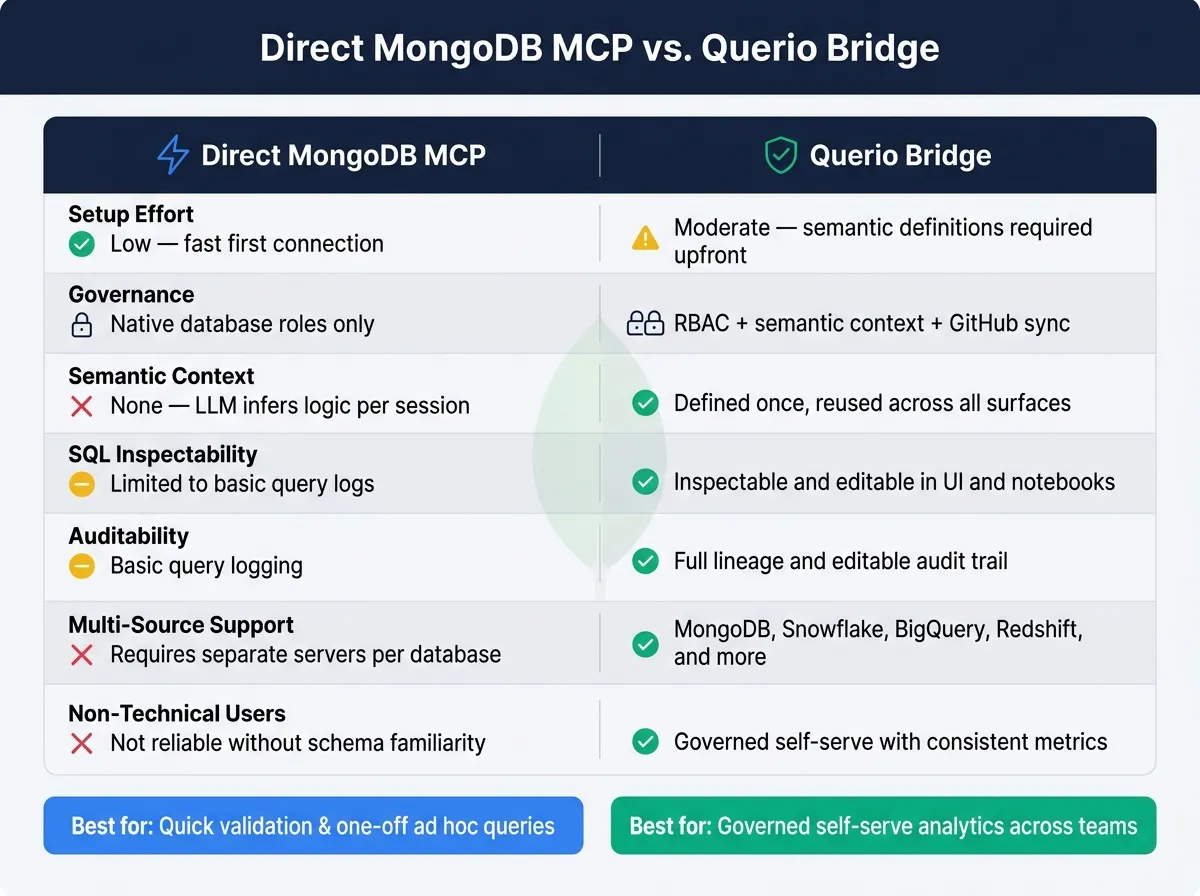 {Direct MongoDB MCP vs. Querio Bridge: Feature Comparison}
:::
{Direct MongoDB MCP vs. Querio Bridge: Feature Comparison}
:::
Once access is scoped, the next step is deciding how Claude should query MongoDB. There are two practical options: a direct MongoDB MCP server or a governed bridge through Querio.
The difference is pretty simple. A direct MCP setup gives Claude a straight path to the database. Querio sits in the middle and adds a semantic layer, inspectable queries, and support for more than one data source, all on top of the same live data.
Pattern 1: Connect Claude to MongoDB through an MCP server
With MongoDB locked down, Claude can reach it through a direct MCP server or through a governed bridge like Querio. In the direct setup, the MCP server runs each query with a read-only service account and returns structured results.
This works well for ad hoc exploration. If someone wants to check a trend, inspect a collection, or validate a quick idea, direct MCP is often enough.
The catch is consistency. If metric definitions need to stay the same from one team to another, a direct connection can get messy fast. In that case, a governed layer makes more sense.
Pattern 2: Use Querio as the governed bridge for Claude
If the goal is governed analytics instead of one-off exploration, use a semantic layer.
Querio connects live to MongoDB through Atlas SQL, which means Claude can query live MongoDB data with SQL and skip exports. On top of that, Querio adds joins, metrics, field descriptions, and trusted query patterns stored as version-controlled SQL, Markdown, and Python alongside dbt in GitHub.
That context carries across the Querio app, Slack, and Claude through MCP. And every answer is backed by real, inspectable SQL in a reactive notebook.
For teams working across MongoDB and a warehouse like Snowflake, BigQuery, or Redshift, this shared context helps keep definitions aligned across every surface. That makes it a better fit when the goal is governed self-serve analytics, not just fast access.
Comparison table: direct MongoDB MCP vs. Querio bridge
| Feature | Direct MongoDB MCP | Querio Bridge |
|---|---|---|
| Setup effort | Low - fast first connection | Moderate - requires semantic definitions upfront |
| Governance | Native database roles only | RBAC + semantic context + GitHub sync |
| Semantic context | None - the LLM infers logic per session | Defined once, reused across surfaces |
| SQL inspectability | Limited to basic query logs | Inspectable and editable in UI and notebooks |
| Auditability | Basic query logging | Full lineage and editable audit trail |
| Warehouse + MongoDB support | Requires separate servers per database | Supports MongoDB, Snowflake, BigQuery, Redshift, and more |
| Non-technical users | Not reliable without schema familiarity | Governed self-serve with consistent metrics |
Direct MCP is a good fit for quick validation. Querio is a better fit for governed self-serve analytics that need to stay consistent across teams. Pick the simplest setup that matches the level of decision quality you need.
Set authentication, permissions, and business context
Connectivity alone won't do the job. Claude needs secure credentials, tightly scoped roles, and clear business context before it can answer in a way you can trust.
Map Claude access to MongoDB and team roles
Every connection Claude makes to MongoDB should go through a dedicated service account. Don't use a shared admin credential or a developer's personal login. Use the Atlas SQL connection string and keep it encrypted in the connector config, so credentials stay inside the connector.
If your identity provider supports it, use OAuth-backed access. That way, queries inherit each user's own permissions instead of flowing through one shared service account. Querio's MCP works this way, so agent queries inherit that user's data permissions.
Set connector scopes by business role from the start. For example:
- Analytics Viewer gets only the access needed to run approved queries.
- Analytics Editor can describe collections and save trusted query patterns.
- Admin manages connections and role assignments.
Keeping those tiers clean makes audits much easier and helps stop scope creep over time.
Then map those roles to the collections and metrics Claude is allowed to use.
Define collections, fields, and trusted metrics
Read access by itself doesn't make Claude accurate. Permissions control what it can see. Context controls how it interprets what it sees. If you want reliable answers about MRR, claims, or active subscriptions, Claude also needs agreed business definitions.
Use a Markdown context file to spell out key collections, fields, masks, and metric rules. Include known traps too, like renamed fields or timezone issues. For example: "The status field in subscriptions must be active to count toward MRR." That one line can shut down a whole class of wrong answers.
In Querio, this context lives in version-controlled SQL, Markdown, and Python files synced to GitHub alongside your dbt project. Joins, metric definitions, and approved query patterns are stored once and reused across the Querio app, Slack, and Claude via MCP.
Comparison table: business roles mapped to MongoDB permissions
This mapping keeps MongoDB permissions, connector scopes, and workspace roles in sync.
| Business Role | MongoDB Role Scope | Connector scope | Querio Workspace Permission |
|---|---|---|---|
| Analytics Viewer | read (specific DBs) |
list_collections, run_query |
View-only (approved metrics) |
| Analytics Editor | read (specific DBs) |
list_collections, describe, run_query |
Edit context (define metrics, save trusted queries) |
| Finance / Claims | read (Claims DB only) |
Restricted to claims collection |
Scoped to Finance context |
| Data Admin | read on admin or metadata collections |
Full connector admin access | Workspace admin (manage connections and roles) |
Mask or exclude PII at the connector layer so Claude can't see it.
With permissions and context in place, the next step is to test read-only prompts and common failure cases.
Run queries safely, troubleshoot edge cases, and wrap up
Example prompts and safe query patterns for MongoDB collections
Once access is scoped, the next control point is the prompt itself. Natural language is vague unless you pin it down, so be specific: name the collection, define the time window, state the metric, and say what the output should look like. That only works if the connector is already locked down. Then Claude can return structured results with far fewer bad queries at the start.
Define the metric in plain business terms before Claude runs anything. For example:
"In
claims, count documents byclaim_statusfor the last completed calendar month."
For large collections, start by sampling the first 500 documents. That gives Claude a chance to check field types before it tries an aggregation. If the sample shows mixed types or nested arrays, deal with that first. It’s much better to catch the mess early than to debug a broken query later.
Text-to-SQL still misses the mark often enough on complex questions, so precise prompts and clear documentation are still needed.
Common issues: nested documents, sampling, and read-only failures
MongoDB’s flexible schema creates three common trouble spots: nested arrays, renamed fields, and blocked access. In most cases, the problem isn’t the model. It’s missing context. These issues usually show up in four patterns:
| Issue | Root Cause | Fix |
|---|---|---|
| Incomplete aggregations | Nested arrays not flattened | Map array paths explicitly; tell Claude to flatten before aggregating |
| Weak or incorrect answers | Missing schema context | Add a context file with collection definitions and known traps |
| Type mismatch errors | Field types vary across documents | Profile 500 documents first; add field-type warnings to context |
| Read-only failures | Missing read access or network block | Verify the Atlas allowlist and connector read-only permissions |
Once you’ve mapped those issues, the job gets simpler: keep access narrow, and document what Claude is allowed to touch.
Conclusion: the minimum safe pattern to put in place first
Start with a controlled connector, least-privilege read-only access, and a maintained context file for approved collections, fields, and traps.
FAQs
::: faq
Do I need MongoDB views before connecting Claude?
No. You do not need to create MongoDB views before connecting Claude.
That said, a governed layer is a smart move if you want accuracy and consistency. Giving Claude direct access to raw collections can lead to mixed results, especially when business rules and join logic sit outside the raw data itself.
A governed semantic layer puts those rules in one place. It can centralize approved metric definitions, join logic, and column descriptions so Claude returns consistent, audit-ready answers. :::
::: faq
When should I use a direct MCP server versus a governed bridge?
Use a direct MCP server when you're doing early testing, building a lightweight prototype, or just need a simple, fast connection to MongoDB Atlas. Switch to a governed MCP layer like Querio when stable metrics, audit trails, and consistent answers start to matter.
Here’s the trade-off in plain English: a governed layer helps stop metric drift because it puts business logic in one place and version-controls it alongside dbt models. A direct connection is simpler to get running, but session-by-session logic can drift, and that can leave teams working from different definitions of the same number. :::
::: faq
How do I keep Claude from seeing PII or PHI?
Use RBAC at the database level with a dedicated, read-only service account that can access only the schemas and collections it needs.
Add column masking and row-level security so sensitive data stays hidden based on role. A governed semantic layer like Querio can standardize access, log queries for audits, and route requests through OAuth so Claude inherits native warehouse permissions and security policies. :::