Business Intelligence
How to Connect ChatGPT to BigQuery (Step-by-Step)
Use a secure, read-only middle layer — not direct DB access — to let ChatGPT query BigQuery with audit trails and guardrails.

You do not connect ChatGPT to BigQuery by logging in through ChatGPT itself. You connect it through a middle layer that sends SQL to BigQuery using a service account or OAuth, then returns the results for ChatGPT to explain.
If I were setting this up, I’d keep the plan simple:
- Use dataset-level IAM, not broad project access
- Turn on the BigQuery API and, if needed, the BigQuery Storage API
- Pick one of 3 paths:
- Test with:
- a table list
- a column check
- one live SQL query for the last 12 months
- Add guardrails like row limits, query timeouts, max bytes billed, and query labels
In plain English: ChatGPT writes the request, your connection layer signs in to Google Cloud, BigQuery runs the SQL, and the answer comes back. That means your data stays inside your setup instead of being moved around in CSV files or pasted into prompts.
A good setup is usually based on least-privilege access, read-only dataset permissions, and clear checks before anyone uses it at scale. For example, a finance team might ask for monthly recurring revenue and get a live answer such as $125,000 on 09/16/2026 formatting rules, with the SQL traceable in BigQuery history.
Quick comparison:
| Option | Best use | Setup | Control level |
|---|---|---|---|
| GPT Actions | Small pilot with approved datasets | Low | Basic |
| MCP | Teams using shared agent tools | Medium | Medium |
| Querio or similar layer | Self-serve analytics with metric control | Medium | High |
The main point: if you already use BigQuery, the job is not giving ChatGPT direct database access. The job is putting a tight, read-only connection in front of BigQuery, testing it, and then locking it down before broader use.
::: @figure 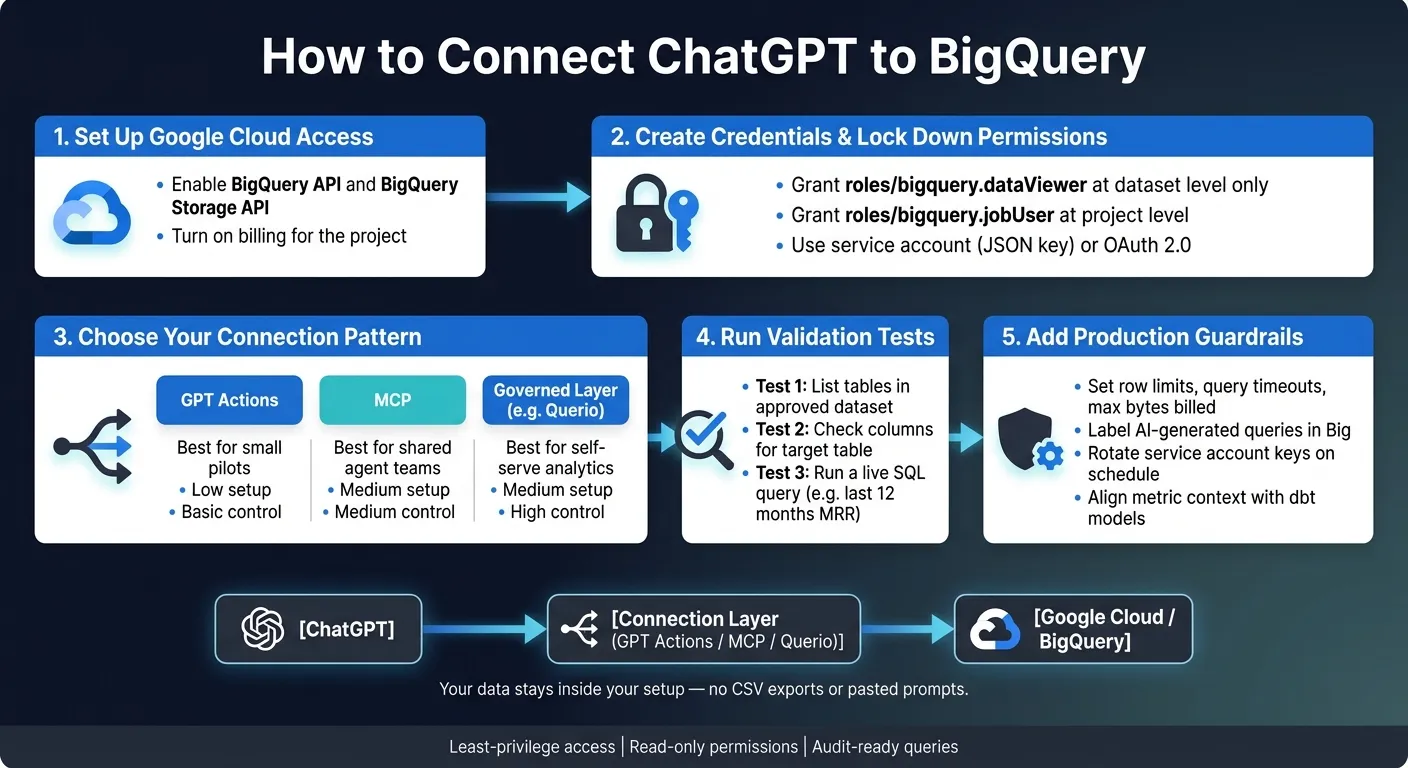 {How to Connect ChatGPT to BigQuery: Step-by-Step Setup}
:::
{How to Connect ChatGPT to BigQuery: Step-by-Step Setup}
:::
Chatting with Your Data: Conversational Analytics in BigQuery | Aryan Irani
::: @iframe https://www.youtube.com/embed/XZuQNgChh0E :::
Set up BigQuery and Google Cloud for secure access
First, make sure you're in the Google Cloud project that owns the BigQuery datasets ChatGPT will query. Billing also needs to be turned on for that project, or BigQuery won't run query jobs [1].
Keep access tight. Give access only to the datasets you've approved, not the whole project. Dataset-level permissions help limit exposure while still allowing schema discovery. That keeps the connector read-only and confined to the data you choose.
Create credentials and limit permissions to approved datasets
Grant roles/bigquery.dataViewer at the dataset level. Do not grant project-wide read access.
| Role | Level | Purpose |
|---|---|---|
roles/bigquery.jobUser |
Project | Run query jobs and use project resources |
roles/bigquery.readSessionUser |
Project | Needed when your setup uses the BigQuery Storage API |
roles/bigquery.dataViewer |
Dataset | Read-only access to tables and schema metadata within a specific dataset |
roles/bigquery.admin |
None | Avoid: grants unnecessary create/delete permissions |
Grant dataViewer only on the datasets you've approved. Don't scope permissions to individual tables. That can block access to INFORMATION_SCHEMA and break schema discovery [1].
If you use row-level or column-level security, also grant the matching row access policy and policy tag permissions along with dataset access.
Enable the right APIs and collect the credential details you will need
Before connecting, enable the BigQuery API and the BigQuery Storage API in Google Cloud [1].
Use the least-privilege identity that fits your setup. If a connector or middleware layer will run queries for users, use a service account with a JSON key file [1]. If you want per-user access and auditing, use OAuth 2.0. For that path, gather the OAuth Client ID, Client Secret, and redirect URIs.
| Credential Detail | Purpose |
|---|---|
| JSON key file | Used for service account authentication in middleware |
| OAuth Client ID | Identifies your OAuth application |
| OAuth Client Secret | Used with OAuth during token exchange |
| Redirect URIs | Where the OAuth flow sends the user after authorization |
Once IAM and API access are in place, the next step is picking the connection pattern ChatGPT will use.
Pick the right connection pattern between ChatGPT and BigQuery
Once IAM is in place, the next step is choosing how ChatGPT will reach BigQuery. You’ve got three main paths: direct GPT Actions, MCP, and a governed layer. The smart move is usually the lightest setup that still gives your team the access controls and guardrails it needs.
Direct BigQuery access with GPT Actions
GPT Actions can call BigQuery’s REST API directly. In practice, that means you set up a runQuery action tied to BigQuery’s Jobs API, and ChatGPT can query the datasets you’ve approved.
A good first move is to query INFORMATION_SCHEMA so ChatGPT can see your tables and columns before it starts writing SQL:
SELECT column_name, table_name, data_type, description
FROM `my_project.my_dataset.INFORMATION_SCHEMA.COLUMN_FIELD_PATHS`
This pattern is a good fit for a small pilot with a handful of approved datasets. For validation queries, start with LIMIT 100 [2]. That keeps things easier to review before you let queries run more broadly.
The main tradeoff is simple: SQL gets generated again on each run. So the same question may produce different queries over time, especially if your warehouse definitions aren’t standardized.
If that feels a bit too open-ended for your team, MCP or a governed layer is usually a better fit.
BigQuery through MCP or a governed layer like Querio
Use MCP when you want shared tools and one place to manage controls. Use a governed layer when you need stable metrics, live warehouse access, and SQL that your team can inspect.
Here’s a quick side-by-side view before you set up credentials and queries:
| Option | Best fit | Setup complexity | Governance |
|---|---|---|---|
| GPT Actions to BigQuery | Small, scoped pilot | Low | Basic, depends on IAM and prompts |
| BigQuery MCP server | Teams standardizing agent access | Moderate | Moderate |
| BigQuery via Querio | Data teams that need governed self-serve | Moderate | High |
Next, follow the step-by-step setup for the pattern you selected.
Step-by-step: configure ChatGPT to query BigQuery
Step 3: run a test query and verify the result
Run the validation in three steps.
First, ask ChatGPT to list tables in finance_reporting. You should see tables like mrr_monthly and subscriptions_summary. If those tables don't show up, the service account likely doesn't have bigquery.tables.list. In that case, check that roles/bigquery.dataViewer is set at the dataset level, not only at the project level [3][4].
Next, ask ChatGPT to show columns for finance_reporting.mrr_monthly. Make sure fields like month, mrr_usd, and customer_segment appear. This is a simple check, but it tells you a lot: can ChatGPT act as a conversational AI data analyst that understands your dataset and table shape?
Then ask a real business question: What is monthly recurring revenue in USD for the last 12 months? ChatGPT should write and run SQL close to this:
SELECT month, mrr_usd
FROM `finance_reporting.mrr_monthly`
WHERE month >= DATE_SUB(CURRENT_DATE(), INTERVAL 12 MONTH)
ORDER BY month
After that, open BigQuery query history and confirm the query touched only analytics_prod and finance_reporting. If you're using Querio, you can also inspect the generated SQL in the notebook and edit it there if needed.
Here’s the side-by-side check:
| Checkpoint | Direct BigQuery via GPT Actions | Querio |
|---|---|---|
| Uses live warehouse data | Yes | Yes |
| Consistent metrics | Manual prompt discipline | Stronger with governed metrics/context |
| Review generated SQL | Possible, depends on setup | Inspectable SQL/Python in notebooks |
| Works for non-technical self-serve | Limited without extra governance | Better suited for broader team access |
| Handles schema drift cleanly | More manual | Better when context is maintained with dbt/GitHub |
Use direct GPT Actions for a small pilot where people already know SQL. Use Querio when several teams need governed, steady answers with auditability.
If this test passes, move on to production guardrails and access review.
Keep the connection safe and reliable in production
Audit access, set guardrails, and handle schema changes
Once the test query works, tighten things up for production. Use the dedicated service account from the setup step and keep access limited to the approved dataset-level read permissions. Stick with dataset-level scope so schema discovery keeps working.
It also helps to plan for auditing and analytics security from day one. Rotate service account keys on a set schedule, or use OAuth if you want per-user audit trails. In BigQuery, label AI-generated queries so you can separate their cost and performance from everything else.
For governed self-serve, keep metric context aligned with dbt. As tables and dbt models change, update joins, metrics, and definitions in version-controlled SQL, Markdown, and Python files stored alongside dbt. That keeps schema updates from drifting out of sync. More importantly, it helps ChatGPT keep answering the right way as models change over time.
Once access and context are stable, add warehouse-level guardrails. Apply Row-Level Security and data masking in BigQuery itself, then set query timeouts, row limits, and maximum bytes billed. These checks apply to every query that hits BigQuery.
FAQs
::: faq
Do I need a service account or OAuth?
Yes. To connect BigQuery to Querio, you need a service account. Create it in Google Cloud, use its JSON key file for sign-in, and assign roles like BigQuery Job User and BigQuery Data Viewer.
Querio also supports OAuth for user-facing access. With OAuth, each person’s queries run with their own warehouse permissions, including row-level security and column masking. :::
::: faq
What BigQuery permissions are required?
Assign the service account these IAM roles at the project or dataset level:
- BigQuery Job User so it can run queries
- BigQuery Data Viewer for read-only dataset access and schema discovery through
INFORMATION_SCHEMA - BigQuery Read Session User for more efficient data retrieval
If the data is sensitive, add BigQuery row-level security and column-level policy tags too. That way, access can be limited based on a person’s role in the organization. :::
::: faq
How do I keep ChatGPT queries safe in production?
Don’t connect ChatGPT straight to your warehouse with broad credentials. That’s asking for trouble.
Instead, send requests through a governed middle layer with read-only access, row-level and column-level security, and OAuth or short-lived tokens. That way, people only see the data they’re allowed to see.
You should also validate any generated SQL against an allowlist before it runs, limit result sizes, and keep an audit log of every prompt, query, and user identity. That gives you a clear record of what happened and who asked for it. :::