Business Intelligence
How Do You Migrate ThoughtSpot Worksheets and TML Into dbt?
Which ThoughtSpot formulas move to dbt MetricFlow as they are, which ones you rebuild by hand, and the running-total setting that quietly gives you the wrong numbers.
 Javier BonillaCo-founder & CTO
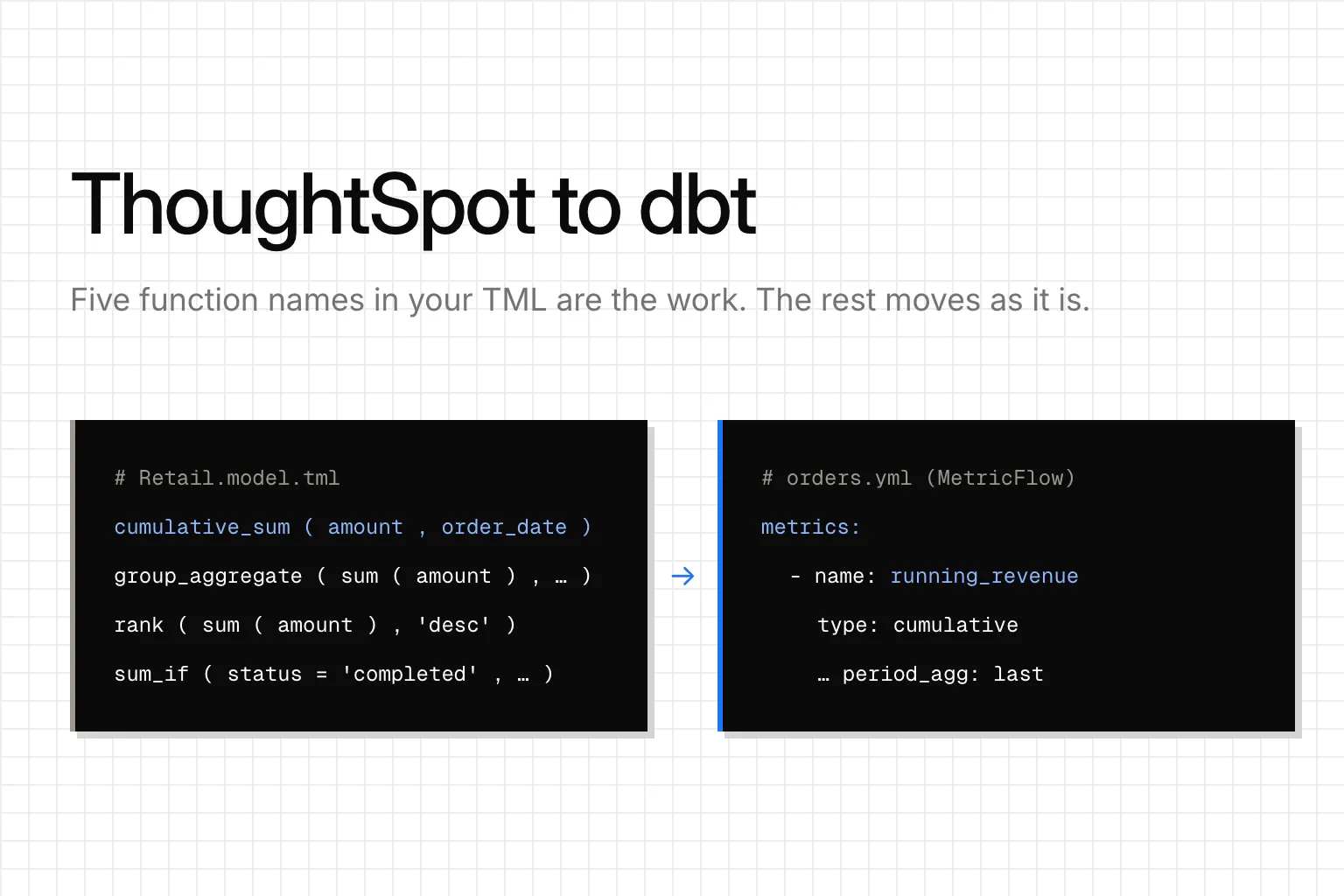
Search your ThoughtSpot model's TML for five names: group_, cumulative_, moving_, rank and last_value. Every formula that uses one has to be rebuilt in dbt by hand. Everything else in the model, the sums, counts, averages, ratios and sum_if filters, becomes a dbt MetricFlow metric as it is. That search is your metric to-do list.
Those five work on the rows of a search result after ThoughtSpot has done the sums: a share of a region, a running total, a rank. A MetricFlow metric is defined once and grouped however each query asks, so no converter can turn one into the other. Someone has to decide what each one becomes.
Which ThoughtSpot formulas have to be rebuilt in dbt?
Run this on the exported model before you plan anything:
grep -nE "group_|cumulative_|moving_|rank|last_value" *.model.tmlHere's where each kind of formula lands in MetricFlow:
| In the ThoughtSpot model | In dbt MetricFlow |
|---|---|
| A measure column with sum, count, count distinct or average | A simple metric |
| One aggregate divided by another, like revenue over orders | A ratio metric |
sum_if or count_if |
A simple metric with a filter |
cumulative_sum |
A cumulative metric you write by hand |
| Everything else on the search list | A dbt SQL model with window functions |
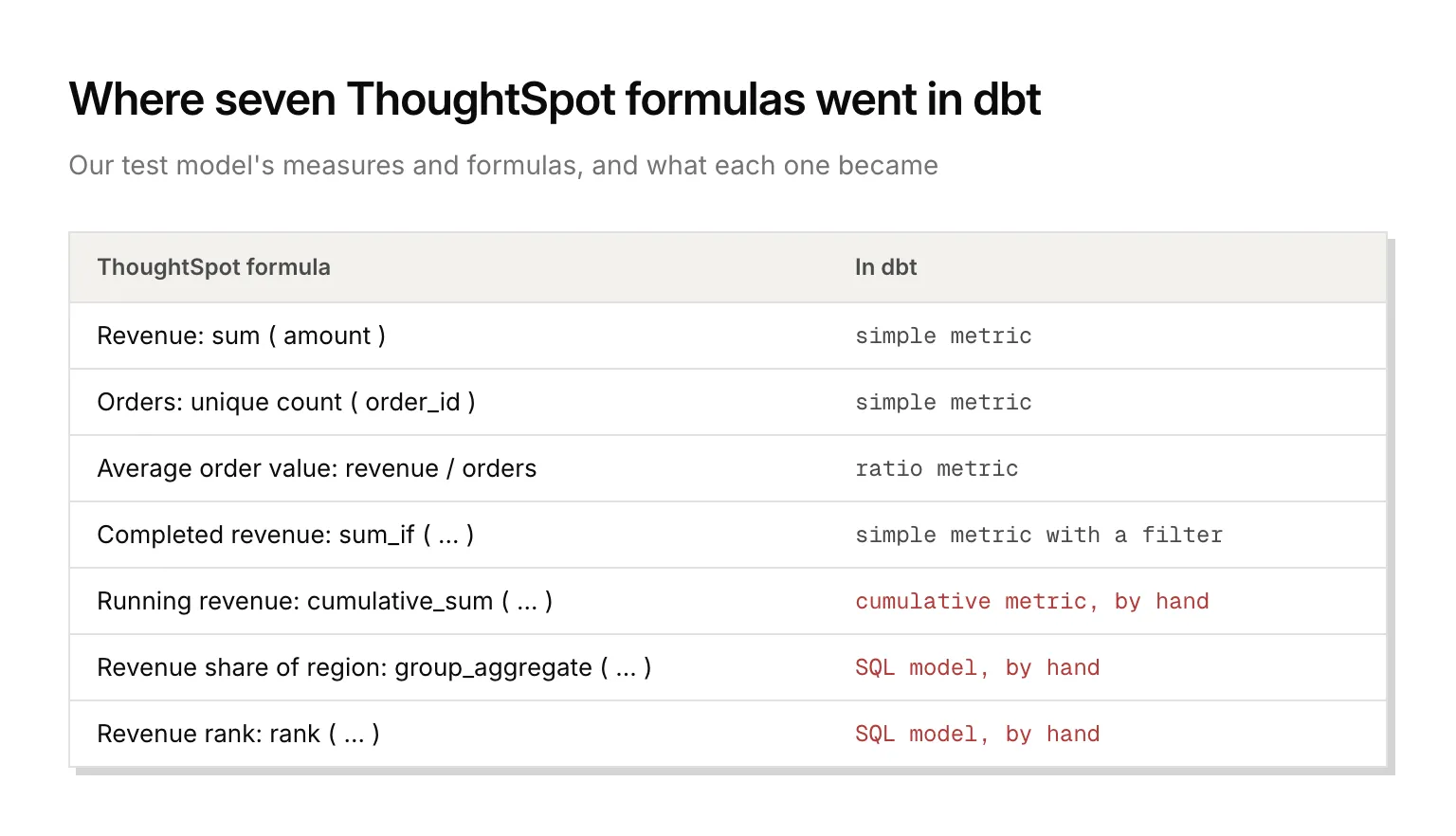
We tested this on a small retail model written in TML from ThoughtSpot's documentation: orders, customers and products, seven measures and formulas, one liveboard. Every plain aggregation came out of the converter as a working metric. Every formula on the search list came back marked, with its ThoughtSpot formula kept beside it.
How do you get the TML out of ThoughtSpot?
Worksheets don't exist anymore. ThoughtSpot removed them in release 10.12.0.cl in August 2025 and migrated every worksheet to a Model, so the TML you want is the Model's. Export it with its associated tables, from Utilities in the Data workspace or through POST /api/rest/2.0/metadata/tml/export with export_associated. The API call needs the Can manage data or Can administer ThoughtSpot privilege.
Then turn the export into dbt files. unshackle, the open-source CLI we built and maintain, reads them with unshackle import thoughtspot <your export>.zip and unshackle build thoughtspot. Its README rates ThoughtSpot support "Early". In a folder with a dbt_project.yml, it writes a semantic model per table with the joins as entities, and the metrics as MetricFlow YAML. The sum_if came out like this:
- name: completed_revenue
  label: Completed revenue
  type: simple
  type_params:
    measure: revenue
  filter: '{{ Dimension(''order__status'') }} = ''completed'''
The rest came back as commented stubs marked TODO(unshackle), each with the formula and a reason, like "use a MetricFlow cumulative metric (window / grain_to_date)" for cumulative_sum.
Two things have to exist in dbt before any of it parses: models or seeds named like the ThoughtSpot tables, and a time spine. Without the spine, dbt parse stops with "The semantic layer requires a time spine model with granularity DAY or smaller in the project, but none was found." Once we added both, mf validate-configs passed the generated YAML with 0 errors, and revenue, orders, average order value and completed revenue matched the rows they came from.
How do you rebuild a running total?
cumulative_sum(amount, order_date) becomes a MetricFlow cumulative metric. It's a few lines of YAML, and the first version can be wrong without any error.
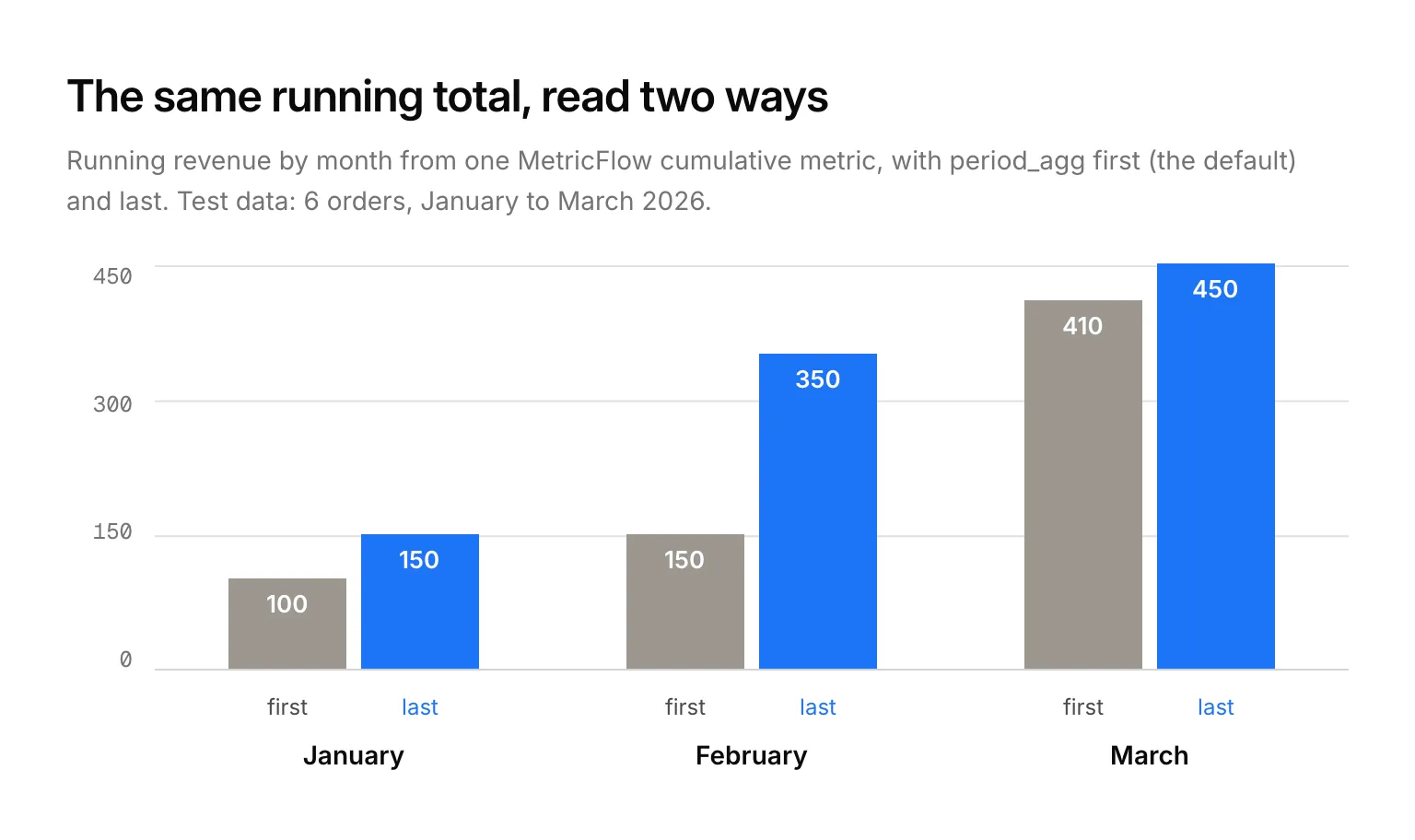
Our first version returned 100, 150 and 410 for January, February and March. The real running totals were 150, 350 and 450. Nothing failed: when you group a cumulative metric by month, MetricFlow shows each month's first value by default, as dbt's cumulative metric docs say. So January showed the total after its first order, and March showed February's total plus March's first order. A running total that ends the month needs the last value:
- name: running_revenue
  label: Running revenue
  type: cumulative
  type_params:
    measure: revenue
    cumulative_type_params:
      period_agg: last
With period_agg: last, the same query returned the right totals.
Do the same check on every formula you rebuild: query a few periods you can add up by hand, and compare before anyone switches dashboards. Run dbt parse after every edit and before mf query, or MetricFlow reads the old manifest and tells you the new metric doesn't exist.
Where do group_aggregate and rank go?
Into a dbt SQL model. Our model had revenue share of region, sum(amount) divided by a group_aggregate of the same sum by region, and revenue rank, rank(sum(amount), 'desc'). In ThoughtSpot, both change with every search. In dbt, you pick the grouping once and write it down:
select
    c.region,
    sum(o.amount) as revenue,
    sum(o.amount) / sum(sum(o.amount)) over () as revenue_share,
    rank() over (order by sum(o.amount) desc) as revenue_rank
from {{ ref('orders') }} o
join {{ ref('customers') }} c using (customer_id)
group by c.region
It ran in dbt-core 1.12.6 on DuckDB. EMEA came out at 280 in revenue, 62% of the total and rank 1. That's each region's share of all revenue. ThoughtSpot's formula divides by the region's own total, so by region alone it's 100% on every row. It becomes useful one level down, like each product's share of its region: group by region and product, and add partition by c.region to the share's window. We'd put moving_ and last_value formulas in the same kind of model.
What happens to liveboards?
Each liveboard becomes a Jupyter notebook with one cell per visualization, and the chart type carries over where there's a match. From exported files, the cells come with no SQL: TML doesn't carry the SQL ThoughtSpot generates. With a service user, unshackle migrate thoughtspot reads the API instead and brings that SQL along. Otherwise, write each tile's query against what you just built: a metric query for the plain aggregations, a select from the SQL model for shares and ranks. Our liveboard's Region filter came out as a notebook parameter set to EMEA and AMER, with a note that no tile used it yet. Add it to each tile's query where the liveboard applied it, or the notebook shows every region.
Can ThoughtSpot read your dbt metrics during the switch?
Some of them. ThoughtSpot can import MetricFlow metrics once support turns it on, an early-access feature certified for Amazon Redshift, Databricks, Google BigQuery and Snowflake connections, but the sync runs one way, from dbt to ThoughtSpot. ThoughtSpot's MetricFlow docs say "Only Simple Metrics and Ratio Metrics are currently supported" and "Metric-level filters for simple metrics are not supported."
So revenue, orders and average order value can feed ThoughtSpot while you move. Completed revenue, a simple metric with a filter, can't, and neither can the running total. Leave those in ThoughtSpot until you switch over. You could point ThoughtSpot at the table the SQL model builds, but for a few weeks of overlap that's one more copy to keep in step, which is the problem you're moving to dbt to fix.
Querio reads your dbt metrics as they are, straight from dbt's semantic_manifest.json, so they stay defined once, in your repo, and we keep no second copy. Querio's agent and any agent connected through our MCP server ask for them by name. If you're weighing the switch, here's how Querio compares with ThoughtSpot. Moving from Looker or Metabase too? We wrote up LookML to MetricFlow and Metabase to dbt.
FAQ
What happens to query_filters() inside a group_aggregate?
It goes away with the formula. In ThoughtSpot, query_filters() makes the share follow whatever filters the person searching applied. A SQL model has no person searching, so put the filters you need in the model, or compute the share in the tool that runs the query.
What happens to Spotter's synonyms and AI context?
They come out as a markdown file per model, not inside the MetricFlow YAML. Column descriptions do land on the dimensions. Keep the file in the repo next to the semantic models, so any agent reading the project finds the words your team uses, like "fulfilment status" for status.
What happens to row-level security rules?
ThoughtSpot keeps them in the table TML under rls_rules, and they come out as a row filter file that dbt doesn't apply. Rewrite each one as a row access policy in your warehouse. Check rules that reach a column through a join, such as a customer's region on an orders table, because the policy has to follow the same join.