Business Intelligence
Querio vs Power BI Copilot (2026)
Querio vs Power BI Copilot: Querio offers inspectable SQL for warehouse-first teams; Copilot fits Power BI/DAX-centric workflows.

If you use Snowflake, BigQuery, Redshift, or Postgres and need inspectable SQL, Querio is usually the better pick. If your team already works in Power BI, Fabric, and DAX, Power BI Copilot usually makes more sense.
I’d boil the choice down to this:
- Querio fits warehouse-first teams that want live queries, shared metric rules, and editable SQL or Python
- Power BI Copilot fits Microsoft-first teams that already publish reports through Power BI semantic models
- The main gap is auditability: Querio shows the query logic, while Power BI Copilot leans on model-driven DAX and report output
- The main workflow split is analysis-first vs report-first
- For teams of 100–500 employees, this often matters most in revenue analysis, KPI checks, and exec reporting
::: @figure 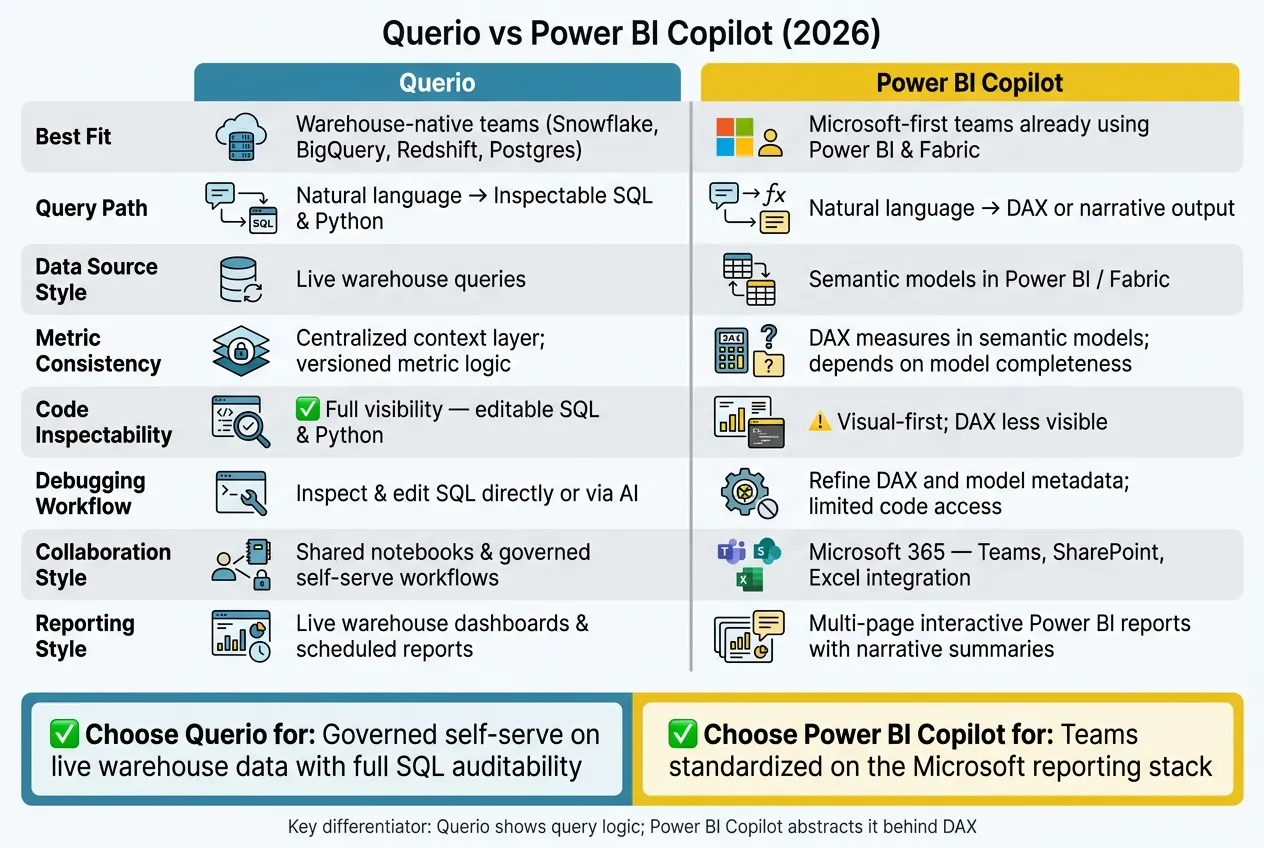 {Querio vs Power BI Copilot: Side-by-Side Comparison 2026}
:::
{Querio vs Power BI Copilot: Side-by-Side Comparison 2026}
:::
The Truth About Copilot in Power BI

::: @iframe https://www.youtube.com/embed/VPEwqQ8Hfyw :::
sbb-itb-284a532
Quick Comparison
| Criteria | Querio | Power BI Copilot |
|---|---|---|
| Best fit | Warehouse-native teams | Microsoft-first teams |
| Data source style | Live warehouse queries | Semantic models in Power BI/Fabric |
| Output | SQL, Python, charts | DAX, visuals, summaries |
| Metric control | Shared context layer | DAX measures in semantic models |
| Debugging | Direct query review and edits | Model and DAX review |
| Self-serve use | Plain-English analysis with guardrails | Plain-English prompts inside Power BI |
| Reporting style | Live dashboards and scheduled reports | Multi-page Power BI reports |
In short, I see Querio as the better choice for governed self-serve on live warehouse data, while Power BI Copilot is the better choice for teams already committed to the Microsoft reporting stack.
Querio vs Power BI Copilot at a glance
Here’s the short version: Querio is built for governed, warehouse-native analysis. Power BI Copilot is built for teams that already run on Power BI and DAX. That difference shows up fast when people start asking revenue questions, checking KPIs, or putting together exec reports.
| Querio | Power BI Copilot | |
|---|---|---|
| Data Architecture | Live warehouse connections | Live connections plus in-memory models |
| Query Path | Natural language → inspectable SQL and Python | Natural language → DAX or narrative output |
| Governance & Metric Consistency | Shared semantic/context layer; metrics stay consistent across analysis | DAX measures defined inside Power BI semantic models |
| Analytics Workflow | Conversational analysis with notebooks for iterative analysis | Dashboard-first build-and-publish with Copilot assistance |
| Collaboration | Shared notebooks and governed self-serve workflows | Power BI/Fabric workspace collaboration |
| Dashboard & Report Workflow | AI-assisted visuals built from live warehouse queries | Structured, multi-page interactive reports with Copilot assistance |
| Best-Fit Team | Warehouse-native data teams and analysts on Snowflake, BigQuery, Redshift, or Postgres | Enterprise teams standardized on the Microsoft ecosystem |
Quick decision guide
Choose Querio if your stack runs on Snowflake, BigQuery, Redshift, or Postgres and your team needs live queries, inspectable SQL and Python, and a shared semantic layer that keeps metrics consistent across ad hoc revenue analysis, KPI debugging, and dashboards.
Choose Power BI Copilot if your company is already standardized on Power BI and DAX-based reporting. That’s a clear edge for teams that already live inside Power BI.
The biggest split comes down to the query path. Querio shows the SQL and Python it generates, so teams can review the logic. Power BI Copilot usually hides that layer behind DAX or narrative output. If metric auditability is non-negotiable, that gap matters a lot.
The next section shows how each tool behaves in day-to-day analytics workflows.
How each product works in real analytics workflows
The table above shows the split. Here’s what that looks like in day-to-day analysis. Querio is warehouse-first and easy to inspect. Power BI Copilot is semantic-model-first and built around reports.
How Querio works
Querio connects straight to your data warehouse - Snowflake, BigQuery, Amazon Redshift, ClickHouse, MotherDuck, or Postgres - with encrypted, read-only credentials. Analysts work on live warehouse data, not a separate copy. When an analyst or business user asks a question in plain English, Querio writes SQL or Python against the live warehouse and shows the full code.
That matters in practice. You can see exactly what ran, check the logic, and spot issues before a chart or summary gets shared more broadly.
The context layer keeps definitions like ARR, active users, and churn steady across every question. Data teams set joins, metric logic, and business terms once, and those rules carry across every question, notebook, dashboard, and scheduled report. Analysts can also work directly in notebooks that update as the SQL and Python change. So ad hoc analysis stays easy to review before anything reaches leadership.
How Power BI Copilot works
Power BI Copilot is an AI assistant built into the Power BI service and Microsoft Fabric. It sits on top of a pre-built, published semantic model with defined relationships and DAX measures. When someone asks a question in the Copilot sidebar, the system uses that semantic model to create report pages, summaries, or DAX calculations.
This setup works well for teams that already run on Power BI governance. DAX-based semantic models fit structured, multi-page reports and audited financial KPIs. But there’s a catch: Copilot output depends on how complete and accurate the model is before people start asking questions.
In plain terms, if the semantic model is solid, Copilot can be useful. If the model has gaps, those gaps show up in the answers too.
Natural-language analysis, governance, and debugging
This is where the gap starts to show in day-to-day work: how easy each tool is to audit, debug, and trust.
| Capability | Querio | Power BI Copilot |
|---|---|---|
| Natural-language querying | Chat-based analysis; generates SQL and Python | Sidebar assistant; generates DAX and visuals |
| Code inspectability | Full visibility of editable SQL and Python | Visual-first; DAX is less visible |
| Metric consistency | Centralized context layer with versioned logic | Governed semantic models built on DAX measures |
| Debugging workflow | Inspect and edit SQL directly, or use AI to fix | Refine DAX and model metadata; limited code access |
Ad hoc revenue analysis and SQL inspectability
Say your VP of Sales asks, "Why did U.S. expansion revenue drop last month?" Querio writes SQL against live warehouse data and shows the joins, filters, and revenue logic.
That matters because you can actually see what happened. If something looks off, an analyst can inspect the SQL, edit it, and move on without playing detective.
Power BI Copilot takes a different path. It generates DAX and visuals from the semantic model. That can work well when the model is complete, but validation often takes more time because the code isn't as visible.
And when revenue definitions need to stay locked in, that visibility becomes a big deal.
KPI debugging and metric consistency
Definition drift is a real problem. ARR, net revenue retention, and pipeline coverage all come with edge cases. When different teams calculate them a little differently, trust in the numbers starts to slip.
Querio's context layer applies versioned metric logic across every question, notebook, and dashboard. So if an analyst asks about ARR in a notebook and a product manager asks the same thing in chat, they get the same calculation. Just as important, both can trace how that number was produced.
Power BI Copilot is only as steady as the semantic model behind it. Certified models with clean DAX can work well. But if there are gaps or fuzzy definitions in the model, those issues flow straight into the answers.
That same gap shows up fast when non-technical users begin asking their own questions.
Non-technical self-serve with analyst control
In Querio, non-technical users can ask follow-up questions in plain English while the context layer applies the right joins and metric logic. Data teams still control what gets exposed and how it's calculated.
Power BI Copilot self-serve goes as far as the semantic model is documented and maintained by analysts.
That same tradeoff carries into dashboard workflows and cross-functional reporting.
Dashboards, collaboration, and team fit
Once analysis needs to land in front of leadership on a set schedule, this is where tools get tested for real. It’s not just about building a chart. It’s about keeping reports live, keeping teams aligned, and making sure the numbers hold up when someone asks, “Where did this come from?”
Executive reporting and dashboard workflows
Querio turns analysis into live dashboards and scheduled reports that stay connected to the warehouse. Weekly metrics reviews and sales funnel reports remain live against Snowflake, BigQuery, or Redshift. That matters because dashboard work doesn’t stop at setup. Teams also need a smooth way to review, share, and act on what those dashboards show.
Power BI Copilot helps speed up report creation inside the existing Power BI and Microsoft Fabric workflow. It stands out for narrative summaries, which can give executives context before they dig into the charts. If a company already runs on Power BI, that can save time and fit neatly into the reporting process.
Collaboration across analysts, product, and leadership
Collaboration is where day-to-day reporting habits become obvious.
Querio keeps the same joins and metric logic across chat, notebooks, and reports. If that logic changes, notebooks update automatically. So when a product manager or a RevOps lead asks a follow-up question, they’re still working from the same logic analysts already set up. That cuts down on the classic “Why does this number look different here?” problem.
Power BI Copilot fits neatly into Microsoft 365 workflows. Teams can share through Teams, SharePoint, and Excel, and discussions stay inside tools many people already know well. The catch is scope: Copilot stays within the open report. For teams working from a standalone warehouse, that can feel limiting. This matters most for groups that already spend most of their time inside Microsoft 365.
Which tool to choose
Here’s how that tradeoff looks in daily work.
| Querio | Power BI Copilot | |
|---|---|---|
| Best fit | Warehouse-native teams wanting governed self-serve | Organizations committed to Power BI and Microsoft Fabric |
| Query output | Fully inspectable and editable SQL and Python | DAX measures and narrative output |
| Metric consistency | Centralized context layer across chat, notebooks, and dashboards | Governed semantic models; consistency depends on model completeness |
| Collaboration style | Reactive notebooks; shared governed self-serve | Microsoft 365 integration; workspace-based collaboration |
| Executive reporting | Live warehouse dashboards and scheduled reports | Narrative summaries and automated report generation |
Choose Querio if your team uses a modern data warehouse like Snowflake, BigQuery, Redshift, or Postgres, needs the same metric definitions across analysts and non-technical stakeholders, and wants every AI-generated answer tied back to editable SQL or Python.
Choose Power BI Copilot if your company is already standardized on Power BI and Microsoft Fabric, your analysts work comfortably in DAX, and your collaboration happens in Teams and SharePoint.
The core tradeoff is simple: warehouse-native governance and inspectability versus deep integration with the Microsoft stack. Neither option is wrong. The better fit depends on where your team already works and how much trust and auditability you need behind each answer.
FAQs
::: faq
Do I need a semantic model before using either tool?
Yes. Both tools work better with a semantic model. Without one, AI-generated answers can drift, metrics can change from one prompt to the next, results can be off, and governance gets shaky.
For Power BI Copilot, a prebuilt semantic model is required. Querio also depends on a governed semantic context layer, so natural-language queries return consistent, trusted data from your warehouse. :::
::: faq
How much SQL or DAX knowledge does my team need?
With Querio, end users don’t need SQL or DAX to get insights. They can ask questions in plain English, and data teams can still inspect and edit the generated SQL and Python.
With Power BI Copilot, natural-language help can speed up DAX work. But it doesn’t remove the need for DAX knowledge. Teams still need a baseline understanding to check outputs and manage complex semantic models. :::
::: faq
Which option is better for trusted self-serve analytics?
For teams that care most about trusted self-serve analytics, Querio is the better fit. It brings together a shared semantic layer with SQL and Python that users can see and inspect. That matters. People don’t just get an answer - they can check how it was built.
Power BI Copilot works well inside the Microsoft ecosystem, but its accuracy leans more heavily on well-kept semantic models and DAX. Querio also connects straight to live warehouses like Snowflake, BigQuery, and Redshift, which helps keep results governed and up to date. :::