Guide
Data Analytics for Product Managers Your Practical Guide
Master data analytics for product managers. This guide covers key metrics, proven frameworks, and AI-powered tools to help you build better products.
For a product manager, data analytics is all about using information—from user behavior, product performance, and business metrics—to make smarter decisions. It’s the discipline of guiding your product's strategy and day-to-day development with hard evidence, not just hunches.
This practice fundamentally shifts product management away from pure intuition and toward evidence-backed choices. The goal is simple: turn raw numbers into a clear story about your users, their needs, and their frustrations. This story then helps you improve their experience, fuel growth, and sidestep potential risks.
Why Data Analytics Is a Core Product Management Skill
Not long ago, a product manager's "gut feeling" was a celebrated part of the job. While intuition still has its place, relying on it alone today is like trying to navigate a new city without a map. Data analytics is your GPS, giving you a clear, actionable path through the ambiguity.
It’s no longer a "nice-to-have" skill; it's a non-negotiable part of modern product leadership. This shift is about moving your team's conversations from "we think our users want this" to "we know they need this."
Instead of guessing which new feature will be a hit, you can analyze usage patterns to see what people actually click on and engage with. Rather than endlessly debating priorities in a meeting, you can point to churn data that pinpoints exactly where the product is failing them. This data-first approach builds credibility, makes it easier to get stakeholder buy-in, and rallies everyone around objective truths.
From Numbers to Narratives
You don't need to be a statistician to master data analytics as a product manager. The real skill lies in learning to read the story your data is telling you.
A sudden drop in daily active users isn't just a number on a dashboard; it's a warning sign that something in the user journey is broken. A high adoption rate for a new feature isn't just a win; it's a chapter in the story of what your users truly value.
This storytelling ability is what allows you to translate a complex spreadsheet into a compelling argument for your product roadmap. It’s the bridge between user behavior and business outcomes, and it's what makes you a far more effective and influential leader. Understanding the "why" behind the numbers is a skill that comes from a strong product thinking mindset.
This isn't just a trend; it's a fundamental change in how products are built. By 2025, it's expected that 41% of companies will embed data analytics and AI directly into their product development process. What's more, AI-driven automation is on track to handle up to 80% of routine PM tasks, freeing you up to focus on the high-level strategy that data illuminates. You can learn more about recent product development statistics here.
Understanding The Metrics That Actually Matter
As a product manager, it's incredibly easy to drown in data. You’re surrounded by dashboards, reports, and an endless stream of numbers. The real challenge isn't finding data; it's finding the right data—the numbers that tell you a clear story about your product and how people are using it.
Think of your core metrics as your product's vital signs. A doctor doesn't just look at one number; they check heart rate, blood pressure, and temperature to get a full picture of a patient's health. You need to do the same for your product. This isn't just about tracking for the sake of tracking. It’s about building a proactive system that turns data analytics for product managers into your most powerful tool for growth.
This is exactly why product managers sit at the intersection of data, strategy, and business success—using analytics as the bedrock for every decision.
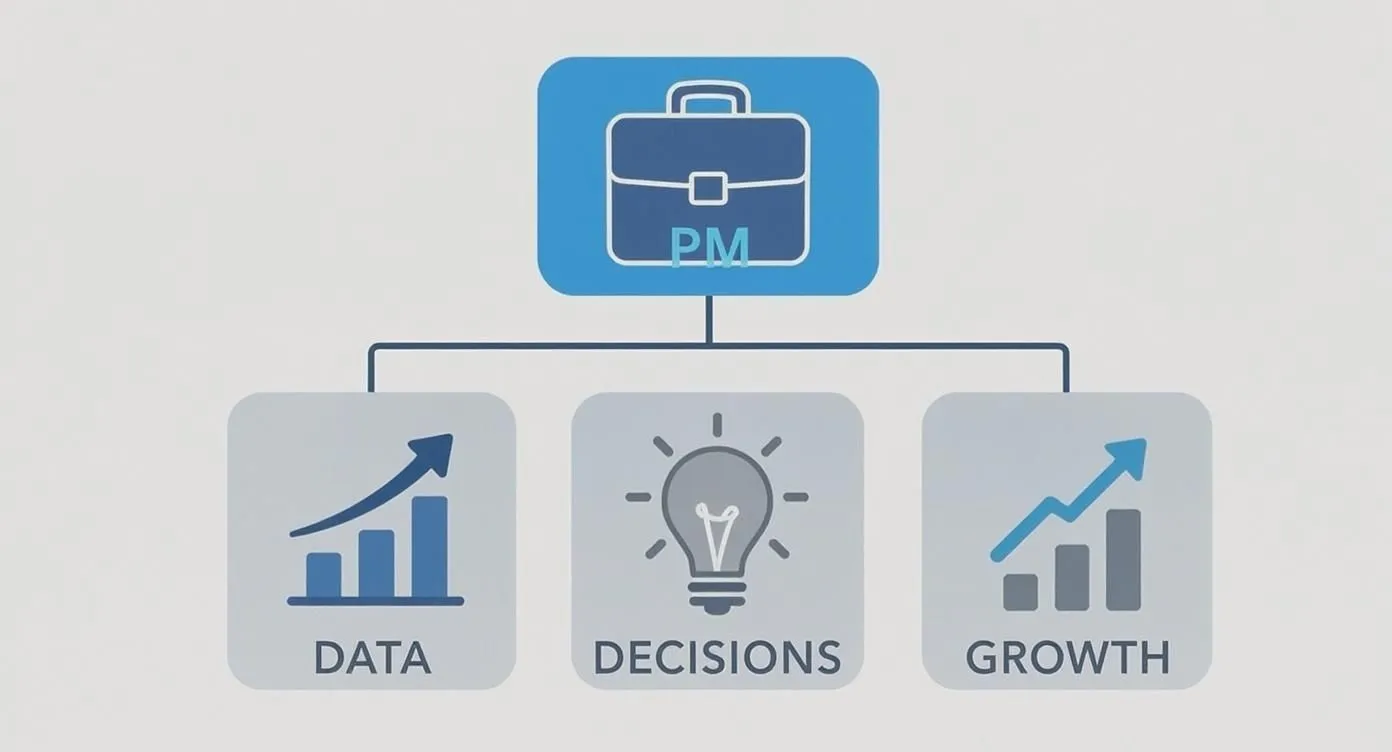
As you can see, everything flows from data. It informs your decisions, and those decisions are what ultimately drive real, measurable growth.
Core Metric Categories
To keep from getting overwhelmed, it helps to group your Key Performance Indicators (KPIs) into four main buckets. This framework lets you map your metrics directly to different stages of the customer journey, from the first time they hear about you to their long-term loyalty.
-
Acquisition: How are you getting new users? This is all about your top-of-funnel performance. A classic metric here is Customer Acquisition Cost (CAC), which tells you exactly how much you're spending in sales and marketing to bring in one new customer.
-
Engagement: So, they’ve signed up. Now what? Engagement metrics tell you if people are actually using your product. Things like Daily Active Users (DAU) and Feature Adoption Rate are crucial for understanding how "sticky" your product is and which parts are delivering the most value.
-
Retention: It's almost always cheaper to keep a customer than to find a new one. Churn Rate is a big one here—it's the percentage of users who leave over a certain period. On the flip side, Customer Lifetime Value (CLTV) helps you predict how much revenue you can expect from a single customer over time.
-
Satisfaction: Are your users happy? It’s a simple question with a complex answer. Metrics like Net Promoter Score (NPS) and Customer Satisfaction (CSAT) give you a direct line into how people feel about their experience.
The real magic happens when you connect these numbers to action. A dip in engagement isn't just a data point; it's a signal. It should make you ask, "Which group of users is dropping off?" or "Did that last feature release break a key workflow?" That’s what separates a good PM from a great one.
This data-first mindset is no longer a niche strategy. In fact, 81% of organizations now rely on analytics to define and measure their product's success, a testament to how essential this skill has become. If you're interested in more stats like this, you can discover more insights on product management trends.
To give you a clearer starting point, here are some of the most essential KPIs broken down by category.
Essential Product Management KPIs
This table summarizes some key metrics product managers should have on their radar, organized by what part of the product's health they measure.
| Metric Category | Example KPI | What It Measures |
|---|---|---|
| Acquisition | Customer Acquisition Cost (CAC) | The total cost to acquire a new customer, including marketing and sales expenses. |
| Engagement | Daily Active Users (DAU) | The number of unique users who interact with your product on a given day. |
| Engagement | Feature Adoption Rate | The percentage of users who use a specific feature for the first time. |
| Retention | Churn Rate | The percentage of customers who stop using your product over a specific period. |
| Retention | Customer Lifetime Value (CLTV) | The total revenue a business can expect from a single customer account. |
| Satisfaction | Net Promoter Score (NPS) | Customer loyalty and willingness to recommend your product to others. |
| Satisfaction | Customer Satisfaction (CSAT) | Short-term happiness with a specific interaction or feature. |
Tracking these KPIs provides a solid foundation, but the ultimate goal is to build a dashboard that doesn't just report on what happened yesterday—it helps you decide what to build tomorrow.
By focusing on these core categories, you can cut through the noise and tune into the signals that truly matter. For a deeper dive into this topic, check out our guide on what product metrics really matter and how AI can surface them.
Applying Frameworks for Smarter Product Decisions
Collecting metrics without a plan is like having a kitchen full of ingredients but no recipe. You might have everything you need, but you'll end up with a mess instead of a masterpiece. Frameworks are the recipes of product management—they give you a structured way to turn raw data into strategic improvements.
Instead of just staring at a dashboard full of charts and feeling overwhelmed, these frameworks give you a repeatable process. They help you connect your KPIs directly to the user journey, making sure you’re tackling the right problems at the right time. For any product manager who wants to move beyond guesswork, this is how you start making consistently smart, evidence-backed decisions.

Mapping the Customer Funnel with AARRR
One of the most battle-tested models out there is the AARRR framework, famously known as "Pirate Metrics." It’s so popular because it neatly breaks the entire customer lifecycle into five distinct stages. This gives you a powerful lens to analyze user behavior and, more importantly, figure out exactly where people are dropping off.
It provides a straightforward way to diagnose your funnel’s weak spots:
- Acquisition: How are people discovering you in the first place? This is all about your channels and first impressions.
- Activation: Do new users have a great initial experience? This is where you guide them to that "aha!" moment—when they truly get the value you're offering.
- Retention: Do they come back? This is the long game, tracking repeat usage and engagement over time.
- Referral: Do they like your product enough to tell their friends? This is the holy grail of organic, word-of-mouth growth.
- Revenue: Can you effectively monetize their activity? This is where product usage ties directly to the bottom line.
Let's make this real. Imagine you see a low trial-to-paid conversion rate, which is a Revenue problem. With AARRR, you can trace the problem backward. Is it really about the price, or is something else going on? You might investigate your Activation metrics and discover that only 20% of new users ever complete the key onboarding steps.
By applying this framework, you’ve correctly diagnosed the root cause. It’s not a pricing problem; it’s an activation problem. Now you can confidently focus your team on improving the onboarding flow instead of just guessing at random solutions.
Measuring User Experience with HEART
While AARRR is brilliant for tracking growth, it doesn't tell the whole story. What about the quality of the user experience? That's where Google's HEART framework comes in. It’s designed to give you a more nuanced, user-centric view of your product's health and usability.
HEART focuses on five key dimensions of the user experience:
- Happiness: How do users feel about your product? (Think Net Promoter Score, customer satisfaction surveys, and app store reviews).
- Engagement: How deeply and frequently are people interacting with your product? (Look at daily active users or session length).
- Adoption: Are new users trying your product or a specific feature? (Tracked by new sign-ups or usage of a recently launched feature).
- Retention: What percentage of users stick around? (Measured by churn rate and cohort analysis).
- Task Success: Can users actually achieve what they came to do, easily and efficiently? (Think conversion funnels, error rates, and time-to-complete a task).
Using frameworks like these completely changes the game for product managers. You stop being a reactive reporter of numbers and become a proactive strategist, using data to build a product that people genuinely love.
How AI Is Your New Data Analytics Superpower
Let's be honest, traditional dashboards are great for a rearview mirror perspective—they show you what already happened. But they often leave you playing detective, trying to piece together the "why" on your own. This is where AI changes the game entirely, shifting data analytics for product managers from a reactive chore to a proactive strategy.
Think of AI less as a replacement for your expertise and more as an incredibly sharp assistant, one that can spot subtle patterns in the noise that a human eye would almost certainly miss.
AI-powered tools don't just serve up static charts. They bring dynamic capabilities to the table like predictive analytics. Imagine being able to forecast future user behavior, like identifying which customers are showing early signs of churn based on tiny shifts in their activity. This lets you step in before they walk away, not after the fact.
Then there's automatic anomaly detection, which is a massive time-saver. Instead of you manually sifting through metrics every morning looking for red flags, an AI system can instantly alert you to a sudden spike in errors or a dip in engagement. You can pinpoint and address issues as they happen.

Asking Deeper Questions Without Code
Perhaps the biggest shift is in how you can now talk to your data. Modern business intelligence (BI) platforms let you ask complicated questions in plain English, just as if you were asking a data analyst for a report. The need to write SQL or wait in a queue for the data team is quickly becoming a thing of the past.
You can literally type, "Which user segment from our last marketing campaign had the highest feature adoption in the first week?" and get an answer back in seconds, complete with a visualization.
This conversational approach shatters the technical barriers, freeing you up to follow your curiosity and dig deeper into insights on the fly. It’s all about getting to the "why" behind the numbers, and AI helps connect the dots across different datasets to find relationships you might never have thought to look for. For more on this, check out our guide on how AI helps identify the questions you didn't think to ask.
Making Sense of Unstructured Feedback
AI is also brilliant at taming qualitative data. No product manager has the time to manually read thousands of App Store reviews or support tickets to spot common threads. It’s an impossible task.
Technologies like Natural Language Processing (NLP) and sentiment analysis can automate this heavy lifting. An AI tool can instantly gauge the overall sentiment from customer reviews and support chats, while NLP can parse all that unstructured text to pull out emerging themes and hidden user needs. This gives you a direct, data-backed line into feature prioritization.
As you start exploring these tools, it’s smart to be discerning. Before you jump in, it helps to review these 10 crucial questions to evaluate AI. This ensures your new superpower is actually solving real problems and driving meaningful growth for your product.
Avoiding Common Data Traps and Pitfalls
Having a ton of data feels like a superpower, but it also lays out a minefield of cognitive traps that can trip up even the sharpest product managers. When it comes to data analytics for product managers, knowing what not to do is just as important as knowing what to do.
Think of data like a powerful spotlight. It's incredibly easy to point it only at what you want to see, leaving crucial context lurking in the shadows. This is why you need to build a healthy, skeptical relationship with your numbers—don't just accept them at face value.
The Lure of Confirmation Bias
The most classic trap is confirmation bias. It’s that all-too-human habit of finding and favoring information that backs up what we already believe. If you’re convinced your new feature is a hit, you’ll naturally gravitate toward rising engagement metrics while conveniently ignoring the spike in customer support tickets about it.
To keep yourself honest, you have to actively fight this pull.
- Form a Falsifiable Hypothesis: Before you dive into the data, frame your belief as something that can be proven wrong. For example, "Simplifying the checkout process will increase our conversion rate by at least 15%." This sets a clear pass/fail line.
- Actively Seek Disconfirming Evidence: Make it a team ritual to ask, "What data would prove this hypothesis wrong?" Then, make a real effort to go find that data.
Chasing Vanity Metrics
Next up is the siren song of vanity metrics. These are the numbers that look amazing in a presentation but don't actually tell you anything about the health of your product or business. We're talking about things like total app downloads or raw page views. A huge number feels great, but it says nothing about whether people are actually using your product, finding value, or sticking around.
Relying on vanity metrics is like judging a restaurant's success by how many people walk through the door, not by how many stay for a meal and come back again.
Instead, zero in on actionable metrics that tell a real story. Things like Daily Active Users (DAU), churn rate, or specific feature adoption rates give you a genuine signal about your product's health and tie directly to your strategic goals.
Escaping Analysis Paralysis
Finally, there’s the dreaded analysis paralysis. This happens when you have so much data and so many ways to slice it that you get stuck, unable to make a decision. It’s that feeling that you just need one more report, one more segment, one more A/B test result before you can move forward.
The trick is to set clear boundaries from the start. Define what "good enough" data looks like for the decision at hand and give yourself a deadline. It's almost always better to make a timely, directionally correct decision than to wait for a perfect one that arrives too late.
Got Questions? We've Got Answers
Stepping into the world of data analytics as a product manager can feel a bit like learning a new language. You're bound to have questions. Let's tackle some of the most common ones that come up.
What’s the Best Starter Toolkit?
If you're just getting your feet wet with data analytics, don't try to boil the ocean. Start by focusing on tools that show you exactly how people are using your product. Platforms like Amplitude or Mixpanel are brilliant for tracking in-app user behavior.
Once you have a handle on that, you can layer on a business intelligence (BI) tool like Tableau or Power BI to connect product activity to broader business metrics. As you get more sophisticated, AI-powered platforms can unlock much deeper, predictive insights.
How Can I Get Buy-in to Invest in Analytics?
This is a big one. To get your stakeholders to open up the budget for better analytics, you have to speak their language: business outcomes. Forget talking about the tool's cool features; talk about what it will do for the company.
Frame your request around concrete goals. Explain how a new tool will help reduce churn by identifying at-risk users or increase feature adoption by pinpointing where people get stuck.
The secret is to build a solid business case that screams ROI. I always recommend starting with a small pilot project. Use it to prove that making decisions with better data leads to real, measurable wins for the product and the bottom line.
Do I Need to Be a Tech Whiz?
Absolutely not. You don't need to be a data scientist or know how to code. A modern PM's job is to be data-literate, not a data technician. This means you know which questions to ask, what the key metrics mean, and how to read the story the data is telling you.
Your most important skill is still translating those data-driven insights into a product strategy that your team can rally behind and execute.
How Much Data Do I Really Need to Make a Call?
Ah, the classic "how much is enough?" question. The honest answer is: it depends entirely on the weight of the decision.
If you're tweaking a button color or changing some copy, seeing how a few hundred users react is probably all you need to move forward. But for a major strategic shift, like entering a new market? You'll need a much larger, statistically significant dataset to back that up.
The real art is balancing the desire for perfect data with the need to move quickly. Often, a directionally correct decision based on "good-enough" data today is far more valuable than a perfect decision based on data that arrives too late.
Ready to make data analytics your superpower? Querio empowers your entire team to ask questions in plain English and get answers in seconds, turning curiosity into clear, actionable insights. Learn more and start your journey at Querio.