Business Intelligence
SaaS Analytics: Build or Buy?
Compare building vs buying a SaaS analytics platform—costs, time-to-value, maintenance, scalability, and 3-year ROI to decide which fits your team.
When deciding between building or buying a SaaS analytics platform, the choice boils down to cost, time, and scalability. Building offers full control but comes with high expenses, longer development time, and the need for a modern SaaS analytics tech stack to manage maintenance demands. Buying, on the other hand, provides quicker implementation, predictable costs, and vendor-managed upkeep.
Key takeaways:
- Building: Costs $50,000–$200,000 upfront, takes 8–18 months, and requires significant developer resources for maintenance and scaling.
- Buying: Costs $2,500–$3,500/month, deploys in weeks, and includes vendor support for updates, compliance, and scaling.
Quick Comparison:
| Factor | Building In-House | Buying Pre-Built |
|---|---|---|
| Initial Cost | $50,000–$200,000+ | $2,500–$3,500/month |
| Time-to-Value | 8–18 months | Weeks to 3 months |
| Maintenance | 30% of developer time | Handled by vendor |
| Scalability | Manual upgrades required | Automatic cloud scaling |
| ROI (3-Year) | ~18% | ~27% |
If analytics aren't core to your business, buying saves time and resources. But if customization is critical, building may be worth the investment. Consider your goals, budget, and team capacity before deciding.
::: @figure 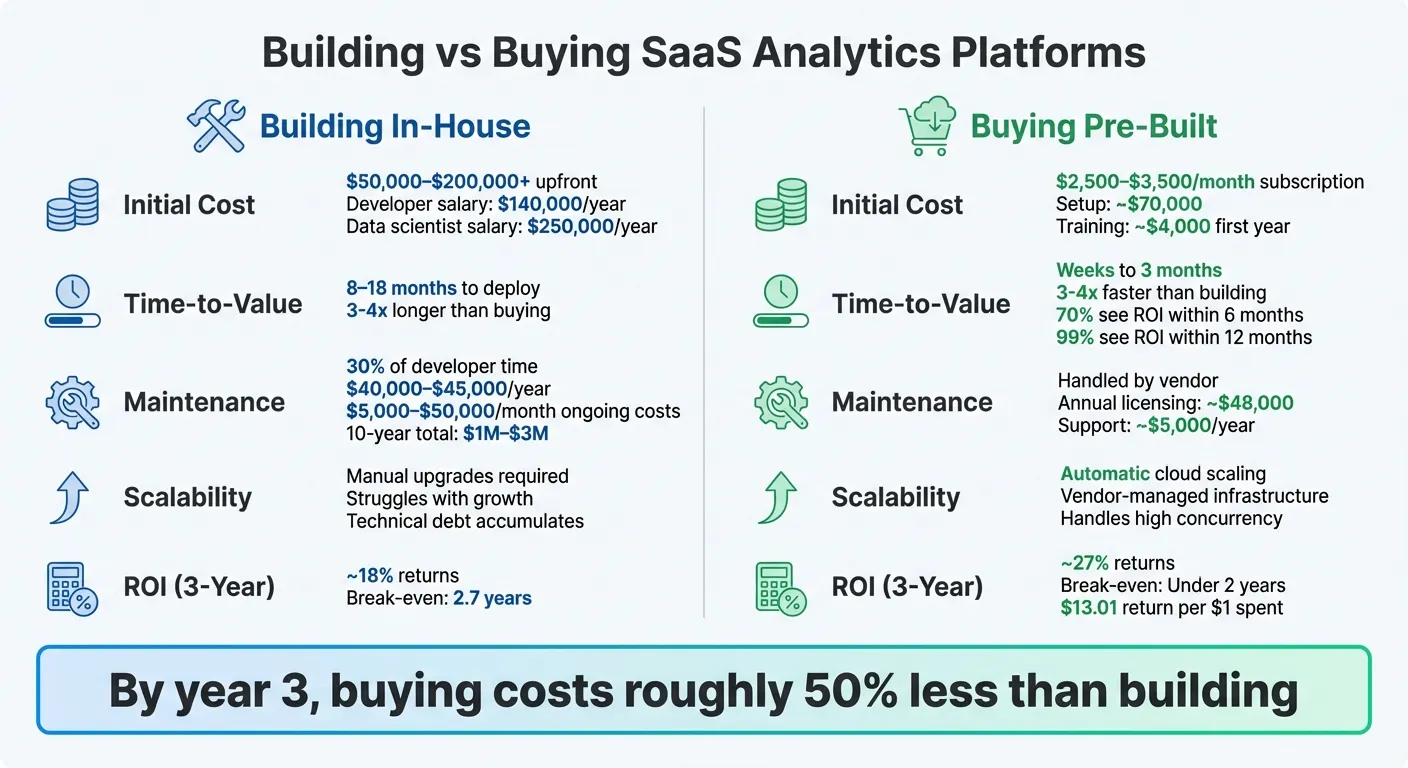 {Build vs Buy SaaS Analytics Platform: Cost, Time, and ROI Comparison}
:::
{Build vs Buy SaaS Analytics Platform: Cost, Time, and ROI Comparison}
:::
Build vs Buy: What's best for your data team?
::: @iframe https://www.youtube.com/embed/x48u6ZpagME :::
1. Building an In-House SaaS Analytics Platform
Creating an in-house analytics platform gives you complete control over every feature, integration, and data pipeline. However, this level of customization comes with steep financial and time commitments.
Cost
Let’s break down the numbers. Developing an in-house platform can cost anywhere from $50,000 to $200,000 upfront. Hiring a single developer for the project will set you back about $140,000 annually, while data scientists with specialized skills can demand salaries closer to $250,000 per year. Maintenance isn’t cheap either - about 30% of a developer’s time (or roughly $45,000 annually) is spent just keeping the system operational. Add in bug fixes, security updates, and budget, and compliance requirements, and monthly maintenance costs can range between $5,000 and $50,000. Over a decade, these ongoing expenses can pile up to $1 million to $3 million.
Time-to-Value
Building a data product in-house takes significantly longer than adopting a ready-made solution - three to four times longer, in fact. This delay means you’ll wait even longer to see any return on your investment. Plus, your data scientists may end up spending 50%–80% of their time on mundane tasks like cleaning data and maintaining infrastructure, rather than delivering actionable insights. The time lost here could be better spent improving your core product.
Scalability
Scaling an in-house solution is another challenge. While your platform may work well for a small user base, it can struggle as the number of users grows. Issues like data isolation, performance slowdowns, and mounting technical debt can limit your ability to handle advanced analytics or integrate generative AI. This often stems from lacking a modern data stack designed for AI readiness. Managing multi-tenant environments adds even more complexity, requiring sophisticated data handling and performance optimization. As data volumes and concurrent users increase, you may encounter problems like dashboard lag, which can frustrate users and limit functionality.
Maintenance and Support
Once your platform is up and running, the work doesn’t stop. Expect to allocate 15%–20% of the initial development costs each year for bug fixes, 10%–15% for security updates, 20%–25% for feature improvements, and 8%–10% for compliance. Your team will need to ensure the system stays reliable while adapting to new performance demands and evolving privacy regulations. Over time, this ongoing workload can make maintaining an in-house system feel like an uphill battle.
2. Buying a Pre-Built SaaS Analytics Solution
Opting for a ready-made analytics platform can shift your focus entirely. Instead of investing heavily in upfront development, you’ll pay predictable licensing fees and gain quick access to actionable insights.
Cost
Financially, buying a pre-built solution is a game-changer. Initial expenses typically include around $70,000 for setup and integration, along with approximately $4,000 for first-year training. Afterward, you’re looking at annual licensing fees of about $48,000, plus $5,000 per year for support. Compared to building an in-house system, these costs are significantly lower. By the third year, purchasing can cost roughly half as much as building your own solution, with a break-even point in under two years, compared to 2.7 years for a custom-built system. On top of that, analytics platforms deliver an impressive ROI of $13.01 for every dollar spent.
Time-to-Value
Speed is another major advantage. Buying a pre-built solution is three to four times faster than developing one from scratch. For example, Avion managed to cut development time by 12 months by choosing a pre-built platform. This time savings allows your team to focus on enhancing your core product rather than navigating complex data pipelines. Additionally, 70% of organizations see ROI within just six months of implementation, and 99% achieve returns within 12 months. This efficiency also frees up data scientists to focus on analysis instead of spending 50%–80% of their time on tasks like data cleanup and managing infrastructure.
Scalability
Pre-built platforms are designed to grow with your business, handling massive API call volumes and high user concurrency - issues that often overwhelm custom-built systems as data demands increase. Vendors take care of scaling infrastructure, optimizing performance, and managing multi-tenant environments, reducing headaches like dashboard lag or database bottlenecks. This scalability is especially important if you plan to embed analytics for your customers or explore advanced AI capabilities in the future. This shift aligns with the future of AI in business intelligence, where automation drives deeper insights.
Maintenance and Support
One of the biggest perks of a pre-built solution is the vendor’s responsibility for maintenance. They handle bug fixes, security updates, feature enhancements, and compliance with regulations like GDPR, SOC 2, and HIPAA. This means your engineering team can focus on your core product rather than being bogged down by upkeep. As Fareed Mosavat, Growth Team Lead at Instacart, puts it:
"I'm much more interested solving the core product problems than building technical infrastructure for analytics."
This shift in focus can be the key to rapidly iterating on revenue-generating features instead of getting stuck in maintenance mode. With these advantages in mind, it’s easier to weigh the overall benefits and challenges of this approach in the next section.
Advantages and Disadvantages
Weighing the pros and cons of building versus buying analytics platforms can help clarify which path aligns best with your needs. Developing an in-house platform offers complete control and customization - every feature can be tailored to your specific requirements. Alternatively, you can integrate embedded natural language BI to provide advanced functionality without the overhead of a full custom build. But that level of control comes at a steep price. Initial development costs can range from $50,000 to $200,000, and ongoing maintenance demands about 30% of a developer's time annually, which translates to $40,000–$45,000 in costs each year.
On the other hand, pre-built AI BI tools prioritize speed and predictability over customization. Most operate on a subscription model, with monthly fees ranging from $2,500 to $3,500. This approach often results in a lower total cost of ownership over three years. For example, pre-built platforms typically deliver around 27% returns over three years, with a break-even point in under two years. In contrast, building in-house yields approximately 18% returns, with a break-even point of about 2.7 years.
Another critical factor is opportunity cost. Diverting engineering resources to build an analytics platform can slow progress on your core product. As Timothy Campos, former CIO at Facebook, points out:
"Anything we build will have a maintenance cost in the future that has to be considered. Moreover... the software that you are 'going to build' always looks better than the software someone else already has because you haven't yet run into the limitations."
To better illustrate the tradeoffs, here’s a side-by-side comparison of key factors:
| Factor | Building In-House | Buying Pre-Built |
|---|---|---|
| Initial Cost | $50,000–$200,000+ for development | Predictable subscription fees ($2,500–$3,500/month) |
| Time-to-Value | 8–18 months | Weeks to 3 months |
| Maintenance | 30% of developer time ($40,000+/year) | Handled by the vendor |
| Scalability | Requires manual upgrades | Cloud-native automatic scaling |
| Resource Focus | Diverts engineers from core product | Frees engineers to focus on core product |
| ROI (3-Year) | ~18% | ~27% |
The decision ultimately hinges on whether analytics serve as a strategic advantage or simply an operational necessity. If analytics are more of a tool than a differentiator, buying makes both financial and strategic sense. To make the best choice, consider using the 3–5 year rule to calculate total cost of ownership. Additionally, frameworks like MoSCoW (Must-have, Should-have, Could-have, Won’t-have) can help ensure that a vendor’s solution aligns with your most critical needs before committing to build.
Conclusion
Deciding whether to build or buy isn’t about uncovering a one-size-fits-all solution - it’s about aligning your analytics approach with your company’s specific needs and circumstances. If your team operates with limited resources, buying a solution often provides faster returns on investment. On the other hand, building your own system demands a significant upfront commitment and takes longer to deliver value.
Ask yourself: Is analytics a core part of your business, or is it simply a tool to support your primary goals? If it’s the latter, purchasing a solution might be the smarter move, allowing you to focus your energy and budget on what truly drives your business forward. As Lindsay Stokes, IT Asset Program Manager at Netflix, insightfully noted:
"Most companies can't afford to wait for a tool to be built internally. You'd have to wait years to get even part of the ROI of building it internally… You need data to help inform decision making like yesterday."
To make an informed decision, tools like a MoSCoW analysis can be incredibly helpful. This method ensures that a vendor solution meets the majority of your critical needs - typically 80–90% - before you commit. You might also consider testing a SaaS solution through a short-term trial to identify which features your team genuinely relies on, instead of diving headfirst into a lengthy and costly internal development process.
Keep in mind that managing in-house analytics systems often comes with hidden expenses. Data scientists, for example, can spend 50–80% of their time handling repetitive, time-consuming tasks like data cleaning and preparation. These unseen costs can significantly inflate your total cost of ownership, potentially reaching two to three times the licensing fees of a pre-built solution.
FAQs
::: faq
What are the long-term costs of building vs. buying a SaaS analytics platform?
Building a custom SaaS analytics platform can demand a hefty initial investment. You’re looking at costs for engineering, infrastructure, and development right out of the gate. But it doesn’t stop there - ongoing expenses like maintenance, security updates, scaling, and adding new features can pile up fast. And let’s not forget those hidden costs, like dealing with technical debt from staff turnover or tackling integration challenges. Plus, as AI-driven analytics evolve, what starts as a one-time project can quickly morph into a recurring expense.
On the flip side, opting for a pre-built SaaS analytics solution usually means paying a predictable subscription fee, often tied to usage or the number of users. This setup transfers many operational costs - like updates, security, and customer support - over to the vendor, cutting down the need for extra in-house resources. Sure, you’ll be working within the vendor’s pricing and product roadmap, but most businesses find this route easier to budget for and more cost-effective compared to the long-term demands of building and maintaining a custom platform. :::
::: faq
What’s the difference in time-to-value between building and buying a SaaS analytics platform?
Building a SaaS analytics platform from scratch can be a long and demanding process. It involves crafting the system architecture, creating a user-friendly interface, connecting various data sources, and committing resources for continuous upkeep. Realistically, this could take 6 to 12 months or even longer before you start seeing actionable insights.
In contrast, opting for a pre-built SaaS analytics solution significantly shortens the timeline. With features ready to go, pre-configured dashboards, and seamless integrations, you can begin analyzing your data and making impactful decisions in just a few weeks - or even days. This faster setup helps deliver a quicker return on your investment. :::
::: faq
How can a company determine if analytics are essential to their business?
When deciding whether analytics are a must-have for your business, start by evaluating how deeply data insights influence your operations and overall value. If analytics play a role in understanding customer behavior, improving product performance, or meeting regulatory standards, they’re likely a key component of your business strategy, not just a bonus.
Next, weigh the internal resources and costs involved. Building an in-house analytics platform demands specialized skills, a significant time investment, and ongoing upkeep. This can pull your team’s attention away from other critical tasks. Alternatively, opting for a ready-made solution can streamline the process, allowing for quicker implementation and less pressure on your internal resources.
Finally, consider scalability and future requirements. If your business expects growth, an increase in data sources, or more advanced analytics needs, it’s smart to choose a solution that can grow with you - without adding unnecessary costs or complications. The ideal choice should align with your strategic objectives, available resources, and long-term business vision. :::