Business Intelligence
ThoughtSpot vs Hex vs Querio: Which AI Analytics Tool? (2026)
Analytics by workflow: search-led BI, notebook analysis, or governed chat-first warehouse analytics focused on trust and reuse.
What is AI analytics software?
AI analytics software lets people ask questions of company data in natural language and returns an answer, a chart and, in the better tools, the query that produced it. Implementations differ: search-style interfaces over a modelled semantic layer, copilots inside an existing BI platform, and agents that connect live to a warehouse and generate SQL or Python for each question.
If I had to boil this down to one line: ThoughtSpot fits search-led BI, Hex fits analyst notebooks, and Querio fits chat-based analytics on live warehouse data with visible SQL or Python.
If you’re picking between these three in 2026, the choice is less about feature lists and more about how your team works every day. In the source article, the main split is clear:
ThoughtSpot: best when business users want to search and get charts in a BI-style workflow
Hex: best when analysts work mostly in SQL + Python notebooks
Querio: best when teams want governed self-serve on live warehouse data with logic they can inspect
For 100–500-person B2B SaaS teams, the article keeps coming back to three buying questions:
How do people ask questions? Search, notebook, or chat
Can the team check the logic? Limited view, notebook cells, or visible SQL/Python
Do metrics stay the same across reports? Semantic model, dbt-led logic, or a shared context layer
A few points stand out fast:
ThoughtSpot leans on a centralized semantic setup and business-user self-serve
Hex gives analysts cell-level review, versioning, and notebook-based sharing
Querio runs on live warehouse data and keeps answers tied to shared metric definitions
The article’s final take is direct: for lean data teams, trust and reuse matter more than feature count. And for teams that want plain-English questions without hiding the query logic, Querio is presented as the strongest fit.
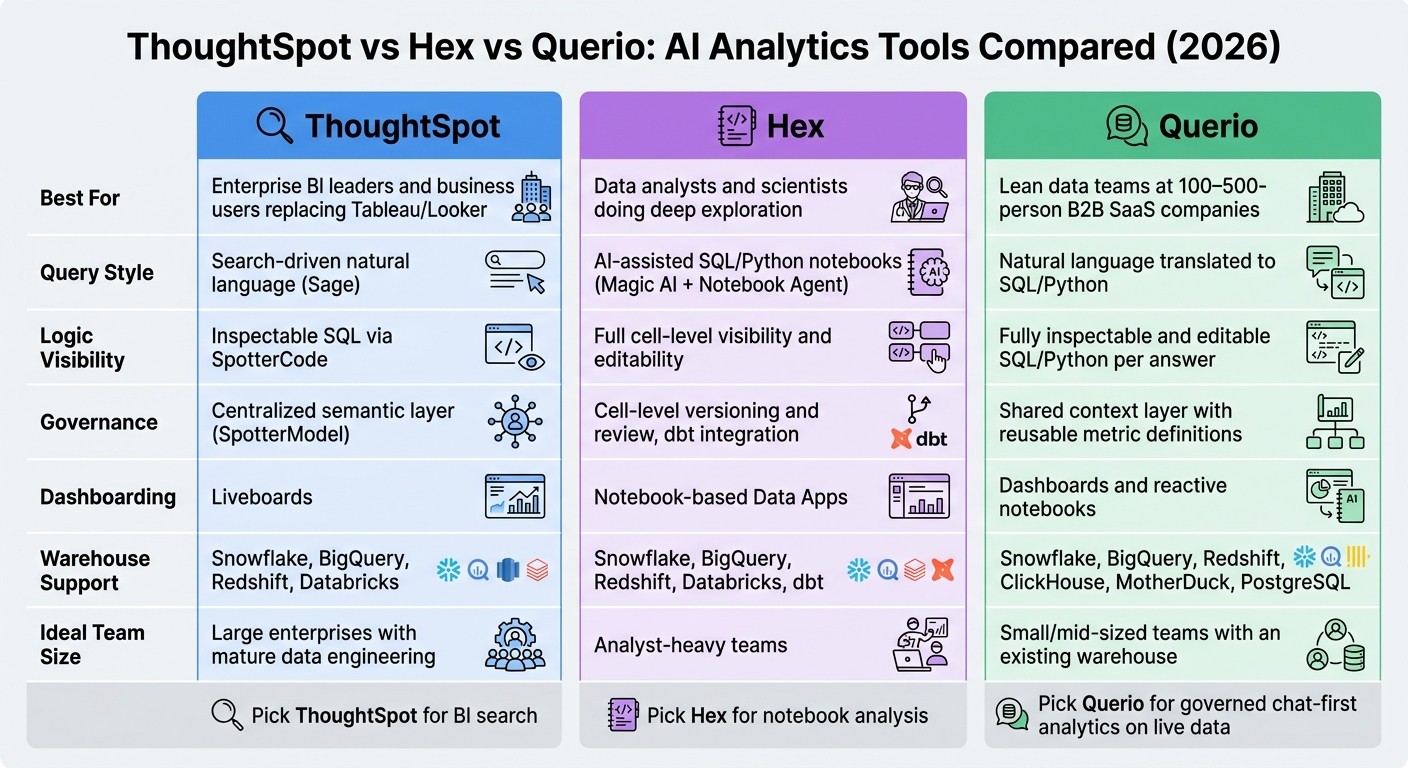
ThoughtSpot vs Hex vs Querio: AI Analytics Tools Compared (2026)
Meet ThoughtSpot Analytics Platform with CEO Ketan Karkhanis & SVP Francois Lopitaux
Quick Comparison
Tool | Best fit | Main query style | Logic visibility | Main governance approach |
|---|---|---|---|---|
ThoughtSpot | BI leaders and business users | Search-driven | Some SQL inspection | |
Hex | Analysts and data scientists | AI-assisted SQL/Python notebooks | Full cell-level visibility | Notebook review + versioning |
Querio | Lean warehouse-based teams | Full SQL/Python visibility | Shared context layer |
So if I were summarizing the article in plain English, I’d say this: pick ThoughtSpot for BI search, Hex for notebook work, and Querio for governed chat-first analytics on live data.
ThoughtSpot, Hex, and Querio at a glance
Start with the main workflow each tool is built for. That’s the fastest way to see where each one fits.
ThoughtSpot overview
ThoughtSpot is an enterprise BI platform built around search-led analysis for business users. The main action is natural-language search: a user asks a question, and ThoughtSpot's Sage returns a chart or summary in Liveboards. It works best when the data model is already set up well upstream. ThoughtSpot was named a 2025 Gartner Magic Quadrant Leader in analytics [4].
Hex and Querio lean more toward analyst-led work.
Hex overview
Hex is a notebook-first workspace for collaborative SQL and Python analysis. Analysts work in versioned notebooks and share results through Data Apps. Its AI layer - Magic AI and the Notebook Agent - helps teams write and debug code faster. Users can accept or reject AI changes one cell at a time.
Querio keeps that analyst review step, but puts live warehouse data at the center.
Querio overview
Querio is an AI-native analytics workspace built for governed self-serve on live warehouse data. It connects directly to Snowflake, BigQuery, Redshift, ClickHouse, MotherDuck, and PostgreSQL. Its answers are backed by inspectable SQL or Python that analysts can edit. A shared semantic layer lets teams define joins, metrics, and business terms once, then reuse them across notebooks, dashboards, and scheduled reports.
Next, the comparison gets more specific: querying style and metric consistency.
At a glance, these three tools split more by workflow than by feature checklist.
ThoughtSpot | Hex | Querio | |
|---|---|---|---|
Best for | Enterprise BI replacement | Analyst-led notebook workflows | Governed self-serve on live warehouse data |
AI querying style | Search-driven (Sage) | AI-assisted coding (Magic AI and Notebook Agent) | Natural-language questions translated into SQL/Python |
Dashboarding | Liveboards | Notebook-based Data Apps | Dashboards and reactive notebooks |
SQL/Python visibility | Limited in standard views | Full visibility, fully editable | Fully inspectable and editable |
Governance model | Semantic-layer grounded | Analyst-curated, project-level | Shared semantic layer |
Collaboration | Shared Liveboards | Collaborative, versioned notebooks | Shared workspaces and scheduled reports |
Warehouse connectivity | Snowflake, BigQuery, Redshift, Databricks | Snowflake, BigQuery, Redshift, Databricks, dbt | Snowflake, BigQuery, Redshift, ClickHouse, MotherDuck, PostgreSQL |
Best-fit team | Large enterprises and business users | Data analysts and scientists | Teams with an existing warehouse and growing analytics demand |
How each tool handles AI querying and metric exploration
Natural-language querying: speed vs. control
The key difference isn't whether these tools can answer plain-English questions. It's how much control you still have after the answer shows up.
ThoughtSpot is built for fast answers in a workflow that feels easy for business users. When a team wants to check the logic, SpotterCode exposes SQL they can inspect.
Hex gives analysts a much closer look at each AI-generated step. Its Notebook Agent writes SQL and Python inside a shared notebook, and analysts can inspect, edit, and version each change. Hex also shows AI-generated updates in a diff view, so teams can accept or reject them right there in the workflow.
Querio runs answers on live warehouse data and keeps the generated SQL or Python fully visible and editable. That means teams get self-serve speed without giving up review. Queries run against live warehouse data in Snowflake, BigQuery, Redshift, or Postgres, which helps teams move fast while still seeing exactly what's happening.
Once the answer is on the screen, a bigger issue shows up: is everyone working from the same metric definition?
Metric consistency and shared definitions
Speed helps, but only if a metric means the same thing everywhere.
ThoughtSpot handles this with SpotterModel, a governed semantic layer that ties AI answers to predefined metric definitions and hierarchies.
Hex leans on analyst-defined logic. Teams can version work in notebooks and reuse dbt models to share metric definitions across projects.
Querio uses a shared context layer to define joins, metrics, and business terms once, then apply them across analysis, dashboards, scheduled reports, and AI-generated answers. If those definitions aren't shared, metric drift starts showing up as soon as people ask follow-up questions.
From there, the focus shifts to governance and collaboration: who can trust the answer, edit it, and reuse it.
ThoughtSpot | Hex | Querio | |
|---|---|---|---|
Code visibility | Inspectable SQL (SpotterCode) | Fully visible and editable cells | Fully visible and editable code |
Metric definitions | Centralized semantic layer | dbt integration, analyst-curated | Shared context layer |
Best-fit team | Enterprise-scale self-service | Analyst-heavy teams | Mid-sized B2B SaaS teams |
Governance, collaboration, and warehouse-native workflows
Live data, reusable logic, and analyst oversight
Once teams agree on metric definitions, the next step is simple: who checks them, and how do people reuse them? That’s where these tools start to feel very different. The main split comes down to how each one governs live data after a query runs.
Hex uses the notebook as the main control layer. Analysts work in versioned SQL and Python cells, and AI-made edits can be reviewed and approved at the cell level before they become part of trusted logic. That helps teams keep analysis repeatable.
ThoughtSpot puts governance in its semantic layer. AI answers follow the model set up in advance. The upside is tighter control during use. The tradeoff is more modeling work at the start.
Querio leaves generated SQL and Python visible and editable for every answer, while reusing shared definitions across questions, notebooks, dashboards, and scheduled reports. That means analysts can stay involved without turning every request into a bottleneck.
That setup also affects how people work together day to day.
Collaboration across BI leaders, analysts, and business users
Each tool’s collaboration style lines up with its main users. Hex is analyst-first: analysts build in versioned notebooks, then publish outputs as Data Apps for business users. ThoughtSpot flips that pattern. Business users use search-based BI tools to explore on their own through Liveboards, with the semantic layer serving as a guardrail.
For smaller data teams, the hard part is keeping definitions aligned while still moving fast. Querio uses shared workspaces and a shared context layer so BI leaders define logic once, analysts review it, and business users use the output. Because dashboards and scheduled reports connect to the same warehouse source, there’s no separate export step between analysis and delivery.
You can see the day-to-day differences most clearly in how teams review logic and share outputs.
ThoughtSpot | Hex | Querio | |
|---|---|---|---|
Governance model | Centralized semantic layer | Cell-level versioning and review | Shared context layer and versioned logic |
Where review happens | Upfront in the semantic model | Cell-by-cell in the notebook | Per-answer SQL/Python inspection |
How logic is reused | Worksheets and formulas | Versioned notebook cells | Shared notebooks and context layer |
Analyst oversight | Upfront modeling and validation | Cell-level review | Inspectable SQL/Python per answer |
Business-user self-serve | Search-driven Liveboards | Analyst-published Data Apps | Governed self-serve with shared definitions |
Which tool fits your team? Final verdict for 2026
Best fit by team and workflow
Pick based on how your team works: self-serve BI, notebook analysis, or governed warehouse-native self-serve. Once you look at workflow, governance, and metric consistency, the choice usually comes down to team structure.
Team / Role | Best fit | Why |
|---|---|---|
ThoughtSpot | Enterprise search-driven BI with a centralized semantic layer [1][4] | |
Data analysts and scientists doing deep exploration | Hex | |
Small data teams at B2B SaaS companies (100–500 employees) | Querio | Governed context layer, inspectable SQL/Python, and live warehouse connections |
Founders and product leaders who need trustworthy self-serve | Querio | Plain-English questions against live warehouse data, with shared metric definitions |
ThoughtSpot asks for a mature data engineering function that can pre-model data upfront. So it tends to work best in teams where centralized modeling already exists.
Hex is a strong match for analyst-led teams that need versioned notebook analysis published as data apps [2][3]. In that setup, analysts usually own the logic from start to finish.
Recommended fit
For most 100–500-person B2B SaaS teams, the main issue isn't feature count. It's how fast people can trust an answer and use it again later.
If you have a lean data team running on a real warehouse, Querio stands out for a simple reason: it gives BI leaders, analysts, and business users a governed way to go from question to answer without waiting through weeks of upfront modeling. Its shared context layer, inspectable SQL/Python, and live warehouse connections make that workflow much easier to manage day to day.
FAQs
How much setup does each tool need?
Setup time mostly comes down to your current data stack and how much control you need around governance.
Querio is often the fastest to get running because it connects straight to warehouses like Snowflake, BigQuery, and Redshift. There’s no need for ETL or data replication, which cuts out a big chunk of setup work.
ThoughtSpot usually asks for more work up front. Teams often need to configure semantic-layer-governed models before things are ready, and full implementation can take weeks.
Hex lands somewhere in the middle. It can often be set up in a matter of hours, but analysts still need time to curate the data context for its AI-assisted notebooks.
Can non-technical teams trust AI-generated answers?
Yes - if the platform puts the focus on clear visibility and governance instead of black-box outputs. Trust tends to build over time: first through verification, then spot-checking, then delegation, and later through day-to-day use.
Teams can get past basic verification when they’re able to inspect and edit SQL, use consistent business definitions, and rely on role-based permissions that keep data access under control.
Which option scales best for a lean data team?
For a lean data team, the best fit comes down to your stack and how your team works day to day.
If you already use a modern data stack, Querio is often the most efficient choice. It connects straight to your warehouse, skips extra ETL and pipeline upkeep, and gives teams self-serve access with transparent SQL and governed metrics.
If your team leans more heavily on notebook-based SQL and Python work, Hex can also scale well.
Either way, as usage grows, put transparent SQL and a semantic layer near the top of your list.
Related Blog Posts



