Business Intelligence
Metric Drift: Why Your KPIs Disagree and How to Stop It
Define one metric, assign owners, version SQL, and test reports to stop KPI disagreements and measurement drift.

My fix for conflicting KPIs: approve one definition, assign owners, version the SQL, and test every report against it. In the article’s example, omitted credits overstate revenue by 5%, while a join that repeats invoice rows overstates it by 10%.
When your numbers disagree, I’d work through four steps:
- Reconcile the queries. Compare sources, joins, filters, date ranges, time zones, and data cutoffs - not just dashboard totals.
- Write a metric contract. Record the formula, row grain, units, owners, and approval rules. Keep separate contracts for measures such as net invoiced revenue and MRR.
- Reuse and test the approved logic. Check dashboards, notebooks, reports, and AI answers against the same calculation and data snapshot.
- Control changes and track gaps. Start with 5–10 priority KPIs, review changes before release, and monitor report adoption and unresolved differences.
My rule: agree on what the number means before checking how it’s calculated. Then check when the data arrived.
Reconcile Conflicting Revenue Calculations
::: @figure 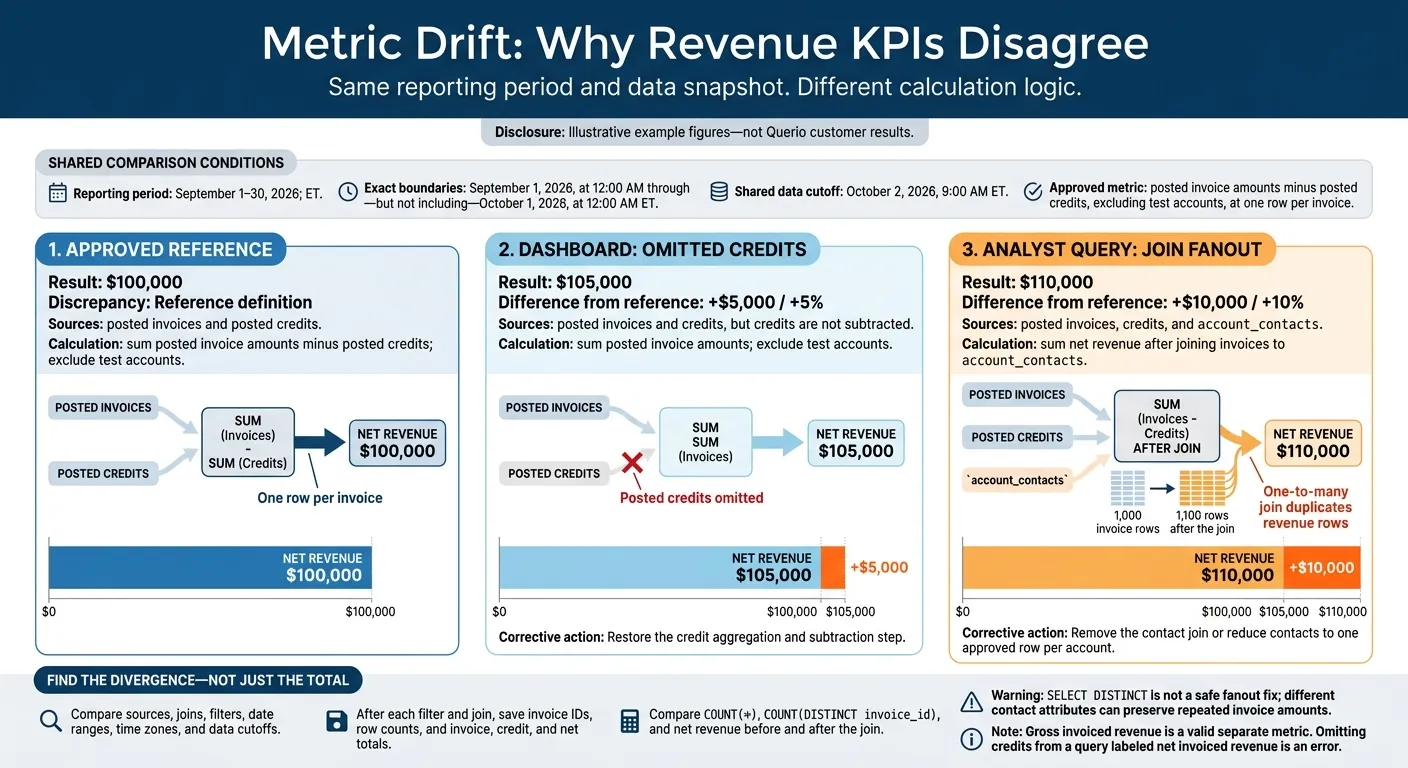 {Metric Drift: Why Revenue KPIs Disagree}
:::
{Metric Drift: Why Revenue KPIs Disagree}
:::
Compare Query Logic and Results
Use this illustrative Snowflake example to compare three September 2026 net invoiced revenue queries. The approved definition is posted invoice amounts minus posted credits, excluding test accounts, at one row per invoice.
Start with the reference query. Then check each other query against it, line by line.
Revenue reconciliation (example figures, not Querio customer results)
Query Source Formula and filters Join path Window and time zone Data cutoff Result Discrepancy Approved reference Posted invoices and posted credits Sum posted invoice amounts minus posted credits; exclude test accounts Invoices joined to one credits row per invoice September 1–30, 2026; ET October 2, 2026, 9:00 AM ET $100,000 Reference definition Dashboard Posted invoices and credits, but credits are not subtracted Sum posted invoice amounts; exclude test accounts Invoice-level calculation omits the credit aggregation or subtraction step September 1–30, 2026; ET October 2, 2026, 9:00 AM ET $105,000 +$5,000 because posted credits are omitted Analyst query Posted invoices, credits, and account_contactsSum net revenue after joining invoices to account_contactsOne-to-many invoice-to-contact join duplicates revenue for accounts with multiple contacts September 1–30, 2026; ET October 2, 2026, 9:00 AM ET $110,000 +$10,000 from join fanout; 1,000 invoice rows become 1,100
The dashboard is missing the credit subtraction step.
If missing credits don't explain the mismatch, check for join fanout next.
The contact join fans out invoice rows; remove it or reduce contacts to one approved row per account.
Compare COUNT(*), COUNT(DISTINCT invoice_id), and net revenue before and after the join. SELECT DISTINCT isn't a safe fix for fanout: different contact attributes can keep repeated invoice amounts in the results.
Find Where the Calculations Diverge
After each filter and join, save invoice IDs, row counts, and invoice, credit, and net totals. Check IDs that appear in only one query, along with repeated IDs added by joins. Gross invoiced revenue is a valid separate metric. But leaving out credits from a query labeled net invoiced revenue is an error.
Use September 1, 2026, at 12:00 AM through - but not including - October 1, 2026, at 12:00 AM ET. Don't use a trailing-30-day window.[3] Check ingestion timestamps, late-arriving credits, query execution times, and dashboard refresh times against the shared October 2 snapshot.
Once the approved logic is clear, document it in a shared metric contract.
Create a Shared Metric Contract
After reconciling the mismatch, lock the approved logic into a metric contract so every dashboard, notebook, and AI answer uses the same KPI. Store its definition and logic alongside warehouse models and dbt code in GitHub, where changes can be reviewed and tested.[6][7]
Document the Definition, Grain, and Owner
Create one contract per KPI.
Revenue is too vague: net invoiced revenue, recognized revenue, and MRR need separate contracts.
Recognized revenue should follow the organization’s accounting policy and U.S. GAAP treatment. MRR should reflect recurring subscription value, with clear rules for discounts, usage charges, pauses, upgrades, downgrades, and cancellations.[4][5]
Use the reconciled reference query as the contract’s source of truth. Document exactly what it does - not a broader business description.
| Contract field | Required detail | Accountable role |
|---|---|---|
| Name and meaning | Metric name, business definition, intended decision, and non-equivalent measures | Business owner |
| Calculation and grain | Executable SQL; aggregation method; row grain; numerator, denominator, and handling of divide-by-zero cases for ratios | Technical owner |
| Sources and joins | Approved warehouse models, join keys, join type, and deduplication rules | Technical owner and source data owner |
| Exclusions and time boundaries | Included and excluded records, date field, time zone, and explicit start/end boundaries | Business owner |
| Refresh, latency, and units | Refresh schedule, latency, cutoff time, late-data policy, completeness threshold, currency, scale, and rounding | Source data owner; Finance approves currency rules |
| Version and approval | Semantic version, approver, approval date, effective date, change reason, and whether historical values are restated | Business owner and technical owner |
Write dates as 2026-01-31 in machine-readable fields and January 31, 2026, in report labels. Specify USD and whether figures appear in dollars, thousands, or millions. Format amounts consistently as $1,250,000.50. Require both business and technical approval before publishing the contract.[6]
Reuse Approved Logic Across Reports
A glossary defines a metric, but it can’t enforce the calculation. Put approved formulas, dimensions, filters, and joins in reusable warehouse models or a governed context layer. Dashboards, notebooks, scheduled reports, and AI answers should use the same metric identifier and approved logic. A filter changes the slice; a formula change changes the metric.[7][8]
In Querio’s governed context layer, link each context entry to the canonical contract and approved live warehouse models. Use inspectable, editable SQL and Python so analysts can check whether an AI answer follows the approved calculation.
Before a context update becomes authoritative, require review by the metric and data owners, compare sample outputs with known results, and record the effective version. Configure every report to inherit the published contract rather than redefine it.
Prevent Drift With Change Reviews and Tests
Once you publish the metric contract, enforce it through change reviews and tests. Have the contract’s named business and technical owners approve every KPI change. Record the reason, effective date, restatement policy, dependency review, and before-and-after results. Notify affected teams before the change takes effect.
Test Metric Logic and Results
Test at the metric’s stated grain. Check duplicate keys, join cardinality, missing owners, required fields, approved filter rules, and invalid values. Use dbt’s unique, not_null, relationships, and accepted_values tests for structural checks.[9] Check for row multiplication after joins. Flag negative values ONLY where the contract prohibits them - refunds and credits can legitimately be negative.
Compare each consuming query with the reference calculation using the same snapshot, filters, permissions, window, time zone, and currency rules. Require exact equality for distinct-user counts. Allow currency tolerance only when the rounding policy and business risk justify it. Matching totals aren’t enough: check the definitions, too.
Run fast tests before merging, reconciliation after deployment, and production checks daily or at each reporting refresh.[10] Save the code version, metric version, snapshot, and differences so you can tell late data apart from approved business changes and implementation drift. These checks catch the same join, filter, window, and source-logic drift examined during reconciliation.
Check AI Answers Against Approved Metrics
Apply the same controls to AI-generated answers. An AI answer is another metric consumer, not an approval authority. Require each answer to show the metric version, period, filters, source, and how current the data is. Then verify it against the approved calculation under the same permissions. Confirm that row-level restrictions and sensitive-data controls apply.
Use review to classify analyses as trusted, experimental, or team-specific. Require approval before experimental results become company-wide KPIs.
Conclusion: A Checklist for Consistent KPIs
Once you understand the mismatch, use this checklist to keep it from spreading. Start with 5–10 KPIs ranked by decision impact, reporting risk, usage frequency, and conflict count. Record each in a KPI register, including its approval status and any unresolved discrepancies.[11][12]
Apply the same controls to every KPI release: reconcile definitions and results, approve source models and metric contracts, name business and technical owners, and use one approved calculation path. Retire duplicate formulas, version changes, and require passing checks across dashboards, reports, notebooks, APIs, and AI assistants. The same KPI must use one approved definition everywhere.[12][14]
After adoption, measure progress by tracking the share of priority KPIs with approved contracts, the share of reports using certified models, and the age of unresolved differences. Review financial and operational KPIs monthly and other executive KPIs quarterly.[11][13][16]
Reconcile definitions first, verify implementation second, and check data timing third. Keep definitions maintained, owners accountable, changes reviewed, and tests recurring.[12][14][15]
FAQs
::: faq
How can we distinguish metric drift from late-arriving data?
Check pipeline health first. Late-arriving data can leave records missing or incomplete, so verify that the data is up to date and complete before reporting results.
Metric drift occurs when reports use different calculation logic, such as filters, time windows, or join keys.
If the data is complete, compare the current SQL or Python code with the approved metric definition. Run both versions over the same fixed historical period. Different results confirm metric drift. :::
::: faq
How should we handle conflicting KPI definitions across teams?
Treat each KPI as a governed contract with a named, accountable owner. In your warehouse-native layer, version its formula, grain, filters, time window, currency, time zone, and source tables. Before publishing, require PR review, automated tests, and checks that confirm matching results for fixed periods.
When definitions conflict, pause publication of unverified copies. Compare identical frozen snapshots and resolve any differences. Then update dashboards, notebooks, and AI queries together so they all use the approved logic. :::
::: faq
When should a KPI change restate historical results?
Restate historical results when a metric change changes what past periods mean, rather than just how new data is labeled. This applies to changes in the metric’s grain, filters, exclusions, or time windows [1]. Restating results keeps past dashboards and AI-generated answers aligned with current business rules [1].
Always version these logic changes and get the metric owner’s approval before applying them to downstream outputs [2][1]. :::