Business Intelligence
Databricks Genie Best Practices for Trusted Self-Service Analytics
Connect an AI query layer to curated dbt models and Unity Catalog, enforce metric definitions, SQL checks, and regular reviews for trusted analytics.

If Genie is pointed at raw data and loose metric rules, it will give mixed answers. I’d treat it as a governed query layer: use curated tables, one definition for each metric, SQL checks, dashboard checks, and a fixed review loop.
Here’s the short version:
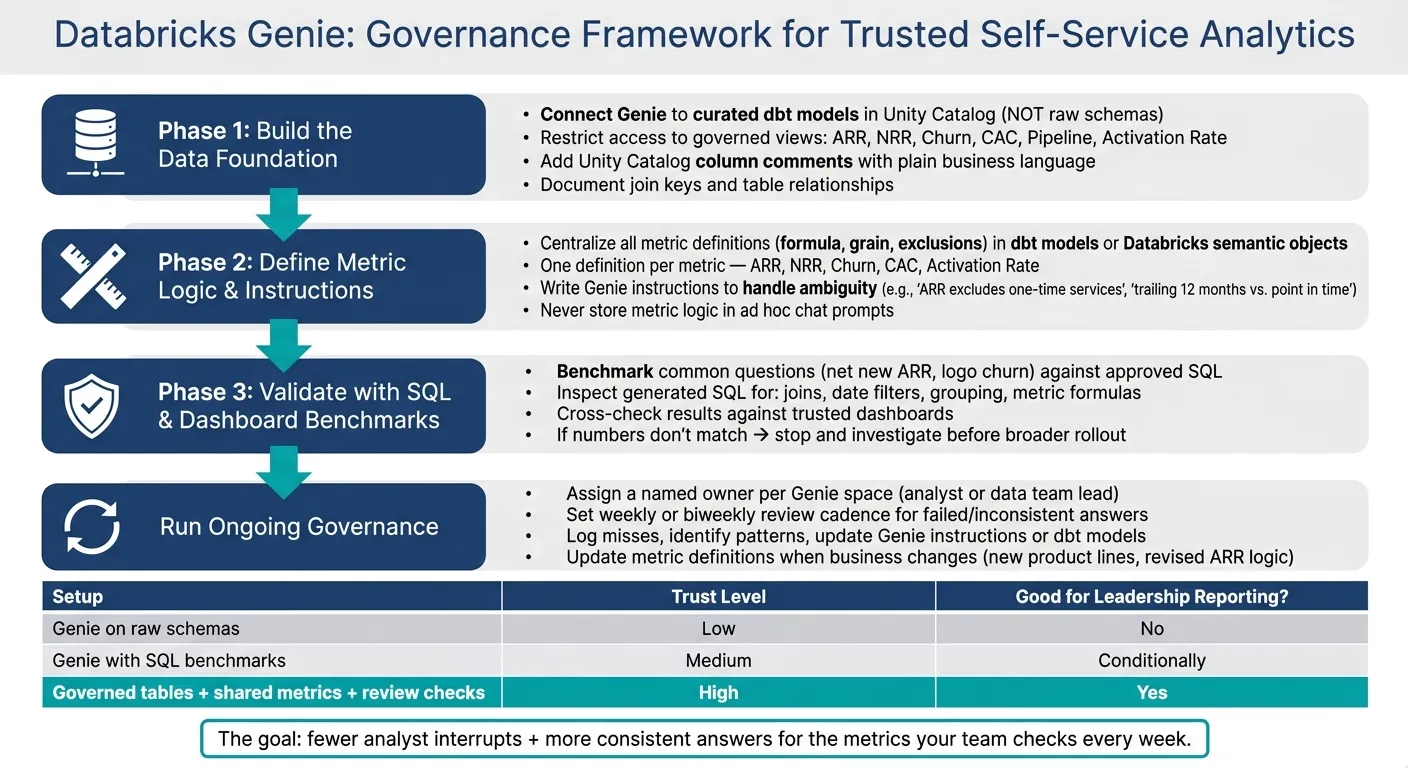
- I’d connect Genie to curated dbt models in Unity Catalog, not raw schemas.
- I’d limit access to the same views analysts already use for ARR, churn, pipeline, CAC, NRR, and activation rate.
- I’d keep metric logic in dbt models or Databricks semantic objects, not in chat prompts.
- I’d use Unity Catalog comments and join details so Genie can map business terms to the right fields.
- I’d test Genie on common questions like net new ARR and logo churn against approved SQL and trusted dashboards.
- I’d review generated SQL for joins, date filters, grouping, and formulas.
- I’d assign a named owner to each Genie space and review misses weekly or biweekly.
In other words: the point is not more AI output. The point is fewer analyst interrupts and more consistent answers for the metrics your team checks every week.
Quick comparison
| Setup | What I’d expect | Good for leadership reporting? |
|---|---|---|
| Genie on raw schemas | Mixed answers, more confusion | No |
| Genie with SQL benchmarks | Better for repeat questions | Sometimes |
| Genie with governed tables, shared metrics, and review checks | Steady self-service use | Yes |
For a 100–500-person B2B SaaS team, that’s the minimum bar I’d use before rolling Genie out to business users as part of your self-service analytics implementation.
Build the data foundation Genie needs to answer questions reliably
Genie earns trust only when the tables and metadata behind it match the way the business talks about revenue, pipeline, and customers. That means starting with a tight scope: give Genie curated views, not raw schemas, and add metadata it can read and use.
Expose curated, business-ready tables instead of raw schemas
Point Genie to curated dbt models in Unity Catalog instead of raw schemas. Keep its access limited to approved views for core workflows like ARR, pipeline, and product usage.
Restrict Genie to the same governed views analysts already trust
Only expose the views tied to the workflows you want business users to ask about. If analysts already rely on those governed views, Genie should too. That keeps answers tied to the same source people use today.
Use Unity Catalog metadata that matches business language
Use Unity Catalog column comments to give Genie plain business context for the data it will query. Also document join keys and table relationships in Unity Catalog so Genie can resolve models correctly and cut down on join ambiguity.
Once the data foundation is scoped, metric definitions and instructions can help keep answers consistent.
Define metric logic and Genie instructions so answers stay consistent
Consistent answers start with consistent definitions. If ARR means one thing in your dbt model and something a little different when a business user asks Genie, the numbers will drift - and trust drops fast. The answer isn't better user prompts. It's putting the logic in one place before anyone asks the first question.
Centralize metric definitions before users start asking questions
For the curated tables Genie queries, centralize metric definitions up front. Every core SaaS metric - ARR, NRR, churn, CAC, activation rate - should have one clear definition that spells out the formula, grain, and exclusions.
For example, ARR should clearly state whether one-time services are included or excluded.
Keep metric formulas and grain in dbt models or Databricks semantic objects, not in ad hoc Genie prompts. When the logic sits in a governed layer, Genie has one source of truth to work from.
Write Genie instructions that remove ambiguity
Even with solid dbt models, Genie still needs direct instructions to handle the messiness of everyday business language. Genie instructions should spell out rules like:
- ARR excludes one-time services.
- Time logic specifies trailing 12 months vs. point in time.
Without these guardrails, Genie can make assumptions that sound reasonable but don't match your business rules. That's where trouble starts: answers can look right on the surface and still be wrong, which makes mistakes much harder to spot.
Comparison table: where metric definitions should live
| Layer | What it should hold | Why it matters for Genie | Best use case |
|---|---|---|---|
| dbt models | Core formulas, grain, and exclusions | Gives Genie governed definitions to query against | Teams standardizing SaaS metrics |
| Unity Catalog metadata | Business terms, descriptions, and join hints | Helps Genie map user language to the right metric and resolve joins correctly | Teams organizing data in Databricks |
| Genie instructions | Ambiguity rules and time logic | Clarifies how to interpret phrases that can be read in more than one way | Teams that want consistent answers to common business questions |
Once those definitions are locked down, benchmark Genie against known-good SQL and dashboards before broad rollout.
Validate Genie answers with SQL, dashboards, and repeatable review workflows
Now that the definitions are set, the next step is simple: check Genie’s answers against approved SQL and trusted dashboards. If your metric logic lives in one place, you can test Genie with the same questions the business asks every week.
Benchmark common SaaS questions against known-good SQL
Begin with recurring SaaS questions like net new ARR or logo churn. These are a good starting point because teams usually already have approved SQL for them, built from the same governed sources analysts use every day.
Keep that approved SQL in one central location and treat it as the ground truth. When Genie answers one of these benchmark questions, line up its output with the approved SQL result. If the numbers don’t match, stop there and dig in before rolling that pattern out for broader self-service.
But matching numbers isn’t enough. You also want to know whether Genie got to the right answer for the right reason.
Inspect generated SQL and cross-check results against dashboards
Look closely at four parts of the generated SQL:
- joins
- date filters
- grouping
- metric formulas
Compare each one against the approved SQL. Then check the result against a dashboard your team already trusts. If there’s any mismatch, take it as a sign that the query needs review.
Comparison table: unvalidated Genie vs. benchmarked Genie vs. governed workflows
| Approach | Trust level | Best use | Suitable for leadership reporting? |
|---|---|---|---|
| Unvalidated Genie self-service | Low - answers can be wrong even when they look right | Ad hoc exploration | No |
| Genie with SQL benchmarks | Medium - reliable for repeated questions | Validated recurring questions | Conditionally, for benchmarked patterns only |
| Governed self-service with approved SQL and dashboard checks | High - aligned with approved SQL and dashboards | self-service analytics for trusted insights | Yes |
Use benchmarks and dashboard checks as the standard way of working. In plain English: this shouldn’t be a one-and-done signoff. It should be part of the day-to-day review flow for trusted self-service.
Run Genie as a governed analytics workflow, not a one-time setup
Benchmarks and dashboard checks are only the starting point. What keeps Genie dependable over time is governance.
After benchmark testing, the next step is operational ownership. Genie stays trustworthy only when ownership, review cadence, and change management are built into the workflow. Assign a clear owner for each Genie space, review failed answers on a set schedule, and update instructions when metric logic or business definitions change. That work starts with plain accountability for each space, metric, and review cycle.
Assign clear ownership for spaces, metrics, and review cycles
Each Genie space should have a named owner, usually the analyst or data team lead for that domain. That person is responsible for the curated tables Genie queries, the metric definitions behind them, and the Genie instructions that shape how answers are produced.
Ownership without a schedule tends to drift. Set a fixed review cadence, weekly or every other week, to catch failed or inconsistent answers before they reach leadership. Treat that review the same way you treat dashboard QA: structured, documented, and repeatable.
Track failure patterns and update instructions as the business changes
Log every answer that doesn't match approved SQL or a trusted dashboard. Over time, those misses start to show patterns: unclear time logic, missing exclusions, or metric definitions that have drifted from how the business uses them.
When a pattern shows up, update the Genie instructions or the underlying dbt model, not the user's question. The fix belongs in the governed layer, not in a workaround. This ensures that your AI semantic layer remains the single source of truth.
As the business changes, new product lines, revised ARR definitions, updated churn logic, metric definitions and Genie instructions need to change too. Build that update step into your standard release process for dbt models so Genie stays aligned with the source of truth by default.
Conclusion: the minimum standard for trusted Genie adoption
Trusted Genie adoption isn't a launch milestone. It's an operating standard: curated tables, centralized metric definitions, validated SQL, and a governance workflow with named owners and a fixed review schedule.
Teams that treat Genie like a one-time setup will watch trust erode as the business changes and answers drift. Teams that build governance into the workflow, ownership, benchmarks, and regular instruction updates, get what Genie is meant to deliver: fewer analyst interrupts and more consistent decisions across the business.
FAQs
How many metrics should we validate first?
Start with 3 to 5 KPIs that guide executive decisions. Keeping the first set small helps your team agree on what each metric means and check that the numbers are right before you add more.
Begin with one common use case, like monthly revenue by sales representative. After those metrics are governed and reliable, you can add more operational KPIs over time.
What should a Genie owner review each week?
A Genie owner should review their instance every week to keep it accurate, well-governed, and trusted by users.
Look at query performance and output reliability. Check for metric drift against your centralized semantic layer. Review access permissions, user feedback, and flagged results. Also make sure trusted or certified datasets still match vetted data.
When should we update Genie instructions versus dbt models?
Update dbt models when you need to change the data itself, like adding a new table, changing a schema, or refining SQL logic.
Update Genie instructions when you need to change how AI understands the business, like defining terms, clearing up ambiguity, or guiding how it responds in conversation, without touching the underlying data.
Think of it this way: dbt is the source of truth for the data layer. Genie instructions sit on top as the governed layer for business vocabulary and user intent.