Business Intelligence
Claude Code vs Cursor for Data Work: A Practical Comparison
Choose the tool that matches your workflow: terminal-first for shell-driven data work or IDE-first for inline code review.

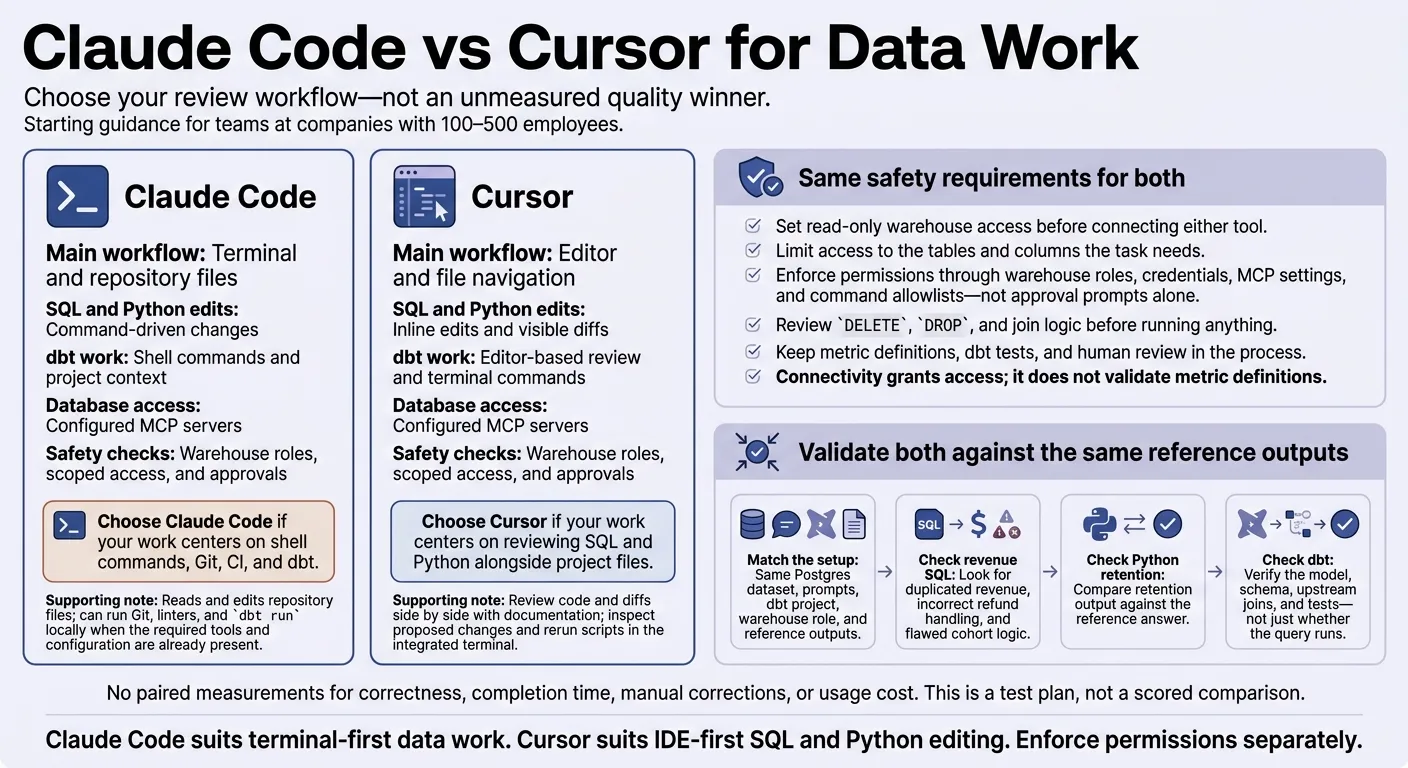
I’d choose Claude Code for terminal-first SQL, Python, and dbt work and Cursor for IDE-first editing and review. For teams at companies with 100–500 employees, my starting rule is simple: pick where you prefer to review changes, then set read-only warehouse access before connecting either tool.
There’s no measured quality winner here. The article provides a test plan - not paired results for accuracy, time, corrections, or cost. I’d check both tools against the same revenue, retention, and dbt reference outputs.
Quick Comparison
| Criterion | Claude Code | Cursor |
|---|---|---|
| Main workflow | Terminal and repository files | Editor and file navigation |
| SQL and Python edits | Command-driven changes | Inline edits and visible diffs |
| dbt work | Shell commands and project context | Editor-based review and terminal commands |
| Database access | Configured MCP servers | Configured MCP servers |
| Safety checks | Warehouse roles, scoped access, and approvals | Warehouse roles, scoped access, and approvals |
My rule for both: running without errors does not mean the answer is right. Keep metric definitions, dbt tests, and human review in the process.
Working with Claude Code
Editing Files and Running Commands
Claude Code works directly in your repository as one of the AI tools that write SQL and code. It reads and edits SQL, Python, and dbt files, using them as context. It can also run Git, linters, and dbt run locally, but the repository must already have the required tools and configuration. [1][4]
Claude Code’s Markdown Skills files store reusable rules, such as your active-customer definition, to keep context consistent across sessions. [1][4] That repository-level context also matters when Claude Code needs live warehouse metadata to maintain accuracy.
Database Access and Permission Modes
With a configured MCP server, Claude Code can query Snowflake, BigQuery, Redshift, or Postgres. MCP tools can provide schema discovery and query execution while respecting authorization. For dbt work, pairing database MCP access with dbt context lets the agent check both live metadata and transformation logic. Limit access to the tables and columns the task needs. [1][4]
Use manual approval, edit approval, and planning as safety controls. Warehouse roles and command allowlists remain the actual access controls. Use a read-only warehouse role, and review DELETE, DROP, and join logic before running anything. [3][4]
Cursor handles the same work from the IDE side, with a different review and approval flow.
Working with Cursor
Inline Editing and File Navigation
Claude Code keeps you in the terminal. Cursor puts the change, model, and docs in one editor view, so you can review code and diffs side by side with the docs. Open your local dbt repo to check the change against the upstream model and documentation without switching views [1]. Less navigation during dbt and Python reviews means more attention to the logic - not just the output.
For dbt changes, trace upstream models and review the diff before accepting it. When debugging Python, inspect the proposed fix, then rerun the script in the integrated terminal. Check the output against a known row count, total, or sample [3]. A query can run without errors and still return the wrong metric.
Use Skills to direct the agent to maintained definitions and dbt docs [4].
MCP Access and Tool Approvals
Cursor can retrieve database schemas and dbt documentation through configured MCP servers [4]. Before using it in production, default to read-only access and limit access to specific tables or columns [3]. Match warehouse roles, table scope, and tool approvals to your governance requirements.
Check that credentials and MCP settings enforce those limits; don't rely on the approval prompt. Connectivity grants access; it does not validate metric definitions. Spot-check generated joins against a known result [3]. Put these controls in place before trusting any result from the test below.
Hands-On Test: Same Data, Same Tasks
Test Setup and Scoring
Workflow differences matter, but output quality on the same task is the test that counts. Run both tools using the same Postgres dataset, prompts, dbt project, warehouse role, and reference outputs to make the comparison measurable.
Limitation: There are no paired measurements for correctness, completion time, manual corrections, or usage cost. This is a method for evaluating the tools, not a scored comparison.
SQL Accuracy and Revenue Errors
Check revenue SQL against the reference definition first. Watch for duplicated revenue, incorrect refund handling, and flawed cohort logic. Apply the same standard to retention code and dbt tests: the structure can be correct while the metric logic is wrong.
Python Retention Analysis and dbt Tests
Check retention output against the reference answer. For dbt, verify the model, schema, and upstream joins - not just whether the query runs [1].
With no measured quality winner, use workflow fit to guide your choice: terminal-first execution versus IDE-first review.
Conclusion: Choose the Tool That Fits Your Workflow
Claude Code suits terminal-first data work. Cursor suits IDE-first SQL and Python editing. Choose based on where you work most, and enforce permissions separately.
Here’s how they compare:
| Area | Claude Code | Cursor |
|---|---|---|
| Workflow and navigation | Terminal-first, across repository files | IDE-first, with visual file navigation |
| SQL/Python editing | Command-driven file changes | Inline editing with visible diffs |
| dbt and commands | Shell-based dbt runs with MCP context | IDE-centered review with configured commands and MCP context |
Match the tool to your day-to-day work:
- Choose Claude Code if your work centers on shell commands, Git, CI, and dbt.
- Choose Cursor if your work centers on reviewing SQL and Python alongside project files.
Keep standardization of data, warehouse permissions, and human review outside the assistant.
FAQs
How can I catch incorrect revenue or retention logic?
Give AI a governed semantic layer instead of a black box. Centralize business definitions, and store metrics, join paths, and filters in version-controlled code, such as your dbt project. That way, AI uses verified logic rather than guessing [1][2][3].
Require SQL and Python outputs that people can inspect and review manually. Keep a test set of 30–50 real questions with known correct answers, and rerun it whenever definitions change to catch incorrect results [4][5][3].
What should I verify before granting warehouse access?
Check that the tool uses least-privilege, read-only credentials and follows your existing row-level and column-level security policies [1][2][3]. Confirm that it connects to your governed semantic layer, keeps metric definitions consistent, and records every executed query in an audit trail [4][3][5].
Before granting production access, test it with complex business questions whose answers you already know. Make sure reviewers can inspect and edit all generated SQL [6][4][7][3].
How can I compare accuracy, speed, and cost fairly?
Go beyond vendor benchmarks. Take five tough questions from last quarter with known answers and test them against your own read-only, representative warehouse data - not clean sandboxes or CSV exports.
Score accuracy based on correct answers, sound join logic, and refusal to answer ambiguous questions. Measure speed as the elapsed time from prompt to result.
For costs, count more than the subscription price. Include developer time spent on maintenance, governance, and context setup.