Business Intelligence
Which BI Tools Read Your dbt Metrics Without Rebuilding Them?
Most BI tools get your dbt MetricFlow metrics through dbt's paid Semantic Layer API, or copy some of them into their own layer. Querio reads the file dbt already writes, on dbt Core too.
 Javier BonillaCo-founder & CTO
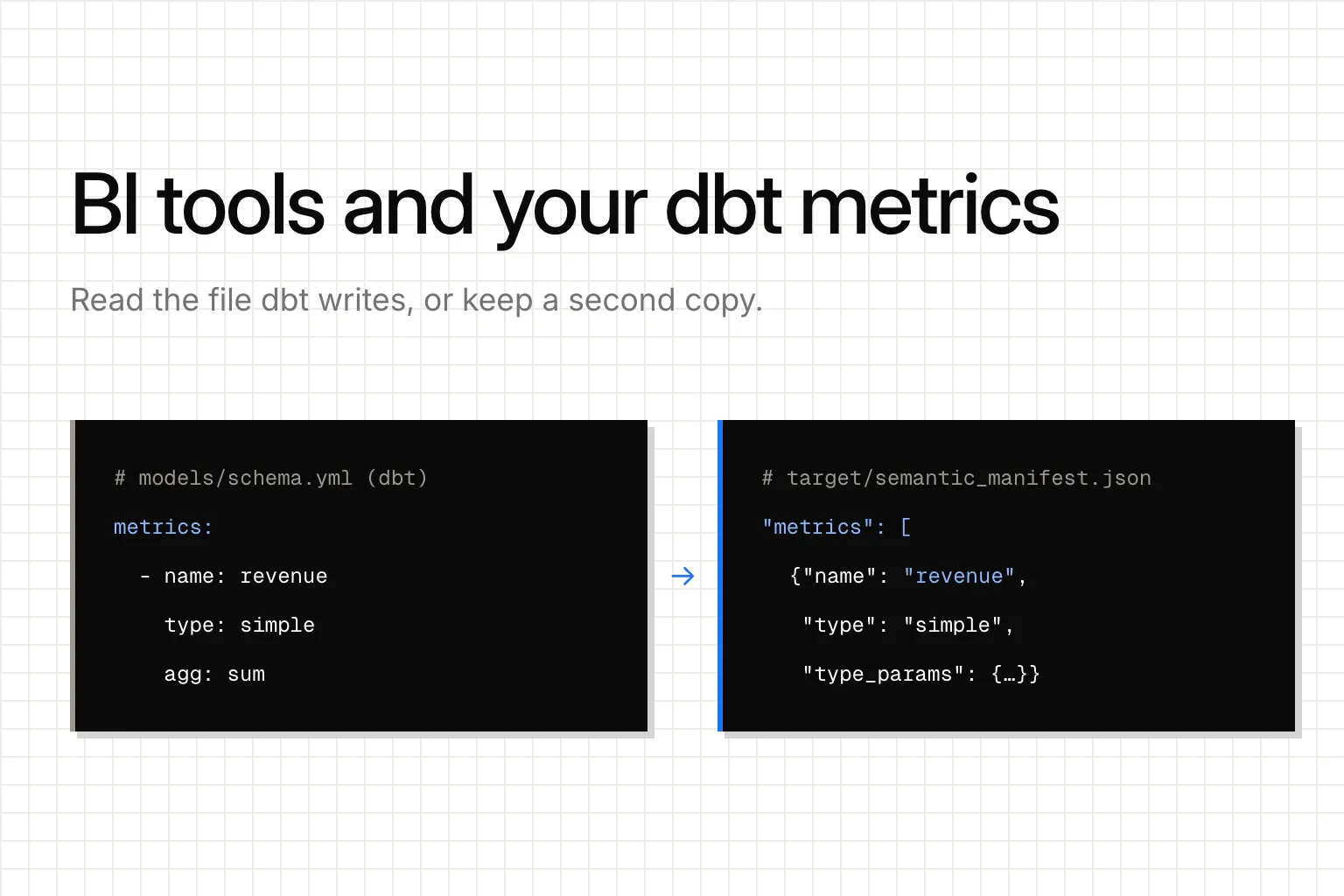
A BI tool gets your dbt metrics in one of three ways. It queries dbt's Semantic Layer API, which needs a paid dbt plan. It reads your project's files and copies the metrics into its own layer, usually only some metric types. Or it imports your models and you define every metric again. Querio reads the metrics file dbt writes, as it is.
That file is semantic_manifest.json. dbt writes it every time it parses your project, on dbt Core too. Your metrics should be defined once, in dbt, and every tool and agent should read them from that file as they are. A tool that keeps its own copy hands you two definitions to keep in step.
How can a BI tool get your dbt metrics?
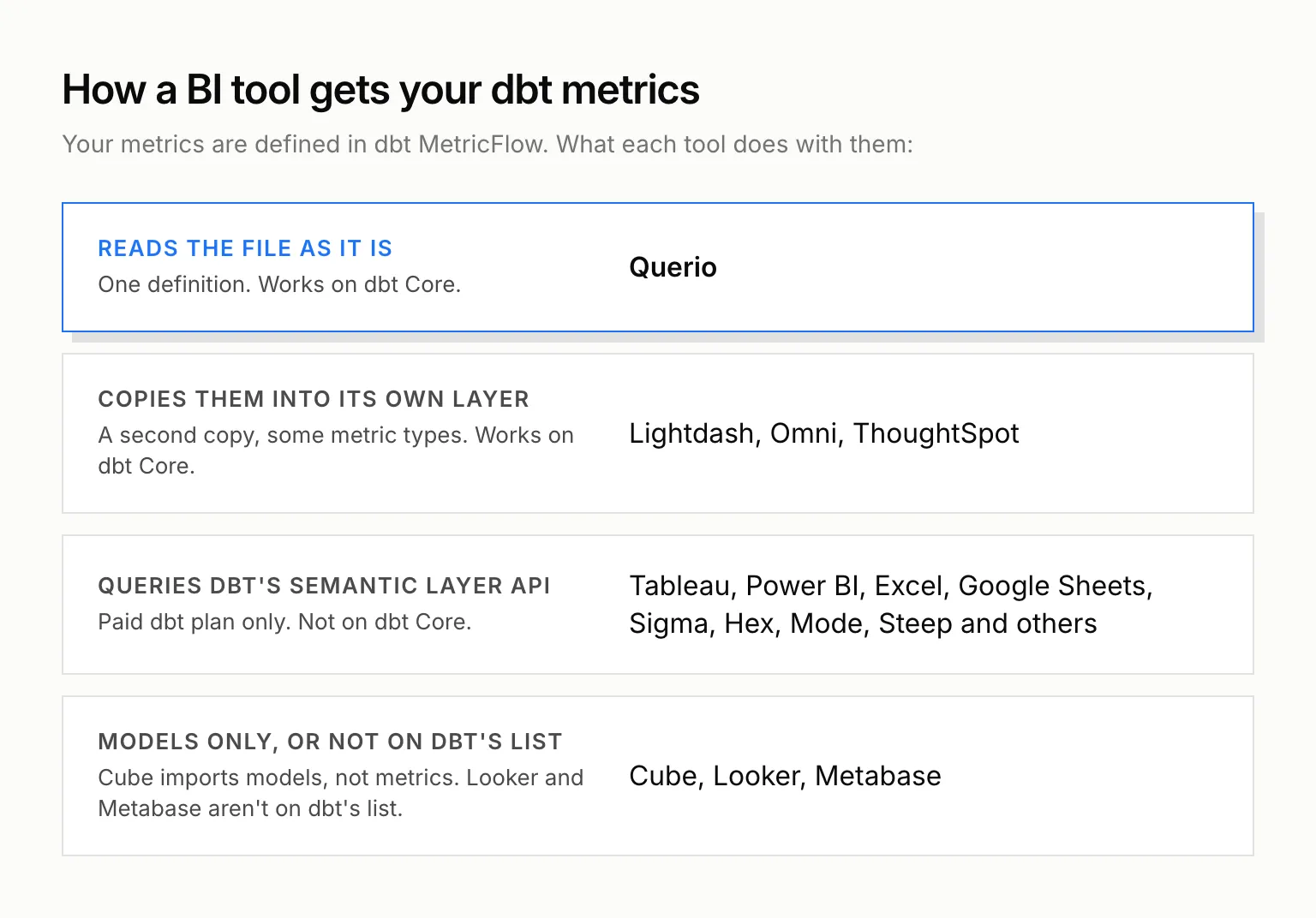
Through dbt's API. This is what dbt means by an integration. dbt's integrations page lists 12 tools: Power BI, Tableau, Google Sheets, Microsoft Excel, Omni, Dot, Hex, Klipfolio PowerMetrics, Mode, Push.ai, Sigma (in preview) and Steep. The tool sends its queries to dbt's servers over JDBC, ADBC or GraphQL with a service token, and dbt runs the SQL against your warehouse. The catch is the plan. The Semantic Layer is on dbt's Starter, Enterprise and Enterprise+ plans, and Starter is $100 per user a month. On dbt Core you can define metrics and query them from the command line, but dbt's FAQ says you "won't be able to use the APIs or available integrations to access metrics dynamically."
By copying them from your project's files. A few tools read the files dbt compiles, turn what they understand into metrics in their own modelling layer, and query from there. This works on dbt Core.
By importing your models and asking you to define the metrics again. The tool picks up tables, columns and joins from dbt, and you write revenue, churn and active users again in its own language.
What does dbt hand a BI tool?
We built a small dbt Core 1.12.6 project on DuckDB (dbt-duckdb 1.11.1, Python 3.12) with dbt-metricflow 0.15.0 and no dbt account: one orders model, a revenue sum, an order count, revenue filtered to completed orders, and average order value as a ratio. Running dbt parse wrote target/semantic_manifest.json with four keys: semantic_models, metrics, project_configuration and saved_queries.
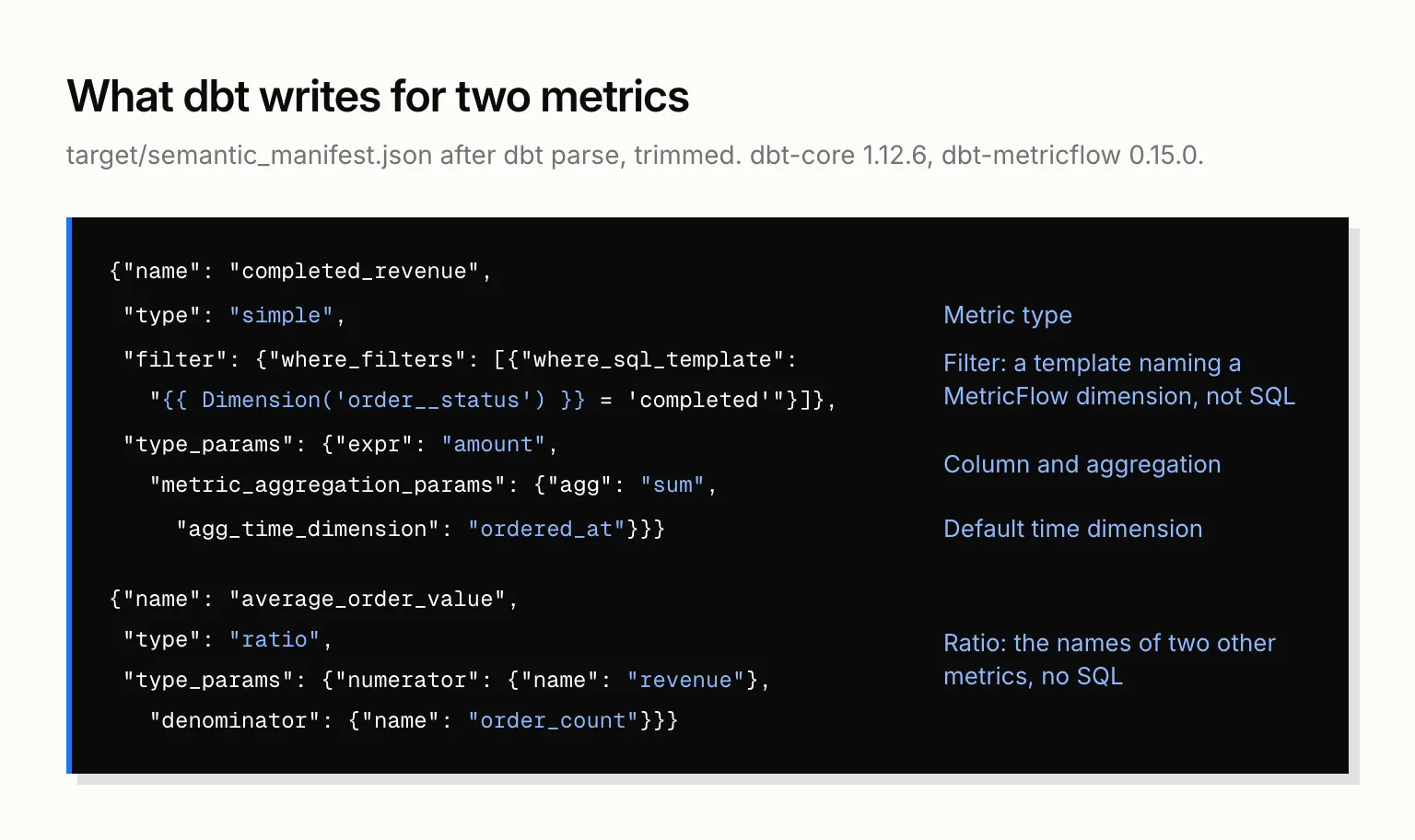
Here are two of the four metrics as dbt wrote them from YAML in its latest metrics spec, trimmed to the fields that matter:
[
  {
    "name": "completed_revenue",
    "type": "simple",
    "filter": {"where_filters": [
      {"where_sql_template": "{{ Dimension('order__status') }} = 'completed'"}
    ]},
    "type_params": {
      "expr": "amount",
      "metric_aggregation_params": {
        "semantic_model": "orders", "agg": "sum", "agg_time_dimension": "ordered_at"
      }
    }
  },
  {
    "name": "average_order_value",
    "type": "ratio",
    "type_params": {
      "numerator": {"name": "revenue"},
      "denominator": {"name": "order_count"}
    }
  }
]
The filter isn't SQL. It's a template that names a MetricFlow dimension, order__status, through the order entity. The ratio holds no SQL either, only the names of two other metrics. A tool that reads this file has to understand MetricFlow to turn it into a query. A tool that copies it has to translate each metric type, and the ones it can't translate get dropped.
Then we changed one thing. We added the completed-only filter to the revenue metric in YAML and ran dbt parse again. The file changed in exactly two fields, the filter and the description, and the same mf query for revenue by month went from 225, 350 and 270 to 150, 320 and 180 on our 10-row sample. Nothing else was edited. A tool that reads this file picks up that change on the next parse. A tool holding a copy picks it up when someone syncs again.
Which BI tools read dbt metrics, and how?
1. Querio
Querio reads semantic_manifest.json and keeps no second copy. Its agent answers from your MetricFlow definitions as dbt wrote them.
Querio's own files (context, saved queries, dashboards, permission policies) can sit inside your dbt repo, so a model change and the context that describes it go in one pull request. Rename a dbt model and CI flags every dashboard, query and context file that uses it before the PR can pass.
It's built for a data team that already has its metrics in dbt and wants business users, Slack and AI agents to answer from them. No dbt? Querio writes metrics as MetricFlow-format files in your repo instead. There's no per-seat pricing.
2. Lightdash
The Lightdash CLI (lightdash deploy, compile and preview) reads your compiled manifest.json and translates MetricFlow metrics into Lightdash metrics. It works on dbt Core 1.6 and up, with no dbt Cloud plan.
Simple metrics translate. Ratio and derived metrics translate only when every input is on the same model, and filters only when they reference a dimension on that same model. Cumulative, conversion and time-offset metrics, and anything that crosses models, are skipped with a warning. And if Lightdash's own meta.metrics YAML has a metric with the same name, Lightdash's wins over dbt's. Our Lightdash comparison covers the rest.
3. Omni
Omni is on dbt's list, but its own docs call the integration a one-way import. Omni compiles your dbt project from git, on dbt Core or dbt Cloud, and maps the semantic layer's dimensions, entities and metrics into its own model. A metric edited in Omni doesn't flow back to dbt. Omni has no agg_time_dimension, computes ratio metrics by joining tables, and has caveats on cumulative and conversion metrics.
4. ThoughtSpot
ThoughtSpot reads manifest.json and catalog.json, from dbt Cloud or as a .zip upload on dbt Core, and brings in names, columns and joins. Formulas, measures and metrics come across only on Snowflake and Databricks connections. Changes in dbt aren't picked up on their own: you integrate again.
5. Tableau, Power BI, Sigma, Hex and the rest of dbt's list
These take the API route. Your metrics stay in dbt and run live, as long as you pay for a Starter or Enterprise dbt plan. On dbt Core, none of them can query your metrics at all.
6. Cube
Cube doesn't read your metrics. Its dbt pull imports models, columns and relationships, one way, and its docs say dbt metrics and semantic models aren't imported. You define every metric again in Cube. We compared the two approaches in Querio vs Cube.
7. Looker and Metabase
Neither is on dbt's integrations list. In Looker, metrics live in LookML. Metabase defines its models and metrics inside Metabase. If you're leaving Looker for dbt, converting LookML to MetricFlow is the job.
The list side by side
| Tool | How it gets dbt metrics | Works on dbt Core? | What you keep in two places |
|---|---|---|---|
| Querio | Reads semantic_manifest.json as it is |
Yes | Nothing |
| Lightdash | Translates from manifest.json on deploy |
Yes | Every metric it translates |
| Omni | One-way import into its own model | Yes | Its model |
| ThoughtSpot | Imports from manifest.json (metrics on Snowflake, Databricks) |
Yes, by upload | Its model, stale until you integrate again |
| Tableau, Power BI, Sigma, Hex and the rest of dbt's list | dbt Semantic Layer API | No | Nothing, on a paid dbt plan |
| Cube | Models only | No metrics | Every metric |
| Looker, Metabase | Not on dbt's list | Not listed | Every metric |
We left out AtScale, Snowflake semantic views and Databricks metric views. Those are semantic layers you'd put next to dbt or instead of it, not BI tools reading it. Our semantic layer tools list covers them.
How do AI agents get your dbt metrics?
The same way BI tools do, with the same catch. dbt's own MCP server lets Claude, Cursor and other MCP clients query your metrics through the Semantic Layer APIs, on the same paid plan. Run the server yourself on dbt Core and an agent can work with your project, but not query your metrics through the Semantic Layer.
Querio's MCP server reads the same file Querio does, and it's on every plan, Free included. An agent connected through it queries your MetricFlow metrics by name, as the signed-in user, and sees only what that person may see. Those calls use no Querio AI credits. The agent your sales lead asks in Claude and the dashboard your CFO opens answer from one revenue metric.
Isn't it faster to define metrics in the BI tool?
That's the case for it. Omni's co-founder Chris Merrick wrote in 2024 that teams who try dbt-only modelling find it "creates a bottleneck that prevents them from keeping up with the data needs of their business."
The slow part was never the YAML file. It was the round trip: write the definition in one place, push it somewhere else, open a UI to see what broke, and copy the error back. We put it this way in a post on how agents should work with data: "Shit workflows and context switching is the symptom, but logic trapped behind a proprietary boundary is the disease."
Put the metrics in files in your repo and the round trip goes away. In Querio an agent proposes a change to the context, a person saves it, and saving opens a pull request under your repo's own reviewers. What's left is review, which your data team already does in pull requests, and the change lands in the one place every tool reads.