Business Intelligence
The Best Generative Business Intelligence Tools in 2025: AI-Native vs Legacy Platforms
Compare AI-native generative BI and legacy BI in 2025: live warehouse access, inspectable SQL/Python, faster setup, unified governance, and pricing.

Generative BI tools are reshaping how businesses analyze data. By allowing users to ask questions in plain English and generating code to deliver precise answers, these tools eliminate the need for technical expertise like SQL or Python.
In 2025, the adoption of generative AI in businesses surged to 65%, up from 33% in 2024, as organizations embraced tools that make data insights accessible to everyone. However, not all tools are created equal. AI-native platforms, purpose-built for natural language and code generation, outperform legacy systems that have added AI features to older frameworks.
Key Takeaways:
- Generative BI Tools: Simplify data analysis with natural language queries.
- AI-Native Platforms: Built for seamless AI functionality, offering transparency, live data access, and faster setup.
- Legacy Platforms: Struggle with usability, transparency, and scalability due to retrofitted AI features.
Querio, an AI-native platform, stands out for its direct data connections, shared semantic layer, and transparent code generation. In contrast, legacy platforms like Tableau and Power BI often require costly add-ons and lack consistent accuracy.
Quick Comparison:
| Feature | Querio (AI-Native) | Legacy BI (AI-Enhanced) |
|---|---|---|
| Query Method | Natural language, instant code | Manual dashboards with AI add-ons |
| Data Access | Live data connections | Often requires extracts |
| Transparency | Full code visibility | Limited logic exposure |
| Setup Time | Minutes to days | Weeks to months |
| Licensing | No per-seat pricing, unlimited users | Per-user pricing |
Choosing the right platform now ensures your organization stays ahead as generative BI becomes the standard for data-driven decisions.
::: @figure 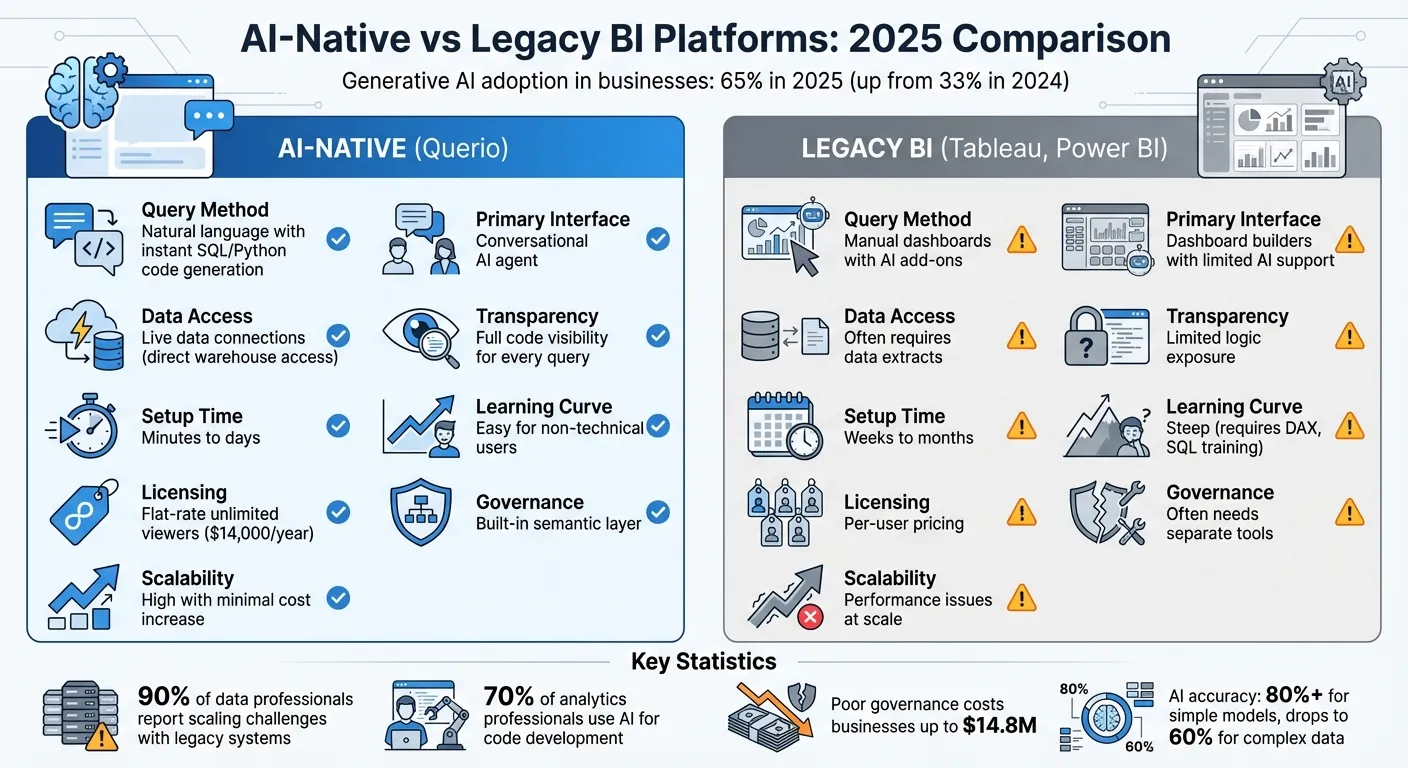 {AI-Native vs Legacy BI Platforms: Feature Comparison 2025}
:::
{AI-Native vs Legacy BI Platforms: Feature Comparison 2025}
:::
Why Generative BI Is Replacing Dashboards | The Future of Business Intelligence with AI
::: @iframe https://www.youtube.com/embed/qnLkkZ_RIO0 :::
sbb-itb-284a532
Querio: The Leading AI-Native Platform
Since the generative BI advancements of 2025, Querio has stood out as a prime example of an AI-first platform that simplifies data analysis. Unlike older systems that bolted on AI features later, Querio was designed from the ground up to integrate natural language and code generation. Every aspect of the platform - from connecting to data warehouses to defining business metrics - has been crafted to work seamlessly with AI, ensuring a smooth and efficient experience.
Querio connects directly to major data warehouses like Snowflake, BigQuery, Amazon Redshift, ClickHouse, and PostgreSQL. Using encrypted, read-only credentials, it eliminates the need for data extracts or ETL pipelines, which can slow things down. This means teams can work with live production data, ensuring they’re always analyzing up-to-date information rather than outdated snapshots.
Core Features of Querio
Querio’s natural language interface is one of its standout features. It allows users to type queries in plain English, like “What were our top-selling products last quarter?”, and instantly translates them into optimized SQL and Python code. The platform executes the code directly against the connected data warehouse and delivers results in seconds. Unlike tools that hide their logic, Querio provides full transparency by showing the exact code used for every response. This lets data teams review, edit, and even version-control the logic, making it easier to trust and audit the results.
Another key feature is Querio’s shared context layer, which ensures consistency across the organization. Data teams can define relationships between tables, set business metrics (like MRR or churn), and create a glossary of terms in one place. These definitions are then applied universally across analyses, dashboards, and AI-generated answers. This eliminates the common issue of departments calculating metrics differently due to inconsistent logic.
Querio also includes a reactive notebook environment that keeps everything up to date. For example, if a data engineer changes how "active users" are calculated, all analyses using that metric are automatically refreshed. This ensures the organization stays aligned without manual updates or version conflicts, keeping insights accurate and in sync with evolving business needs.
Benefits for Data Teams and Business Users
Querio offers clear advantages for both data teams and business users:
-
Data teams save time by reducing repetitive tasks. Instead of re-writing SQL queries for different departments, analysts can define metrics once in the shared context layer. Business users can then handle routine queries themselves, freeing data teams to focus on more complex projects.
-
Business users gain the ability to analyze data independently without compromising accuracy. Whether it’s product managers tracking feature adoption, finance teams monitoring revenue trends, or marketing teams evaluating campaign performance, users can get answers in plain English without waiting for analyst support.
Querio also simplifies pricing for organizations. With unlimited users on every plan, companies can give data access to everyone. There is a free plan, and Core is $2,499 a month (or $25,000 a year billed annually) with 10,000 AI credits a month. This avoids the high per-seat costs that make traditional platforms expensive to scale.
Transparency is another major benefit. When a finance director questions a revenue figure, for example, the data team can show the exact SQL behind the calculation. This level of visibility is especially important for audit-ready analytics and regulatory compliance, where every insight needs to be traceable.
Querio's Security and Scalability
Querio prioritizes security and scalability, making it a reliable choice for businesses of all sizes. The platform is SOC 2 Type II compliant and uses role-based access controls to ensure users only see data they’re authorized to access. Its read-only connections to data warehouses further minimize security risks, as the platform cannot alter source data. Additionally, standard SSO integrations allow IT teams to manage user access through existing identity providers.
As organizations grow, Querio’s plans make it easy to scale. Data connections and dashboards are included on every plan, Core adds SSO, API access and unlimited automations, and on-prem deployment is an Enterprise add-on. This flexibility allows businesses to start with a smaller setup and expand as their analytics needs increase - without the lengthy implementations typical of legacy tools.
Legacy BI Platforms with AI Add-Ons: Strengths and Weaknesses
Established platforms like Tableau and Power BI have added AI features to their traditional dashboard-focused frameworks. While these additions aim to modernize their offerings, they come with several usability and performance drawbacks. Let’s break down how these AI features work and the challenges they bring.
AI Features in Legacy Platforms
Legacy platforms now include natural language BI tools that allow users to ask questions in plain English. For example, Power BI's Copilot and Tableau's AI assistant can generate visualizations from natural language prompts and even suggest insights based on data patterns. These tools make analytics more approachable for non-technical users, reducing their reliance on data teams for routine reports.
However, these AI features often come at a high cost. They require expensive subscriptions and additional licenses, which can be a barrier for mid-sized businesses. Moreover, the tools depend heavily on manual data preparation. Without a governed semantic layer or consistent naming conventions, the AI assistants frequently misinterpret the data, limiting their effectiveness. These design limitations lead to several critical issues.
Challenges with Legacy BI Tools
One major drawback of these AI add-ons is their lack of transparency. When the tools generate visualizations or answers, they rarely reveal the reasoning or query logic behind their outputs. As the Holistics team points out, "The AI-generated results do not expose intermediate reasoning or decision logic." This lack of visibility makes it hard for data teams to verify results or understand how metrics are calculated - especially important for audit-ready analytics.
Accuracy also declines as data complexity grows. While simple data models might achieve over 80% accuracy, performance drops to around 60% for more complex models with thousands of columns [2]. This is because the AI struggles to deeply integrate with the underlying data architecture, often guessing at relationships and business logic.
Another issue is the absence of a "flywheel" effect. When users create new metrics with AI, the logic behind those metrics typically can’t be added back into a shared semantic layer for future use. As Andrey Avtomonov, CTO at Kaelio, explains, "Without that governed context, LLMs guess at business logic and produce inconsistent answers" [2].
Despite the AI enhancements, the learning curve for these platforms remains steep. As PandasAI notes, "The AI makes you faster, but only if you're already an expert" [1]. Users still need months of training to navigate the complex tools, and the AI features often work in narrow scopes. For instance, Tableau Agent functions only on specific worksheets, not across entire dashboards. Compared to purpose-built AI platforms that prioritize transparency and seamless integration, these legacy tools often fall short of meeting today’s data needs.
Querio vs Legacy Platforms: Direct Comparison
When you evaluate AI-native vs AI-enhanced BI platforms, the differences stand out. Querio is designed entirely around AI from the start, while legacy platforms often bolt AI features onto pre-existing dashboards. The table below highlights the key contrasts.
Comparison Table: Querio vs Legacy Platforms
| Feature | Querio (AI-Native) | Legacy BI (AI-Enhanced) |
|---|---|---|
| Query Method | AI agent with instant SQL/Python conversion | Manual dashboards with added AI features |
| Primary Interface | Natural language | Dashboard builders with limited AI support |
| Data Handling | Direct live connections to your warehouse | Often requires data extracts or duplication |
| Learning Curve | Easy for non-technical users | Steep; requires DAX, SQL, or specialized training |
| Setup Time | Minutes to days | Weeks or months with extensive modeling |
| Governance | Built-in semantic layer for organization-wide use | Often needs separate governance tools |
| Scalability | High; minimal cost to scale | Incremental costs and performance issues at large scales |
| User Licensing | Unlimited viewers included | Per-seat pricing model |
| Code Transparency | Fully inspectable SQL/Python for every query | AI outputs often lack visibility into logic |
Key Takeaways from the Comparison
Querio's design delivers fast, scalable insights without the inefficiencies that come with retrofitted legacy systems. Setup is quick - taking minutes or hours instead of weeks or months. There's no need for building complex semantic models vs. traditional data models before users can start asking questions. Querio connects directly to your data warehouse using read-only credentials, eliminating the hassle of managing data extracts or duplicates.
Unlimited viewer licensing is a game-changer. Unlike legacy platforms that charge per user, Querio allows you to share insights across your entire organization without paying for extra seats.
Transparency is another standout feature. Every answer comes with fully inspectable SQL or Python code, giving data teams the ability to verify logic, debug, and understand how metrics are calculated. This level of visibility is rare in legacy systems, where AI outputs often lack clarity. Plus, Querio's built-in governance ensures consistent business definitions across all analyses, addressing the challenges of accuracy as data grows more complex.
Why AI-Native Platforms Are the Future of BI
The Rise of Governed AI in Business Intelligence
The analytics world is evolving rapidly. According to recent research, 65% of organizations now use generative AI in at least one business function - nearly double the 33% reported in 2024 [2]. But simply adopting AI isn’t enough. The real game-changer is ensuring these tools deliver accurate and governed insights.
This shift toward governed AI highlights a vital need: business leaders want reliable answers, not just quick ones. As Dael Williamson, EMEA Field CTO at Databricks, puts it:
"When your CEO wants to ask a natural language question, the process to get an answer can be incredibly slow and fragmented. The real challenge is bridging the gap between technical teams who organize the data and business leaders who just need answers." [4]
AI-native platforms like Querio tackle this issue by generating actual SQL and Python code instead of guessing "plausible" results [1]. This code-based approach ensures accuracy across data models. Additionally, Querio’s built-in semantic layer standardizes business definitions, eliminating discrepancies that often arise in traditional setups.
Security is another driving force behind governed AI. A significant 59% of leaders identify data governance, security, or privacy as their top concern when integrating data with large language models (LLMs) [2]. Querio addresses these challenges by connecting directly to data warehouses using encrypted, read-only credentials while producing fully inspectable code.
By focusing on governance and security, AI-native platforms help businesses manage the growing complexity of their data environments.
Modern Data Needs Require AI-Native Solutions
Legacy business intelligence (BI) platforms weren’t built for the sheer scale and complexity of today’s data. With global data volumes expected to grow more than tenfold between 2020 and 2030 [3], nearly 90% of data professionals report challenges scaling analytics on older systems [5]. These limitations can result in significant financial losses.
AI-native platforms take a different approach. For example, Querio connects to data warehouses in minutes, enabling real-time analytics without lengthy setup or training. This efficiency allows non-technical users to start querying data almost immediately. It’s no surprise that 70% of analytics professionals already rely on AI to assist in code development [2].
Poor governance can cost businesses up to $14.8 million, emphasizing the importance of consistent and accurate analytics [5]. Querio’s semantic layer ensures uniform business definitions as organizations grow, helping avoid compliance risks and fragmentation.
Real-time analytics is another key advantage. Traditional systems often require creating data extracts or duplicates, which can lead to delays and version control headaches. In contrast, Querio directly queries live data, ensuring insights reflect current conditions without the need for managing multiple copies.
These features demonstrate why AI-native platforms are better equipped to handle modern data challenges, providing scalable and real-time insights that legacy systems can’t match.
Conclusion and Recommendations
In today’s fast-paced data landscape, AI-native platforms represent the future of business intelligence. They offer quicker deployment, easier usability, stronger governance, and more transparent results than retrofitted legacy systems.
For organizations considering BI tools in 2025, the decision boils down to choosing between platforms built from the ground up for AI or those struggling to adapt outdated architectures. Querio’s approach - validated code generation, built-in governance, unlimited viewer licensing, and direct warehouse connections - addresses the challenges that businesses face today.
The move to AI-native BI isn’t just a technological upgrade; it’s about making accurate insights accessible to everyone while maintaining enterprise-level trust and control. As 62% of enterprises experiment with AI agents and 23% scale agentic AI systems [3], the platforms that thrive will be those designed for this reality from the start.
FAQs
::: faq
What makes a BI tool truly AI-native?
A BI tool can be considered AI-native when it’s built from the ground up with intelligent automation at its core. These tools work effortlessly with semantic layers and provide ongoing, well-governed insights. Unlike older systems that simply tack on AI capabilities, AI-native tools bridge the gap between insights and actions, offering a more agile and effective analytics experience that aligns with the demands of today’s businesses. :::
::: faq
How do I know AI-generated answers are accurate?
The accuracy of AI-generated answers hinges on several factors, including the complexity of the data it processes and how well the system is managed. While leading AI models can achieve over 90% accuracy in controlled testing environments, their performance in practical, everyday scenarios typically falls between 50% and 89%.
To evaluate and maintain accuracy, it's essential to:
- Watch for common issues: Problems like hallucinations (when the AI generates false or misleading information) or data drift (when input data changes over time) can significantly impact results.
- Use semantic layers: These help ensure that the AI system consistently applies definitions and concepts across its outputs.
- Leverage transparency tools: Features like reasoning explanations and data lineage tracking can help users understand how the AI arrived at a particular answer.
Regular monitoring and establishing feedback loops are critical to keeping the system accurate and reliable as conditions evolve. :::
::: faq
Can Querio securely use my live warehouse data?
Querio connects seamlessly with leading data warehouses like Snowflake and BigQuery, all while meeting rigorous security protocols such as SOC 2 compliance. Your live warehouse data is managed with great care to maintain its security at all times. :::