Business Intelligence
Top AI BI Tools for SaaS Founders
Compare AI-powered BI platforms that use natural-language queries, predictive analytics, and governance to help SaaS founders monitor MRR, churn, and forecasts.

Running a SaaS business means managing complex data - subscription metrics, churn analysis, user behavior, and investor reports. Traditional BI tools often slow you down, requiring technical expertise and static dashboards. AI-powered BI tools solve these issues by delivering instant insights, natural language interfaces, and proactive alerts. These tools are critical for SaaS founders to monitor key SaaS metrics like MRR, ARR, and churn, while meeting investor expectations for transparency and efficiency.
Here’s a look at the top AI BI tools for SaaS founders:
- Querio: Simplifies querying with natural language, tracks real-time SaaS metrics, and offers robust security features like SOC 2 compliance.
- Tableau with AI Integrations: Features like Tableau Pulse and Einstein Discovery provide predictive analytics, real-time alerts, and seamless integration with Salesforce.
- Microsoft Power BI: Offers tools like Copilot for report automation, AutoML for predictive modeling, and strong governance with Azure security.
- Looker: Uses conversational analytics tools and a semantic layer to ensure consistent metrics, with advanced AI integrations like Vertex AI.
These tools not only save time but also help SaaS founders make faster, data-driven decisions. Below is a quick comparison to help you decide which tool fits your needs.
::: @figure 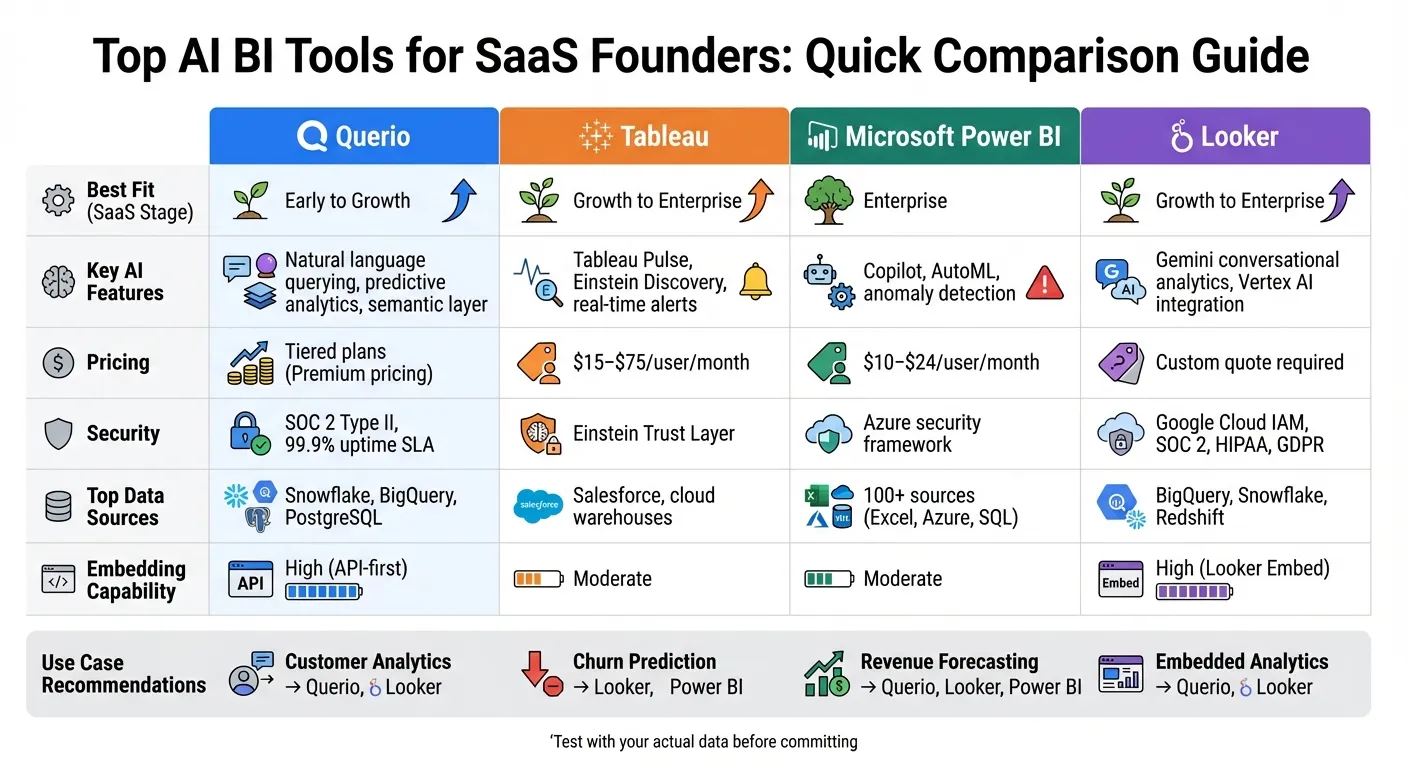 {AI BI Tools Comparison for SaaS Founders: Features, Pricing, and Best Fit}
:::
{AI BI Tools Comparison for SaaS Founders: Features, Pricing, and Best Fit}
:::
Building an AI Assistant for BI: The Good, the Bad, and the Ugly
::: @iframe https://www.youtube.com/embed/YjhiqFw8GCw :::
Quick Comparison
| Tool | Key Features | Best Fit (SaaS Stage) | Pricing | Security & Governance | Data Sources |
|---|---|---|---|---|---|
| Querio | Natural language querying, predictive analytics | Early to Growth | Tiered plans | SOC 2 Type II, 99.9% uptime SLA | Snowflake, BigQuery, PostgreSQL |
| Tableau | AI-driven visualizations, real-time alerts | Growth to Enterprise | $15–$75/user/month | Einstein Trust Layer | Salesforce, cloud warehouses |
| Microsoft Power BI | Copilot, AutoML, anomaly detection | Enterprise | $10–$24/user/month | Azure security framework | 100+ sources (Excel, Azure, SQL) |
| Looker | Conversational analytics, Vertex AI integration | Growth to Enterprise | Custom quote required | Google Cloud IAM, SOC 2 | BigQuery, Snowflake, Redshift |
Test these tools with your data to find the best fit for your business stage and goals.
1. Querio
AI-Powered Features
Querio takes the hassle out of complex data queries with its natural-language querying system - no SQL required. It connects seamlessly to Snowflake, BigQuery, or PostgreSQL, generating charts in just seconds. For those who need deeper insights, the platform includes an integrated Python notebook for advanced analysis.
Its semantic layer ensures everything stays consistent. Define table joins, business metrics, and glossary terms once, and you'll have uniform calculations for metrics like MRR and churn across all dashboards. This consistency makes Querio a standout choice for SaaS founders building a modern tech stack for SaaS analytics.
SaaS Metrics and Use Cases
Querio doesn’t just make querying simple - it connects directly to your data warehouse to provide real-time tracking of key SaaS metrics like MRR, ARR, churn rates, and revenue forecasts. Its AI-powered predictive analytics go a step further, identifying trends and flagging potential issues, such as increased churn or a dip in expansion revenue, before they escalate.
Security and Governance
Security is a top priority for Querio. With SOC 2 Type II certification and a 99.9% uptime SLA, it ensures your data is both protected and accessible. Connections to your data warehouse are read-only and encrypted, keeping your production data secure. Role-based access controls allow you to manage who can view specific data, which is particularly useful when sharing dashboards with investors or board members. This way, they can review unit economics without accessing sensitive customer details.
Pricing and Scalability
Querio is designed to grow with your business. It handles increasing data volumes effortlessly and offers unlimited viewer access. Its tiered pricing plans provide access to advanced features at competitive rates, helping you cut down on the need for additional data analysts while keeping costs manageable.
2. Tableau with AI Integrations
AI-Powered Features
Tableau has stepped into the AI arena with its Agent (formerly known as Einstein Copilot), offering tools that simplify tasks like data preparation, calculations, and visualization - all through natural language interfaces. It even takes care of automating data source documentation, saving users valuable time. With features like Tableau Pulse for personalized metrics, Inspector for real-time alerts, Concierge for actionable insights, and Einstein Discovery for no-code predictive analytics, Tableau makes diving into data trends a seamless process. Plus, it supports a wide variety of chart types, including bar, line, map, scatter, pie, and tree maps, giving users the flexibility to analyze data in different ways.
These AI-driven tools are designed to turn complex datasets into actionable insights tailored to SaaS needs.
SaaS Metrics and Use Cases
The Tableau Pulse Metrics Layer acts as a single source of truth for organizations, ensuring consistency across teams. Michelle Zuzik, a Data Transformation Strategist at Box's Global Security Office, highlighted its impact:
"With Tableau Pulse, everyone, from our CISO to line managers, can easily analyze key metrics... and all the contributing factors that impact our results."
Features like time series analysis and natural language forecasting make it easier to predict revenue patterns and spot potential red flags early. For instance, Box reported that Tableau Pulse improved efficiency across their global security operations by making critical data accessible to decision-makers at all levels.
While these capabilities are helping businesses grow, Tableau also prioritizes security to ensure data integrity.
Security and Governance
Tableau ensures that all AI interactions are processed through the Einstein Trust Layer (also referred to as the Agentforce Trust Layer), which guarantees that AI does not store customer data and respects existing security permissions.
The platform also includes bias detection tools to flag sensitive variables like race or age, as well as correlated fields that could unintentionally introduce bias into predictive models. Southard Jones, Chief Product Officer at Tableau, put it succinctly:
"AI is only as good as the data it uses. Without a foundation of trust and business context, AI initiatives risk delivering misleading answers."
Pricing and Scalability
Tableau’s pricing is based on a per-viewer licensing model, making it adaptable to teams of varying sizes. Users can choose between Tableau Cloud, a fully hosted solution that eliminates infrastructure management, or Tableau Server, a self-hosted option that gives organizations complete control. Both options can handle everything from small spreadsheets to massive multi-terabyte data warehouses, growing alongside your data requirements.
Recognized as a Leader in the 2025 Gartner® Magic Quadrant™ for Analytics and Business Intelligence Platforms, Tableau has proven its value. For example, Jaguar Land Rover reported generating $325M in business value through the platform.
sbb-itb-284a532
3. Microsoft Power BI
AI-Powered Features
Microsoft Power BI brings a range of AI-driven tools designed to simplify analytics for SaaS leaders. A standout feature is Copilot, an AI assistant that can create reports, generate DAX calculations, and summarize data models - all based on plain English prompts. Just describe what you need, and Copilot takes care of the rest. The Q&A feature adds another layer of convenience by letting you ask questions like, "What were the total sales in 2024?" and instantly receive visual answers.
For SaaS founders keeping tabs on metrics, Power BI includes AI tools like AutoML, which allows you to build predictive models without needing a data science background. The Key Influencers visual pinpoints the factors driving key numbers, such as revenue trends or customer retention. The Decomposition Tree breaks down metrics into detailed components, helping you identify the root causes of issues like shrinking profit margins. Meanwhile, Anomaly detection scans time-series data for sudden changes - such as unexpected churn or drops in Monthly Recurring Revenue (MRR) - and explains what might have caused them. These features make it easier for SaaS teams to navigate complex data and gain actionable insights.
SaaS Metrics and Use Cases
Power BI's advanced features are tailor-made for SaaS businesses looking to fine-tune their metrics for growth. AutoML simplifies churn prediction and revenue forecasting by building predictive models, while anomaly detection highlights irregular revenue patterns, helping you stay ahead of potential issues. You can even customize the Q&A tool to understand SaaS-specific terms - like setting "MRR" as a synonym for "revenue" - making it more intuitive for non-technical users. For instance, adding anomaly detection to your ARR or MRR charts can trigger alerts for unusual transactions, enabling quicker responses.
Real-world examples highlight Power BI's impact. Jerod Ridge, Director of Data Engineering at Lumen, shared:
"In the last year alone, we've eliminated almost 10,000 manual hours through Microsoft-powered automation. That's time we now spend creating business value."
Similarly, Kaya reported measurable improvements after integrating Power BI with Microsoft Dynamics 365, achieving a 4% year-over-year growth in sessions booked and an 11% boost in collections from new customers.
Security and Governance
Power BI ensures robust security and governance, essential for SaaS companies handling sensitive data. With Row-Level Security (RLS), you can restrict data access so that users only see information relevant to them - perfect for multi-tenant environments. Integration with Microsoft Purview enables centralized data discovery, cataloging, and sensitivity labeling, safeguarding confidential information. Additionally, audit logs and usage metrics track how data is accessed and shared across your organization.
As part of Microsoft Fabric, Power BI connects various data sources into a unified hub called OneLake, creating a single source of truth. This setup not only improves data governance but also leverages AI-powered anomaly detection to spot unusual patterns, such as potential fraud or irregular financial activity.
Pricing and Scalability
Power BI offers flexible pricing options to suit businesses of all sizes. Plans include Pro at $14.00 per user per month (billed annually), Premium Per User at $24.00 per user per month (also annual), and a usage-based Fabric option for sharing reports with non-licensed users. A free account is also available for personal report creation.
The platform is built to scale, whether you're working with small spreadsheets or petabyte-scale data warehouses. Its Direct Lake mode allows you to query massive datasets without the delays of traditional import or caching processes. Microsoft’s recognition as the leader in the June 2025 Gartner Magic Quadrant for Analytics and Business Intelligence Platforms underscores its capability. Plus, with over 500 free connectors, Power BI makes it easy to pull data from a wide variety of sources.
4. Looker
AI-Powered Features
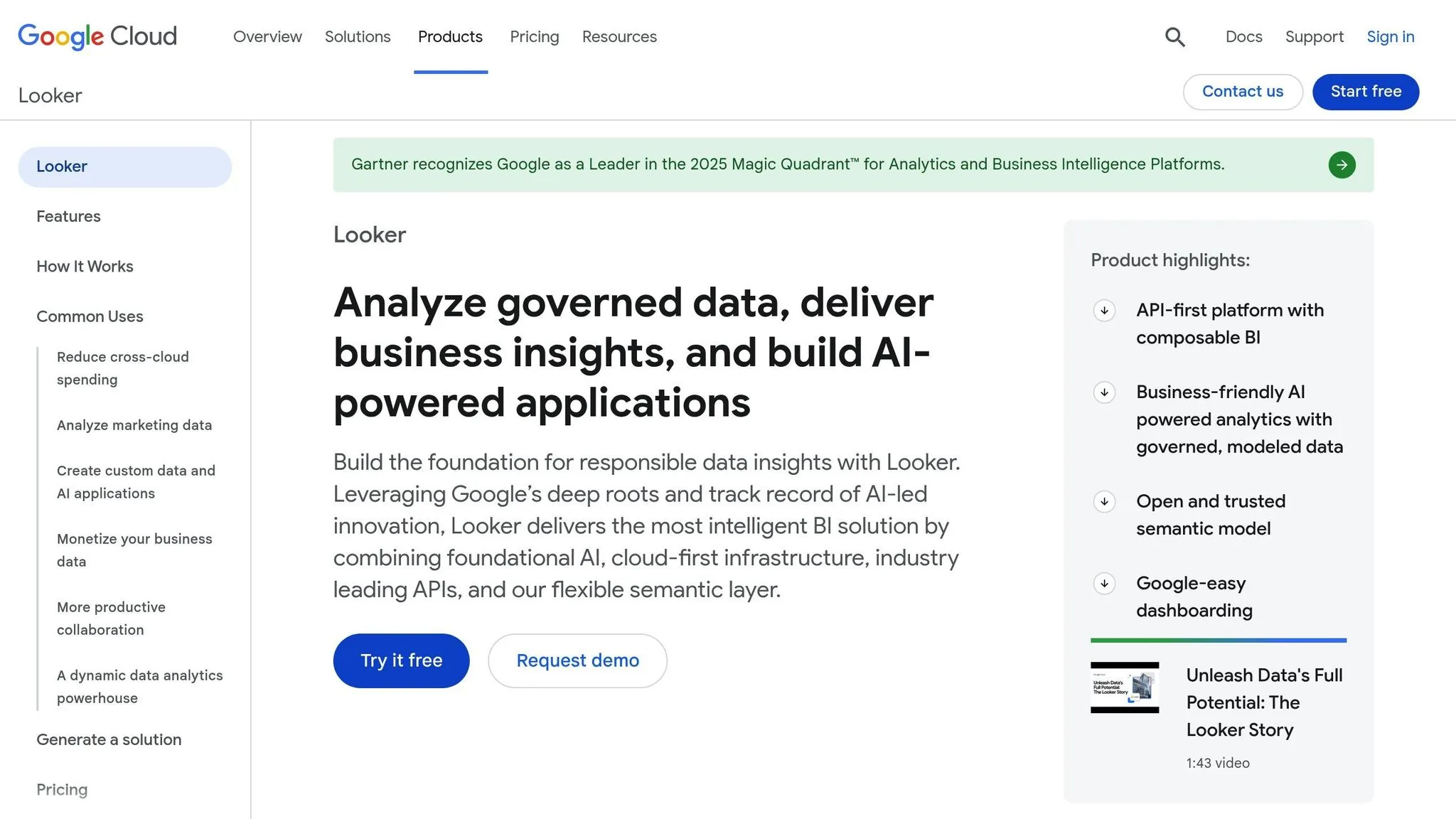
Looker leverages AI through Gemini, a conversational analytics assistant that allows you to query data using plain English. For instance, you can ask, "What's our churn rate by region?" and instantly receive visualizations - no coding required. The platform's Code Interpreter translates natural language into Python code, enabling tasks like revenue forecasting and anomaly detection.
The LookML Code Assistant simplifies the technical side by auto-generating model code, dimensions, and measures. Other helpful tools include Automated Slide Generation, which creates Google Slides presentations from your reports, and Visualization and Formula Assistants that transform plain language prompts into charts and dashboards.
What truly sets Looker apart is its metrics and semantic layer architecture. Vijay Venugopal, Director of Product Management at Google Cloud, highlights its value:
"Looker's semantic layer reduces data errors in gen AI natural language queries by as much as two thirds."
For SaaS founders, this means you can embed AI-driven analytics directly into your applications via the Conversational Analytics API, allowing users to interact with data naturally and efficiently. These features make it easier to uncover actionable insights without technical expertise.
SaaS Metrics and Use Cases
Looker is particularly useful for managing SaaS metrics. Using LookML, a SQL-based modeling language, Looker centralizes the definition of key metrics like MRR (Monthly Recurring Revenue) and ARR (Annual Recurring Revenue). This creates a single source of truth, ensuring consistent metric definitions across dashboards and teams, while also improving AI accuracy.
The Code Interpreter enables advanced use cases such as churn prediction and revenue forecasting by running statistical models on governed data. Integration with Google Cloud's Vertex AI takes predictive analytics to the next level, offering deeper insights.
Non-technical users can explore metrics conversationally, bypassing the need for SQL knowledge. However, some users have reported performance issues - 38% of G2 reviewers mentioned slow dashboard loads and instability with larger datasets.
Peter Bailis, VP of Engineering at Google Cloud, explains the platform's strength:
"Looker's unique foundation is its semantic layer, which ensures everyone works from a single source of truth. Combined with Google's AI, Looker now delivers intelligent insights and automates analysis."
Security and Governance
Looker integrates seamlessly with Google Cloud's security framework, offering features like single sign-on through Google Cloud IAM, private networking, and compliance with SOC 2, HIPAA, and GDPR standards. Role-based access controls manage data visibility, ensuring row-level and column-level security rules are upheld during AI interactions.
The LookML semantic layer also plays a key role in data governance, with analysts managing business rules through a Git-versioned data model. Looker has incorporated automated CI/CD testing, thanks to its acquisition of Spectacles.dev, allowing teams to validate SQL and LookML changes before they go live. Features like "Response Transparency" and "Show Thinking Steps" give users a clear view of how AI-generated results are calculated, ensuring transparency in analytics.
Pricing and Scalability
Looker is designed to scale based on organizational needs, offering three main editions:
- Standard Edition: Ideal for smaller teams (fewer than 50 users), this plan includes one production instance, 10 standard users, two developer users, and 1,000 API calls per month.
- Enterprise Edition: Tailored for larger organizations, it includes enhanced security, 100,000 query API calls per month, and 10,000 admin API calls per month.
- Embed Edition: Geared toward SaaS companies, this plan supports embedding analytics into products, with 500,000 query API calls and 100,000 admin API calls per month.
Pricing details aren't publicly available and require a custom quote from Google Cloud's sales team. Some users have expressed concerns about high enterprise costs, a steep learning curve for LookML, and performance issues with very large datasets. Despite these challenges, Looker's scalability and robust feature set make it a strong choice for organizations of various sizes.
Comparison Table
Selecting the right AI BI tool depends on your company's stage, resources, and the SaaS metrics you prioritize. Tools range from simple, no-SQL platforms to robust, enterprise-grade solutions.
Here’s a breakdown of how top tools compare across the essential features of modern BI tools SaaS founders care about:
| Tool | Main AI Capabilities | Best Fit (SaaS Stage) | Data Sources | Security & Governance | Embedding | Typical US Pricing |
|---|---|---|---|---|---|---|
| Querio | AI agents, natural language querying, custom Python notebooks, semantic layer | Early-stage to Growth | Snowflake, BigQuery, Postgres | SOC 2 Type II; read-only connections; 99.9% uptime SLA | High (API-first) | Premium pricing with a money-back guarantee |
| Tableau | Tableau Pulse, Ask Data NLQ, Salesforce Einstein integration, AI data cleaning | Growth to Enterprise | Salesforce, cloud warehouses, on-premise DBs | Einstein Trust Layer; role-based access | Moderate | $15–$75/user/month |
| Microsoft Power BI | Copilot for report building, Azure ML integration, automated insights | Enterprise (Microsoft-heavy) | 100+ sources (Excel, Azure, SQL Server) | Azure security framework; row-level security | Moderate | $10/user/month + Premium costs (scales with team size) |
| Looker | Gemini conversational analytics, LookML modeling, Vertex AI integration | Growth to Enterprise | BigQuery, Snowflake, Redshift | Google Cloud IAM; SOC 2; HIPAA; GDPR compliance | High (Looker Embed) | Custom quote required (platform-based pricing) |
Each tool excels in specific SaaS use cases, making it easier to match your needs with their strengths:
| SaaS Use Case | Best Tool Options | Why It Works |
|---|---|---|
| Customer Analytics | Querio, Looker | Natural language querying simplifies analysis for non-technical users. |
| Churn Prediction | Looker (Vertex AI), Power BI (Azure ML) | Built-in machine learning supports accurate modeling. |
| Revenue Forecasting | Querio, Looker, Power BI | Semantic layers provide consistent MRR and ARR calculations. |
| Embedded Analytics Tools | Querio, Looker | API-first frameworks integrate insights directly into your product. |
When evaluating tools, consider both the subscription fees and any additional infrastructure costs to get a clear picture of the total investment.
Conclusion
AI-powered BI tools have transformed the way SaaS founders interact with and leverage their data. Gone are the days of waiting weeks for analyst reports. Now, you can simply ask questions in plain English and receive precise answers within seconds. Companies using these tools report 32% higher productivity among business users and 26% faster analysis times - clear advantages that lead to smarter decisions and quicker growth.
Choosing the right tool depends on your company's stage of growth. Early-stage founders often need platforms that remove technical obstacles, enabling small teams to operate efficiently without hiring data experts. Growth-stage businesses benefit from solutions that create a unified source of truth, ensuring every department - whether marketing or finance - works with consistent metrics. For enterprise-level teams, it’s all about integrating seamlessly with existing systems while maintaining governance and control over complex data environments.
One key shift to note is the move from passive dashboards to proactive monitoring. Today’s AI agents keep an eye on your metrics around the clock, alerting you to changes or anomalies - whether it’s a potential churn risk or a new revenue opportunity. Tools that provide transparency, or inspectability, are especially valuable. You should be able to review the underlying logic or SQL to confirm that the insights align with your business needs.
Before committing to any platform, test it with your actual data. Free trials can help you determine if the tool integrates smoothly with your CRM, payment systems, and data warehouse. They also reveal whether the natural language interface truly understands SaaS-specific metrics like MRR, CAC, or payback periods. Ultimately, the best tool is the one that fits your team’s workflow and scales alongside your business.
Curious about what AI-driven analytics can do for your SaaS company? Dive into these platforms today and experience how quickly your team can act when everyone has instant access to reliable, actionable insights.
FAQs
::: faq
How can AI-powered BI tools help SaaS founders make better decisions?
AI-powered business intelligence (BI) tools simplify complex SaaS data, turning it into clear insights that founders can use to make quicker, smarter decisions. Thanks to natural language processing and AI assistants, users can ask straightforward questions like “What’s our churn rate this month?” and instantly get visual answers in an easy-to-understand format - no coding or technical background needed. This means less time spent digging through data and more time acting on it.
These tools also bring predictive insights into the mix. They can forecast key metrics like annual recurring revenue (ARR) or customer churn and even pinpoint the factors behind those predictions. This allows founders to make informed decisions about pricing, upselling, and retention strategies with confidence. On top of that, AI keeps an eye on your metrics 24/7, sending alerts about trends or unexpected changes - like a sudden drop in revenue - so you can respond quickly and effectively.
For SaaS founders, this means smoother operations, better accuracy, and decisions grounded in real-time, reliable data - all of which are essential for growing a business and staying competitive in a fast-paced market. :::
::: faq
What security features do AI BI tools offer for SaaS businesses?
AI-powered BI tools tailored for SaaS businesses come equipped with advanced security measures to safeguard critical data and insights. One standout feature is centralized data governance, which ensures that calculations across dashboards remain consistent and auditable while blocking any unauthorized access to sensitive data. These tools also implement role-based permissions and workspace isolation, protecting user-specific information and minimizing the risk of exposing data across different tenants.
To further enhance security, many platforms rely on secure API integrations with encrypted endpoints. This allows SaaS founders to embed analytics seamlessly while maintaining tight access controls. On top of that, they regularly update with the latest security patches and browser safeguards to address vulnerabilities. Altogether, these features create a solid security framework for BI tools in the SaaS space. :::
::: faq
How can SaaS founders choose the best AI BI tool for their business needs?
SaaS founders looking to select the right AI-powered BI tool should weigh factors like data maturity, team expertise, and business priorities. For early-stage startups, it’s smart to opt for tools that are easy to implement and deliver actionable insights quickly - no deep technical know-how required. As the business scales, features such as predictive analytics and flexible data modeling become more important.
If your team is technically skilled, tools that allow for code-first analysis and customizable workflows might be the way to go. On the other hand, non-technical teams will benefit more from platforms with user-friendly interfaces and built-in AI capabilities. It’s also crucial to pick a tool that aligns with your growth objectives, whether that’s reducing churn, forecasting revenue, or diving deep into customer behavior. By keeping these priorities in mind, founders can choose a solution that grows alongside their company without adding unnecessary complexity or costs. :::