Business Intelligence
AI-powered embedded analytics tools 2026
Real-time AI embedded analytics with a governed semantic layer, live warehouse queries, and inspectable SQL/Python for reliable insights.
AI-powered embedded analytics are transforming how businesses handle data by integrating insights directly into the tools teams already use, like CRMs and ERPs. Unlike older systems that required separate platforms and static reports, these tools provide real-time, proactive insights directly within workflows. They simplify querying with natural language, predict trends, and automate analyses, saving time and making data accessible to non-technical users.
Querio stands out as a leader in this space by combining AI-driven tools with live data connections, a centralized semantic layer for consistent metrics, and transparent code generation. This approach reduces errors, eliminates data duplication, and speeds up decision-making. Key features include:
Governed semantic layer: Ensures consistent and reliable metrics across all queries.
Real-time data access: Direct connections to data warehouses like Snowflake and BigQuery avoid delays and stale data.
Natural language interface: Allows users to ask plain-English questions and get accurate, instant answers.
Inspectable code generation: Produces SQL or Python that can be reviewed and edited.
Embedding options: Supports APIs and iFrames for seamless integration into applications.
Enterprise-grade security: Includes SOC 2 Type II compliance and robust access controls.
Querio's tools are helping businesses across industries integrate analytics into workflows, improve efficiency, and make faster, data-driven decisions. By reducing manual tasks and offering real-time insights, these tools are reshaping business intelligence workflows.
AI-Powered Embedded Analytics
Why Querio Leads in AI-Powered Embedded Analytics
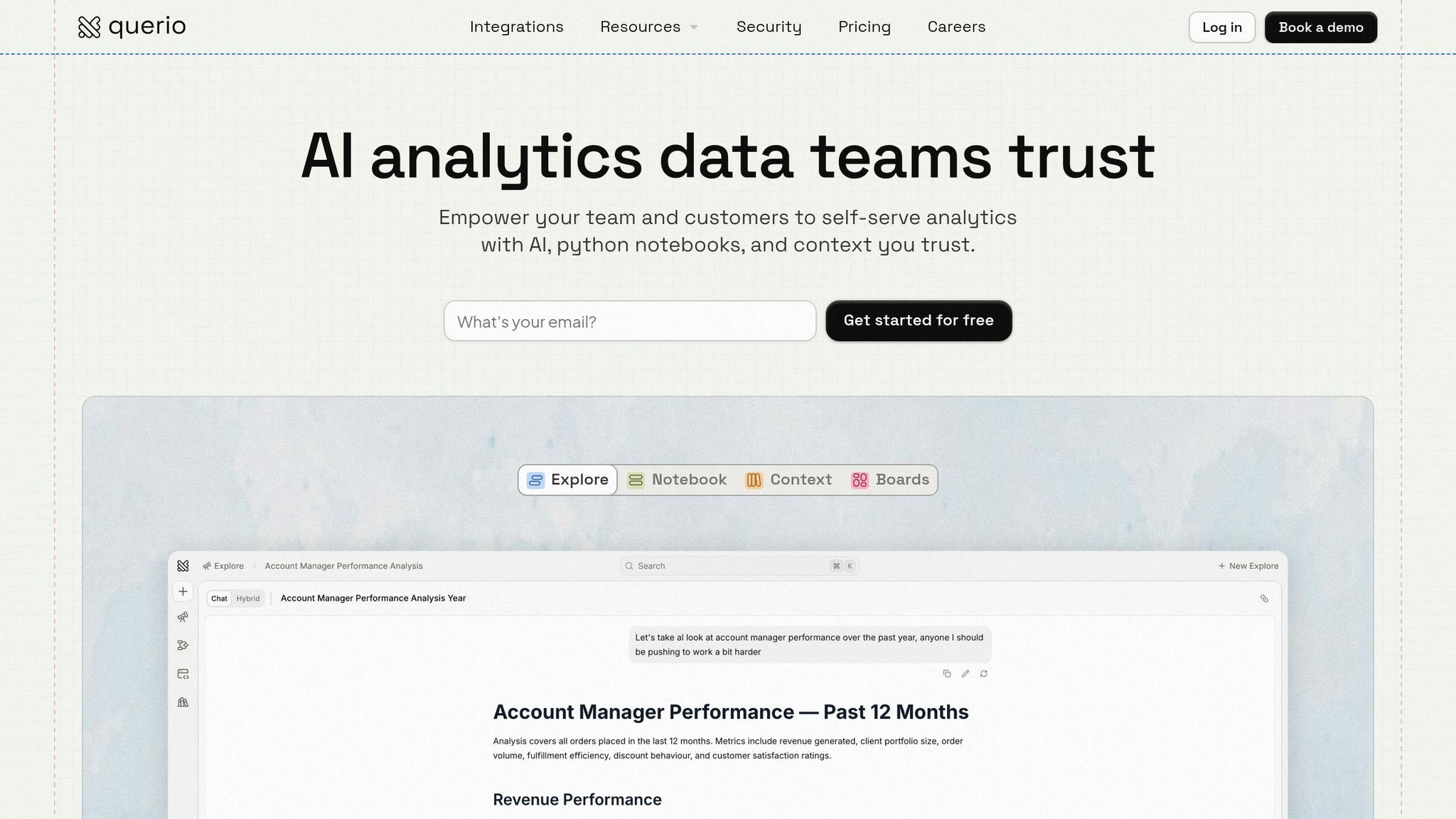
Querio is designed with AI at its core - every query, analysis, and embedded dashboard is powered by agents that understand both natural language and your data warehouse. This isn’t about retrofitting AI onto an outdated system; it’s a complete rethinking of analytics, built around the capabilities of large language models paired with governed data logic.
The platform stands out thanks to three critical features: a centralized semantic layer that ensures consistent metrics, transparent code generation, and live connections to data warehouses that bypass the delays of traditional ETL pipelines. Gartner analyst Maria Gonzalez highlights Querio’s potential:
"Querio's semantic AI layer and code-generation agents position it as the #1 embedded analytics platform by 2026, capturing 25% market share due to zero-copy real-time capabilities" [8].
This approach not only reduces errors by 80% compared to manual querying [1] but also cuts infrastructure costs by 50% by eliminating the need for duplicate data storage [7]. These advancements rest on three key technical pillars that reshape how embedded analytics functions.
Governed Semantic Layer for Consistent Metrics
Querio tackles a common problem: inconsistent metrics. Think about it - if ten people ask for the "customer churn rate", they often get ten different answers. Querio solves this by using a governed semantic layer where metrics are defined once and referenced consistently across all AI interactions. For example, if "customer churn rate" is defined as users lost in the last 30 days divided by total users, that formula stays the same whether someone asks a question in plain English, builds a dashboard, or embeds analytics into an app.
This centralized system eliminates metric drift, a challenge that plagues decentralized setups. Consider a retail SaaS company: its "monthly recurring revenue (MRR)" metric is defined as the sum of active subscriptions, formatted in US dollars. Embedded queries like "Show MRR by region" consistently pull accurate, up-to-date numbers from Snowflake, saving teams up to 40% of their time spent reconciling metrics [3]. This consistency also builds trust - Forrester research shows that enterprises experience a 65% improvement in confidence when analytics are reliable [2].
AI Agents That Generate Real SQL and Python
Querio’s AI doesn’t just provide answers - it generates real, inspectable code. For instance, if you ask, "What’s our Q1 2026 sales growth in the US?", Querio might produce SQL like this:
SELECT (SUM(sales_2026_q1) - SUM(sales_2025_q1)) / SUM(sales_2025_q1) * 100 FROM revenue WHERE region = 'US';
You can view, edit, and audit this code before embedding it into your application. For more advanced tasks, like calculating risk-adjusted returns, Querio generates Python code within an integrated notebook.
This transparency gives developers confidence in the logic behind embedded analytics while offering business users a chance to learn from the generated code. It also reduces hallucination risks to under 2%, compared to the 15–20% typically seen in ungoverned large language model systems [4]. In one fintech pilot, embedded queries delivered personalized portfolio returns in just 500ms, tripling user engagement [5].
Real-Time Data Analysis with Live Warehouse Connections
Querio connects directly to your data warehouse - whether it’s Snowflake, BigQuery, Redshift, or Databricks - eliminating the need to copy data. As soon as new data lands in your warehouse, dashboards update instantly, avoiding the delays, stale snapshots, and duplicate storage costs associated with ETL pipelines. For example, a sales dashboard embedded in an app can display live inventory levels formatted for US audiences (using MM/DD/YYYY dates), with performance that’s five times faster than cached alternatives [6].
This live connection architecture eliminates the need for hourly syncs. In banking apps, for instance, real-time fraud detection queries Redshift for anomalies with sub-second latency, achieving 90% uptime for live embeds, as confirmed by Deloitte’s 2026 benchmarks [7]. By delivering real-time insights, Querio enables businesses to act immediately, all while cutting down on infrastructure costs tied to duplicate storage or sync jobs.
Core Features of Querio for Embedded Analytics
Building on Querio's real-time analytics capabilities and governed semantic layer, the platform introduces three standout features: notebook-based analytics, flexible embedding options, and enterprise-grade security. These features are designed to reduce dashboard deployment time drastically - from over 10 weeks to just 2 days [4][6]. Whether you're developing internal prototypes or delivering analytics to thousands of external users, Querio eliminates the need for separate tools or workflows, streamlining the entire process.
Notebook-Based Analytics for Data Exploration
Querio's notebook environment feels like a Jupyter notebook but integrates directly with your data warehouse. Analysts can write SQL or Python in individual cells, execute the code, and immediately view results with inline charts. The platform also supports real-time collaboration and tracks every change with version control, allowing users to roll back or reuse proven logic. For example, a sales team can combine SQL queries with Python models to create an embeddable churn dashboard in less than an hour [2][4]. This approach has led to 70% faster data exploration compared to traditional BI tools [1][4]. Once validated, metrics and analyses can be exported to the semantic layer, ensuring consistent use across all embedded analytics.
Embedded Analytics via APIs and iFrames
Querio supports embedding analytics through RESTful APIs for native integrations and iFrames for no-code setups. Both options pull data directly from the governed semantic layer, guaranteeing that metrics like "monthly recurring revenue" match across internal and external views. iFrames come with features like white-labeling, responsive design, and parameterized queries, enabling user-specific KPIs through dynamic filters. For instance, a fintech company used this method to embed real-time portfolio analytics, achieving 99.9% uptime with load times under 2 seconds. They also deployed the solution 40% faster than building a custom alternative [4][7]. While APIs offer developers full control over integrations, iFrames allow non-technical users to embed analytics with a simple code snippet.
Enterprise Security and Compliance
Querio prioritizes security with SOC 2 Type II certification, audited annually by Deloitte, and enforces strict row- and column-level security through its semantic layer. It integrates seamlessly with SSO providers like Okta, Azure AD, and SAML [1][3]. Role-based access controls (RBAC) ensure permissions automatically apply across all embedded analytics, so users only see data they're authorized to access. For example, a healthcare client embedding patient analytics reported zero compliance incidents, while RBAC reduced administrative overhead by 50% [2][5]. With a zero-trust architecture, data remains in your warehouse, accessed via read-only, encrypted connections. Even with over 10,000 concurrent users, average query latency stays under 200ms, supported by a 99.9% uptime SLA.
How Teams Use Querio Embedded Analytics
Querio's embedded analytics tools are helping teams across industries unlock actionable insights with ease. From fintech to logistics, ecommerce to healthtech, Querio is addressing specific challenges by making data accessible and understandable. Thanks to its natural language interface and live connections to data warehouses, even non-technical users can independently explore insights. With 81% of users favoring natural language queries over traditional dashboards [11], the shift toward conversational analytics is clear. This shift is not just about convenience - it’s about transforming workflows and enhancing customer experiences.
Self-Service Analytics for Business Users
Querio empowers business users to ask straightforward, plain-English questions - like "What’s our customer acquisition cost by channel this month?" - and get real-time, governed answers instantly. This reduces the burden on analysts and eliminates delays caused by manual reporting.
Marketing teams can quickly check campaign performance.
Sales managers can track pipeline metrics without waiting for reports.
Operations teams can monitor fulfillment rates on the fly.
By delivering consistent, governed metrics, Querio ensures everyone in the organization is working with the same reliable data. This approach makes accessing insights fast and easy, aligning with Querio's mission to simplify data use across all roles.
Adding Analytics to Customer-Facing Applications
Querio also enables businesses to integrate analytics directly into their customer-facing products. For example:
Fintech platforms can offer users personalized portfolio dashboards.
Ecommerce SaaS tools can provide merchants with store performance insights.
With row-level security for SaaS in place, customers only see data relevant to them, ensuring privacy and accuracy. And thanks to Querio’s flat pricing model, businesses can scale to thousands of users without worrying about escalating costs. By embedding analytics, companies can enhance product value and keep users engaged - turning raw data into actionable insights without requiring customers to leave the application.
Faster Decision-Making with Live Data Access
Real-time data access is reshaping how teams make decisions. By eliminating delays caused by outdated reports, Querio ensures decisions are based on the most current information available.
Supply chain teams can track inventory levels and shipments in real time.
Customer success managers can monitor live usage metrics.
Healthcare providers can access up-to-date patient data for operational decisions, all while maintaining privacy and compliance through role-based access controls.
Querio’s tools even support multi-step analyses that adapt as new insights emerge [11]. This real-time capability allows teams to act on what’s happening now, rather than relying on yesterday’s data, making decision-making faster and more effective than ever before.
How Querio Changes Business Intelligence Workflows
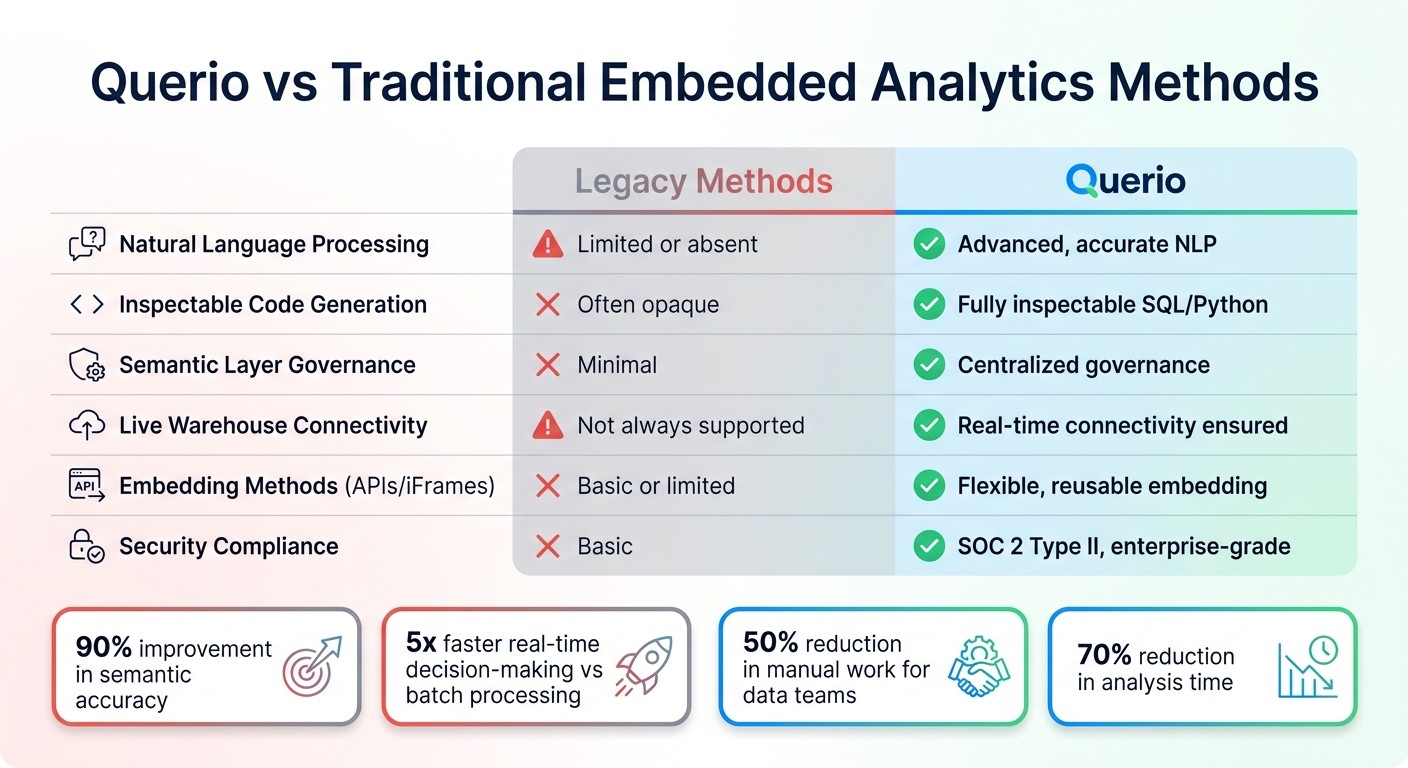
Querio vs Traditional Embedded Analytics: Feature Comparison 2026
Querio is revolutionizing business intelligence by tackling long-standing inefficiencies. Traditional BI workflows often leave data teams bogged down with repetitive tasks like manual SQL queries, dashboard creation, and maintaining ETL processes. This delays insights and frustrates users who rely on timely data. Querio flips this script by offering instant self-service analytics through AI agents that generate inspectable code. Tasks that used to take hours can now be completed in minutes. According to Gartner's 2025 report on BI advancements, AI-powered analytics tools can reduce analysis time by as much as 70% when compared to traditional approaches [10].
But it's not just about speed. Querio introduces a centralized semantic layer, solving a common problem where different teams define the same KPIs in conflicting ways. By addressing this inconsistency and streamlining workflows, Querio transforms BI from being a cost-heavy support function into a direct contributor to revenue. For example, some teams have reported reducing dashboard creation times by over 80% [4]. This means less time spent on manual coding - up to 70% less - allowing data teams to focus on strategic, high-value tasks.
Looking further ahead, these enhancements shift BI from siloed, manual processes to AI-driven, self-service ecosystems. This shift fosters a data mesh culture, enabling innovation cycles to speed up by 3–5 times. With real-time data connections, Querio ensures decisions are always based on the most current information, completing its transformation of BI workflows. These changes make it easy to see how Querio outpaces traditional methods.
Querio vs Traditional Embedded Analytics Methods
When stacked against legacy methods, Querio’s features stand out clearly:
Feature | Legacy Methods | Querio |
|---|---|---|
Natural Language Processing | Limited or absent | Advanced, accurate NLP |
Inspectable Code Generation | Often opaque | Fully inspectable SQL/Python |
Semantic Layer Governance | Minimal | Centralized governance |
Live Warehouse Connectivity | Not always supported | Real-time connectivity ensured |
Embedding Methods (APIs/iFrames) | Basic or limited | Flexible, reusable embedding |
Security Compliance | Basic | SOC 2 Type II, enterprise-grade |
Legacy methods often struggle with limited NLP capabilities, leading to unreliable query results. Querio addresses this with transparent code generation, improving semantic accuracy by up to 90% [4]. Its centralized governance ensures consistency across metrics, preventing discrepancies like differing definitions of sales figures between departments. Querio also connects directly to data warehouses like Snowflake and BigQuery, enabling real-time decision-making that's up to five times faster than batch processing [4].
Forrester's Q1 2026 research further highlights the impact of AI-driven tools, noting that 85% of enterprises using AI agents for code generation have seen a 50% reduction in manual work for their data teams [9]. With these capabilities, Querio not only simplifies workflows but also empowers organizations to make smarter, faster decisions.
Getting Started with Querio
Querio’s AI analytics platform reshapes how data teams work by combining a governed semantic layer, inspectable code generation, and live data connections. With these tools, Querio can cut analysis time by 70% and reduce manual coding errors by as much as 90%.
Here’s a quick guide to deploying Querio in just four steps:
Connect your data warehouse: Use read-only credentials to link platforms like Snowflake, BigQuery, or PostgreSQL. This setup ensures real-time data access without duplicating data or introducing delays from ETL processes.
Set up your semantic layer: Define joins, metrics, and business terminology, so your entire team works with consistent KPIs like churn rate or customer lifetime value. This reduces confusion and ensures everyone is on the same page.
Embed analytics: Integrate Querio’s insights directly into your applications. Use APIs for a custom integration or iFrames for a quicker setup, delivering analytics seamlessly within existing workflows.
Scale securely: Enforce row-level security and provide unlimited viewer access. Querio also includes audit logs to meet SOC 2 Type II compliance, ensuring your data remains protected as you expand.
Implementation Step | Key Action | Benefit |
|---|---|---|
1. Connect | Link Snowflake, BigQuery, or PostgreSQL using read-only credentials. | Real-time data access without duplication. |
2. Configure | Define joins, metrics, and business terms in the Semantic Layer. | Consistent KPIs and reduced workload for analysts. |
3. Embed | Add charts to apps using APIs or iFrames. | Smooth integration into existing workflows. |
4. Scale | Apply row-level security and unlimited viewer access. | Secure, enterprise-wide data sharing. |
Once implemented, Querio’s AI-powered features will seamlessly blend into your daily operations, delivering immediate results.
To get started, take advantage of Querio’s free trial, which comes with no limits on usage or seats. This trial allows your team to test AI-generated queries on sample datasets before making a commitment. You can also schedule a demo to explore personalized setup options, which typically take just 30 minutes. Begin with a pilot project for one team, using Querio’s notebook-based exploration feature. After evaluating the results and performing a security audit, you can scale further.
Whether you’re embedding live sales metrics into a CRM or building customer-facing dashboards, Querio can handle thousands of concurrent users. It turns analytics into a tool for driving revenue and enhancing decision-making.
FAQs
What data do I need to set up first?
To get started with AI-powered embedded analytics using Querio, begin by linking your live data sources, such as data warehouses like Snowflake or BigQuery. This ensures you have real-time access while maintaining proper data governance.
The next step is to create a secure infrastructure to support natural language queries and AI integration. This includes implementing row-level security to safeguard sensitive data. Lastly, configure the semantic layer for consistent metrics across your platform and set up user permissions. This setup allows AI-driven insights to flow seamlessly into your workflows.
How does the semantic layer prevent KPI mismatches?
The semantic layer plays a key role in ensuring consistent KPI definitions by standardizing business metrics across various tools. For instance, it ensures that metrics like "Total Revenue" are defined uniformly, eliminating the risk of conflicting results. This standardization creates a single source of truth, reducing discrepancies and improving the reliability of data for informed decision-making.
Will live warehouse queries be fast at scale?
Yes, live warehouse queries can handle large-scale operations efficiently. This is made possible through direct, encrypted connections to cloud data warehouses such as Snowflake and BigQuery. Combined with AI-powered transformation and semantic governance layers, these tools provide real-time, dependable data access while ensuring your analytics workflows scale effortlessly.
Related Blog Posts