Business Intelligence
How to Add AI Analytics to Your SaaS Product in a Week
Build a one-week AI analytics pilot: connect curated data, enforce tenant access, define governed metrics, embed Q&A, and test accuracy.

I’d aim for one tested customer workflow in seven days - not a full analytics workspace. Start with revenue changes or product usage, approve 3–5 metrics, and connect only the data those metrics need.
Here’s the plan I’d follow:
- Connect and restrict: Use read-only warehouse access, with tenant and role rules enforced on every query.
- Define and embed: Set metric, join, and date rules. Use Querio’s iframe or API to add questions, query-backed answers, charts, and clear error messages.
- Test before release: Check 20–50 customer questions against approved results. Measure accuracy, median and p95 response times, and model and warehouse costs.
- Pilot, then decide: Complete database security and privacy reviews, enable selected customers, and set support, rollback, and expansion gates.
My launch rule: no cross-tenant data exposure and no unresolved errors in critical answers. If a check fails, I’d move the date - not weaken the control. The week ends with a pilot, not a promise of general availability.
::: @figure 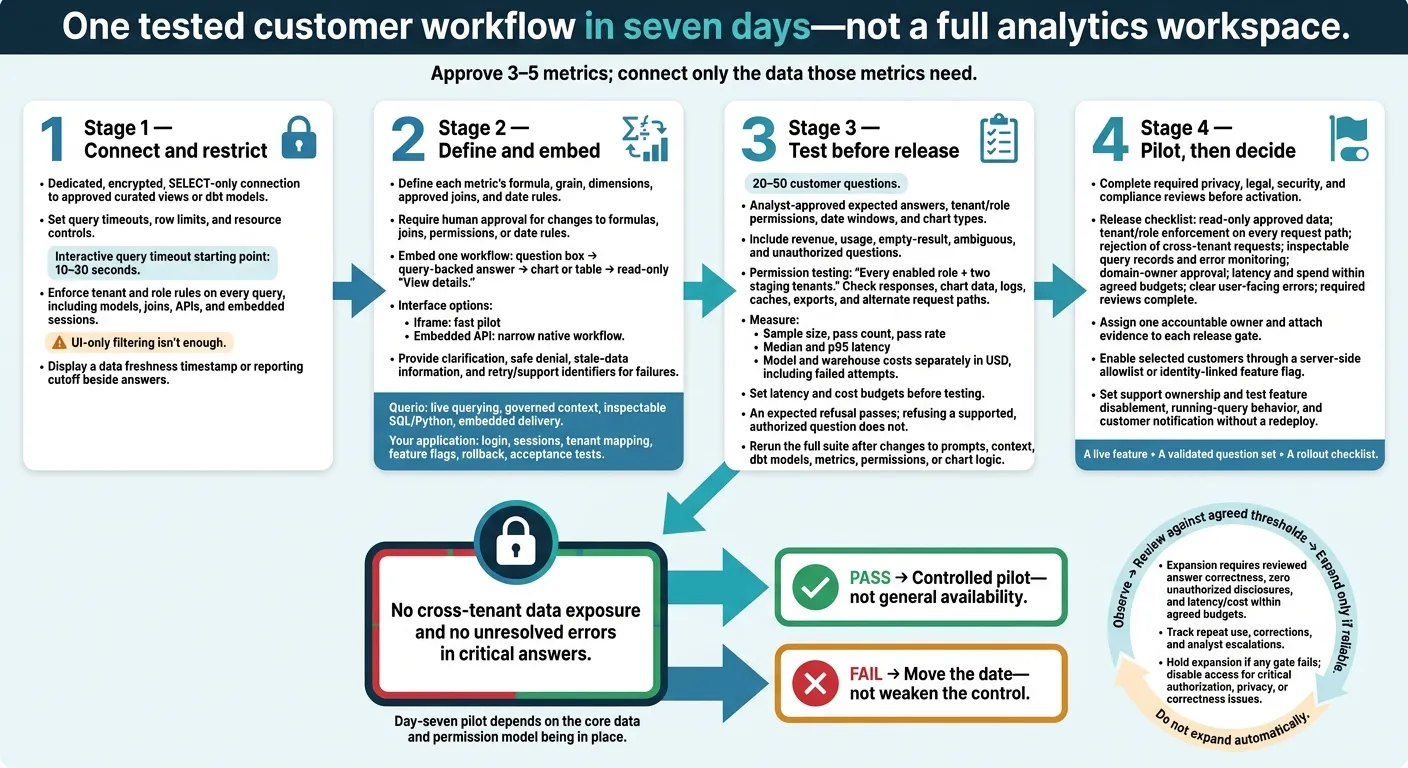 {AI Analytics SaaS Pilot: The One-Week Workflow}
:::
{AI Analytics SaaS Pilot: The One-Week Workflow}
:::
Connect Data and Enforce Access
Connect Only the Required Data
Expose only approved curated views or dbt models through a dedicated, encrypted, SELECT-only connection. Set query timeouts, row limits, and resource controls. For interactive analytics, 10–30 seconds is a practical starting point. Snowflake supports statement timeouts and resource monitors.[4][6][8]
Live warehouse access removes the need for CSV exports, but upstream delays still affect the data. Display a data freshness timestamp or reporting cutoff beside each answer so customers know which events it includes.
Then enforce tenant and role rules on every query within that limited data scope.
Enforce Tenant and Role Rules on Every Query
Apply restrictions across models, joins, APIs, and embedded sessions - not just charts. Use the verified session context established above. In pooled SaaS architectures, apply PostgreSQL row-level security to all tenant tables.[9]
| Enforcement point | Strengths | Failure modes | Suitability for generated queries |
|---|---|---|---|
| Application-layer filtering | Uses existing identity and role mappings | Missed predicates or alternate endpoints can expose rows | Insufficient alone |
| Warehouse row-level security or restricted views | Restricts rows during execution | Privileged credentials or incomplete policies can bypass controls | Strong foundation; test execution identity |
| Semantic-layer security | Limits models, metrics, dimensions, and joins | Incomplete rules can broaden access | Complements warehouse enforcement |
UI-only filtering isn't enough. Test both denied and permitted requests, including cross-tenant joins and revoked sessions. Log verified identity, tenant, normalized SQL, applied policies, status, latency, and row counts. Keep sensitive values, raw prompts, and full results out of logs.
With access controls in place, define the metric rules before building self-serve analytics and embedding the experience.
Define Metrics, Joins, and Reporting Dates
Document each metric’s formula, grain, dimensions, approved joins, and date rules. Spell out how to handle refunds, cancellations, nulls, late-arriving data, time zones, and inclusive or exclusive boundaries. Add dbt documentation and tests for keys, relationships, accepted values, and data freshness.[2][5][7]
Store these definitions in Querio’s editable SQL and Python context files so generated queries follow approved definitions. Sync the files with GitHub and dbt, and require human approval for any change to a formula, join, permission rule, or date rule.[1][3]
The embedded Q&A layer should use the fixed schema, permissions, and metric rules to map questions to governed answers.
Embed Questions, Answers, and Charts
Choose an Embedding Method
With governed metrics and tenant rules defined, choose the simplest interface that can deliver them.
Ship one customer workflow, not a full analytics workspace. For week one, provide a question box, a query-backed answer, one chart or table, and limited inspection details. Querio offers iframe delivery for its Explore interface and an Embedded API for custom interfaces, conversations, follow-up turns, and chart or table assets.[10][13] Use only documented embed methods.
| Method | Build effort | Interface control | One-week fit |
|---|---|---|---|
| Iframe | Lowest | Available embed settings | Fast pilot |
| Embedded API | Moderate | Custom question flow, answers, and errors | Narrow native workflow |
| Headless API | Highest | Full custom build | Only for teams already planning a custom front end |
How you pass authenticated context and restrict access matters more than the embed method. Before building, verify authentication, tenant rules, and branding controls. Treat iframe tokens as secrets: they grant workspace and data-source access.[10]
Show Query Details and Handle Failures
Add a “View details” panel showing the interpreted question, metric definition, filters, reporting date, data refresh time, and query ID. Show SQL only if it’s approved for customers. Keep it read-only, with no credentials, connection strings, unrestricted schema metadata, or hidden tenant predicates.
Handle unclear questions and failures with direct next steps:
- Ask for clarification when a question is ambiguous, and suggest supported metrics when a definition is missing.
- Hide restricted values when access is denied.
- Show the last refresh time for stale data.
- For failed queries, provide a retry action and a support ID or query ID.
Keep trend descriptions separate from causal claims the data can’t support. Preserve the original question and follow-up context so users can adjust dates or filters without starting over.[13]
These details should match the query IDs and data refresh checks used in test runs.
Separate Querio and Application Responsibilities
Querio handles live querying, governed context, inspectable SQL/Python, and embedded delivery.[10][11][12][13] Your application handles login, session management, tenant mapping, feature flags, rollback, and acceptance tests.
Resolve tenant identity server-side before sending each question to the embedded analytics layer. This split keeps the release small and speeds up testing. Use it to test answers, failures, and latency in the next step.
Test Answers and Measure Results
Test 20–50 Customer Questions
Once the embedded workflow is live, test it with real customer questions before release.
Use a versioned set of 20–50 customer questions from support tickets, sales calls, onboarding sessions, and interviews. Have an analyst approve the expected values, metric definitions, authorized tenant and role, date windows, and chart types. Include revenue, usage, empty-result, ambiguous, and unauthorized questions across roles and tenants. Judge the returned value and its business interpretation - not the SQL text. Different queries can produce the same correct answer, while valid SQL can still double-count revenue.[19][21][22]
For each case, log the query ID, SQL, parameters, row count, chart type, and reviewer notes. Compare date boundaries, aggregation grain, join behavior, assumptions, and numerical tolerance against approved reference queries.
Test permissions across every enabled role and two staging tenants. Try changing tenant IDs, account IDs, URL parameters, request headers, saved-question identifiers, and background-job inputs. Also test cache-key reuse and export requests. Inspect returned rows, chart data, logs, cached responses, and downloadable files - not just the answer on screen. Any cross-tenant or restricted-field exposure blocks release.[14][15][16][17]
Use this same test set to measure answer quality and system performance.
Measure Accuracy, Latency, and Query Cost
After functional testing, score the release on quality, speed, and cost.
Report the sample size, pass count, and pass rate. Include judgments for metric correctness, filters, dates, grain, joins, chart fit, explanation, and safe refusal. Break down minor and major corrections, failures, correct refusals, and incorrect refusals by tenant, role, and question category. An expected refusal passes; refusing a supported, authorized question does not. Save the dataset timestamp, warehouse, model and prompt versions, and reviewer process so others can reproduce the results.[20][23]
Measure median and p95 latency, warehouse execution time, timeouts, and retries. State the concurrency and cache conditions. Report model and warehouse costs separately in USD, including failed attempts. Use provider rates from the test period - latency is not a substitute for cost. For BigQuery, record bytes scanned. For Snowflake, record the warehouse’s reported query credits. Set latency and cost budgets before testing.
Rerun the full suite whenever prompts, context, dbt models, metrics, permissions, or chart logic change. Use these results to decide whether the release is ready for selected pilot customers. Do not launch with fabricated values or unresolved errors in critical revenue and usage questions.[18][20][23]
Launch to Selected Customers
Treat day seven as a controlled pilot, not a full launch, provided the core data and permission model is in place. Give a small customer group query-backed answers to validated customer questions. Confirm three outputs: a live feature, a validated question set, and a rollout checklist. Decide whether to go live using the same accuracy, latency, and cost thresholds used in testing.
Complete the Release Checklist
Once the pilot scope is fixed, use a short pass/fail checklist to approve launch. Assign one accountable owner and attach evidence to each gate:
- Read-only access to approved data.
- Tenant and role enforcement on every request path.
- Rejection of cross-tenant requests.
- Query records available for inspection and error monitoring.
- Domain-owner approval.
- Latency and spend within agreed budgets.
- Clear, user-facing error states.
- Required privacy, legal, security, and compliance review.
Complete required reviews before exposing healthcare or financial data.
Invite customers whose data and use case fit the scope, ideally with a named pilot reviewer. Enable access through a server-side allowlist or feature flag tied to customer and user identity. Record the customer group, activation date, responsible owner, and support owner.
Test who can disable the feature, what happens to running queries, and how customers will be notified - all without a redeploy.
Set Criteria for Expanding the Feature
After launch approval, define the gates for expansion.
| Work item | Expansion gate | Accountable owner |
|---|---|---|
| Additional metrics and chart types | Approved definitions and passing answer and chart tests | Product and analytics |
| Scheduled anomaly reviews | Stable metrics, validated thresholds, and a named review owner | Data/product analytics |
| Additional interfaces | Reliable query-backed answers and tested interface-specific access controls | Product/platform |
Before activation, set an observation period and review date. Do not expand automatically. Require answers to keep matching reviewed answers, zero unauthorized disclosures, and latency and cost within agreed budgets. Track repeat use, corrections, and analyst escalations.
Hold expansion if any gate fails. Disable access for a critical authorization, privacy, or correctness issue. After the pilot period, review results against the agreed thresholds; expand only when the pilot shows the first use case is reliable.
FAQs
::: faq
What prerequisites make a one-week pilot realistic?
A one-week pilot needs clean, well-modeled data and established governance before it starts. That means having:
- Read-only access to Snowflake, BigQuery, Redshift, or Postgres.
- A dbt project or equivalent semantic layer that defines core metrics, joins, and business logic.
- Preconfigured row-level security (RLS) rules to keep tenants’ data separate.
- Stakeholder-approved KPIs to keep the scope from drifting.
These prerequisites let AI reliably connect natural-language questions to accurate data while following governance rules. Without them, it can’t do that reliably. :::
::: faq
How do we prevent prompt injection from exposing customer data?
Treat all LLM-generated content as untrusted, and enforce security directly in the warehouse. Use input guardrails to block commands users aren’t allowed to run. Use output guardrails to scan for sensitive information before users see the results.
Never execute raw SQL from the LLM. Instead, extract parameters and pass them into pre-audited, hard-coded SQL templates. Run every query under the end user’s effective warehouse role. Apply native row-level security and tenant-specific filters so users can access only their own data. :::
::: faq
How should we set accuracy thresholds for critical metrics?
Start with a governed semantic layer as your single source of truth. Define KPIs, such as MRR or churn, once in your warehouse or dbt models so their definitions don’t drift.
Before granting users access, have analysts test AI-generated answers against trusted reports or dashboards using approved baseline questions. Check the underlying SQL and fix unclear joins, filters, or logic until the answers consistently match. Then approve the baseline for more users. :::