Guide
SQL Join Where Clause: How Filters Change Your Results
Learn how the SQL join where clause behaves across inner and outer joins, why ON vs WHERE matters, and how to avoid silent NULL-filtering bugs in real queries.

A junior analyst starts with a sensible reporting request: list every customer, then show orders created after a reporting cutoff. The first LEFT JOIN returns customers with no matching order as rows containing NULL. Then the analyst adds WHERE orders.created_at > '2024-01-01', refreshes the dashboard, and notices that inactive customers have disappeared.
Nothing is wrong with the database. The query changed meaning.
The difference between a SQL JOIN ... ON condition and a WHERE condition is often taught as a formatting preference. For INNER JOIN, that advice is usually practical because modern optimizers treat equivalent predicates similarly. For outer joins, though, filter placement is a semantic fork. One placement preserves unmatched rows, while the other can remove them after the join has created them.
Table of Contents
- The Moment Your Outer Join Stops Behaving Like an Outer Join
- How INNER JOINs Treat WHERE and ON as the Same Predicate
- Outer Joins and the Filter Placement Problem
- Reading a Filter Placement Table
- NULL Handling and Three-Valued Logic in Join Filters
- How Modern Data Warehouses Optimize These Predicates
- Best Practices for Data Teams Using Self-Serve Analytics
- Common Questions About SQL Join Where Clause Behavior
The Moment Your Outer Join Stops Behaving Like an Outer Join
Start with the relationship:
SELECT
    c.customer_id,
    c.customer_name,
    o.order_id,
    o.created_at
FROM customers AS c
LEFT JOIN orders AS o
    ON o.customer_id = c.customer_id;
A LEFT JOIN preserves every row from the table on the left, which is the preserved side. If a customer has no matching order, the query still returns that customer, but columns from orders are filled with NULL.
That behavior changes when the filter is added in WHERE:
SELECT
    c.customer_id,
    c.customer_name,
    o.order_id,
    o.created_at
FROM customers AS c
LEFT JOIN orders AS o
    ON o.customer_id = c.customer_id
WHERE o.created_at > '2024-01-01';
For an unmatched customer, o.created_at is NULL. The expression NULL > '2024-01-01' doesn't evaluate to TRUE, so the WHERE clause removes that row. The query still contains the words LEFT JOIN, but its result now behaves like an inner join for this condition. Snowflake's WHERE documentation describes the same principle: a predicate that evaluates to NULL filters the row out.
The safer version places the right-side restriction inside ON:
SELECT
    c.customer_id,
    c.customer_name,
    o.order_id,
    o.created_at
FROM customers AS c
LEFT JOIN orders AS o
    ON o.customer_id = c.customer_id
   AND o.created_at > '2024-01-01';
Here, the date condition limits which orders qualify as matches. It doesn't remove customers that have no qualifying order. The customer remains, with NULL order fields.
Practical rule:
ONcontrols the match.WHEREcontrols which joined rows survive.
That rule is more reliable than “put joins in ON and filters in WHERE.” For inner joins, the distinction often disappears after optimization. For outer joins, it determines whether unmatched rows remain visible, which is why a reporting query can look structurally correct while producing the wrong population.
How INNER JOINs Treat WHERE and ON as the Same Predicate
Consider these two queries:
SELECT
    c.customer_id,
    o.order_id
FROM customers AS c
INNER JOIN orders AS o
    ON o.customer_id = c.customer_id
   AND o.created_at > '2024-01-01';
SELECT
c.customer_id,
o.order_id
FROM customers AS c
INNER JOIN orders AS o
ON o.customer_id = c.customer_id
WHERE o.created_at > '2024-01-01';For an INNER JOIN, both queries return the same qualifying customer-order pairs, assuming the predicates are logically equivalent. An unmatched customer is already excluded by the inner join, so there isn't an outer row to preserve before the date condition is applied.
The optimizer can represent the date restriction as a scan filter, a join predicate, or both, depending on the engine and plan. Microsoft explains that SQL Server's optimizer chooses join order and physical join method, and can apply transformations such as semi-joins and anti-semi joins that aren't written directly in the SQL text. Microsoft's join documentation supports the broader point: the written clause placement isn't a literal instruction to execute every expression in textual order.
The logical model still matters
SQL is easier to reason about if you separate the conceptual stages:
FROMidentifies the starting relation.JOIN ... ONforms matching row combinations.WHEREremoves rows whose predicate isn'tTRUE.- Projection and aggregation shape the output.
That isn't a promise about the physical execution plan. It is a reasoning tool. In an inner join, rows that fail the relationship are discarded anyway, so a filter on the joined table generally reaches the same final set whether it appears in ON or WHERE.
A plan may show the date restriction pushed into the orders scan before the join. That doesn't contradict the SQL semantics. The optimizer has recognized that moving the predicate is safe for this join type.
| Filter Placement | Query Snippet | Rows Before Filter | Final Row Count |
|---|---|---|---|
ON |
ON o.customer_id = c.customer_id AND o.created_at > '2024-01-01' |
Matching customer-order pairs | Same qualifying pairs |
WHERE |
ON o.customer_id = c.customer_id WHERE o.created_at > '2024-01-01' |
Matching customer-order pairs | Same qualifying pairs |
For inner joins, choose the placement that makes the query easiest for your team to read. Some teams keep relationship predicates in ON and row restrictions in WHERE; others group selective conditions with the join. Either convention can work. The important exception is the outer join, where preserving unmatched rows is part of the query's meaning.
Outer Joins and the Filter Placement Problem
Use a small dataset:
customers
| customer_id | customer_name | status |
|---|---|---|
| 1 | Ava | active |
| 2 | Ben | churned |
orders
| order_id | customer_id | created_at |
|---|---|---|
| 101 | 1 | 2024-02-10 |
Ben has no order after the reporting cutoff. Compare the following forms.
Filter inside the ON clause
SELECT c.customer_id, c.status, o.order_id, o.created_at
FROM customers AS c
LEFT JOIN orders AS o
    ON o.customer_id = c.customer_id
   AND o.created_at > '2024-01-01';
Result:
| customer_id | status | order_id | created_at |
|---|---|---|---|
| 1 | active | 101 | 2024-02-10 |
| 2 | churned | NULL |
NULL |
Ben remains because the date condition determines whether an order matches. It doesn't determine whether the customer survives.
Filter on the right side in WHERE
SELECT c.customer_id, c.status, o.order_id, o.created_at
FROM customers AS c
LEFT JOIN orders AS o
    ON o.customer_id = c.customer_id
WHERE o.created_at > '2024-01-01';
Result:
| customer_id | status | order_id | created_at |
|---|---|---|---|
| 1 | active | 101 | 2024-02-10 |
For Ben, the right-side date is NULL. The predicate isn't TRUE, so WHERE removes the null-extended row. Sybase documents this outcome as a restriction on the null-supplying table in WHERE that is usually equivalent to an inner join. This is the silent inner join bug.
The same reasoning applies to RIGHT JOIN and FULL OUTER JOIN. Identify which side supplies NULL values for an unmatched row. A WHERE predicate against that side can eliminate those rows. A filter on the preserved side has a different effect because it intentionally limits the rows that enter the preserved relation.
For a broader grounding in relational relationships, see relationships in relational databases.
| Filter Placement | Active Customer Row | Churned Customer Row | Final Row Count |
|---|---|---|---|
Right-side filter in ON |
Preserved with order | Preserved with NULL order fields |
Both customers |
Right-side filter in WHERE |
Preserved with order | Removed because the predicate isn't TRUE |
Active customer only |
| No date filter | Preserved with order | Preserved with NULL order fields |
Both customers |
Before changing a LEFT JOIN, ask what the report promises. If it promises a complete customer population, right-side predicates generally belong in ON. If it promises only customers with qualifying orders, an inner join or an intentional WHERE filter may express that requirement more clearly.
Reading a Filter Placement Table
Use these reference tables:
customers
| customer_id | region | signup_date |
|---|---|---|
| 1 | East | 2024-01-10 |
| 2 | East | 2023-11-15 |
| 3 | West | 2024-02-01 |
| 4 | West | 2023-09-20 |
| 5 | North | 2024-03-05 |
orders
| order_id | customer_id | status | amount |
|---|---|---|---|
| 201 | 1 | paid | 80 |
| 202 | 1 | pending | 40 |
| 203 | 2 | paid | 120 |
| 204 | 4 | cancelled | 60 |
Assume the base query is:
SELECT c.customer_id, c.region, o.order_id, o.status, o.amount
FROM customers AS c
LEFT JOIN orders AS o
    ON o.customer_id = c.customer_id;
Customer 3 and customer 5 have no orders, so they appear with NULL order fields. The location of each additional predicate changes whether those customers stay visible.
| Filter Placement | Predicate Location | Rows Returned | NULLs from Right Side? | Effective Join Type |
|---|---|---|---|---|
| Region restriction | ON |
All customers, with nonmatching regions null-extended | Yes | Still outer |
| Region restriction | WHERE |
Only customers in the selected region | Possibly | Outer join with left-side population restricted |
| Order status restriction | ON |
All customers, only matching orders attached | Yes | Still outer |
| Order status restriction | WHERE |
Customers with qualifying orders only | No for removed unmatched rows | Inner-like for the right-side predicate |
Suppose the predicate is c.region = 'East'. Placing it in WHERE intentionally removes West and North customers. Placing it in ON doesn't remove them from a LEFT JOIN; it prevents them from finding a matching right-side row, so they remain with NULL order columns.
Now change the predicate to o.status = 'paid'. In ON, customer 1 keeps only order 201, customer 2 keeps order 203, and customers without paid orders remain. In WHERE, customers 3 and 5 disappear because their right-side status is NULL, and customer 4 disappears because cancelled isn't paid.
The quickest way to understand a join bug is to mark the preserved rows before evaluating the final
WHEREclause.
This table-reading habit is more useful than memorizing a slogan. Label each table as preserved or null-supplying, then ask whether the predicate runs while matches are being formed or after null extension has occurred.
NULL Handling and Three-Valued Logic in Join Filters
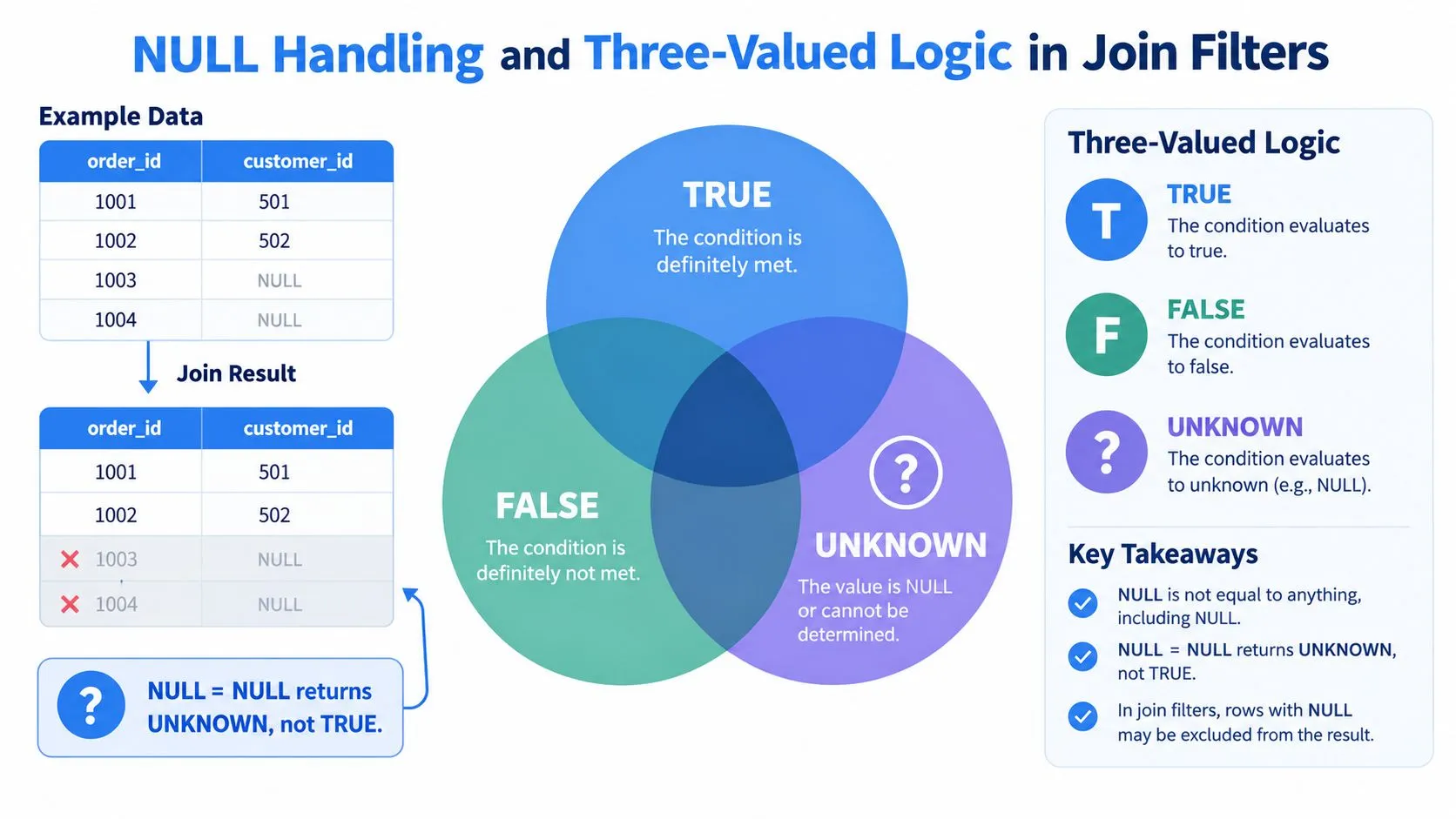
SQL predicates don't produce only TRUE and FALSE. They can also produce UNKNOWN, which is what happens when a comparison depends on NULL.
For example:
SELECT *
FROM left_events AS l
JOIN right_events AS r
    ON l.customer_id = r.customer_id;
If both l.customer_id and r.customer_id are NULL, the expression l.customer_id = r.customer_id returns UNKNOWN, not TRUE. Ordinary equality doesn't treat two missing values as equal. Because an inner join keeps only rows where the join condition is true, those rows don't match.
The same issue appears in filters:
WHERE o.customer_id <> 42For a row where o.customer_id is NULL, the comparison is UNKNOWN, so the row is removed. IN and NOT IN can create even more confusing results when a subquery contains a NULL.
Use explicit NULL logic
When you want to find customers without orders, this pattern is clear:
SELECT c.customer_id
FROM customers AS c
LEFT JOIN orders AS o
    ON o.customer_id = c.customer_id
WHERE o.customer_id IS NULL;
The IS NULL predicate explicitly asks whether the outer join produced no right-side match. It doesn't rely on = or <>, so the intention is visible.
For a correlated anti-join, NOT EXISTS is often easier to audit:
SELECT c.customer_id
FROM customers AS c
WHERE NOT EXISTS (
    SELECT 1
    FROM orders AS o
    WHERE o.customer_id = c.customer_id
);
If your engine supports IS NOT DISTINCT FROM, it can express null-safe equality directly:
ON l.customer_id IS NOT DISTINCT FROM r.customer_idCheck your warehouse's syntax before using it, because null-safe comparison operators vary across SQL dialects. The practical point is consistent: use an operator that states whether NULL should match NULL.
For a focused explanation of conditional behavior around missing values, see SQL IF and NULL handling.
The following video provides another visual treatment of join filters and null behavior:
How Modern Data Warehouses Optimize These Predicates
Modern engines don't execute SQL by following the text from top to bottom. They build a logical and physical plan, estimate cardinalities, choose join methods, and move predicates when the rewrite preserves semantics. For inner joins, that flexibility usually makes equivalent ON and WHERE predicates interchangeable, as Microsoft describes for SQL Server's optimizer behavior in its documentation on joins and query processing.
Outer joins constrain those rewrites. A warehouse can't push a right-side WHERE predicate through a LEFT JOIN as if unmatched rows didn't matter unless it also recognizes that the predicate makes those rows impossible to retain. In that case, the plan may legitimately show an inner join because the SQL itself has made the outer preservation irrelevant.
Read the plan, not only the query text
Snowflake, BigQuery, Redshift, and Postgres all optimize queries, but their plan interfaces and physical strategies differ. A distributed warehouse may move data between workers to align join keys, while Postgres may choose among local scan and join strategies using planner statistics. You shouldn't assume that the same textual placement produces the same physical operations across engines.
Use an execution plan to inspect:
- Join type: Does the plan still show a left, right, or full outer join?
- Filter location: Is the predicate applied during a scan, at the join, or above the join?
- Estimated versus actual rows: Does the estimate diverge sharply from observed output?
- Null-preserving behavior: Are unmatched rows still present at the operator where you expect them?
- Join order: Did the optimizer reorder inner joins or preserve an outer-join boundary?
A filter can move physically without changing the result. That is a valid optimization. A filter on the null-supplying side can also expose that the written query no longer needs outer semantics, which is a result of the predicate's meaning rather than a failure to honor LEFT JOIN.
Teams troubleshooting complex reports can use a structured review of query optimization techniques, but the final check remains concrete: compare the plan's join type and row flow with the business requirement. Don't infer correctness from a predicate appearing in the clause where you originally wrote it.
Best Practices for Data Teams Using Self-Serve Analytics
A team needs a rule set that survives handoffs, dashboard builders, and generated SQL. Start with the data model, then make preservation intent explicit in the query.
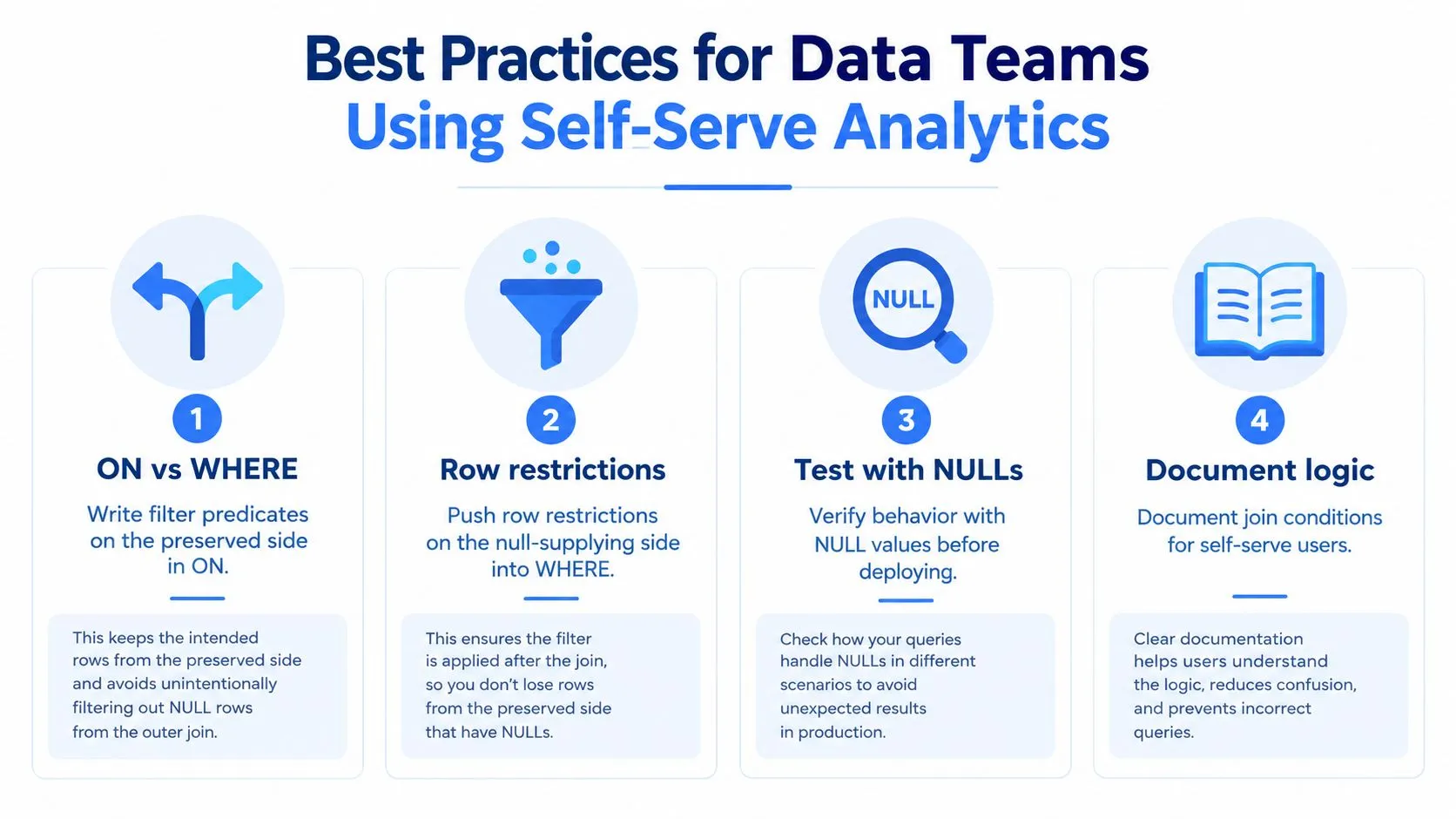
Four habits prevent most placement bugs
-
State the relationship in
ON: Keep key relationships such aso.customer_id = c.customer_ideasy to identify. If a right-side restriction must preserve customers with no qualifying order, add that restriction to the sameONexpression. -
Use
WHEREdeliberately: A condition such aso.status = 'paid'inWHEREsays that rows without a qualifying order shouldn't survive. That may be correct, but it should be an intentional population decision. -
Probe anti-joins with
IS NULL: If the requirement is “customers with no matching order,” useLEFT JOIN ... WHERE o.customer_id IS NULLorNOT EXISTS. Don't replace that intent with a nullable equality test. -
Document generated logic: A self-serve user may see a friendly question while the platform creates SQL with joins, dimensions, and filters. The query should make preserved populations and exclusion rules inspectable.
BI and notebook products can also append filters outside the SQL block an analyst originally wrote. Looker explores, Mode reports, Hex notebooks, and Sigma workbooks may expose different layers of generated or user-authored logic, so a harmless-looking dashboard filter can affect an outer join after the join has been formed.
A data team can reduce that risk with lightweight controls:
- Add a lint rule that flags
WHEREpredicates referencing the null-supplying side of an outer join. - Require reviewers to name the preserved table in reporting queries.
- Test a customer or entity with no matching fact row.
- Test a matching fact row that fails the right-side filter.
- Compare the report's entity population with the base table before release.
Self-service data analytics works best when users can explore without hiding semantic decisions. Querio can generate SQL from plain-English questions against live warehouse connections, including queries with joins and filters, so teams should review the generated join semantics just as they review handwritten SQL. The tool can be one part of a governed workflow, alongside tests and query review.
Common Questions About SQL Join Where Clause Behavior
How can I detect a silent inner join?
Compare the preserved table's population with the final result. Run the base table count, then run the outer join without filters, and finally add the complete WHERE clause. If entities with no right-side match vanish only after the filter appears, inspect every predicate that references the null-supplying table.
COUNT(*) helps show total joined rows, while COUNT(DISTINCT c.customer_id) helps show whether the preserved entity population changed. The diagnostic is especially useful in legacy reporting SQL where several outer joins and dashboard-generated filters interact.
What changes with USING instead of ON?
USING (customer_id) expresses an equality relationship on a same-named column and returns one shared join column instead of separate copies. That can make projections shorter, but it can also hide which table a later condition references. ON is more explicit, especially when several tables share names or when the relationship includes additional conditions.
WHERE still filters the result after the join. USING doesn't protect unmatched rows from a right-side predicate placed in WHERE.
Which anti-join pattern should I choose?
| Pattern | NULL Handling | Readability | Typical Use |
|---|---|---|---|
NOT EXISTS |
Safer for nullable subquery data | Explicit relationship test | Correlated exclusion |
LEFT JOIN ... IS NULL |
Clear when the join key is tested with IS NULL |
Familiar to many analysts | Find unmatched dimension rows |
NOT IN |
Sensitive to NULL values in the subquery |
Compact but easy to misread | Use only when nullability is controlled |
NOT EXISTS and LEFT JOIN ... IS NULL make the anti-match intention visible. NOT IN deserves extra scrutiny because a NULL in the subquery can make the predicate evaluate as UNKNOWN rather than producing the expected exclusions.
Does moving a filter change performance?
It can change the physical plan, but not necessarily the result for an inner join. Optimizers commonly push safe predicates toward scans or joins and may reorder inner joins. For outer joins, semantic constraints limit movement, and a right-side WHERE predicate may make an outer join effectively inner.
Use EXPLAIN or your warehouse's query profile to verify the actual join type, filter location, and row flow. Performance tuning should follow semantic correctness, not replace it.
Your team can apply these checks manually in code review, or use Querio to generate and inspect warehouse SQL while preserving the reasoning behind joins and filters. Visit Querio to see how its self-serve workflow can help analysts explore live data without turning the data team into a permanent SQL help desk.