Business Intelligence
Zenlytic vs Querio: Semantic AI Analytics Compared
Contrast managed AI delivery with inspectable, Git-owned analytics to evaluate semantic layers, SQL visibility, permissions, and POC tests.

If I need governed analytics that my team can inspect line by line, I’d pick Querio. If I want a managed AI analyst that delivers decks, spreadsheets, and chat answers to business users, I’d look at Zenlytic.
Here’s the short version:
- Querio fits teams that want open SQL and Python, Git-owned metric logic, and live warehouse queries
- Zenlytic fits teams that want packaged answers through Zoë with a Git-managed semantic layer
- The main choice is not feature count. It’s how your team works every day
- For small data teams - often 1 to 5 people - the review path matters just as much as the answer itself
- A wrong KPI can still look fine on the surface, so I’d test SaaS metrics like NRR and CAC, gross margin, permissions, and SQL review before buying
If I boil the article down to one point, it’s this: Zenlytic centers on managed delivery, while Querio centers on inspectable analysis. That difference shows up in context ownership, SQL visibility, permissions, and how fast someone can check a number when it looks off.
What I’d compare first:
- Semantic layer depth: can users stay inside approved metric logic?
- Context ownership: does the team keep definitions in Git?
- Explainability: can I see the SQL and why it ran?
- Live warehouse access: does it query current data or copied data?
- Self-serve safety: can business users ask questions without bypassing access rules?
- Team load after changes: what happens when schemas or KPI rules shift?
Zenlytic Demo // Modern Conversational AI-powered Business Intelligence Platform | Demohub.dev
::: @iframe https://www.youtube.com/embed/oIKNBaIVNo4 :::
Quick Comparison
| Criteria | Zenlytic | Querio |
|---|---|---|
| Best fit | Business users and execs | Analysts and governed self-serve teams |
| Main output | Decks, reports, spreadsheets, Slack/Teams replies | Reactive notebooks with SQL and Python |
| Context layer | Clarity Engine | SQL, Markdown, and Python files in GitHub |
| SQL review | Available for review | Open and editable by default |
| Data access | Warehouse-backed | Live, read-only warehouse queries |
| Permissions | Platform-managed row and column controls | Warehouse permissions passed through user OAuth |
| Audit path | PR-based review flow | Open notebook with recompute path |
| Main tradeoff | Easier packaged delivery | More direct inspection and control |
One detail stands out in the article: when the same finance question is asked - like Q2 2026 vs. Q2 2025 NRR for U.S. mid-market customers - the gap is less about answer generation and more about how easily the team can verify the result.
That’s the frame I’d use as I read the rest: Which tool gives you the answer style, review path, and ownership model your team can live with?
Zenlytic: managed AI analyst with governed semantic context
Zenlytic uses Zoë, a managed AI analyst, to turn plain-English questions into answers backed by your warehouse. Instead of stopping at a query result, Zoë delivers packaged outputs like reports, slide decks, spreadsheets, and replies in Slack or Teams.
At the center of this setup is Clarity Engine, a Git-managed semantic layer that reuses dbt or LookML definitions and keeps joins and metric logic in one place. Define them once, then use them across queries. Zenlytic also applies row-level and column-level permissions on its own, so people only see the data they’re allowed to see. And every answer comes with citations and lineage, which makes it possible to trace a result back to the source tables and metric definitions.
The product leans toward managed, packaged answers instead of fully inspectable analysis.
Where Zenlytic is strongest
Zenlytic connects straight to Snowflake, BigQuery, Amazon Redshift, and Databricks. Zoë works in two modes: Default Mode, which uses only verified fields from the semantic layer, and Exploratory Mode, which allows on-the-fly fields for metrics that haven’t been formally defined yet.
That leads to the main practical question: how does this managed model change day-to-day analysis for business users and data teams?
| Feature | Zenlytic Approach |
|---|---|
| Primary audience | Executives and business stakeholders |
| Canonical output | Reports, slide decks, spreadsheets, Slack/Teams replies |
| Governance layer | Clarity Engine (Git-managed, dbt/LookML integrated) |
| Security | Automatic enforcement of row-level and column-level permissions |
| Transparency | Full data lineage and citations for every result |
This setup makes sense for teams that want business users to get packaged answers instead of digging through raw analysis.
Questions to validate in a proof of concept
The managed AI analyst model tends to work best when the semantic layer is mature and stable. But that’s exactly the kind of thing you should test in a proof of concept, not just assume.
A few checks matter most:
- How editable is the generated logic? Look at how easily an analyst can inspect the workflow and review the SQL when a result seems off.
- What happens when KPI definitions change? Test how much manual work the data team needs to do to realign the AI’s outputs with the current source of truth.
- How portable is the context over time? Check how easily the semantic context can be maintained as schemas and KPI definitions change.
That tradeoff shows up most clearly when a team wants packaged answers for business users but still needs enough governance to trust the numbers.
Querio: inspectable analysis, Git-owned context, and reactive notebooks
Where Zenlytic packages answers for business users, Querio starts from a different idea: every answer should be open to inspection. An analyst should be able to open it, read it, and check it line by line. Querio turns questions from the app, Slack, Teams, or Claude via MCP into inspectable SQL and Python inside a reactive notebook. That notebook recomputes on its own when SQL or Python changes. And that only holds up when the context behind the answer is versioned and easy to review.
Querio stores metric definitions, joins, and trusted queries as SQL, Markdown, and Python files in GitHub next to your dbt project. That setup shapes three parts of the workflow: where context lives, how changes are handled, and how analysis gets reviewed.
| Feature | Querio Approach | Benefit for Data Teams |
|---|---|---|
| Context Storage | Plain SQL, Markdown, and Python files in GitHub | Version control, peer review, and no vendor lock-in |
| Change Management | Agent proposes; human approves and commits | Keeps metric definitions governed and consistent |
| Analysis Surface | Reactive SQL/Python notebooks | Code is inspectable, reusable, and recomputes automatically |
| Audit Trail | Slack and Teams questions open the underlying notebook | Transparency into how an answer was derived |
| Data Access | Live, read-only warehouse connections | No stale extracts or duplicated copies |
How Querio handles governed self-serve on live warehouse data
Governed self-serve works best with live data, not copied data. Querio connects straight to Snowflake, BigQuery, Amazon Redshift, ClickHouse, PostgreSQL, MySQL, MariaDB, Microsoft SQL Server, and MongoDB through encrypted, read-only credentials. There are no CSV exports or extracted copies. Every query runs against live warehouse data, so dashboards and chat answers point to the same source of truth your team already uses.
Permissions move with the user. If someone asks a question in Slack, Teams, or Claude via MCP, OAuth passes that user’s warehouse permissions into the query. That gives teams a clear audit trail instead of a dead-end message sitting in a chat thread.
Why Querio fits small data teams that need auditability
For a 1–5 person data team, Querio cuts down the load of acting as the manual bottleneck for ad hoc questions. Because context lives in GitHub next to your dbt project, a change to a KPI definition can be reviewed like any other code change. That connects straight to the buying question: lower maintenance for production analytics.
If a business user asks for something the data doesn’t support, Querio returns no result instead of making one up. And if a result looks off, an analyst can open the notebook, review the logic, and recompute it on the spot.
Zenlytic vs Querio: side-by-side comparison
::: @figure 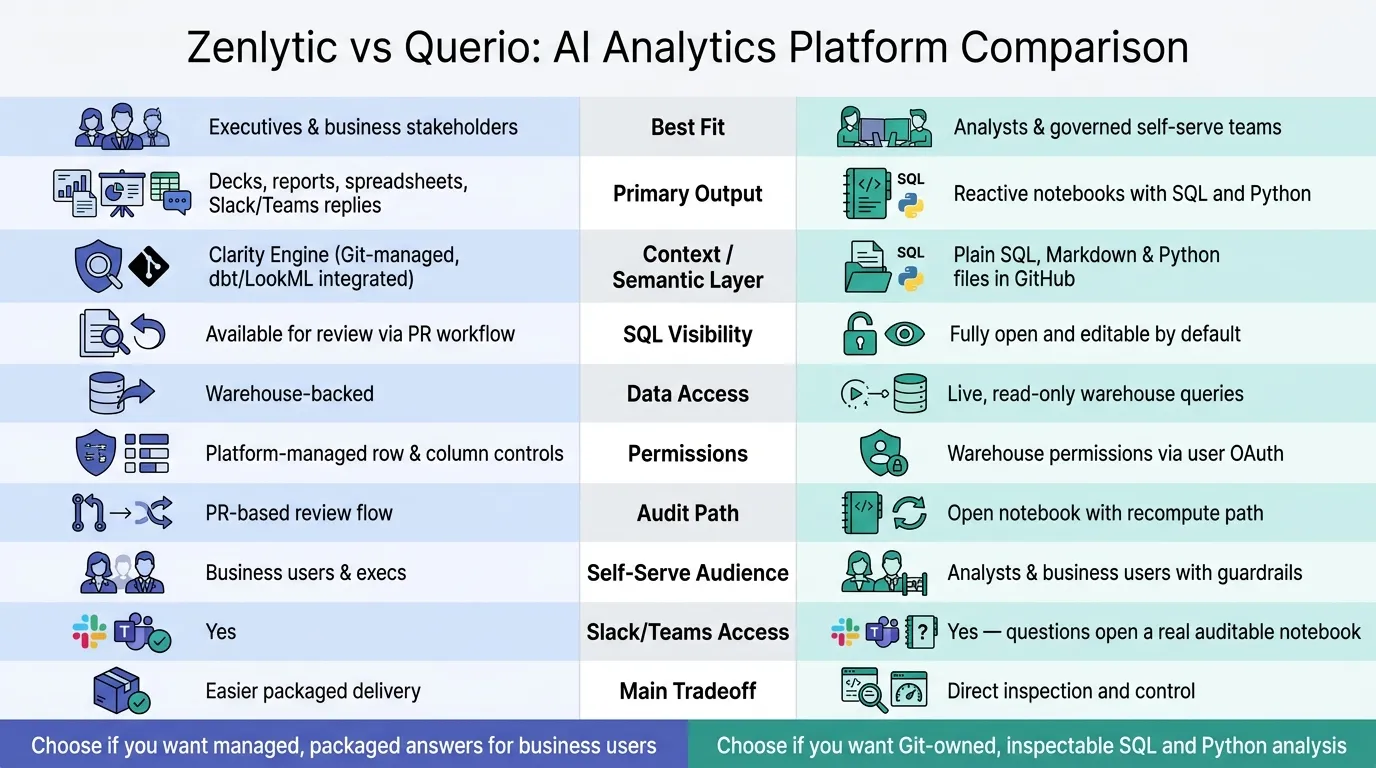 {Zenlytic vs Querio: AI Analytics Platform Comparison}
:::
{Zenlytic vs Querio: AI Analytics Platform Comparison}
:::
Zenlytic and Querio both aim to give teams answers they can trust on governed data. The split is in how they do it. Zenlytic leans toward packaged delivery. Querio leans toward SQL and Python that you can open, check, and edit. That difference shows up pretty fast in day-to-day work.
| Feature | Zenlytic | Querio |
|---|---|---|
| Primary surface | Zoë (Slack, Teams, Email) | Reactive notebook |
| Canonical output | Executive-ready outputs (decks, memos, Excel) | Inspectable SQL and Python |
| semantic / context layer | Clarity Engine (Git-managed semantic layer) | Plain SQL, Markdown, and Python files |
| Context ownership / metric workflow | Git-managed inside Clarity Engine | Plain SQL, Markdown, and Python files in GitHub next to your dbt project |
| SQL visibility | Available for review | Fully inspectable and editable by default |
| Verification path | Review through the PR workflow | Open the notebook, inspect the SQL, and recompute |
| Permissions | Managed within the platform | RBAC plus OAuth keeps agent queries tied to each user's warehouse permissions |
| Slack and Teams access | Yes | Yes; Slack questions open a real notebook with a full audit trail |
| Self-serve audience | Executives and business users | Analysts and business users with governed guardrails |
If a number looks off, this is where the two tools part ways. In Querio, an analyst can open the notebook, look at the SQL, and recompute the answer right there. In Zenlytic, review runs through Clarity Engine's PR workflow, which can fit teams that already work that way in dbt.
You see the contrast even more clearly when both tools handle the same business question.
Same business question test: accuracy, speed, and explainability
To make this concrete, use the same question in both tools and compare metric accuracy, cohort handling, and how fast each answer can be checked.
Take a question a mid-market SaaS finance team might ask: "What was net revenue retention for U.S. mid-market customers in Q2 2026 versus Q2 2025?" This is a good stress test. It checks whether the platform knows your NRR definition, applies the cohort filter the right way, and compares two non-adjacent periods without blending them together.
| Evaluation dimension | Zenlytic (Zoë) | Querio (Agent) |
|---|---|---|
| Metric accuracy | Depends on how NRR is defined in Clarity Engine | Uses the NRR definition stored in your context layer files |
| Cohort and filter correctness | Applied through Zoë's semantic model | Applied through SQL the analyst can verify directly |
| SQL handling | Reviewable in the PR workflow | Visible and editable by default |
| Reproducibility | Tied to the versioned semantic model | Notebook is saved, shareable, and recomputable |
| Context ownership | Managed inside the platform | Managed in your own GitHub repo next to dbt |
The explainability gap gets sharpest when the data is incomplete. Querio answers only from what is actually in the warehouse, and if something isn't there, it says so instead of filling in the blanks. For finance and healthcare teams, that's a big deal when a wrong NRR number could change a board deck or shape a stakeholder review.
The speed difference shows up in the review step. Querio lets the analyst inspect and recompute in the same notebook. Zenlytic sends that review through the PR workflow.
That operating-model choice leads straight into the final recommendation.
Conclusion: which platform fits your team's operating model
Zenlytic fits teams that want managed answers for executives and business users. Querio fits teams that want Git-owned context, inspectable SQL and Python, and governed self-serve on live warehouse data. The best way to judge that tradeoff is simple: run a proof of concept on your own setup.
If you have a small data team, the upkeep gap can matter a lot. Querio keeps context in plain SQL, Markdown, and Python files synced to GitHub in the same repo as your dbt project. That means your team can work where it already works instead of juggling one more closed system.
Self-serve also plays out differently in each product. If someone asks a question in Slack, Querio opens the underlying notebook. So the answer doesn't just sit in chat and vanish into the scroll. It stays auditable outside Slack, where an analyst can check the logic, read the query, and trace how the result was produced.
Buying checklist for data leaders
Before you commit, test both tools on your real data and real questions:
- KPI consistency: Ask both tools for NRR, CAC, or gross margin. Then compare each definition against the one your team has already agreed on.
- SQL inspectability: Open the answer and make sure an analyst can read the SQL and recompute it without filing a ticket.
- Honest gaps: Ask a question your data can't fully answer. See whether the platform says so or starts guessing.
- Permissions in practice: Check that warehouse permissions carry through to agent queries, especially for healthcare or finance data with regulatory exposure.
- Context ownership: Confirm where metric definitions live after you sign the contract and whether your team can version them in Git alongside your dbt project.
- Safe self-serve: Have a non-technical stakeholder use the tool without coaching. Then see whether they get a correct, explainable answer without analyst help.
Deploy the platform that passes these checks on your data, not demo data.
FAQs
::: faq
How should I run a fair proof of concept?
Focus on governance and day-to-day messiness, not a shiny feature rundown. Use 20 real questions from last month, including two that your data can’t answer. Then score each result as correct, wrong, refused, or hedged. If the question is unanswerable, a refusal should count as a pass.
That gives you something much closer to how the system holds up in practice. Not in a demo. In the wild.
For the five most critical questions, go one layer deeper and inspect the SQL or Python behind the answer. You’re checking the logic, the joins, the filters, and the metric math. This is where small mistakes often hide.
Next, change a metric definition and see what happens. Then rerun the full 20-question set two weeks later to confirm the update flows through the system and that accuracy gets better over time. :::
::: faq
What happens when KPI definitions change?
Querio updates the definition across notebooks, dashboards, Slack bots, and API calls because the metric logic lives in one central context layer.
That means you define it once, and Querio uses that same logic everywhere.
Those definitions live as version-controlled SQL, Markdown, and Python files synced to GitHub. So when someone changes the code underneath, that update carries across every surface. The result is simple: metrics stay aligned, and teams are less likely to deal with drift. :::
::: faq
Which setup is better for a small data team?
For a small data team, Querio is the better fit if you want governed self-serve analytics without taking on the extra work of a large semantic-layer project.
It works well for lean teams because it keeps context in SQL, Markdown, and Python in GitHub right next to dbt. It also uses live read-only warehouse connections. And it gives non-technical users AI-driven answers that are backed by editable SQL and Python. :::