Business Intelligence
Snowflake Semantic Layer: Semantic Views, dbt, Git and MCP
Snowflake's semantic layer is the semantic view. How it works, the ways to keep it in git, what happened when we ran the open format's converters, and who can read it.
 Javier BonillaCo-founder & CTO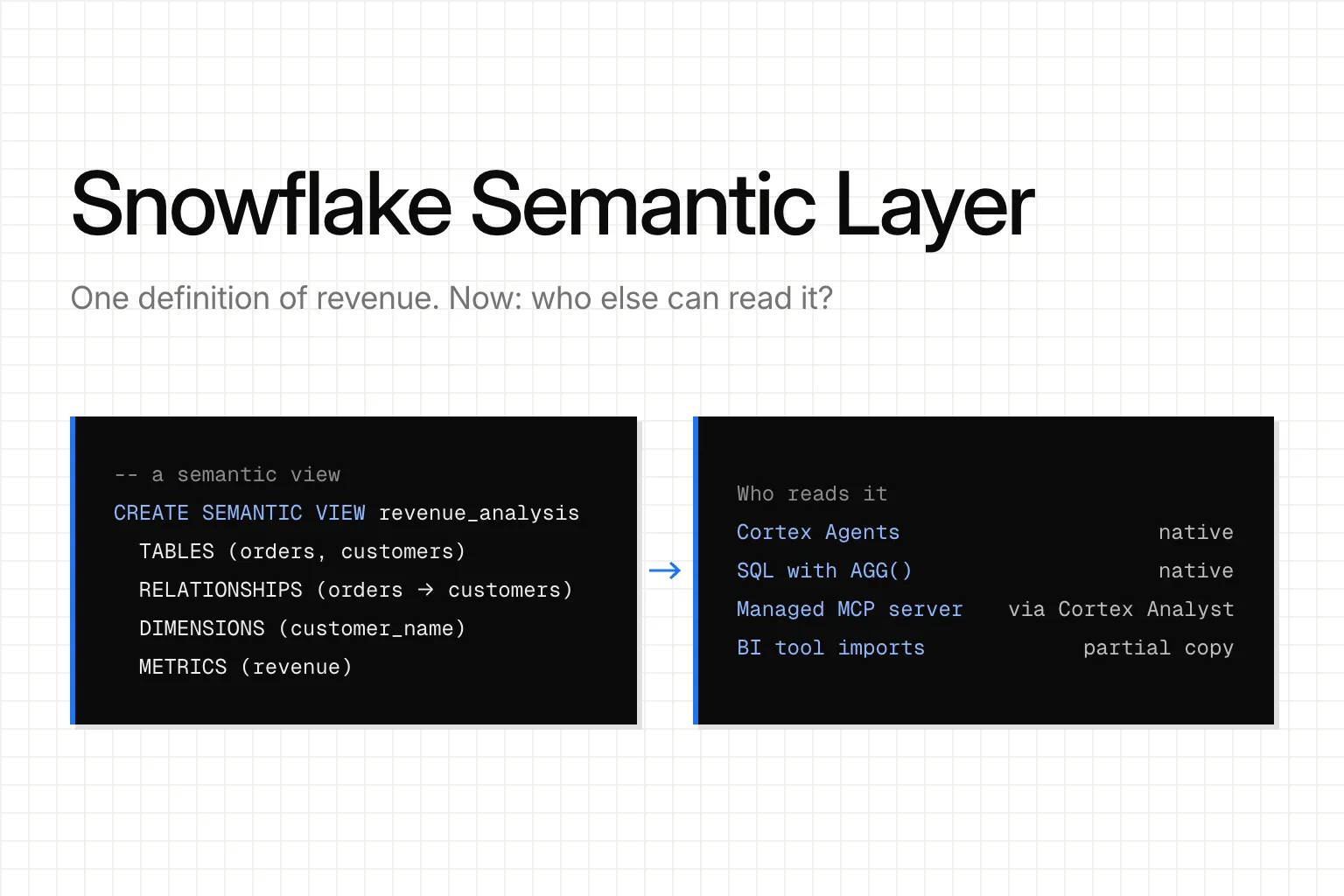
Snowflake's semantic layer is the semantic view: a database object that holds your tables, joins, dimensions and metrics, so Cortex Agents and plain SQL queries use one definition of revenue. The older YAML semantic model files still work, but Snowflake recommends semantic views for all new work, and you can now keep them as files in git.
For anything that runs inside Snowflake, it's a good layer. The harder question is who else has to read it. Your Slack bot, Claude, a BI tool that isn't Snowflake's, a second database: some read the view, some get a partial copy, some can't read it at all. That, not git versus clicking in a UI, decides where your metric definitions should live.
What is the Snowflake semantic layer? Semantic views, defined
A semantic view is a schema-level object, like a table or a regular view. It holds business metrics, business entities and their relationships on top of your physical tables. Here are its five parts, with examples from Snowflake's own TPC-H sample:
| Part | What it holds | Example |
|---|---|---|
| Tables | The physical tables and their primary keys | orders, customers |
| Relationships | How the tables join | orders (o_custkey) REFERENCES customers |
| Facts | Row-level numbers: "how much" or "how many" | Discounted price per line item |
| Dimensions | What you group and filter by | Customer name, order year |
| Metrics | Aggregations across rows | Average order value |
Defining semantic views has been generally available since Snowflake Summit in June 2025. Since March 2, 2026, you can query one with ordinary SQL: name the view in FROM and wrap metrics in AGG(). A role that doesn't own the view needs SELECT on the semantic view only, not on the tables under it.
-- Abridged from Snowflake's CREATE SEMANTIC VIEW example:
-- https://docs.snowflake.com/en/sql-reference/sql/create-semantic-view (read 2026-10-19)
CREATE SEMANTIC VIEW tpch_rev_analysis
  TABLES (
    orders AS SNOWFLAKE_SAMPLE_DATA.TPCH_SF1.ORDERS
      PRIMARY KEY (o_orderkey),
    customers AS SNOWFLAKE_SAMPLE_DATA.TPCH_SF1.CUSTOMER
      PRIMARY KEY (c_custkey)
  )
  RELATIONSHIPS (
    orders_to_customers AS
      orders (o_custkey) REFERENCES customers
  )
  DIMENSIONS (
    customers.customer_name AS customers.c_name
  )
  METRICS (
    orders.order_average_value AS AVG(orders.o_totalprice)
  );

-- Standard SQL, adapted to this view from the querying page:
-- https://docs.snowflake.com/en/user-guide/views-semantic/querying
SELECT customer_name, AGG(order_average_value)
  FROM tpch_rev_analysis
  GROUP BY customer_name;
Cortex Analyst semantic model (YAML) vs semantic views
Before semantic views, Cortex Analyst read a semantic model: a YAML file on a stage. Snowflake now calls that the "legacy stage API". Existing files "continue to work with Cortex Analyst", but they have no direct SQL query interface and no native sharing, and Snowflake recommends semantic views "for all new implementations". SYSTEM$CREATE_SEMANTIC_VIEW_FROM_YAML converts a file into a view, one file at a time.
YAML hasn't gone away, though. A semantic view can be written as DDL or as YAML, and Snowflake says the two have "near-complete feature parity" and produce the same object. It also says YAML is "easy to review in pull requests and diffs", which matters when you keep views in git.
Keeping Snowflake semantic views in git: four ways, October 2026
Snowflake's best-practices page says to "store the semantic view YAML (or SQL DDL) in a Git repository" and run tests on changes in CI. As of October 19, 2026, there are four ways to do it:
| Route | Status | How it works |
|---|---|---|
| Semantic Studio | GA since September 30, 2026 | Edit the YAML in Workspaces, deploy it to Snowflake, with Git-backed version control |
| DCM Projects | DEFINE SEMANTIC VIEW GA since September 30, 2026 |
The view is declared with the rest of your Snowflake objects |
| YAML plus a stored procedure | Available now | Keep the YAML in your repo; CI calls SYSTEM$CREATE_SEMANTIC_VIEW_FROM_YAML with verify_only set to TRUE to check it without creating anything, then without it to deploy |
dbt, through dbt_semantic_view |
Snowflake Labs package, v1.0.6 | A dbt model holds the view's clauses (next section) |
Snowflake's own announcement puts it plainly: "In Workspaces, a semantic view is a file in a repository your team owns." We agree with that part. One warning from the best-practices page: updating a view through SQL "overwrites any manual edits that you have made in an active Snowsight session". Pick one place to edit, and make it the repo.
Snowflake semantic views and dbt
If you're on dbt, the dbt_semantic_view package adds a semantic_view materialization. It's a direct passthrough: you write the CREATE SEMANTIC VIEW clauses yourself inside a dbt model, using ref() and source(), and dbt runs them. We compiled one offline, and this is what it rendered:
-- Rendered by dbt_semantic_view v1.0.6 (dbt compile, 2026-10-18; not run against Snowflake)
-- Package docs: https://github.com/Snowflake-Labs/dbt_semantic_view
create or replace semantic view DEMO_DB.PUBLIC.orders_semantic_view
  TABLES (orders AS DEMO_DB.PUBLIC.orders PRIMARY KEY (order_id))
  DIMENSIONS (orders.status AS status)
  METRICS (orders.revenue AS SUM(orders.amount))
What it doesn't do is translate your dbt Semantic Layer (MetricFlow) metrics into a semantic view. If you define revenue in MetricFlow YAML and in a semantic view, you have two definitions, kept in step by hand or by CI. dbt Labs' own framing is that the dbt Semantic Layer is the "code-first system of record" and semantic views are "the Snowflake-native consumption layer". If you're weighing the two, our dbt Semantic Layer guide covers what's free and what it costs.
Is Open Semantic Interchange (Apache Ossie) portable yet? We ran the converters
Open Semantic Interchange is the format meant to fix the two-definitions problem. Snowflake launched it in September 2025 with 17 partners, and in July 2026 it entered the Apache Incubator as Apache Ossie, with more than 50 organizations involved. Snowflake can import an Ossie file with SYSTEM$CREATE_SEMANTIC_VIEW_FROM_OSSIE_YAML, a Preview feature that supports spec version 0.1.1.
So we tested the promise. On October 19, 2026, we built a two-table dbt project (orders and customers) with a MetricFlow revenue metric and ran it through Apache Ossie's own converters:
::: @figure 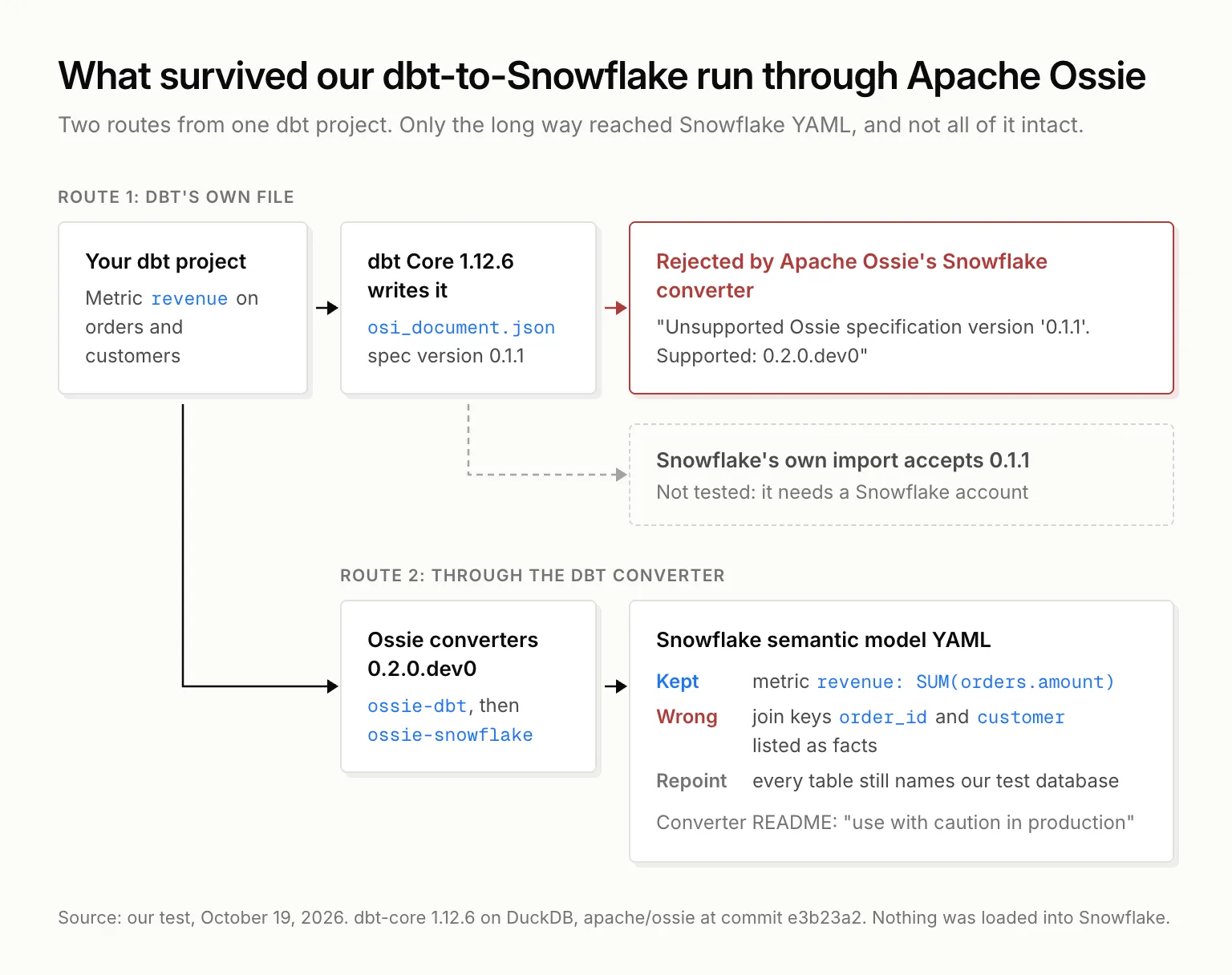 {What survived our dbt-to-Snowflake run through Apache Ossie, October 19, 2026.}
- The versions don't line up. dbt Core 1.12.6 wrote an Ossie file on its own at version 0.1.1, and Snowflake's import procedure accepts 0.1.1. But Apache Ossie's Snowflake converter rejected that same file: "Unsupported Ossie specification version '0.1.1'. Supported: 0.2.0.dev0". The project's current spec is a draft that "may change before 0.2.0 is released".
- Through the converters, the metric survived. Going the long way (dbt's semantic manifest, then the dbt converter, then the Snowflake converter),
revenuecame out asSUM(orders.amount). That part works. - The join keys didn't.
order_idandcustomerlanded underfacts, which Snowflake defines as "how much" or "how many" numbers. You'd move them by hand. The output also pointed at our test database's names, so you'd repoint every table at Snowflake before loading it. - The converter says so itself. Its README says it "has not been thoroughly tested against all edge cases" and to "use with caution in production."
One path we couldn't test: loading dbt's 0.1.1 file straight into Snowflake's procedure, which needs an account. Our call today: Ossie is a sensible bet for later, but not a sync you can rely on today. If two systems need the same metric, one of them still holds a copy.
Snowflake MCP server, Cortex Analyst and business metrics for AI agents
Inside Snowflake, the main reader is Cortex. On August 28, 2026, Snowflake started recommending that you transition from Cortex Analyst to Cortex Agents. The Cortex Analyst REST API remains available, and semantic views carry over unchanged.
For agents outside Snowflake, such as Claude or Cursor, Snowflake runs a managed MCP server. Two lines in its docs matter:
- It "only supports using semantic views with Cortex Analyst. It does not support semantic models." So the agent reaches your metrics through the Cortex Analyst tool, and Cortex writes the SQL.
- If you also expose the SQL execution tool, that "allows the MCP client to bypass the agent's semantic views, verified queries, and orchestration." An agent that writes its own SQL ignores your definitions. Leave that tool off if the metrics are the point.
Our guide to connecting Claude to Snowflake over MCP covers the setup itself.
Limitations of Snowflake semantic views
- Querying by name has limits. With the view's name in
FROM, you can't use joins, window functions,QUALIFY,PIVOTor correlated subqueries. If you need a join, use theSEMANTIC_VIEW()form instead: its result can be joined and grouped. - One view per question. Snowflake's best-practices guide says Cortex Analyst routing "will NOT join across semantic views", and suggests starting with 5 to 10 tables.
- Many-to-many joins aren't directly supported; you model them through a bridge dimension. Range joins and relationship paths are still in Preview.
- Accuracy takes upkeep. The same guide calls verified queries "essential" and suggests 10 to 20 to start. Synonyms are "no longer recommended".
What Snowflake semantic views cost
We found no listed fee for a semantic view itself: Snowflake's AI pricing page and its Service Consumption Table don't mention one. The cost is in what reads it. Cortex Analyst bills 67 Platform Credits per 1,000 messages through its API. Cortex Agents bill AI Credits by tokens. Either way, the SQL they generate runs on your warehouse at normal compute rates.
Governed metrics layer for Snowflake: which one fits
Who reads your numbers decides it:
- Every reader is inside Snowflake (Cortex Agents, Cortex Analyst, SQL in Snowsight): semantic views cover it, kept in git through Semantic Studio or YAML in CI.
- A BI tool outside Snowflake reads them: it gets a partial copy at best. Omni's docs say every relationship imports as many_to_one because Snowflake doesn't expose cardinality, and verified queries don't come across. Power BI is a harder case: Chris Webb, a Microsoft employee writing on his personal blog, says Microsoft has no plans to make Power BI's front end work properly with anything but its own semantic models.
- Many readers, many of them outside Snowflake (people in Slack, Claude, internal agents, a second database): the definitions need a home all of them can open.
That last case is ours, and it's where we'd take Snowflake's own idea one step further. A metric definition should be a file in a repo you own, and every person and agent should read that one file, not a copy that only one warehouse's tools can open. Querio keeps your metrics, joins and business context in that repo. If you're on dbt, we'll import your dbt models, and you update them and the context together, in one PR. People ask in Querio, Slack or Claude, and any agent connects through MCP, API or CLI. Querio connects to Snowflake and uses Cortex functions where it makes sense. As Max, a BI engineer at OpenVPN, put it: "It's great every business user gets the same definition of a metric no matter which tool they're asking from."
If you're still choosing tools, our roundup of AI BI tools that connect to Snowflake compares how each one handles semantic views.