Business Intelligence
How to Onboard an AI Agent to Your Data in One Day
Set up a secure read-only connection, document 10–15 governed metrics, run 8–12 validation tests, and hand off a scoped AI agent in one day.

I’d start with one data source, read-only access, and a small set of approved metrics - not the whole warehouse. With access approvals and trusted reference queries ready, I can use one working day to connect the agent, document its rules, and test its answers.
Here’s how I’d spend the day:
- 9:00–11:00 a.m.: Set scope and owners, connect securely, and check permissions, query limits, and audit logs.
- 11:00 a.m.–1:00 p.m.: Document 10–15 metrics, approved joins, and answer rules in version-controlled files.
- 1:30–4:00 p.m.: Run 8–12 analyst-reviewed tests against trusted queries, including checks for unclear questions, missing data, and restricted requests.
- 4:00–5:00 p.m.: Record measured results, approve only tested uses, assign owners, and schedule the next review.
The rule I’d keep front and center: a working connection does not prove accurate answers. This is a limited pilot, not a production rollout. I’d expand its scope only after more tests pass.
::: @figure 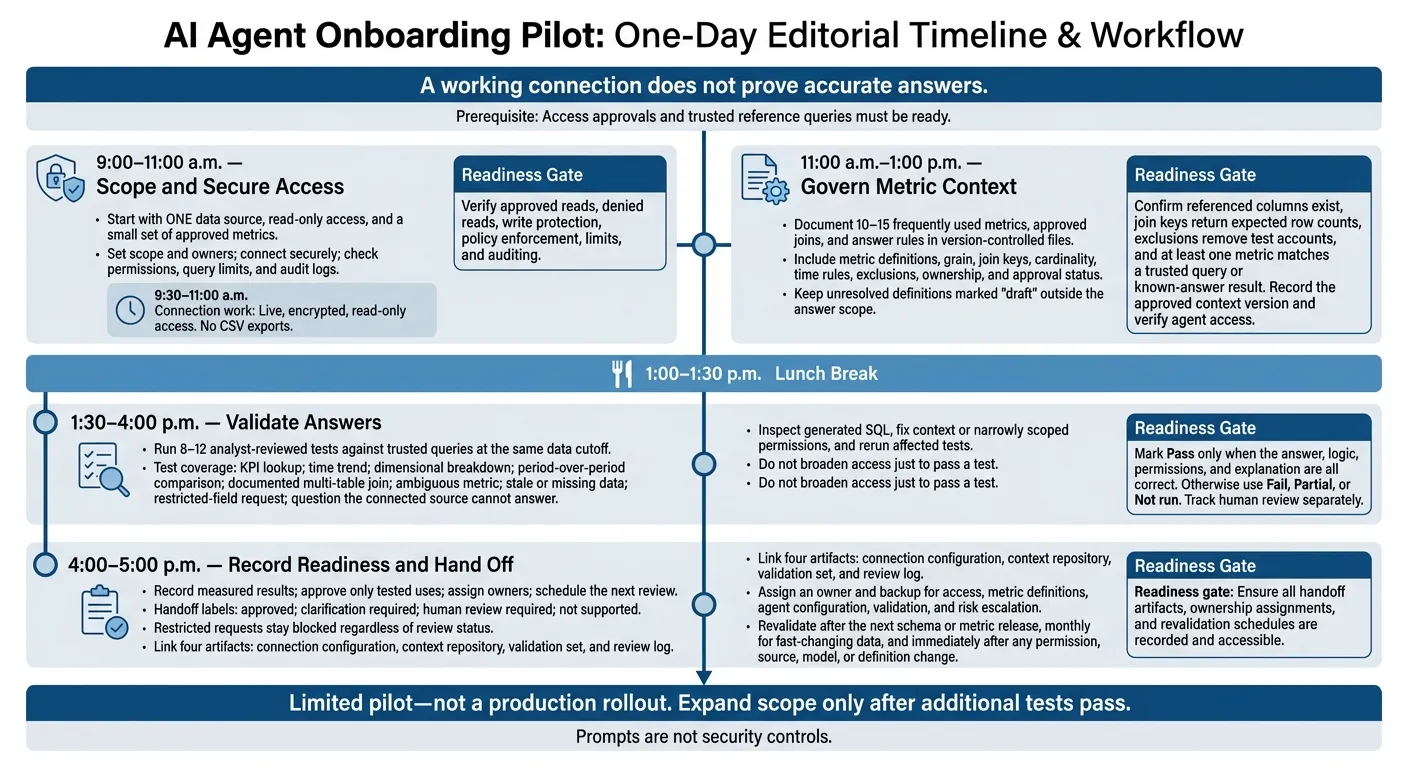 {AI Agent Data Onboarding: A One-Day Pilot}
:::
{AI Agent Data Onboarding: A One-Day Pilot}
:::
9:30–11:00 a.m.: Connect with Secure Read-Only Access
Create a live, encrypted, read-only connection to the source. Verify the network path before querying business data. No CSV exports. This step confirms the agent can read the right warehouse objects without expanding access.
Read-only access blocks writes - not bad joins or metric drift. Those need context and answer testing. Once the connection is live, move to schema and metric context.
Restrict Access to Approved Tables and Views
Use a dedicated service identity for a fixed connector, or per-user OAuth when access must follow each user’s grants. Avoid administrator credentials. Grant only the object and metadata permissions needed for schema discovery, and check them against your platform’s identity model.
| Source | Minimum access pattern | Check before proceeding |
|---|---|---|
| Snowflake | USAGE on the warehouse, database, and schema; SELECT on approved tables or views | No writes or broader inherited roles |
| BigQuery | Read access to approved datasets and tables; query-job permission in the billing or query project | No access beyond the approved dataset and project |
| Redshift | CONNECT to the database, USAGE on the schema, and SELECT on approved tables or views | No writes or sensitive-schema access |
| PostgreSQL | CONNECT to the database, USAGE on the schema, and SELECT on approved tables or views | No schema creation or broader inherited roles; default privileges reviewed |
Use curated views that omit or mask sensitive fields. Apply tenant or department restrictions in the warehouse. Then run the same query under two identities or policy contexts, testing joins and aggregates too. Confirm that neither context reveals the other’s records, and repeat these policy checks during later answer testing.
Prompts are not security controls. Snowflake row access policies filter visibility but do not remove write permissions. Restrict those separately.[5]
Check Credentials, Query Limits, and Audit Logs
Store passwords, keys, and tokens in an approved secret manager or encrypted configuration - not the context repository. If the connector uses OAuth, document the actual identity. Don’t assume every connection path maps permissions the same way.
Set timeouts, result caps, concurrency limits, and scan budgets. Record which controls the warehouse enforces and which the connector enforces.
Verify that approved reads and metadata discovery work, and that unapproved reads are denied. Check protected columns and row policies, then test query limits. Confirm write protection through a permission review. Attempt writes only in an authorized, safe test environment.
Find the matching audit records and check that they include the identity, timestamp, source, object, query, and outcome.[6]
Record setup time, wait time, and blockers separately. Assign an owner to each unresolved issue. At 11:00 a.m., mark the connection ready only after verifying approved reads, denied reads, write protection, policy enforcement, limits, and auditing. The next block turns raw schema into governed metric context.
11:00 a.m.–1:00 p.m.: Build Schema and Metric Context
Once access is approved, turn the schema into a small, governed set of metrics. Start with 10–15 frequently used metrics, chosen by frequency, business impact, and queryability. Focus on recurring finance, sales, or customer-success questions. These are the ONLY metrics the agent must answer today.
For each metric, record its plain-English definition, formula, source, unit, time basis, permitted dimensions, exclusions, owner, approval status, last review date, and known limitations. Work through disagreements about terms like revenue with the metric owner. Mark unresolved definitions as draft and keep them outside the answer scope.
Define Grain, Joins, Metrics, and Answer Rules
Create one reusable context file for the pilot. For every table or view, document its purpose, grain, primary key, key columns, refresh schedule, owner, and approval status.
Include join keys and cardinality, with one-to-many and many-to-many risks clearly spelled out. Add metric formulas and filters, timezone and fiscal-calendar rules, partial-period handling, data-update timing, privacy restrictions, and rules for ambiguity, missing data, and uncertainty. Each governed field needs a meaning, owner, source, and certified status - not just a raw column name. This context will guide the validation set in the next block.
Tell the agent to ask for clarification when the period, timezone, currency, or metric definition is unclear. It should flag missing or stale data and stop when no approved definition exists. Every numerical answer should include the period, unit, filters, and refresh timestamp. Avoid partial-period comparisons unless requested: don't compare October 1–9 with all of September.
Hypothetical subscription-revenue definition: MRR is the recurring subscription amount scheduled for active paid subscriptions at the end of the month. Exclude test accounts, internal accounts, free trials, one-time charges, taxes, and refunds. A cancellation request does not remove MRR before the paid service period ends; the subscription is excluded after its effective end date.
Keep these definitions outside chat so the agent draws from the same source of truth each time.
Store Approved Definitions Outside Chat
Store approved definitions in version-controlled plain-text files, such as Markdown, YAML, SQL, or Python, alongside dbt models. Use files like context/metrics.md, context/join_rules.md, context/answer_policies.md, and queries/known_answers.sql. Reuse dbt metadata rather than rewriting it.
These files become the agent’s source of truth for later answers. Require human review for lasting changes. GitHub sync alone doesn't make a definition authoritative.
| Storage approach | Editability | Reviewability | Portability | Metric-drift risk |
|---|---|---|---|---|
| Version-controlled plain-text context | High; easy to update in small files | High; changes can be reviewed, approved, and reverted | High; readable by agents and tools | Lower when ownership and tests are enforced |
| Conversation prompts | Medium for the original author; difficult to maintain systematically | Low; assumptions can be buried in chat history | Low to medium; hard to reuse consistently | High |
| Dashboard descriptions | Medium; convenient for dashboard users | Medium; often lacks formal change history and complete logic | Medium; may be tied to one BI platform | Medium to high |
| Undocumented team knowledge | Low | Low | Low | Very high |
Before 1:00 p.m., confirm that referenced columns exist, join keys return the expected row counts, and exclusions remove test accounts. Compare at least one metric against a trusted query or known-answer result. Attach known-answer queries to priority metrics, record the approved context version, and check that the agent can access it.
Reserve 1:00–1:30 p.m. for lunch. Answer validation starts at 1:30 p.m.
1:30–4:00 p.m.: Check Answers Against Trusted Queries
Run 8–12 analyst-reviewed tests. Cover a KPI lookup, a time trend, a dimensional breakdown, a period-over-period comparison, a documented multi-table join, an ambiguous metric, a stale or missing-data scenario, a restricted-field request, and a question the connected source cannot answer. Use the same data cutoff for the agent and reference queries, and log it so the tests can be repeated.
Once the context file is approved, check the agent’s answers against trusted results at that cutoff. This testing block shows what the agent can answer reliably by day’s end - and what still needs human review.
Test Answers, Clarifications, and Refusals
Before each test, log the question, expected behavior, metric definition, filters, grain, assumptions, tolerance, and shared cutoff. For numeric answers, include the expected value, currency, unit, time zone, and date range.
For trends and comparisons, specify the periods and whether the comparison uses absolute values or percentages. For breakdowns, note the approved dimension, ordering, null handling, and whether the categories must add up to the total. For joins, document the expected grain and relationship.
For stale or missing data, log the latest available timestamp or the missing field or period. Require clarification when a question is ambiguous. Restricted-field requests must be refused without revealing protected values or bypassing permissions. When the source cannot answer, the agent should say so and name the source or owner needed.[7][9]
Review SQL, Fix Context, and Rerun Tests
When a test fails, inspect the generated SQL before changing permissions or context. Use Querio’s inspectable, editable SQL and Python in reactive notebooks. Check object selection, grain, join keys, row multiplication, aggregation, null handling, date boundaries, filters, permissions, and query cost.
Save the original question, generated SQL, execution output, and any notebook calculation before investigating. Correct the context file or narrowly scoped permissions, then rerun every affected test at the same cutoff. Do not broaden access just to pass a test. Log each rerun’s outcome.
Report Measured Setup Time and Test Results
Use the table below as a template, with one row per question in the actual log. Mark Pass only when the answer, logic, permissions, and explanation are all correct. Otherwise, use Fail, Partial, or Not run. Track human review separately for stale data, incomplete data, and unresolved business-rule judgment.[7][8][9]
| Question | Expected Answer | Agent Result | SQL Review | Status | Human Review Needed |
|---|---|---|---|---|---|
| KPI lookup | Reference value, definition, period, unit, filters, tolerance | Returned value and cutoff | Objects, grain, aggregation, dates, permissions, cost | Not run | To assess |
| Documented join | Reference result, row grain, relationship | Output and cutoff | Keys, cardinality, duplicate checks, filters, cost | Not run | To assess |
| Restricted-field request | Refusal without disclosure or permission bypass | Actual response | Access attempts and audit evidence | Not run | To assess |
Log setup duration, validation start and stop times, interruptions, fixes, context changes, error categories, and retest outcomes. Keep SQL-generation time separate from query execution time. Report pass/fail counts only after the full workflow runs, and don’t claim a setup time or success rate without measured results.
In the log, mark which results are ready for handoff and which still need review.
4:00–5:00 p.m.: Record Readiness and Hand Off
Once validation is complete, turn the results into a handoff the team can maintain.
One-day success means reliable answers in a tested domain - not unrestricted warehouse self-service. Create a readiness record with scoped access, reviewed SQL, measured setup time, validation results, source version, approved context version, test-set version, test date, and approving reviewer.[11][13]
Mark What Is Approved and What Needs Review
Label the day’s test results as approved, clarification required, human review required, or not supported. List the tables, views, metrics, and question types approved for handoff. Keep untested joins, disputed definitions, and high-stakes decisions under human review. Restricted requests stay blocked, regardless of review status.[12][3]
These labels separate safe answers from items that need more review. Before approving anything, document unresolved issues with data freshness, data quality, and access. For each issue, record its impact, owner, and resolution date. Withhold approval if an issue could materially change an answer.[11][10] The handoff must also include permitted user groups, row and column restrictions, query limits, and prohibited actions.[12][3]
Assign Owners and Schedule the Next Review
Link the handoff to four artifacts: connection configuration, context repository, validation set, and review log.[3][4] Assign an owner and backup for access, metric definitions, agent configuration, validation, and risk escalation.[3] Tie approved metric context to the ownership record - not chat instructions.
Set the next review date before closing the pilot. Schedule revalidation after the next schema or metric release, monthly for fast-changing data, and immediately after any permission, source, model, or definition change. Record this schedule in the review log.[11][3]
Hand over the working live connection, reusable approved context, and recorded evidence of answer accuracy. Expand access or question coverage only after additional tests pass.
FAQs
::: faq
What if access approvals take longer than a day?
Treat onboarding as a phased rollout, not a one-day sprint. While you wait for final security sign-off, prepare the read-only service account and Model Context Protocol (MCP) server. Use that time to document metric definitions and build a validation set with known answers.
Once permissions are granted, connect the agent and run your validation tests. Put governance first before making the agent available to more users. :::
::: faq
How should we set acceptable error tolerances?
Investigate variances greater than 0.5%–1.0% against trusted benchmarks, such as dbt models. Check outputs before sharing them: AI-generated SQL can have valid syntax and still produce incorrect results.
Review generated SQL for errors in joins, filters, or time handling. If errors recur, update your governed semantic layer or context instructions rather than applying ad hoc fixes. This keeps metrics aligned with your organization’s single source of truth. :::
::: faq
When is our pilot ready for production?
Your pilot is ready for production when the governed workflow runs repeatably and passes its readiness checks. That means a live, secure, read-only connection; scoped roles, row-level security, and column masking that work as intended; and validation results that match trusted answers.
SQL/Python must be available to inspect and edit in reactive notebooks. Definitions, grain/joins, time semantics, data freshness, permissions, and provenance must also be approved.
In Querio’s rollout plan, the pilot typically reaches this point by day 30, after two weeks of clean runs. [1][2] :::