Business Intelligence
Context Engineering for Data Teams: A Practical Guide
Box AI with governed data rules so analytics match dashboards—use semantic models, lineage, permissions, and Git for inspectable SQL.

If your AI can write SQL but can’t follow your metric rules, table approvals, and access limits, it will give wrong answers with confidence. For data teams, context engineering is the layer that tells AI which tables to use, which metrics count, which joins are allowed, and what each person can see.
I’d sum up the article like this:
- Context engineering connects AI to governed data, not just raw schema.
- It relies on six core inputs: schema, metric definitions, dbt models, lineage, permissions, and business rules.
- It splits into static context (definitions, docs, dbt, rules) and dynamic context (freshness, row counts, query history, and user role at runtime).
- It works best when paired with a semantic layer, so AI reads business meaning instead of guessing from column names.
- It should be Git-managed, so metric changes go through review, tests, and rollback.
- To put it into use, I’d build:
- a source-of-truth map
- a context checklist
- a change approval flow
- a small rollout plan tied to one high-use case
- The goal is simple: AI answers that match dashboard logic, stay inside warehouse access rules, and show inspectable SQL.
Here’s the main point in plain English: AI analytics fails less when the model is boxed in by data rules your team already uses. That matters because 64% of data teams already use generative AI, while 36% say weak governance is their top blocker. And when AI guesses in finance-heavy work, the cost can be huge.
Quick Comparison
| Area | What the article says | Why it matters |
|---|---|---|
| Raw warehouse only | AI sees tables and columns, but not full business meaning | More guessing, more metric mistakes |
| Tool-only layer | Metrics and models are cleaner, but access and agent workflow can still be uneven | Better than raw schema, but gaps stay |
| Governed hybrid layer | Warehouse controls, semantic logic, lineage, and review process work together | Lower risk of drift, access issues, and silent SQL errors |
So if I were distilling the whole piece into one line, it would be this: context is the control layer that turns AI from a SQL demo into something a data team can use with less risk.
The context engineering playbook (Claire Gouze)
::: @iframe https://www.youtube.com/embed/daacM5TxIKA :::
What context engineering includes in a warehouse-first stack
In a warehouse-first stack, context engineering is the set of governed assets an AI assistant reads before it generates SQL or answers a question.
You can split those assets into two groups: static context and dynamic context.
Static context covers the definitions that give the warehouse its meaning. That includes schema documentation, dbt manifests, metric definitions, and business rules. Dynamic context is pulled at query time. It includes metadata like table freshness, row counts, sample values, query history, plus the user's role and permissions.
That split matters. Static context tells the AI what the data means. Dynamic context helps it decide which tables, filters, and access rules fit the question in front of it.
The six context assets that matter most
Every reliable warehouse-first AI stack depends on six core assets working together. Miss one, and the AI starts filling in the blanks.
| Context Asset | Purpose | Failure Mode |
|---|---|---|
| Warehouse schema | Real table/column names, data types, PII tags | Hallucinated or invented columns, wrong joins |
| Metric definitions | Formulas, filters, and time grain for MRR, gross margin, claim denial rate | Metric drift, inconsistent numbers across dashboards and tools |
| dbt models & manifests | Transformation logic, model dependencies, tests, and tags | Queries against raw or staging tables instead of curated models |
| Lineage | How upstream sources flow into semantic models and dashboards | Stale or deprecated tables used in production answers |
| Permissions | Warehouse roles, row-level security, column-level access | PHI exposure or unauthorized data access |
| Business rules | Documented exclusions and edge cases, such as internal test accounts or setup-fee exclusions | Wrong logic baked silently into generated SQL |
Gross margin is a good example. An AI working from raw tables might calculate revenue - COGS and stop there. On paper, that looks fine. But finance may also need discounts, refunds, or internal transfer pricing handled in a very specific way.
A governed metric definition spells that out. Without it, the SQL can still look correct while the number is off. And that kind of mistake often shows up only when finance checks the result.
Those assets become much more useful when a semantic layer turns warehouse objects into governed business concepts.
How semantic layers turn tables into governed metrics and entities
A semantic layer sits between the warehouse and the AI. Its job is simple: turn raw tables into business objects the model can use with less guesswork.
That means entities like Customer or Claim, dimensions like product_line or state, and metrics like mrr or claim_denial_rate with exact aggregation logic, filters, and time grain already defined.
dbt Labs built Ask dbt, an agent that queries the dbt Semantic Layer using natural language. Benchmark testing showed a 3x improvement in accuracy compared with AI chatbots that infer meaning straight from raw schema.[2] In a separate evaluation, dbt Labs observed 83% accuracy on questions answered through the dbt Semantic Layer.[3]
"Text-to-SQL without a semantic layer is a useful demo. Text-to-SQL grounded in a well-maintained semantic model is an enterprise capability." - Alex Merced, Developer Advocate [1]
dbt Semantic Layer exposes governed metrics through an API. Looker encodes joins and filters in LookML. ThoughtSpot and Hex query governed models instead of raw schema.
Different products, same idea: the AI reads definitions, not just column names.
Why Git-managed context supports review, versioning, and rollback
When you store context in Git - SQL models, dbt YAML configs, metric definitions, and Markdown business rules - every change can go through a pull request.
Say a data engineer updates the MRR definition. They open a PR. An analytics lead reviews it. CI runs dbt tests to check that nothing downstream breaks. That process gives teams a clear paper trail instead of silent changes buried in a tool.
It also helps when answers start drifting after a metrics update. Git history shows exactly what changed, when it changed, and who changed it. If needed, rollback is straightforward.
Storing context in Git gives you pull requests, version history, and rollback when metric definitions change.
Next, turn those assets into source-of-truth maps, lineage paths, and permission rules.
How to put context into practice with lineage, permissions, and source-of-truth maps
Now it’s time to turn those assets into controls the agent can use: source-of-truth maps, lineage, and permissions. This is where context stops being just documentation and starts acting like an enforceable control layer.
Start with a source-of-truth map for the domains and metrics your teams rely on most.
Build a source-of-truth map for key domains and metrics
A source-of-truth map is a version-controlled catalog that links business domains to the warehouse tables, dbt models, and approved metrics behind them. Think of it as the lookup layer the agent checks before it generates SQL.
Begin with your highest-use domains: Customers, Subscriptions, Billing, Claims, and Transactions. For each one, record the canonical warehouse table, the related dbt mart, approved metrics, primary keys, freshness SLAs, and an owner. Finance or RevOps owns revenue metrics. Product owns activation rates. Data Engineering owns source and staging tables.
Use this metric template:
| Field | Example |
|---|---|
| Metric Name | Monthly Recurring Revenue (MRR) |
| Definition | Revenue from active subscriptions at month-end |
| Calculation Logic | Sum of monthly subscription fees for active customers, in USD |
| Grain | Account, Month |
| Source Tables | fct_subscriptions, dim_customer |
| Exclusions | Test accounts |
| Owner | Finance / RevOps |
| Status | Certified |
Store this as context/source_of_truth.yml in the same Git repo as your dbt project, or expose the same logic through a semantic layer or catalog entry. If a metric formula changes, send it through a pull request that updates the dbt model and the source-of-truth map together. No silent edits. That one habit saves a lot of confusion later.
Use lineage to check that each certified metric still traces back to the right upstream models and tables.
Use lineage to connect dbt models, warehouse tables, and BI outputs
Use dbt manifest.json for table-level lineage, then add warehouse query logs and a catalog such as Alation, Collibra, or DataHub for column-level lineage. Together, those assets form a shared lineage graph you can use in code.
In practice, this means an AI assistant can answer a churn-rate question by pointing to the exact dbt model and upstream tables instead of taking a wild guess. It can also flag when a requested metric depends on a model or column that changed upstream. That keeps stale or deprecated objects out of AI answers before users ever see them.
Then lock those paths down with the same warehouse roles and policies your BI tools already use.
Enforce warehouse and tool permissions consistently
The biggest governance gap in AI-driven analytics is a shared service account that sidesteps warehouse controls. Use the same secured views and tables everywhere. If a support agent can’t see sensitive data in your BI tool, they shouldn’t see it in an AI-generated answer either.
In Snowflake, map personas to named roles and use OAuth so the assistant inherits them at query time. BigQuery uses IAM roles, and Redshift uses GRANT/REVOKE on warehouse objects. Row-level security and column masking - Snowflake's row access policies and masking policies, BigQuery's row access policies and policy tags - limit what a given role can see inside AI-generated SQL.
Querio's Model Context Protocol (MCP) layer uses OAuth, so each agent query inherits the requesting user's warehouse permissions. The assistant queries only what that user's warehouse role allows.
With meaning, lineage, and access aligned, the agent can safely generate inspectable SQL.
A step-by-step workflow to cut hallucinations, metric drift, and governance risk
With your source-of-truth map, lineage, and permissions in place, roll out AI one controlled slice at a time. Treat each use case as a test of the context layer, not just a test of the model. And use that source-of-truth map as the gate for every rollout.
Start with one narrow, high-traffic use case
Begin with one domain your team already handles all the time and already trusts in dashboards. Good examples include weekly revenue reporting or daily active users. Go with the use case that has the clearest metric definition and the highest volume of repeat questions.
Set success criteria before launch. At a minimum, the AI should:
- Match dashboard totals closely
- Cut down repeat ad hoc questions
Require inspectable SQL, shared metrics, and live warehouse access
Set three hard rules for every AI answer in that domain.
First, every answer should show its SQL or Python. If the AI generates executable SQL against real warehouse tables, mistakes are easier to spot before a stakeholder ever sees them.
Second, every metric needs to resolve to the same canonical definition your dashboards already use. If the dashboard says one thing and the AI says another, trust disappears fast.
Third, queries must run against live warehouse connections. Static CSV exports and cached snapshots weaken the control layer. They skip row-level security, drift away from current data, and create unmanaged copies outside normal review. Direct connections to Snowflake, BigQuery, or Redshift keep AI queries inside the same access-control perimeter as your BI tools.
Querio's live warehouse connections and reactive notebooks give analysts a clear way to inspect generated SQL, edit it in place, and rerun it interactively. That keeps the AI inside the governance boundary instead of letting it work around it.
Ship a context checklist and approval process
A metric is AI-ready only when it is documented, tested, lineage-backed, and permission-safe.
| Checklist Item | What to Verify |
|---|---|
| Metric owner | Named individual, such as the Head of Finance, not just a team |
| Semantic definition | Explicit formula, filters, grain, and currency/date format |
| Approved joins | Whitelisted join paths; prohibited joins documented |
| dbt tests | Uniqueness, not-null, referential integrity, accepted values |
| Freshness expectations | Update frequency and how late data is flagged |
| Sensitive-column handling | PII fields excluded or masked by default |
| Lineage coverage | Documented path from source tables to BI output |
| Review cadence | Scheduled audit date, with quarterly as a reasonable starting point |
A metric is AI-ready only when every item is complete and approved. Capture each AI-proposed change as a pull request, have the metric owner review it, and merge only after dbt tests pass.
Once this workflow is in place, compare the operating models below to see where governed self-serve fits best.
Comparison tables, implementation artifacts, and conclusion
::: @figure 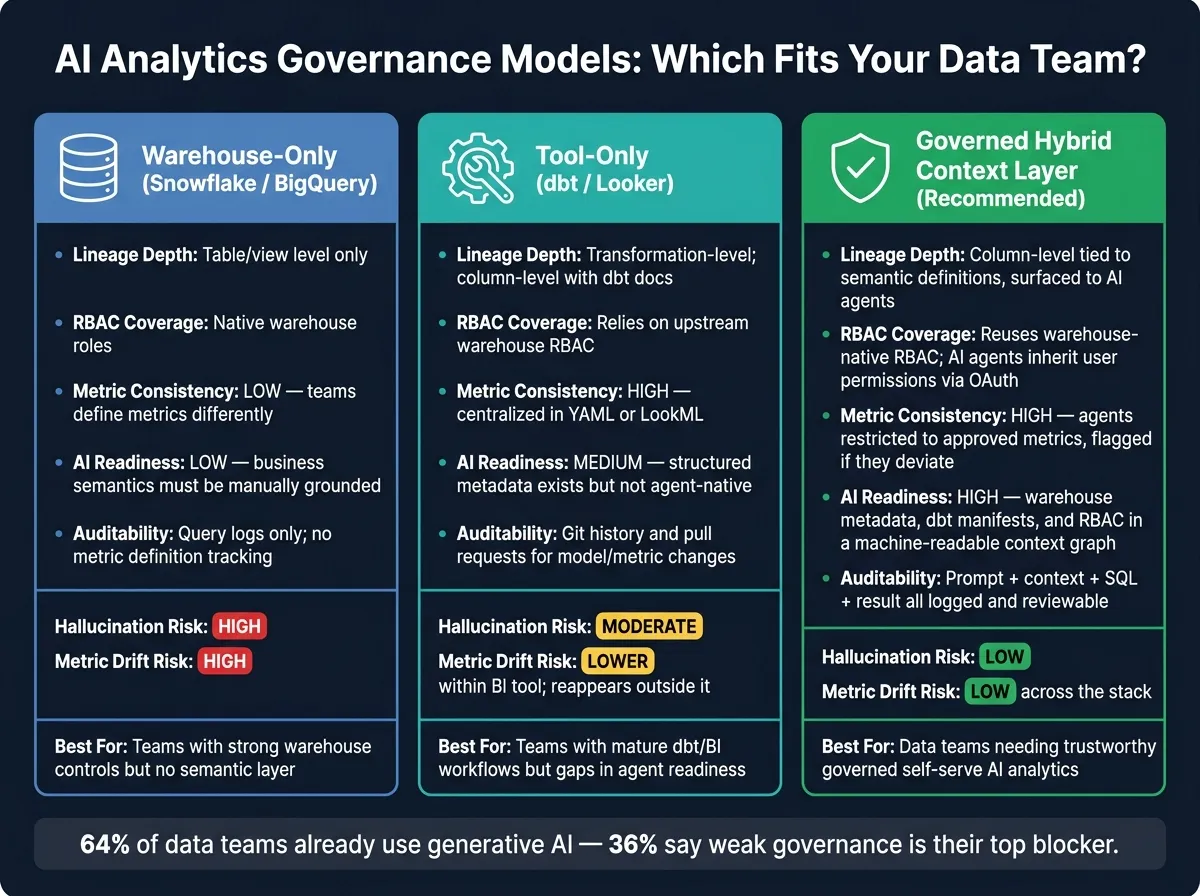 {AI Analytics Governance Models: Warehouse-Only vs. Tool-Only vs. Hybrid}
:::
{AI Analytics Governance Models: Warehouse-Only vs. Tool-Only vs. Hybrid}
:::
Comparison table: warehouse-only vs. tool-only vs. hybrid semantic governance
Pick the model that fixes your biggest gap: access control, metric logic, or agent readiness. The three operating models below show what each layer can do - and where it falls short.
| Dimension | Warehouse-only (Snowflake / BigQuery) | Tool-only (dbt / Looker) | Governed hybrid context layer |
|---|---|---|---|
| Lineage depth | Table/view level via query history and information schema | Transformation-level; column-level with dbt docs and manifest | Column-level lineage tied to semantic definitions, surfaced to AI agents |
| RBAC coverage | Native warehouse RBAC, row-level and object-level policies | Relies on upstream warehouse RBAC | Reuses warehouse-native RBAC; AI agents inherit user permissions via OAuth |
| Auditability | Query logs show access, but not which metric definition was applied | Git history and pull requests for model and metric changes | Prompt, context used, SQL, and result are all logged and reviewable |
| Metric consistency | Low - teams define metrics differently | High - metrics centralized in YAML or LookML | High - agents restricted to approved metrics, flagged if they deviate |
| AI readiness | Low - business semantics must be manually grounded for LLMs | Medium - structured metadata exists but does not natively handle agent workflows | High - warehouse metadata, dbt manifests, and RBAC combined into a machine-readable context graph |
Use this table to decide whether your next move is access control, metric governance, or both.
Comparison table: ad-hoc LLM SQL vs. BI AI features vs. governed agent workflows
This next table shows what changes when AI is grounded in governed context - especially around the three requirements from the workflow section: inspectable SQL, shared metrics, and live warehouse access.
| Dimension | Ad-hoc LLM SQL | BI AI features | Governed agent workflows |
|---|---|---|---|
| Hallucination risk | High - model guesses table relationships and metric formulas | Moderate - constrained to the BI tool's known schema, but edge cases can slip through | Low - agents plan against curated dbt models, semantic definitions, and schema checks before execution |
| Metric drift risk | High - each prompt can produce a different version of revenue or churn | Lower within the BI tool; drift reappears when teams query outside it | Low across the stack - approved metrics from dbt or semantic models, with changes reviewed in Git |
| Governance alignment | Weak - easy to bypass without model constraints | Moderate - inherits BI-layer access controls, but may not reflect full warehouse RBAC | Strong - warehouse RBAC and row-level policies enforced; AI queries stay inside the same access perimeter as BI tools |
| Setup effort | Near zero upfront, but high hidden cost in debugging and governance cleanup | Moderate - requires BI semantic model curation and content governance | Moderate - warehouse, dbt manifests, semantic models, and RBAC linked into a unified context layer |
| Inspectability | Low - lineage and metric context are usually missing | Varies - some tools show the query, but the link from prompt to metric definition can be opaque | High - SQL and Python are visible and editable in a reactive notebook, with logs linking prompt to context to result |
Conclusion: context is the control layer for trustworthy AI analytics
Once you have a source-of-truth map, lineage, and permissions in place, AI answers stop drifting away from certified metrics. If a metric changes in dbt, the agent uses the updated definition. If an analyst asks about revenue in Snowflake or BigQuery, they get the same answer shown in the dashboard.
For data leaders at B2B SaaS, healthcare, and finance companies, that kind of alignment cuts compliance risk and makes governed self-serve analytics something teams can depend on.
FAQs
::: faq
How is context engineering different from a semantic layer?
Context engineering is the broader practice of giving an AI agent the rules and surrounding information it needs to use your data warehouse safely and accurately.
A semantic layer is one part of that job. It defines business logic such as metric formulas, join paths, and shared terms.
Context engineering goes further. It includes the semantic layer, plus documentation, lineage, and warehouse-enforced security policies. :::
::: faq
What should a data team build first to get started?
Start with a governed data foundation, not tools.
First, define a shared source of truth. Document five to ten high-risk KPIs, including the exact formulas, grains, and business logic behind each one. If people across teams calculate the same metric in different ways, confusion shows up fast.
Then put a few core pieces in place:
- Curated, certified views
- A documented join graph and authoritative metadata
- A logic repository in code, such as dbt models
- Role-based or attribute-based access controls :::
::: faq
How do you keep AI answers aligned with warehouse permissions?
Rely on warehouse-enforced security, not app-layer checks. Set up row-level security and column masking in Snowflake, BigQuery, or Postgres so the warehouse itself blocks data a user shouldn’t see - no matter how the AI writes the SQL.
Also use scoped delegation. Expose governed semantic views instead of raw tables. Require inspectable SQL or Python, and keep a full audit trail that records the user, the agent, the executed code, and the objects that were accessed. :::