Business Intelligence
Choosing the Best AI Data Analysis Platform
Compare warehouse-native AI analytics, legacy BI, and basic AI tools to find the platform that balances governance, scalability, and transparency.

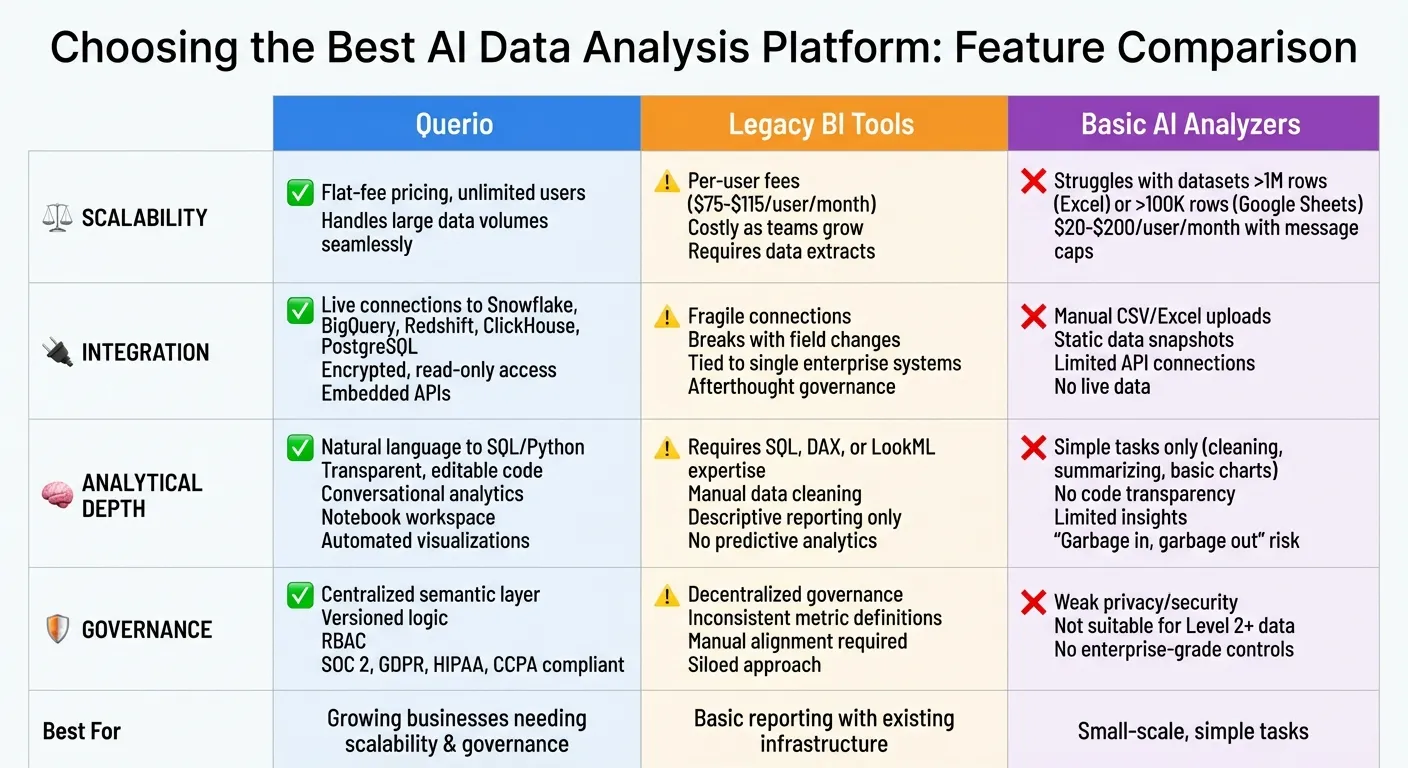
AI data analysis platforms are changing how businesses handle data, going beyond traditional tools by offering predictive insights and plain language queries. Here's what you need to know:
- Querio: Best for teams needing scalable, secure, and user-friendly analytics. It connects directly to data warehouses, uses plain English queries, and ensures consistent governance with a centralized semantic layer.
- Legacy BI Tools: Suitable for basic reporting but struggles with scaling, integration, and modern analytics needs. High costs and outdated infrastructure are common drawbacks.
- Basic AI Analyzers: Affordable and easy to set up but limited in scalability, integration, and governance. Best for small-scale or simple tasks.
Quick Comparison:
| Feature | Querio | Legacy BI Tools | Basic AI Analyzers |
|---|---|---|---|
| Scalability | No per-seat fees, unlimited users | Per-user fees, costly | Struggles with large data |
| Integration | Live data connections | Limited, fragile systems | Manual uploads, static data |
| Analytical Depth | SQL/Python transparency | Basic descriptive reporting | Simple tasks only |
| Governance | Centralized, secure | Decentralized, inconsistent | Weak privacy/security |
Choosing the right platform depends on your team's size, data needs, and budget. Querio offers a balance of scalability, ease of use, and governance, making it a strong choice for growing businesses.
1. Querio
Querio is an AI-powered analytics workspace designed for teams that need accurate, self-service analytics with full control. It connects directly to popular data warehouses like Snowflake, BigQuery, Amazon Redshift, ClickHouse, and PostgreSQL. Users can ask questions in plain English, and Querio generates SQL or Python code behind the scenes, which can be reviewed, edited, and reused.
Scalability
Querio offers a pricing model with no per-seat fees and unlimited users, making it cost-effective as your team expands. Unlike per-user licensing, this approach avoids unexpected cost spikes as your team grows. Since Querio queries live data directly in your warehouse, it uses your existing infrastructure to handle increasing data loads. There's no need for data duplication or additional processing layers. This warehouse-native design ensures that your analytics scale seamlessly alongside your data.
Integration
Secure and flexible integration is a key strength of Querio. It connects to your data warehouse using encrypted, read-only credentials, keeping your data secure within your environment. Querio supports major platforms, including Snowflake, BigQuery, Amazon Redshift, and ClickHouse, as well as other relational databases. It also provides embedded APIs and iframes, making it easy to integrate analytics into internal dashboards, scheduled reports, or customer-facing applications.
Analytical Capabilities
Querio simplifies data analysis with its natural language querying, allowing users to ask questions in plain English. The platform translates these queries into real-time SQL or Python code, making analytics accessible even for non-technical users. It also supports conversational analytics, enabling follow-up questions like "What about North America?" while maintaining context from previous queries. For deeper analysis, Querio features a notebook workspace that combines SQL and Python in a single environment. Each query generates automated visualizations and narrative summaries, helping users understand insights quickly.
Governance
Querio ensures consistency and security with its centralized semantic layer, which allows data teams to define metrics, joins, and business terms once for use across the organization. With versioned logic, any updates are tracked and applied consistently to all queries, dashboards, and embedded analytics. The platform includes role-based access controls (RBAC) and complies with enterprise security standards like SOC 2 Type II, GDPR, HIPAA, and CCPA. This governance framework reduces the risk of inconsistent definitions or unauthorized access, highlighting Querio's focus on delivering a secure and reliable analytics solution.
2. Legacy BI Tools
Legacy BI tools once met enterprise reporting demands but now fall short of modern expectations. Designed for an era of smaller data volumes and IT-controlled analytics, they struggle to keep pace with today’s need for dynamic, scalable, and integrated solutions.
Scalability
Legacy BI tools often rely on per-user licensing models, which can become prohibitively expensive as teams grow. For instance, Tableau charges $75 per user per month for standard licenses and $115 per user per month for enterprise licenses [3]. This pricing structure makes it costly to extend data access across an entire organization. On top of that, these tools frequently require data extracts that duplicate warehouse information, adding unnecessary processing overhead. As data volumes grow, this duplication becomes increasingly difficult to manage, further hindering seamless integration and scalability.
Integration
Connecting legacy BI tools to modern data sources can feel like piecing together mismatched parts, leading to fragile systems that break easily. Even small changes - like renaming a field - can disrupt downstream results [4]. Industry expert Isaac Sacolick highlights that older tools are often "tied to one enterprise system" and lack the flexibility to integrate with multiple sources, making them restrictive [1]. Additionally, governance features like audit logs and data policies are frequently added as afterthoughts rather than being embedded into the platform's core design [4].
Analytical Capabilities
The integration challenges extend into analytics as well. Legacy platforms often require specialized query languages like SQL, DAX, or LookML, limiting accessibility for non-technical users. Summer Lambert, Content Specialist at Zerve, explains:
"Ask it to write DAX formulas, it gets you 80% of the way there. The final 20% still demands deep expertise" [3].
These tools also rely heavily on manual data cleaning and organization, slowing down the journey from question to insight. While they excel at descriptive reporting, they lack advanced features like predictive analytics and automated root cause analysis - capabilities that are increasingly essential for businesses today.
Governance
Governance is another weak spot for legacy BI tools. Without a centralized semantic layer, these platforms often lead to decentralized governance, where teams define metrics differently. This siloed approach creates inconsistencies across reports and dashboards, requiring constant manual intervention to maintain alignment. The lack of a unified framework increases the risk of conflicting definitions and makes it harder for teams to operate from a shared source of truth. These shortcomings highlight the growing need for modern, AI-driven platforms to meet today’s dynamic data challenges.
3. Basic AI Analyzers
Basic AI analyzers offer a simplified way to gain insights through natural language queries, but their ease of use comes with limitations. Tools like ChatGPT Plus ($20/month), Julius AI (starting at $20/month), and Excel Copilot ($30/user/month) allow users to ask questions in plain English and create basic visualizations without needing to write any code [9].
Scalability
These tools often struggle as data volumes increase. For instance, Excel encounters performance issues with datasets exceeding 1 million rows, while Google Sheets slows significantly after 100,000 rows [2]. Many of these platforms rely on chatbot interfaces layered over spreadsheets rather than rethinking the underlying data architecture. This approach limits their ability to handle the growing global data output, which is expected to reach 175 zettabytes annually [6]. Additionally, subscription models - ranging from $20 to $200 per user monthly - often impose restrictions like message caps and file size limits, making it harder for teams to scale effectively [9][10].
Integration
Most basic AI analyzers require manual file uploads, such as CSV or Excel files, instead of connecting directly to enterprise data warehouses [7][2]. While some tools, like Rows.com, provide API connections to specific platforms like Stripe, these integrations are often limited in scope. Although the setup process is quick - sometimes just a few minutes - it sacrifices the ability to work with live, centralized data. Instead, users are left with static snapshots, which limits the depth and accuracy of the analysis.
Analytical Capabilities
These tools are best suited for simple tasks, such as automating data analysis steps like cleaning data, summarizing information, and creating basic charts [9][5]. However, their capabilities have clear boundaries. As Summer Lambert, a Content Specialist at Zerve, aptly states:
"If your warehouse is a mess of inconsistent naming and broken relationships, [basic AI search] will confidently surface garbage" [3].
While they can generate Python scripts and support exploratory analysis, the insights they provide often lack originality and deeper analytical value [9].
Governance
When it comes to privacy and security, basic AI analyzers fall short compared to enterprise-grade solutions. For example, Harvard University explicitly prohibits the use of public generative AI tools for data classified as Level 2 or higher [8]. This highlights the significant risks associated with these platforms, particularly for organizations that handle sensitive information.
Strengths and Weaknesses
Choosing the right AI platform means weighing factors like cost, flexibility, and usability. Each option has its own trade-offs, and understanding these can help you find the best fit for your needs.
Querio stands out with no per-seat pricing, unlimited user access, and a live connection to your data warehouse. It translates natural language queries into verifiable SQL and Python code, giving you full transparency into how results are calculated. This makes it especially user-friendly for non-technical users. Plus, its centralized semantic layer ensures consistent definitions across analyses, simplifying governance as your team grows. These features address key challenges that competing platforms struggle to resolve.
Legacy BI tools, on the other hand, often require expertise in proprietary languages like DAX or LookML. This creates a steep learning curve and restricts report creation to a select group of experts. Their per-user licensing model can quickly drive up costs for larger teams, and reliance on data extracts instead of live connections can lead to data silos. Additionally, the proprietary logic used by these tools limits transparency and complicates governance - issues that make them less effective compared to solutions like Querio.
Basic AI analyzers may appeal with their simple setup, but they come with significant drawbacks. Many require manual file uploads instead of integrating directly with your data warehouse, leaving you with static data snapshots. The lack of transparency in their analytics process means you get answers without understanding the underlying logic, making it hard to verify accuracy or resolve errors. Weak governance further limits their suitability for industries dealing with sensitive or regulated data.
Conclusion
Choosing the right AI data analysis platform boils down to three essential factors: governance, scalability, and transparency. Querio checks all these boxes by directly connecting to your data warehouse, converting natural language queries into inspectable SQL and Python code, and ensuring consistency across your organization with a centralized semantic layer.
Querio’s pricing, which has no per-seat fees, and its open calculation processes stand out as major benefits. By revealing the SQL and Python code behind every result, it empowers technical teams to audit and verify outputs. This level of transparency is especially important when accuracy is non-negotiable - whether you’re preparing reports for stakeholders, making high-stakes decisions, or dealing with regulated data.
Governance is equally crucial. With a centralized semantic layer, non-technical users can access pre-approved, accurate metrics without risking data silos. When evaluating platforms, think beyond per-user fees and consider the total cost of ownership. Flat-fee pricing often proves more sustainable for large-scale deployments. And always demand transparency - access to the underlying code ensures you can catch errors early and maintain confidence in your data.
FAQs
How can I tell if Querio works for my team’s size and data complexity?
Querio is designed to grow with teams, no matter their size or the complexity of their data. It has no per-seat pricing, with unlimited users on every plan, making it cost-effective for businesses of all scales. Querio supports major data warehouses such as Snowflake and BigQuery, ensuring seamless integration with large datasets. Its intuitive interface, combined with natural language query capabilities and options for SQL or Python customization, makes it accessible to users with varying technical expertise while meeting the evolving demands of your organization.
What do I need to connect Querio to my data warehouse securely?
To connect Querio to your data warehouse securely, establish a live, direct connection using secure authentication methods. Ensure data protection by employing encryption standards like AES-256 for data at rest and TLS for data in transit. Strengthen security further by implementing access controls such as Role-Based Access Control (RBAC) to manage user permissions and Row-Level Security (RLS) to limit access to specific data rows.
Live connections minimize the risk of data exposure during transfers. Additionally, maintaining audit logs allows you to track access and changes, improving both security and compliance efforts.
How does Querio ensure metric definitions stay consistent across teams?
Querio ensures that metric definitions remain consistent across teams by using SQL and Python code to promote transparency. This method provides clear governance, maintaining standardized data definitions across the platform. The result? Better alignment and improved accuracy for all users.