Business Intelligence
How to Calculate Churn Correctly (SQL Included)
Defines customer churn as opening-cohort losses and provides SQL, rules, and validation for accurate monthly churn reporting.

I calculate customer churn by dividing lost customers by paying customers active at the start, then multiplying by 100. Lose 2 of 4 starting customers, and churn is 50%. New customers don’t offset those losses.
For September 2026, I use subscription history - not today’s account status - to check who fully lost paid service. A canceled subscription doesn’t count if another paid subscription keeps that customer covered.
Here’s what I check before trusting the result:
- Customer IDs: Count each starting customer once; exclude trials, free plans, and test accounts.
- Loss dates: Use service-end timestamps, with September 1 as the start and October 1 as the cutoff.
- Reactivations: Decide whether a return changes the churn count or gets reported separately.
- SQL results: Test replacements, date boundaries, and empty cohorts.
- Metric choice: Keep customer losses separate from recurring revenue losses.
There’s a catch: the sample SQL measures closing coverage, which can hide September losses followed by returns and count October 1 endings as September churn. I flag those conflicts before publishing. The query must match the stated loss policy.
Below, I walk through the PostgreSQL setup, warehouse and dbt changes, validation checks, and storing the approved definition in Querio.
TOP 5 Churn Rate Calculations in SQL : Fighting Churn With Data Master Class - Stream 2
::: @iframe https://www.youtube.com/embed/1NrutyRcTYo :::
Define your customer churn rules
A customer churns only when every qualifying paid subscription has ended. If one subscription is canceled but another paid subscription stays active, that customer has not churned.[3][2][4] Identify each customer with a stable customer_id, not a subscription ID.
Set the reporting dates and starting cohort
Use September 2026 as the reporting window, in your reporting timezone. Define it as a half-open range: the start is included, but the end is not.
period_start = 2026-09-01 00:00:00period_end = 2026-10-01 00:00:00
Service that starts or ends exactly on September 1, 2026, at 12:00 a.m. does not qualify for the opening cohort. Loss events must meet event_at >= period_start AND event_at < period_end. An end exactly at October 1 belongs to October.
| Metric or rule | Definition | Included | Excluded |
|---|---|---|---|
| Opening cohort | Distinct customers with qualifying paid subscriptions where started_at < period_start AND (ended_at IS NULL OR ended_at > period_start) |
Opening paid customers | September acquisitions, trials, free plans, test accounts |
| Customer churn | Opening customers that completely lost paid service | First complete customer-level losses | Partial cancellations, customers acquired and lost entirely in September |
| Gross revenue churn | Cancellation MRR + downgrade MRR | Opening-base losses | Expansion, new sales, reactivation gains |
| Net revenue churn | Cancellation MRR + downgrade MRR − expansion MRR − eligible reactivation MRR | Opening-base losses, expansion, policy-approved reactivations | New sales and gains outside the opening base |
These date boundaries determine the SQL filters in the next section.
Handle cancellations and reactivations
Use the effective service-end timestamp, not the date the customer requested cancellation.[5] Treat ended_at as exclusive: service becomes inactive at that instant. Check all qualifying subscriptions together. Overlapping service - or a replacement that starts at the exact end timestamp - prevents churn.
Count each opening customer’s first complete loss once, then report later reactivations separately. That way, a customer who returns won’t be counted twice in monthly churn.
Document whether pauses, payment failures, grace periods, refunds, disputes, and backdated cancellations end qualifying service. Also explain how backdated corrections change reported results.
Choose customer churn or revenue churn
Use customer churn to measure retention and revenue churn to measure revenue impact. Before calculating revenue churn, normalize MRR (monthly recurring revenue) for annual, discounted, and usage-based plans. Keep the opening revenue denominator fixed, and state whether reactivation gains count toward net revenue churn.
The table below separates customer retention from revenue movement.
| Metric | Numerator | Denominator | Answers | Important caveat |
|---|---|---|---|---|
| Customer churn | Opening customers that completely lost paid service | Opening paid customers | How many customers did we lose? | Small and large accounts count equally |
| Gross revenue churn | Cancellation MRR + downgrade MRR | Opening MRR | How much recurring revenue did we lose? | Expansion does not offset losses |
| Net revenue churn | Cancellation MRR + downgrade MRR − expansion MRR − eligible reactivation MRR | Opening MRR | Did existing-account gains offset losses? | Can be negative even when customers churn |
Use revenue churn for questions about revenue loss, not customer loss. These metric rules guide the SQL calculations against subscription history in the next section.
Write runnable monthly customer churn SQL
Create the subscription history table
Run this in a Postgres schema. Each row represents one service interval, identified by subscription_id, so reactivations need new IDs. Only basic, pro, business, and enterprise count as paid plans. The status field is informational; a NULL value in ended_at means service hasn't ended. The interval check rejects zero-length and reversed rows.[6]
SET TIME ZONE 'UTC';

CREATE TABLE subscription_history (
    subscription_id BIGINT PRIMARY KEY,
    customer_id     BIGINT NOT NULL,
    started_at      TIMESTAMPTZ NOT NULL,
    ended_at        TIMESTAMPTZ,
    plan_type       TEXT NOT NULL,
    status          TEXT,
    mrr             NUMERIC(12,2) NOT NULL DEFAULT 0,
    is_test         BOOLEAN NOT NULL DEFAULT FALSE,
    CHECK (ended_at IS NULL OR ended_at > started_at),
    CHECK (mrr >= 0),
    CHECK (
        plan_type IN (
            'basic', 'pro', 'business', 'enterprise', 'free', 'trial'
        )
    )
);

-- Synthetic test data, not customer records.
INSERT INTO subscription_history
    (subscription_id, customer_id, started_at, ended_at,
     plan_type, status, mrr, is_test)
VALUES
    -- 101: opening customer; loses service September 10.
    (1, 101, '2026-08-01 00:00:00+00', '2026-09-10 00:00:00+00',
     'basic', 'canceled', 49.00, FALSE),

    -- 102: opening customer; ongoing service.
    (2, 102, '2026-08-01 00:00:00+00', NULL,
     'pro', 'active', 149.00, FALSE),

    -- 103: September acquisition; excluded from opening cohort.
    (3, 103, '2026-09-15 00:00:00+00', NULL,
     'basic', 'active', 49.00, FALSE),

    -- 104: replacement starts at the exact end timestamp.
    (4, 104, '2026-08-01 00:00:00+00', '2026-09-05 00:00:00+00',
     'pro', 'canceled', 149.00, FALSE),
    (5, 104, '2026-09-05 00:00:00+00', NULL,
     'pro', 'active', 149.00, FALSE),

    -- 105: September loss; separate October reactivation.
    (6, 105, '2026-08-01 00:00:00+00', '2026-09-12 00:00:00+00',
     'basic', 'canceled', 49.00, FALSE),
    (7, 105, '2026-10-05 00:00:00+00', NULL,
     'basic', 'active', 49.00, FALSE),

    -- excluded from churn
    (8, 106, '2026-08-01 00:00:00+00', NULL,
     'business', 'active', 499.00, TRUE),
    (9, 107, '2026-08-01 00:00:00+00', NULL,
     'free', 'active', 0.00, FALSE);
Ignore current status when calculating historical churn. An account marked canceled today may have qualified in September.
The table’s mrr column doesn't show historical revenue changes, either. To calculate revenue churn, use historical MRR snapshots or a revenue bridge that includes prior MRR, new MRR, and the reason for each change.
Find customer losses and calculate churn
The query below applies these rules. Keep replacement rows in the coverage check, and use the opening cohort and coverage rules exactly as written above.
WITH period_params AS (
    SELECT
        TIMESTAMPTZ '2026-09-01 00:00:00+00' AS period_start,
        TIMESTAMPTZ '2026-10-01 00:00:00+00' AS period_end
),
qualifying_subscriptions AS (
    SELECT
        s.subscription_id,
        s.customer_id,
        s.started_at,
        s.ended_at
    FROM subscription_history AS s
    WHERE s.plan_type IN ('basic', 'pro', 'business', 'enterprise')
      AND s.is_test = FALSE
),
opening_cohort AS (
    SELECT DISTINCT
        s.customer_id
    FROM qualifying_subscriptions AS s
    CROSS JOIN period_params AS p
    WHERE s.started_at < p.period_start
      AND (s.ended_at IS NULL OR s.ended_at > p.period_start)
),
covered_at_period_end AS (
    SELECT DISTINCT
        o.customer_id
    FROM opening_cohort AS o
    JOIN qualifying_subscriptions AS s
      ON s.customer_id = o.customer_id
    CROSS JOIN period_params AS p
    WHERE s.started_at < p.period_end
      AND (s.ended_at IS NULL OR s.ended_at > p.period_end)
),
counts AS (
    SELECT
        (SELECT COUNT(*) FROM opening_cohort) AS opening_customers,
        (SELECT COUNT(*) FROM opening_cohort)
          - (SELECT COUNT(*) FROM covered_at_period_end) AS lost_customers
)
SELECT
    opening_customers,
    lost_customers,
    ROUND(
        lost_customers * 100.0 / NULLIF(opening_customers, 0),
        2
    ) AS churn_rate_pct
FROM counts;
The expected result is
4opening customers,2lost customers, and50.00percent churn. That result confirms the boundary rules and deduplication logic. Customer 104’s replacement prevents a loss; customer 105’s October return does not reverse September’s loss.
DISTINCT keeps multiple subscription rows from inflating customer counts. NULLIF returns a NULL percentage when the opening cohort is empty.
Adjust SQL for your warehouse and dbt
Keep the cohort logic unchanged. Change only the timestamp casting and division syntax to match your warehouse.
In dbt, parameterize the boundaries with {{ var('period_start') }} and {{ var('period_end') }}, using adapter-specific timestamp conversion. Add unique and not_null tests for subscription_id, not_null tests for required fields, and accepted_values for plan_type. A singular test should return rows where ended_at <= started_at; it passes when it returns zero rows.
| Warehouse | Timestamp and type changes | Percentage expression |
|---|---|---|
| Snowflake | Use TIMESTAMP_TZ and TO_TIMESTAMP_TZ('2026-09-01 00:00:00+00:00') for explicit-offset boundaries. |
ROUND(100.0 * lost_customers / NULLIF(opening_customers, 0), 2) |
| BigQuery | Use TIMESTAMP('2026-09-01 00:00:00+00'), BOOL for is_test, and NUMERIC for MRR. |
ROUND(SAFE_DIVIDE(lost_customers * 100.0, opening_customers), 2) |
| Redshift | Cast boundary literals to the same timestamp type as the stored columns. | ROUND(100.0 * lost_customers / NULLIF(opening_customers, 0), 2) |
Validate the September 2026 churn results
::: @figure 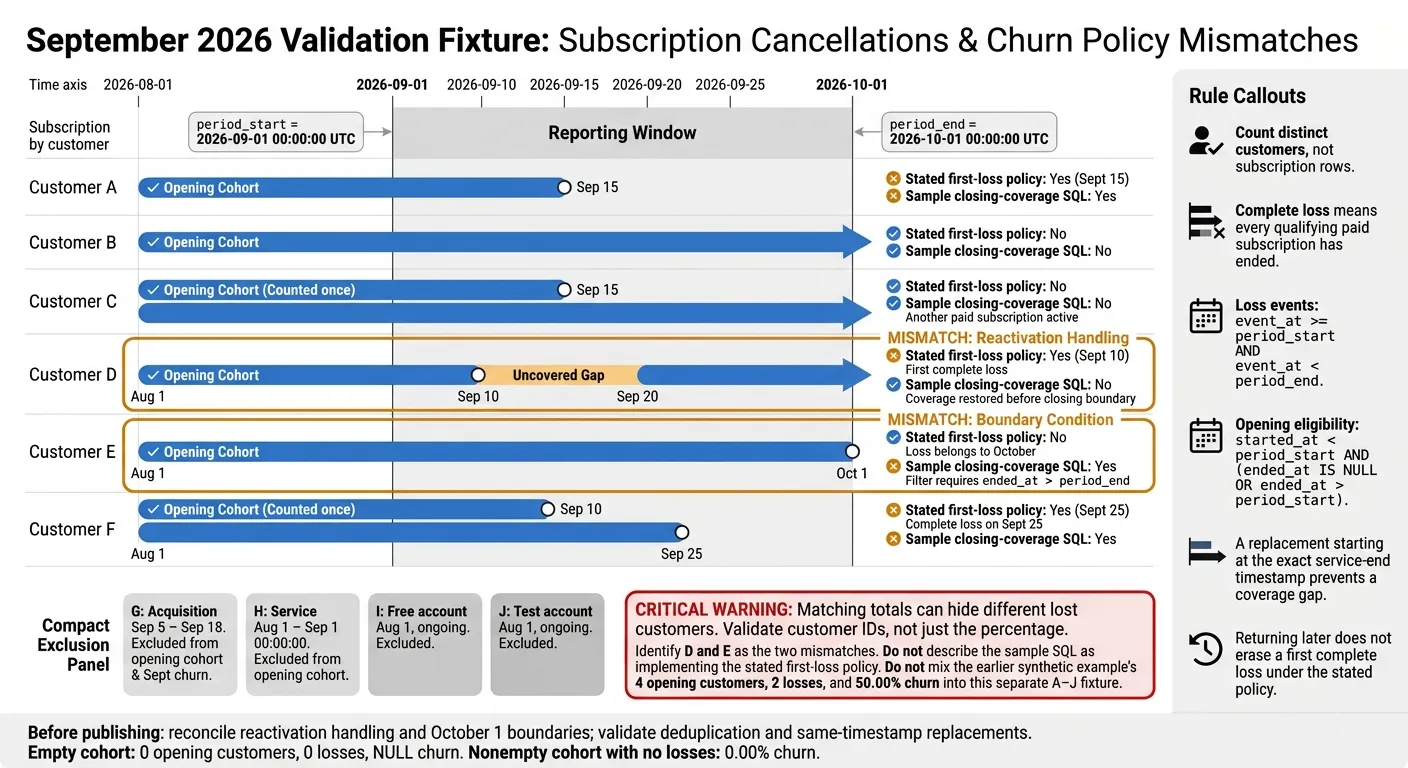 {Customer Churn: Timeline Rules vs. SQL Results}
:::
{Customer Churn: Timeline Rules vs. SQL Results}
:::
Check the sample table and expected results
Check customer IDs, not just the percentage. The earlier September 2026 sample returns 4 opening customers, 2 lost customers, and 50.00% churn. The fixture below adds edge cases for the same query, which counts distinct opening customers without qualifying service at the closing boundary. D’s reactivation is a separate event, but its restored service keeps it out of the churn count.
Customer Subscription start Subscription end In opening cohort? Counts as September churn? New during period? A Aug. 1, 2026 Sept. 15, 2026 Yes Yes No B Aug. 1, 2026 Ongoing Yes No No C - subscription 1 Aug. 1, 2026 Sept. 15, 2026 Yes No No C - subscription 2 Aug. 1, 2026 Ongoing Yes No No D - original Aug. 1, 2026 Sept. 10, 2026 Yes No No D - reactivation Sept. 20, 2026 Ongoing Excluded; original subscription establishes membership No No E Aug. 1, 2026 Oct. 1, 2026 Yes Yes under the query’s closing-coverage filter No F - subscription 1 Aug. 1, 2026 Sept. 10, 2026 Yes Yes No F - subscription 2 Aug. 1, 2026 Sept. 25, 2026 Yes Yes No G - acquisition Sept. 5, 2026 Sept. 18, 2026 No Excluded Yes H - opening-boundary cancellation Aug. 1, 2026 Sept. 1, 2026 No Excluded No I - free account Aug. 1, 2026 Ongoing No Excluded No J - test account Aug. 1, 2026 Ongoing No Excluded No
This fixture checks customer deduplication, reactivations, and half-open date boundaries. Before publishing the metric, load it into a temporary validation table and run the same query against churn_validation to verify the customer-level rules.
CREATE TEMP TABLE churn_validation
    (LIKE subscription_history INCLUDING ALL);

INSERT INTO churn_validation
    (subscription_id, customer_id, started_at, ended_at,
     plan_type, is_test)
VALUES
    -- A: September cancellation.
    (201, 201, '2026-08-01 00:00:00+00',
     '2026-09-15 00:00:00+00', 'basic', FALSE),

    -- B: ongoing.
    (202, 202, '2026-08-01 00:00:00+00',
     NULL, 'pro', FALSE),

    -- C: one of two subscriptions remains.
    (203, 203, '2026-08-01 00:00:00+00',
     '2026-09-15 00:00:00+00', 'pro', FALSE),
    (204, 203, '2026-08-01 00:00:00+00',
     NULL, 'pro', FALSE),

    -- D: service restored before the closing boundary.
    (205, 204, '2026-08-01 00:00:00+00',
     '2026-09-10 00:00:00+00', 'basic', FALSE),
    (206, 204, '2026-09-20 00:00:00+00',
     NULL, 'basic', FALSE),

    -- E: exact closing-boundary test.
    (207, 205, '2026-08-01 00:00:00+00',
     '2026-10-01 00:00:00+00', 'pro', FALSE),

    -- F: final concurrent subscription ends September 25.
    (208, 206, '2026-08-01 00:00:00+00',
     '2026-09-10 00:00:00+00', 'business', FALSE),
    (209, 206, '2026-08-01 00:00:00+00',
     '2026-09-25 00:00:00+00', 'business', FALSE),

    -- G–J: excluded acquisition, boundary, free, and test cases.
    (210, 207, '2026-09-05 00:00:00+00',
     '2026-09-18 00:00:00+00', 'basic', FALSE),
    (211, 208, '2026-08-01 00:00:00+00',
     '2026-09-01 00:00:00+00', 'basic', FALSE),
    (212, 209, '2026-08-01 00:00:00+00',
     NULL, 'free', FALSE),
    (213, 210, '2026-08-01 00:00:00+00',
     NULL, 'business', TRUE);
If the counts differ, start with customer_id deduplication, boundary timestamps, and reactivation handling.
Test date boundaries, duplicates, and empty cohorts
Apply the boundary rules consistently. Test timestamps immediately before, exactly at, and immediately after each reporting boundary. Check same-timestamp replacement events, too: the billing system may record a cancellation and reactivation with no gap.
Resolve the closing-boundary mismatch before publishing. The preceding SQL excludes subscriptions ending exactly at period_end from closing coverage, so it counts E as lost. That conflicts with the earlier rule that excludes October 1 loss events from September. This fixture exposes the mismatch; the original sample does not.
In production, compare opening and lost customer IDs against billing events, paid-through dates, and a finance-approved dbt model. Reconcile acquisition, free-account, and test-account exclusions separately, and investigate duplicates, late events, and time zone differences before publishing.
An empty fixture must return 0 opening customers, 0 losses, and NULL churn. A populated cohort with no losses must return 0.00%. Save the SQL, parameters, source snapshot, and customer-level output so you can trace later corrections.
Publish the approved churn metric in Querio
Run the approved query through Querio’s live Snowflake, BigQuery, Redshift, or PostgreSQL connection - no CSV exports needed. Inspect and edit its SQL and Python in the reactive notebook.
Store the chosen loss policy, boundary rules, eligibility filters, joins, and trusted query in Querio’s governed context layer as files synced to GitHub alongside dbt. Require human approval before self-serve questions ask what drove churn last month without writing SQL using a changed definition, especially when a change affects which customers count as lost.
Conclusion: Use consistent churn definitions
Customer churn is the share of the opening cohort that fully lost paid service during the period.[1] Deduplicate that cohort, then lock the time zone, reporting boundaries, loss rule, acquisition exclusion, and reactivation policy.
Make this definition the reporting standard. Validate it again before publishing, and use the same cohort logic each month. The SQL should return the same customer-level result for the same cohort and time window. Once the metric passes validation, freeze the logic.
Use customer churn for retention and revenue churn for revenue impact. The metric is then ready for monthly self-serve use. Store the approved definition in Querio’s governed context layer to keep monthly reporting consistent.
FAQs
::: faq
How do I fix the SQL to count losses before reactivation?
Start with distinct accounts that were active on the cohort start date. Mark accounts as churned if their subscription cancellation or end date falls within the reporting window.
Next, left join reactivations - accounts with a new active period after cancellation. Keep only churned accounts with no matching reactivation. Use COUNT(DISTINCT account_id) for the final count so each account is counted only once.
:::
::: faq
How do I keep October 1 losses out of September churn?
Count only customers who were active on September 1 and whose cancellation or termination takes effect in September, before October 1. Exclude losses that take effect on October 1.
Count a customer as churned only if they have no active or reactivated state during the rest of September before churn takes effect. Deduplicate by customer_id so repeated cancellation events don’t inflate the count.
Before publishing, verify that the denominator counts distinct customers active on September 1. :::
::: faq
When should I restate churn after backdated corrections?
Restate churn figures whenever you make backdated corrections so historical reports stay accurate and retain a single source of truth. Clearly label corrected reports so readers can tell them apart from the originals during performance reviews.
Keep accounting logic and edge-case rules in a centralized, governed semantic layer. Update the underlying dbt model or warehouse view so corrections automatically reach every dashboard and report, keeping the data open to inspection and consistent. :::