Business Intelligence
business intelligence tools direct query snowflake bigquery ai
How direct query links BI tools to cloud warehouses with AI-driven SQL, semantic governance, and performance best practices.

Direct query connects BI tools directly to data warehouses like Snowflake and BigQuery, ensuring real-time insights without relying on outdated data snapshots. This approach is ideal for scenarios requiring live data, such as retail operations or real-time marketing analytics. Key benefits include:
- Real-time data access: Dashboards reflect the most current data by executing live SQL queries.
- Enhanced performance: Snowflake’s virtual warehouses and BigQuery’s serverless architecture handle large-scale workloads efficiently.
- Simplified workflows with AI: Tools like Querio convert plain English into optimized SQL, ensuring consistent metrics and faster decision-making.
- Built-in governance: Row-level security and data masking policies ensure compliance and controlled data access.
With AI-driven query optimization, semantic layers for clarity, and robust security measures, direct query enables faster, more reliable analytics for businesses managing complex, high-volume data environments.
How To Connect Power BI to Google Big Query (Google Public Data Sets)

::: @iframe https://www.youtube.com/embed/mdwadv4N0E4 :::
sbb-itb-284a532
How Direct Query Works with Snowflake and BigQuery
Direct query establishes a secure, live connection between your BI tool and your data warehouse. Unlike traditional methods, it avoids copying, exporting, or storing data within the BI layer. Instead, whenever users interact with the tool, it triggers SQL queries that fetch live data directly from the warehouse. This process is protected by strict security protocols, which are detailed in the next section.
Direct Query Architecture and Deployment Patterns
For secure connections, service accounts with read-only permissions are essential. In BigQuery, this often involves assigning the BigQuery Data Viewer and BigQuery Job User roles, authenticated using secure JSON key files or RSA encryption. Similarly, Snowflake uses dedicated service roles scoped to specific schemas or databases to maintain tight control.
Beyond authentication, connections are safeguarded by advanced measures like TLS 1.3 encryption, IP whitelisting, and SSH tunneling. These steps ensure that your warehouse remains shielded from public internet exposure. Additionally, a semantic layer bridges the gap between raw warehouse schemas and BI tools. This layer simplifies technical field names into standardized business terms - like converting rev_gross_usd into "Gross Revenue" - to ensure consistency across teams.
Key Snowflake and BigQuery Features for Direct Query
Both Snowflake and BigQuery operate on a compute and storage separation model, ensuring analytical queries don't interfere with data ingestion processes. Snowflake achieves this with virtual warehouses, which are isolated compute clusters that can be independently scaled or paused. BigQuery, on the other hand, offers a serverless model, automatically assigning compute resources (known as slots) without requiring manual infrastructure management.
BigQuery's distributed engine is designed for speed, capable of querying terabytes in seconds and petabytes in minutes [2]. A standout feature is BigQuery continuous queries, which run persistently to analyze streaming data in real time. These queries can push results to services like Pub/Sub for immediate action. However, they are available only in the Enterprise or Enterprise Plus editions and are billed using capacity-based (slot) pricing [1]. These capabilities make direct query a powerful option for large-scale, real-time analytics.
When to Use Direct Query
Direct query isn't always the best fit, but it excels in specific scenarios:
| Scenario | Why Direct Query Fits |
|---|---|
| Operations dashboards | Provides real-time accuracy without waiting for batch ETL processes |
| Revenue monitoring | Ensures finance teams access live data instead of outdated snapshots |
| Regulatory environments | Keeps sensitive data within governed warehouses to meet HIPAA, GDPR, or CCPA requirements |
| Real-time anomaly detection | Leverages BigQuery continuous queries to trigger alerts instantly when thresholds are crossed |
One of the biggest advantages of direct query lies in governance. Since data never leaves the warehouse, Row-Level Security (RLS) and data masking policies defined at the warehouse level are automatically applied to every query. This means users only see data they are authorized to access, with no extra configuration needed in the BI tool. These governance benefits, combined with AI-driven query optimization, will be explored further in the upcoming section.
How AI Improves Direct Query Workflows
AI isn't just about speeding up direct queries - it transforms the entire process, making it smoother and more efficient, from the moment a question is typed to when the results are displayed.
AI-Assisted Query Generation and Refinement
One of AI's biggest contributions to direct query workflows is natural language to SQL conversion. Instead of analysts manually writing complex SQL queries for platforms like Snowflake or BigQuery, AI can take plain English input - such as "What were last quarter's gross revenue figures by region?" - and convert it into optimized SQL. This process leverages a shared semantic layer, which ensures the use of predefined business rules. The result? Consistent answers for all users, no matter how they phrase their queries.
| Workflow Area | Traditional SQL | AI-Powered Direct Query |
|---|---|---|
| Time to Results | Hours to days | Seconds to minutes |
| Accuracy | Prone to human error | Governed by semantic layer |
| Schema Changes | Manual query updates | Automatic AI adaptation |
AI doesn’t stop at query generation; it also enhances how queries are executed within the data warehouse.
Warehouse-Level Tuning with AI
AI takes query execution to the next level by optimizing performance directly within the warehouse. For instance, in June 2025, AI-enhanced vectorization sped up a 13-billion-row query by an impressive 21x - cutting execution time from 61 seconds to just 2.9 seconds [3]. These improvements were achieved by eliminating repeated computations and avoiding unnecessary hashmap creation during aggregation. Additionally, AI uses expression folding, which evaluates conditions using metadata to skip irrelevant data scans. This means the engine can completely bypass files when filter conditions are guaranteed to be false.
AI-Guided Modeling and Semantic Governance
AI also ensures data consistency and governance by proactively addressing potential issues in semantic models. It identifies ambiguous joins, fields mapped to multiple definitions, and missing partition keys that could lead to costly full scans. By catching these problems during the modeling stage, AI prevents them from surfacing during critical decision-making moments, saving both time and resources.
Best Practices for Direct Query in Business Intelligence
::: @figure 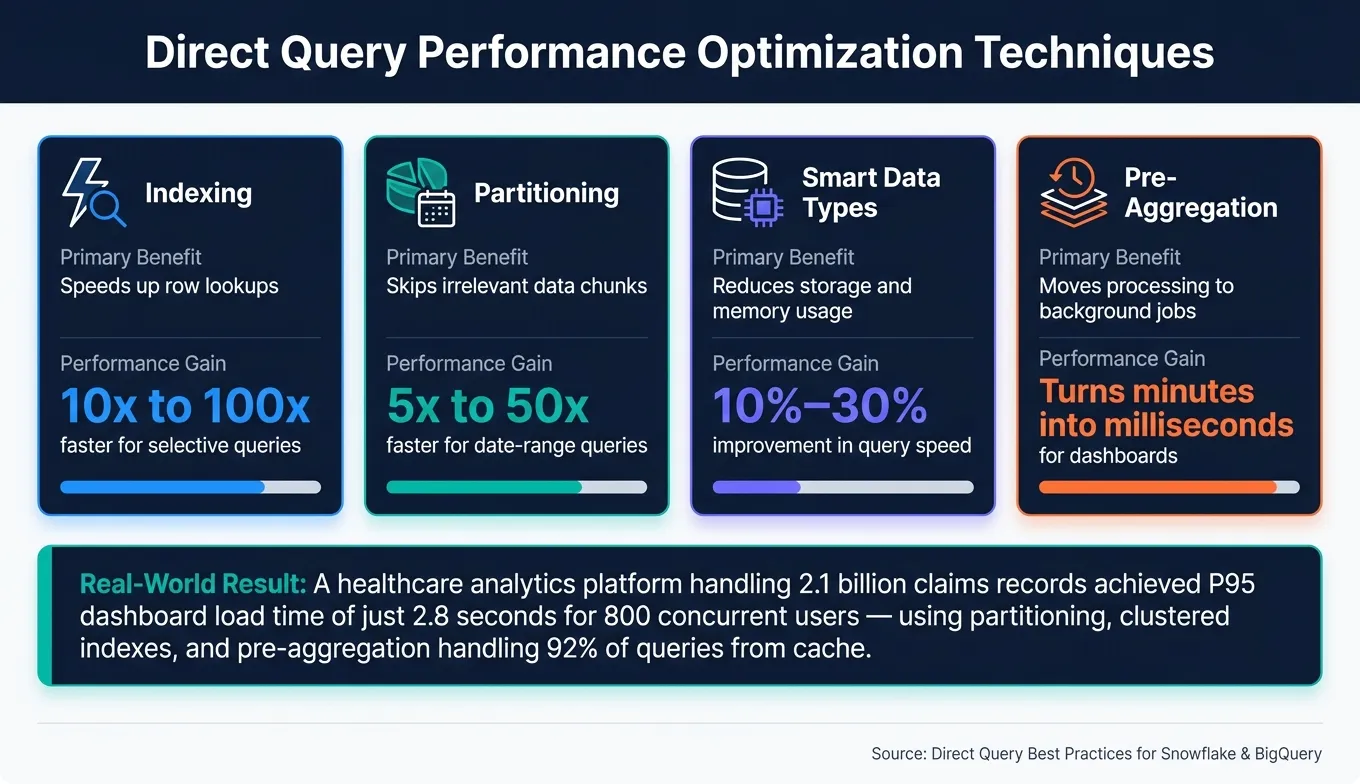 {Direct Query Performance Optimization Techniques: Speed & Benefit Comparison}
:::
{Direct Query Performance Optimization Techniques: Speed & Benefit Comparison}
:::
Setting up direct query effectively goes beyond simply connecting your BI tool to platforms like Snowflake or BigQuery. It's about creating a system that stays fast, dependable, and secure as your data and team grow.
Schema Design and Query Folding
The structure of your schema is one of the biggest factors influencing performance in direct query setups. Partitioning large tables by date and clustering them based on frequently filtered columns allows your data warehouse to bypass irrelevant data chunks instead of scanning everything.
Query folding plays a major role for BI tools that rely on pushing transformation logic back to the data source. When these transformations are folded into a single SQL query, the warehouse does the heavy processing instead of the BI tool. Centralizing complex logic in views or materialized tables can help streamline this process. For example, a healthcare analytics platform managing 2.1 billion claims records achieved a P95 dashboard load time of just 2.8 seconds for 800 concurrent users. They accomplished this by combining clustered columnstore indexes, date partitioning, and three import-mode aggregation tables - handling 92% of queries directly from cache [4].
Another tip: explicitly select only the columns you need in production dashboards. This reduces input/output operations, network traffic, and memory usage at scale [5].
These schema optimizations work hand-in-hand with effective resource management to maintain performance, even under heavy loads.
Managing Connections and Concurrency
A single heavy ad-hoc query can disrupt dashboards for hundreds of users if connections and resources aren't managed properly. The solution? Resource pools and priority queuing. By allocating CPU and memory to different workloads, you can ensure customer-facing dashboards take priority, followed by internal analytics, with exploratory queries running last [5].
Caching at multiple levels - database, application, and BI tool - can also reduce the load on your data warehouse. For metrics that are queried frequently, such as Daily Active Users, pre-aggregating data into summary tables shifts the processing burden to scheduled background jobs. This turns what could take minutes of compute time into results delivered in milliseconds for end users [5].
| Technique | Primary Benefit | Performance Gain |
|---|---|---|
| Indexing | Speeds up row lookups | 10x to 100x faster for selective queries [5] |
| Partitioning | Skips irrelevant data chunks | 5x to 50x faster for date-range queries [5] |
| Smart Data Types | Reduces storage and memory usage | 10%–30% improvement in query speed [5] |
| Pre-Aggregation | Moves processing to background jobs | Turns minutes into milliseconds for dashboards [5] |
Governance and Security in Direct Query
Performance is just one piece of the puzzle - strong governance is equally important. One of the lesser-discussed benefits of direct query is that security can be managed directly within the data warehouse. Instead of duplicating access rules in your BI tool, you can align direct query paths with the identity-provider groups and roles already configured in platforms like Snowflake or BigQuery. Features like Snowflake's row access policies or BigQuery's row-level security help ensure consistency in access control [6].
To further minimize risks, expose only governed metrics and curated data marts to users. Avoid giving access to every raw table in your data lake. This approach not only lowers compliance risks but also reduces the chance of users pulling inaccurate or misleading data from unvetted sources [6].
How Querio Supports Direct Query on Snowflake and BigQuery
Querio simplifies direct query workflows for Snowflake and BigQuery by merging AI-driven query generation with a semantic framework and a dynamic analytics environment. This approach prioritizes governance and performance, making data queries more efficient and reliable.
AI-Powered Query Generation in Querio
Querio uses AI to create SQL queries based on your warehouse metadata. It starts by analyzing your warehouse catalog to understand table structures, column types, partitioning keys, clustering, and access policies. From there, it translates plain English queries into semantic entities, generates optimized SQL or Python scripts, and validates them against live metadata. The output includes inline comments to explain elements like joins, filters, and aggregations, making the queries transparent and easy to refine. This process integrates seamlessly with a semantic framework to maintain metric accuracy.
Querio also incorporates optimizations tailored to specific warehouses. For BigQuery, it ensures partition filters are applied to _PARTITIONTIME columns and avoids expressions that unnecessarily increase data scans. For Snowflake, it focuses on clustering keys and prevents unneeded warehouse resizing. When running exploratory queries, Querio defaults to limited time frames - like the last 90 days - instead of scanning entire tables, helping control costs.
| Query Behavior | Without Querio | With Querio |
|---|---|---|
| Schema awareness | Relies on raw schema guesses | Uses live warehouse catalog data |
| Partition/cluster usage | Often overlooked | Applied based on warehouse guidelines |
| Join logic | Prone to errors | Validated with semantic layer |
| Explainability | Limited transparency | Inline comments for clarity |
Querio's Semantic Layer for Consistent Metrics
Querio's semantic layer builds on its AI optimizations to prevent metric inconsistencies and enforce governance. In direct query setups, teams often calculate metrics like "Monthly Recurring Revenue" or "Active Users" differently, leading to conflicting results. Querio addresses this by defining metrics, entities, dimensions, and reusable filters in one place, then compiling them into warehouse-native SQL during query execution.
For instance, if "Active Users (28-day)" is defined in the semantic layer, that precise definition is applied consistently across notebooks, dashboards, and reports on both Snowflake and BigQuery. Governance rules are also embedded: row-level filters limit data access (e.g., US sales reps see only their regions), PII fields like emails are masked, and metric changes require approval from designated owners like Analytics or Finance leaders. This ensures compliance is built into the process, eliminating the need for manual checks.
Scaling Self-Serve Analytics with Querio
By anchoring metrics in the semantic layer, Querio makes scaling self-serve analytics straightforward. Its reactive notebooks enable users to conduct ad-hoc analyses and create production-ready reports. Each notebook cell - whether it’s a natural-language prompt, SQL query, Python script, or visualization - executes directly against Snowflake or BigQuery using live credentials and governed semantics. Adjusting a filter or metric in one cell automatically updates dependent cells.
Users can easily turn queries and visualizations into dashboards with parameterized controls, such as date ranges or customer segments, applied consistently. For scheduled reporting, Querio allows teams to automate runs (e.g., every weekday at 8:00 AM ET), delivering results via email or Slack. These reports respect access rules, ensuring recipients only see permissible data.
To balance self-serve capabilities with governance, Querio offers curated data products - like "Revenue Analytics" or "Marketing Funnel" - as controlled exploration spaces. Business users can query approved metrics and dimensions in plain English, while data teams monitor usage, set query complexity limits, and convert valuable ad-hoc analyses into certified metrics. This prevents the buildup of unverified logic across the organization.
Conclusion: Getting More from Direct Query with AI
Direct query on platforms like Snowflake and BigQuery has evolved far beyond its earlier reputation for being slow or costly. With the right setup, these platforms now provide fast and reliable responses to BI tools - eliminating the need for maintaining data extracts or running nightly ETL jobs. This shift creates a strong foundation for AI to step in and enhance workflows even further.
AI takes these capabilities to the next level, streamlining direct query processes for quicker insights. Features like natural language to SQL conversion, automated query optimization, and governed semantic layers make it easier for business users to access data while ensuring data teams maintain control. According to a McKinsey study, companies embedding AI into analytics workflows are 23% more likely to outperform their peers on key financial metrics. This highlights how faster and more consistent decision-making can drive tangible business results.
That said, AI isn't a standalone solution. Teams that maximize the benefits of direct query pair AI with robust semantic modeling and clear governance practices. By centralizing metric definitions and access controls, self-serve analytics becomes a strength rather than a potential risk, giving businesses a true competitive edge.
Querio tackles these challenges head-on with a solution tailored for teams managing large-scale direct queries on Snowflake and BigQuery. It combines AI-powered SQL generation, a governed semantic layer, and reactive notebooks into one streamlined workspace. Whether you're building high-traffic executive dashboards, aligning metrics across finance and marketing, or exploring sensitive data with row-level security, Querio ensures workflows remain fast, reliable, and secure - without adding unnecessary complexity.
FAQs
::: faq
When is direct query a bad fit?
Directly running queries on live production databases isn’t the best choice when dealing with exploratory or ad hoc queries. Why? It can bog down system performance and potentially disrupt the customer experience. A smarter approach is to use read-only replicas or set up separate analytical data warehouses. This keeps workloads isolated, ensuring your production system runs smoothly while still allowing for efficient data analysis. :::
::: faq
How do I keep direct query fast at high concurrency?
To keep direct query performance fast, even with high user demand, platforms like Querio offer AI-driven query optimization and automatic caching. Here's how it works: AI tweaks and optimizes SQL queries on the fly, cutting down execution time and avoiding bottlenecks. On top of that, features like intelligent caching and automatic aggregations help lighten the load on your backend systems.
By connecting securely to data warehouses like Snowflake or BigQuery, you can ensure scalability. Plus, AI dynamically adjusts query plans to handle changes in demand, keeping everything running smoothly even during peak times. :::
::: faq
How does AI prevent wrong metrics in self-serve BI?
AI plays a crucial role in delivering accurate metrics within self-serve BI tools by leveraging a centralized semantic layer and strong data governance practices. Querio sets the foundation by defining key metrics, relationships, and glossary terms in one place, ensuring all users access consistent information. Its AI capabilities streamline the process by automating data validation and converting natural language inputs into efficient SQL queries that align with established business rules. This approach reduces errors, safeguards data integrity, and builds confidence in the analytics provided. :::