Business Intelligence
Best AI Data Analyst Tools (2026): Compared by Use Case
Compare five AI data analyst tools by use case, features, governance, and warehouse support for 2026.
Choosing the right AI data analyst tool can save time, improve accuracy, and streamline workflows. This article compares five top tools in 2026 - Querio, ThoughtSpot, Tableau with Tableau Pulse, Microsoft Power BI with Copilot, and Hex - based on their features, warehouse integration, governance, and ideal use cases.
Key takeaways:
- Querio: Best for mid-sized B2B SaaS teams needing live data access and consistent metrics. Starts at $400/month for 10 users.
- ThoughtSpot: Ideal for enterprise teams wanting search-driven analytics. Pricing starts at $50/user/month.
- Tableau with Pulse: Strong for visualization-heavy teams in the Salesforce ecosystem. Costs $70/user/month for Explorer, with AI features at extra cost.
- Power BI with Copilot: Works well for Microsoft-centric organizations. Pricing starts at $44/user/month with the Copilot add-on.
- Hex: Great for analyst-heavy teams building interactive data apps. Costs $36–$75 per editor per month.
Quick Comparison
| Tool | Best For | Price Range | Key Features |
|---|---|---|---|
| Querio | Mid-sized SaaS teams | $400/month (10 users) | Live data, shared metrics, editable SQL/Python |
| ThoughtSpot | Enterprise teams | $50/user/month+ | Search-driven, anomaly detection |
| Tableau + Pulse | Visualization-heavy teams | $70/user/month+ | Proactive insights, Salesforce integration |
| Power BI + Copilot | Microsoft-first organizations | $44/user/month+ | Conversational AI, DAX-based queries |
| Hex | Analyst-heavy teams | $36–$75/editor/month | SQL/Python notebooks, data apps |
Each tool serves distinct use cases, so consider your team’s size, technical expertise, and data infrastructure when deciding.
::: @figure 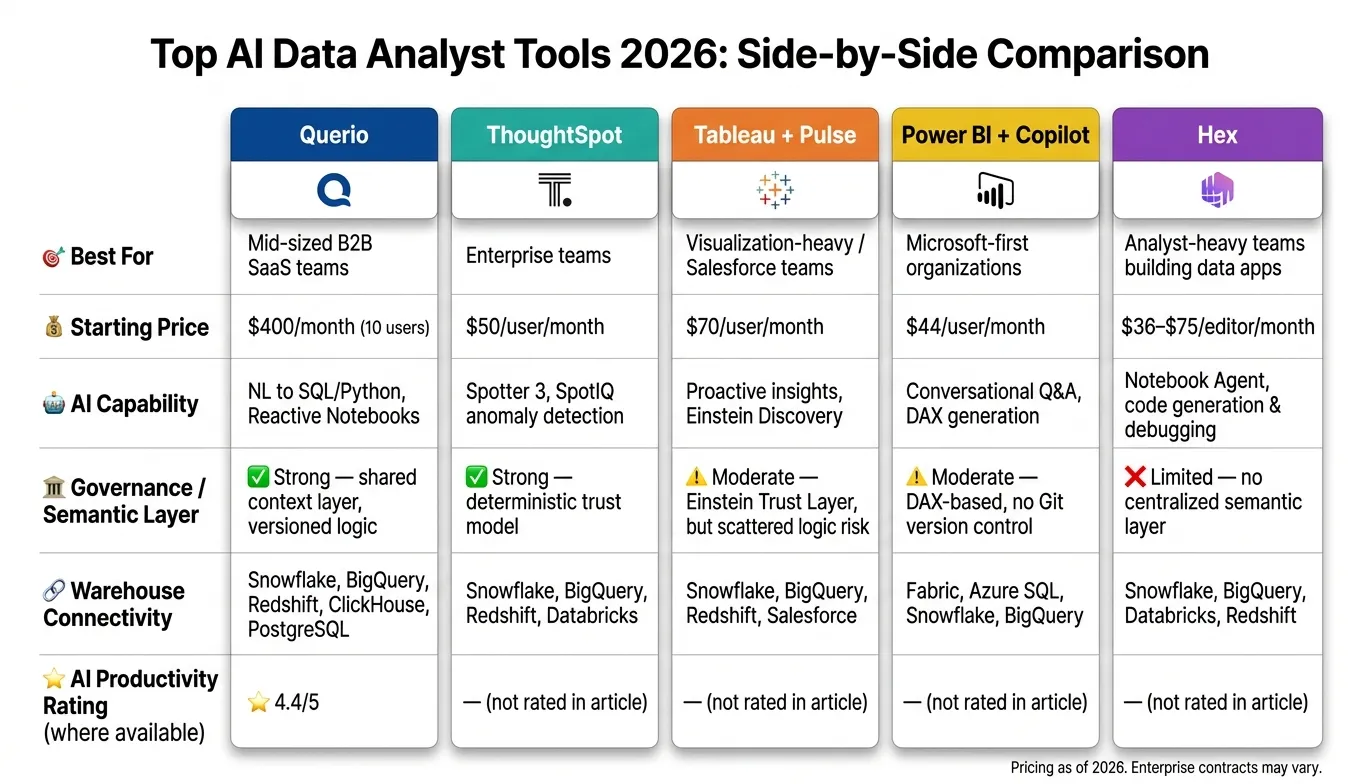 {Top AI Data Analyst Tools 2026: Side-by-Side Comparison}
:::
{Top AI Data Analyst Tools 2026: Side-by-Side Comparison}
:::
1. Querio
Querio is an analytics workspace designed specifically for data teams looking to scale insights without compromising on precision or control. It directly connects to your data warehouse and generates SQL and Python for every query - ensuring nothing is hidden behind opaque AI processes.
Warehouse Connectivity
Querio pulls live data straight from Snowflake, BigQuery, Amazon Redshift, ClickHouse, MotherDuck, and PostgreSQL using encrypted, read-only credentials. This eliminates the need for CSV exports, data duplication, or waiting on ETL syncs. If someone asks a question at 9 a.m., the answer comes directly from your trusted live warehouse - not from an outdated extract.
AI Features
Querio’s AI translates plain-English questions into SQL and Python, displaying the code for review or editing. This transparency is critical for data teams in B2B SaaS companies, where trust in output is essential. The reactive notebook environment allows analysts to refine logic effortlessly. Plus, since notebooks are reactive, any changes to definitions automatically update downstream results. As of January 2026, Querio holds an AI productivity rating of 4.4/5 [3].
Governance and Semantic Layer
Querio’s shared context layer ensures consistent analytics workflows. Joins, metrics, and business definitions - like MRR or active users - are established once by the data team and applied across all queries, dashboards, and AI-generated answers. This means a sales leader and a finance analyst asking the same question will get the same answer, avoiding discrepancies in metric interpretation.
| Feature | How Querio Handles It |
|---|---|
| Metric definitions | Unified in a shared context layer for consistency |
| SQL/Python transparency | Code is fully visible and editable |
| Live data access | Direct connection to the warehouse; no extracts or delays |
| Non-technical access | Natural language interface with governed logic |
| Pricing model | Starts at $400/month for 10 users; most plans offer unlimited users |
Use Case Fit
Querio is ideal for data leaders and analytics teams in 100–500-employee B2B SaaS companies running a modern data warehouse. It’s designed to empower non-technical stakeholders with self-serve access to insights while maintaining consistency and accuracy. However, it’s not intended for ML engineers creating custom models or hobbyists exploring datasets. Querio is purpose-built for teams where data integrity and metric alignment are critical to business success.
sbb-itb-284a532
2. ThoughtSpot
ThoughtSpot stands out as a search-driven BI tool tailored for large-scale enterprise use. It empowers non-technical business users to ask questions in plain English and retrieve answers directly from their data warehouse - no SQL required.
Warehouse Connectivity
ThoughtSpot functions as a query layer that doesn’t store data itself. Instead, it connects directly to cloud warehouses like Snowflake, BigQuery, and Redshift. Queries are executed in real time, directly on the warehouse at runtime.
AI Features
In 2026, ThoughtSpot enhanced its AI capabilities significantly. Its Spotter 3 feature enables conversational queries, while SpotIQ identifies anomalies and patterns in data. A key addition in March 2026 was Spotter Semantics, a semantic layer that translates natural language into optimized SQL for more accurate answers [3]. However, users may need to learn specific phrasing patterns for the best results, introducing a slight learning curve [5].
To ensure consistency across teams, ThoughtSpot integrates a strong semantic governance framework.
Governance and Semantic Layer
ThoughtSpot’s governance relies on a deterministic trust model. This means data must first be modeled within its semantic layer before AI can provide governed insights [4][5]. While this upfront modeling requires some effort, it ensures consistent and reliable results for non-technical users. This approach has made ThoughtSpot a popular choice among Fortune 100 companies, with some deployments supporting tens of thousands of users [4].
Use Case Fit
ThoughtSpot’s robust governance and search-driven analytics make it a great fit for enterprise BI teams looking to move away from static dashboards. Its Liveboards allow for real-time, interactive drill-downs, making it particularly useful for operations and business teams [5].
Pricing reflects its enterprise focus. The Pro plan is priced at $50 per user/month (supporting up to 1,000 users and 250 million rows), while Enterprise contracts are custom and typically range between $150,000 and $350,000 annually, with mid-market averages around $140,000 [5]. While ThoughtSpot excels in delivering governed, live analytics, teams requiring more transparent SQL/Python workflows or reactive data notebooks might explore other options.
| Feature | ThoughtSpot Capability |
|---|---|
| Warehouse connectivity | Query layer over Snowflake, BigQuery, Redshift |
| AI layer | Spotter 3, SpotIQ, Spotter Semantics (March 2026) |
| Semantic governance | Deterministic model; requires upfront data modeling |
| Target user | Non-technical business users at enterprise scale |
| Pricing | Starts at $50/user/month; Enterprise from ~$150,000/year |
3. Tableau with Tableau Pulse
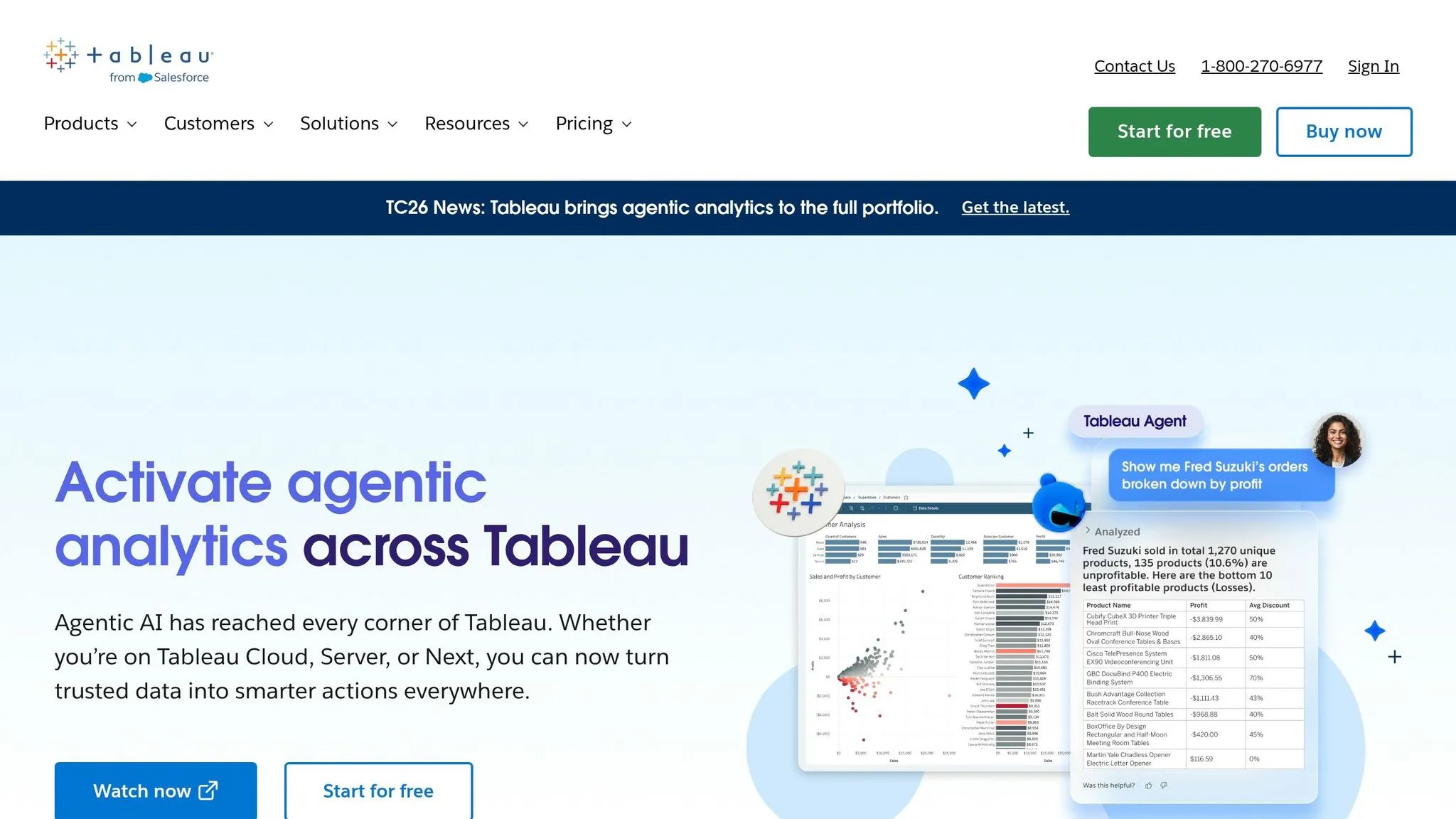
Tableau has long been a leader in data visualization, and now it's stepping into the AI-driven world with Tableau Pulse. As part of the broader Tableau Next platform (set to launch in 2026), Salesforce is building toward an autonomous business intelligence (BI) experience. The idea is to have AI actively deliver insights, cutting down on the need for manual data exploration.
Warehouse Connectivity
Tableau integrates directly with major cloud data warehouses like Snowflake, BigQuery, and Redshift, allowing live querying against your data. While its connectivity is solid, Tableau's strength continues to lie in its visualization capabilities.
AI Features
Tableau Pulse introduces tools like proactive metric summaries, tracking progress against goals, anomaly alerts, and plain-language explanations. Tableau Agent enhances this with conversational querying and automated chart creation, while Einstein Discovery delivers features like forecasting and anomaly detection right out of the box [3]. However, these advanced AI tools are not included in the standard Explorer license ($70/user/month) and are part of the Tableau+ tier or come with additional costs [3]. These features highlight the growing importance of governance in analytics workflows.
Governance and Semantic Layer
When it comes to governance, Tableau's semantic layer is often seen as less robust compared to competitors like Looker's LookML. Without a centralized and governed model, business logic can end up scattered across individual workbooks, leading to inconsistencies in AI-generated insights [3]. Unlike platforms that hide underlying code, Tableau's approach can sometimes result in uneven outcomes if definitions aren't centralized. Tools like Tableau Catalog, which help track data lineage and certify assets, and the Einstein Trust Layer, which ensures PII masking for AI queries, are useful. Still, the effectiveness of governance relies heavily on having a unified semantic layer.
Use Case Fit
Tableau Pulse is designed to bring proactive insights to teams that already rely on Tableau’s strong visualization tools. It works especially well for teams that prioritize executive-level reporting and are part of the Salesforce ecosystem. However, there’s a tradeoff: the platform often requires a dedicated BI developer to unlock its full potential, and the per-seat pricing model can make it less accessible for mid-sized teams [3].
"Tableau remains the industry standard for data visualization and executive-grade reporting. Tableau Pulse and Tableau Agent extend the platform into proactive, AI-driven territory." - Databox [1]
| Feature | Function | Target User |
|---|---|---|
| Tableau Pulse | Proactive metric monitoring, anomaly alerts, pace-to-goal insights | Business users & executives |
| Tableau Agent | Conversational querying and automated chart creation | Analysts |
| Einstein Discovery | Forecasting, driver analysis, predictive modeling | Analysts & data scientists |
| Tableau Catalog | Lineage tracking, quality warnings, asset certification | Data governors & admins |
| Einstein Trust Layer | PII masking and zero-data retention for AI queries | IT & security teams |
4. Microsoft Power BI with Copilot
Microsoft Power BI with Copilot brings conversational analytics into the familiar Microsoft 365 ecosystem. It allows users to generate DAX-based insights without ever leaving Power BI. This makes it an appealing option for organizations deeply integrated with Microsoft tools, though it does rely on pre-modeled data for dependable results. Power BI Copilot's conversational multi-turn chat feature became widely available in April 2026 [3].
Warehouse Connectivity
Power BI integrates seamlessly with Microsoft's OneLake and Fabric ecosystem, while also supporting external data sources like Snowflake, BigQuery, and Redshift. These live connections enable real-time decision-making. However, natural language processing in BI queries depend on pre-modeled datasets in DAX to ensure consistent and accurate responses [1][3].
AI Features
Copilot stands out for its ability to summarize reports, answer questions based on pre-built datasets, and create charts automatically. Teams can also use Fabric Data Agents to define specific data scopes through custom instructions. While Copilot performs well in summarization tasks, it struggles with more intricate, multi-step analyses that span across multiple tables [3].
Governance and Semantic Layer
Power BI's semantic layer, built on DAX, is functional but lacks the depth of more advanced governance frameworks. For example, it does not include Git-based version control, which makes tracking changes more challenging. Without disciplined centralization of business logic, inconsistencies can arise across reports - posing a challenge for organizations operating at scale. These governance limitations make it important to evaluate whether this setup aligns with an organization's needs [3].
Use Case Fit
Power BI with Copilot is a strong choice for Microsoft-first organizations that already rely on Azure, Teams, and Fabric. Priced at approximately $44 per user per month (including the Pro license and Copilot add-on), plus additional Fabric capacity costs, it may not be the best fit for teams requiring advanced semantic governance or those operating outside the Microsoft ecosystem [1][3]. Unlike platforms that lack comprehensive governance, tools like Querio offer a fully governed semantic environment, ensuring consistent and transparent analytics for data teams. For data leaders, cost and governance depth are critical factors when evaluating AI tools.
| Feature | Detail |
|---|---|
| AI Capability | Summarization, DAX generation, conversational Q&A |
| Semantic Layer | DAX-based (basic/thin) |
| Version Control | No Git support |
| Pricing | ~$44/user/month (Pro + Copilot add-on) |
| Capacity Requirement | Fabric F2 or Power BI Premium P1 minimum |
| Best For | Microsoft 365 / Azure-native organizations |
5. Hex
Hex is a notebook platform designed for teams that rely heavily on SQL and Python to create interactive data apps. It's a collaborative tool tailored for analysts who need flexibility and efficiency in their workflows.
Warehouse Connectivity
Hex works seamlessly with modern data warehouses like Snowflake, BigQuery, Databricks, and Redshift. Its interface allows users to move easily between SQL and Python in the same notebook, a feature that sets it apart from traditional setups like Jupyter or Mode, which lack this kind of integration.
AI Features
One of Hex's standout tools is its Notebook Agent. This AI-driven assistant simplifies tasks like writing code, debugging, and iterating directly within the notebook. Once the analysis is complete, users can publish their work as interactive data apps, skipping the need for engineering support to make the data accessible to stakeholders.
Governance and Semantic Layer
For teams focused on self-service analytics and data governance, Hex has some limitations. Its version control is basic, offering tagging but no Git integration. Additionally, it lacks a centralized semantic layer, which means there’s no unified way to define metrics. This could lead to inconsistencies, like two analysts defining "monthly recurring revenue" differently and creating conflicting data apps. These gaps make Hex better suited for specific scenarios rather than broad governance-focused applications.
Use Case Fit
Hex shines for teams of analysts who frequently build interactive data apps and prefer notebook-based workflows. It’s an excellent alternative to Jupyter or Mode for users comfortable working with code rather than plain-English query tools. Pricing ranges from $36 to $75 per editor per month [2].
| Feature | Detail |
|---|---|
| Primary Interface | Collaborative SQL & Python notebooks |
| Native Integrations | Snowflake, BigQuery, Databricks, Redshift |
| AI Tools | Notebook Agent and data app publishing |
| Version Control | Limited (version tagging only) |
| Pricing | $36–$75 per editor per month |
| Best For | Analyst-heavy teams building data apps |
Pros and Cons by Tool
The best AI data analyst tools offer real-time analytics by connecting directly to modern data warehouses. Querio stands out with its shared context layer, which ensures consistent metrics, transparent SQL/Python, and reactive notebooks. This setup simplifies AI self-serve analytics, especially for mid-market B2B SaaS teams. Ultimately, the right tool for your team will depend on factors like technical expertise, your existing data stack, and governance needs.
Here’s a breakdown of the key features of each tool, focusing on warehouse connectivity, AI capabilities, governance, and suitability for mid-market B2B SaaS teams:
| Tool | Warehouse Connectivity | AI Features | Governance & Semantic Layer | Use Case Fit (Mid-Market B2B SaaS) |
|---|---|---|---|---|
| Querio | Snowflake, BigQuery, Redshift, PostgreSQL, MySQL, ClickHouse – live, zero-copy | Natural language to SQL/Python; Reactive Notebooks | Shared context layer; versioned logic; SOC 2 Type II | Teams needing governed, warehouse-native self-serve without ETL overhead |
| ThoughtSpot | Snowflake, Databricks, BigQuery, Synapse – native | Spotter AI Agent; SpotIQ anomaly detection | Inherits warehouse RLS/CLS; SOC 2 & ISO 27001 | Search-driven self-service on large, well-modeled datasets |
| Tableau + Pulse | Salesforce, Snowflake, BigQuery, S3, Looker | Pulse (proactive insights); Conversational Agent; Einstein Discovery | Einstein Trust Layer; PII masking; Tableau Catalog | Visualization-heavy teams already in the Salesforce ecosystem |
| Power BI + Copilot | Fabric, Azure SQL, Dynamics 365, SharePoint | Copilot (NLQ/summarization); AI Insights; Azure ML integration | Inherits M365 permissions; Microsoft Purview | Microsoft-centric teams with existing data engineering capacity |
| Hex | Snowflake, BigQuery, Databricks, Redshift | Notebook Agent; code generation and debugging | Basic version control; warehouse-based RLS; lacks centralized semantic layer | Analyst-heavy teams building code-driven, interactive data apps |
Querio is designed to deliver consistent and transparent analytics, eliminating delays and ensuring governed insights - a must-have for modern data teams. One standout feature is its shared context layer, which allows data teams to define metrics once and apply them across AI-generated answers, notebooks, and dashboards. This approach tackles the common problem of inconsistent metric definitions.
ThoughtSpot shines with its search-first interface, making it perfect for non-technical users when data is already well-organized. Meanwhile, Power BI with Copilot offers competitive pricing, starting at $10–$14 per user per month for Pro, with an additional $30 per user per month for the Copilot add-on. However, it relies heavily on the Microsoft ecosystem to deliver its full potential.
Conclusion
Querio offers live analytics tailored for mid-market B2B SaaS teams, connecting directly to your data warehouse while providing inspectable and editable SQL and Python. Its shared semantic layer ensures consistent metrics across the board, enabling quick and transparent decision-making. For teams focused on maintaining metric accuracy and simplifying self-serve analytics, Querio presents a strong option.
Different tools cater to specific needs - whether it's search-driven self-service, detailed visual reporting, Microsoft-integrated workflows, or code-heavy environments. However, for mid-market B2B SaaS teams using data warehouses like Snowflake, BigQuery, or Redshift, the priority lies in governed analytics with clear, transparent workflows.
Querio's shared context layer allows data teams to define logic once and apply it seamlessly across AI-generated answers, dashboards, and notebooks. Every result is backed by editable SQL or Python, providing full transparency. Plus, its live connection to your warehouse ensures you're always working with up-to-date, accurate data - no duplicates, no delays.
For teams seeking AI-powered analytics directly tied to their warehouse without the complexity of a full-scale enterprise BI platform, Querio is definitely worth considering.