Guide
Hadoop Distributed File System Explained for Data Teams
Understand Hadoop Distributed File System architecture, read/write flows, fault tolerance, and how HDFS compares to modern object stores like S3 and GCS.
Most advice about the Hadoop Distributed File System starts with the wrong question. HDFS isn't dead, and it isn't the default storage layer for every large data platform either. For teams running regulated, on-premises, hybrid-cloud, or air-gapped environments, the practical question is whether HDFS still fits the workload, and how to move away from it without breaking the pipelines that depend on it.
That distinction matters because HDFS was built for a specific operating model. It distributes large files across commodity servers, keeps redundant block copies, and lets batch engines process data close to where it lives. Those characteristics still work well in the right environment. They also create administrative obligations that object storage can remove, from NameNode capacity planning to DataNode balancing and small-file control.
Table of Contents
- Why HDFS Still Matters in 2026
- Understanding HDFS Architecture and Block Storage
- How Read and Write Operations Flow Through the Cluster
- Fault Tolerance and High Availability Mechanisms
- Comparing HDFS with Modern Object Stores
- Production Pitfalls and Migration Considerations
- Recommended Practices for Data Teams
Why HDFS Still Matters in 2026
The binary narrative, HDFS is dead versus HDFS is still the default, obscures the environments where teams have good reasons to keep it. HDFS continues to appear in banks, telecommunications companies, government agencies, and some HPC and research clusters, particularly where data residency, controlled infrastructure, or existing application dependencies limit a direct move to public-cloud storage. Independent coverage of HDFS highlights these regulated and specialized deployments as part of the reason the technology persists (operational overview of HDFS).
A bank may have compliance rules that require certain datasets to remain on premises. A government environment may be isolated from public networks. A research cluster may already have storage, compute scheduling, security controls, and batch jobs designed around Hadoop APIs. In each case, replacing HDFS isn't a storage-only project. It can involve application refactoring, security review, data-transfer planning, and a long period in which old and new systems must operate together.
Practical rule: Treat HDFS as an operating constraint to manage, not as a technology label to defend.
The platform's historical adoption explains why so many organizations still have this problem. Hadoop grew from ideas in the Google File System paper published in October 2003, with development beginning in Apache Nutch before moving into a Hadoop subproject in January 2006. Hadoop 0.1.0 arrived in April 2006, and Yahoo was operating a 1,000-node cluster by April 2007. Hadoop became an Apache top-level project in January 2008, followed by reports of a 4,000-node cluster in July 2008 (Apache Hadoop history).
That momentum turned HDFS into enterprise infrastructure rather than a temporary experiment. Facebook reported a Hadoop cluster holding 21 PB in 2010, data growth to 100 PB in June 2012, and an increase of roughly 0.5 PB per day later that year. By 2013, more than half of the Fortune 50 companies were using Hadoop, according to the historical account of HDFS adoption (HDFS history and adoption).
The better 2026 framing is migration strategy. Recent coverage describes Apache Hadoop 3.5.0 as shipping in April 2026, with Java 17 support, HDFS concurrency improvements, and a native Google Cloud Storage filesystem. It also notes AWS DataSync HDFS support added in July 2026 for transfers to Azure Blob, positioning HDFS increasingly as a bridge between established clusters and modern storage rather than a greenfield default (Hadoop's future and migration role).
For a broader context on how Hadoop fits into enterprise analytics, see this overview of big data analytics and Hadoop. The useful decision isn't whether HDFS has a future in the abstract. It's whether your organization should stay, migrate, or run both for a defined period.
Understanding HDFS Architecture and Block Storage
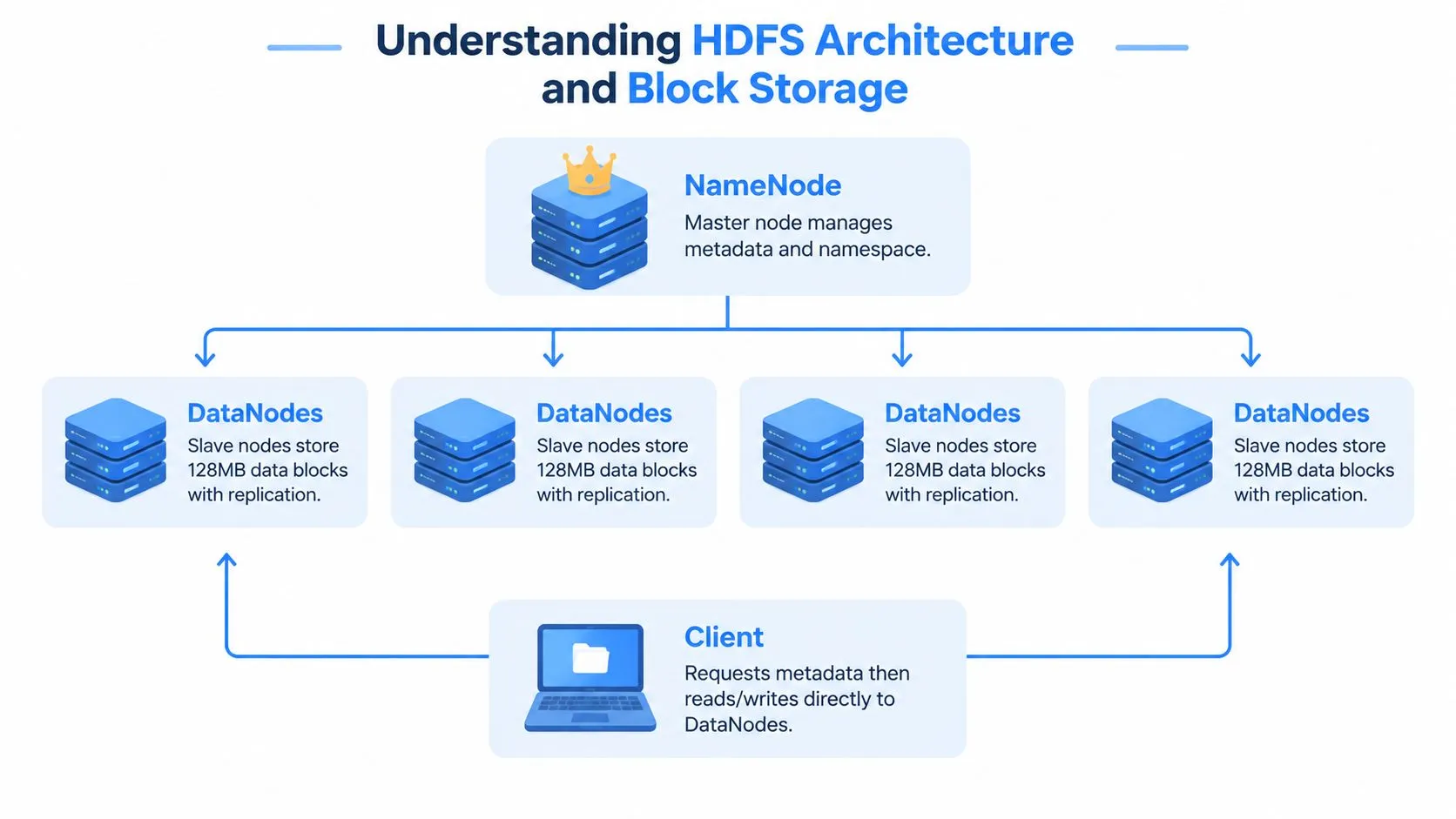
HDFS separates filesystem coordination from bulk data movement. The NameNode maintains the filesystem namespace, permissions, file-to-block mappings, and block locations. DataNodes store the blocks and serve them directly to clients.
A client asks the NameNode for metadata, receives the locations of the required blocks, and then reads from or writes to the appropriate DataNodes. The NameNode therefore coordinates placement and namespace operations without carrying every byte of a large transfer. That separation remains useful in legacy clusters, although it also makes NameNode capacity and availability important operational concerns.
Why HDFS uses large blocks
HDFS divides each file into fixed-size blocks. Apache documents 128 MB as a typical block size, while administrators can configure block size and replication settings per file (Apache HDFS design).
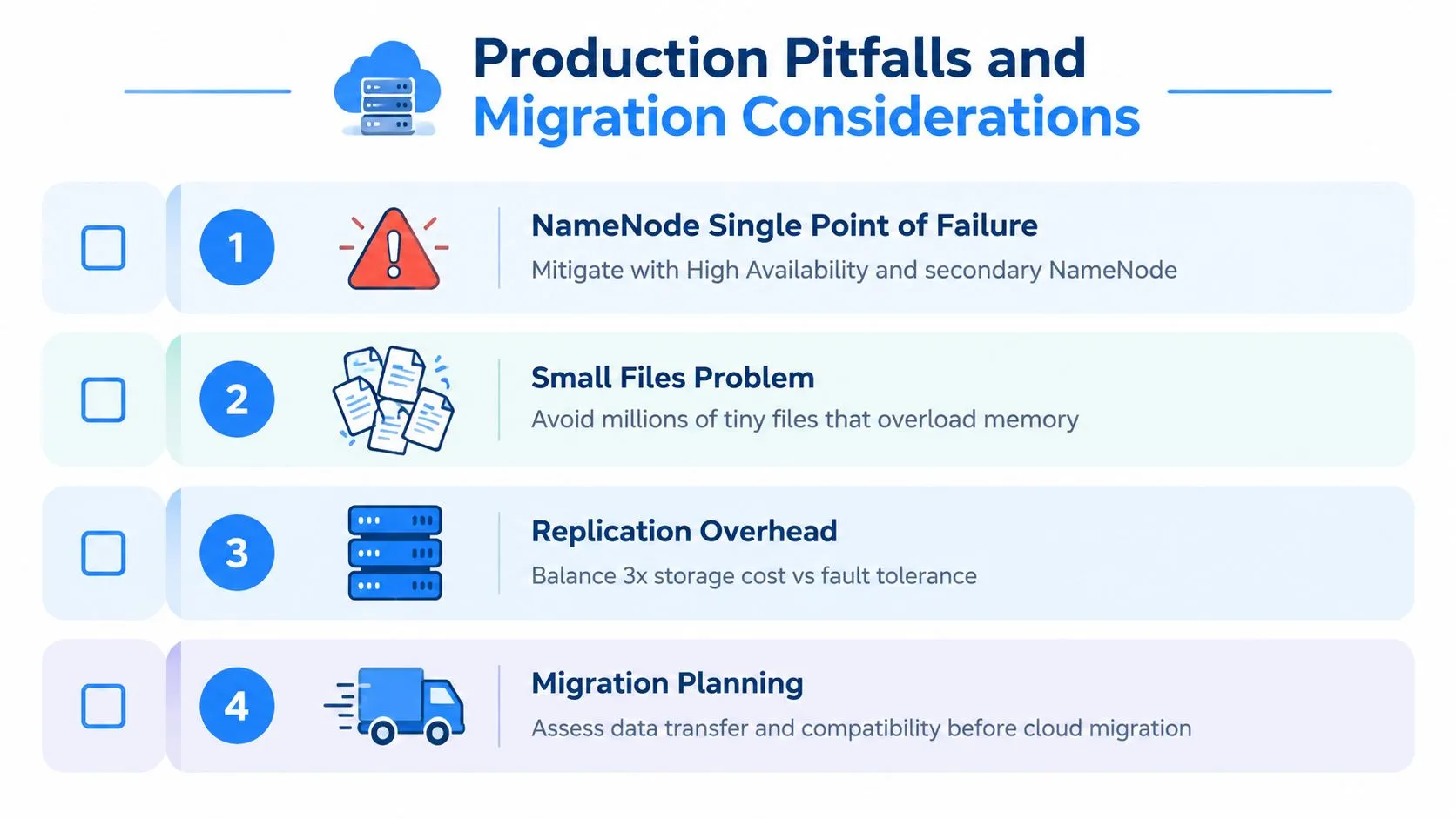
Large blocks reduce the number of block records the NameNode must track for a given data volume. They also support long, sequential transfers from DataNodes, which suits batch scans and distributed processing. The trade-off is weaker fit for workloads built around small files, frequent updates, or random point reads.
Three architectural consequences matter in production:
- Centralized namespace: The NameNode tracks directories, permissions, file-to-block mappings, and block locations.
- Direct data serving: DataNodes hold the blocks and send data to clients, so large transfers use the cluster's disks and network rather than the NameNode as a data path.
- Batch-oriented behavior: Large scans, append-heavy pipelines, and immutable datasets fit well. Small-file collections and low-latency random access create pressure elsewhere in the stack.
Replication protects blocks, not transactions
HDFS commonly uses a default replication factor of 3, storing each block on three DataNodes (HDFS replication management). The NameNode avoids placing replicas of one block on the same DataNode, while the cluster's node count limits the practical number of distinct replica locations.
Replication is asynchronous repair, not transactional protection. If a DataNode fails, a disk reports an error, a block is corrupted, or a file's replication policy changes, the NameNode schedules new copies in the background. Applications do not receive database-style rollback or synchronous multi-record mutation guarantees.
That distinction defines HDFS's useful boundary. It can continue serving large datasets through infrastructure failures, but repeated record updates, low-latency lookups, and transactional semantics belong in systems designed for those operations. For regulated environments, block placement and repair also need operational review before a workload is retained on HDFS or moved to an object store.
How Read and Write Operations Flow Through the Cluster
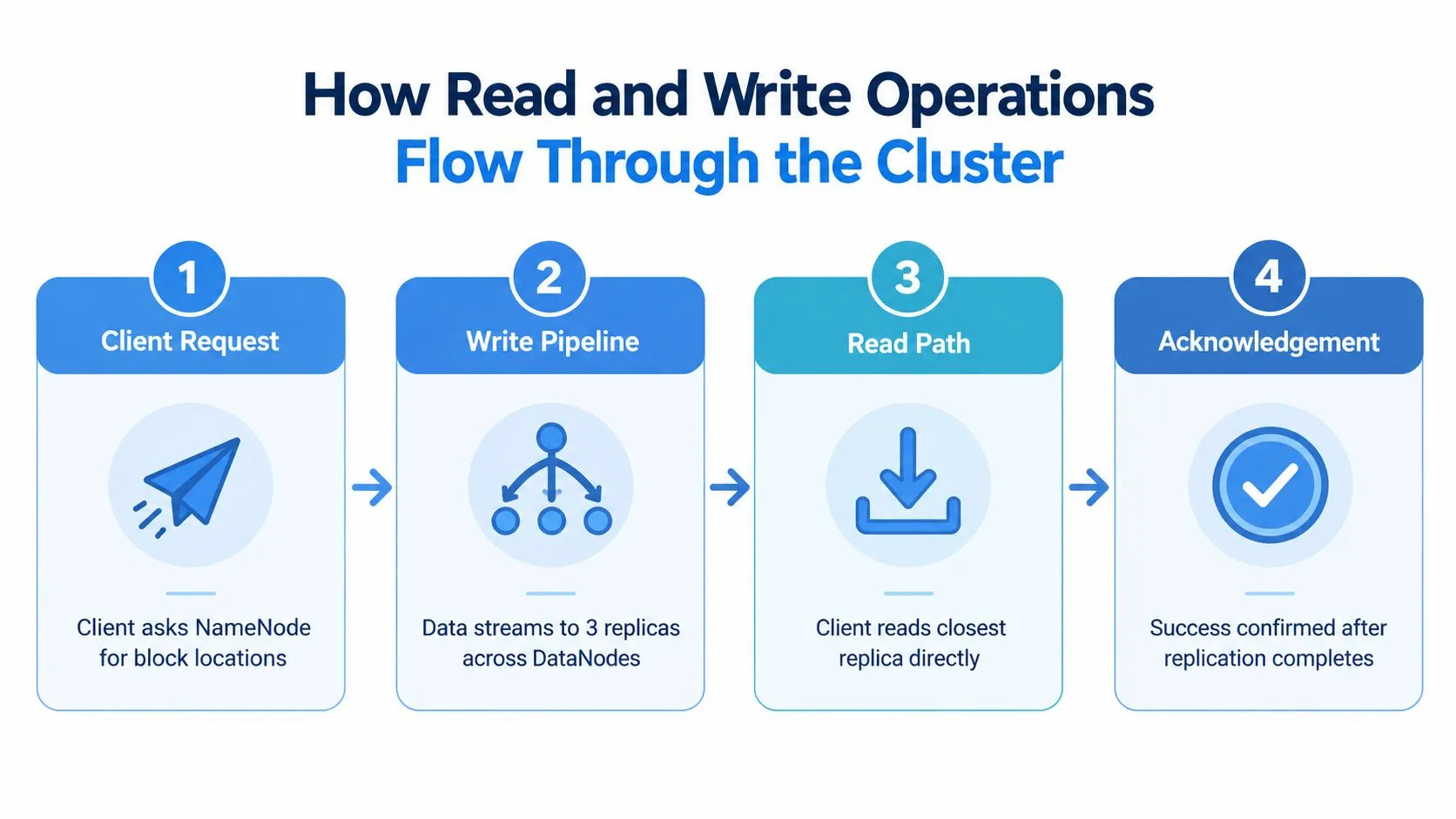
HDFS write performance comes from streaming, but the write path still requires coordination. A client first contacts the NameNode to create a file and request block placement. The NameNode selects DataNodes, generally considering rack and network topology, then returns a pipeline for the client to use.
The client sends data to the first DataNode. That node forwards the stream to the next DataNode, which forwards it to the next replica target. Each DataNode writes its copy and passes an acknowledgement back through the pipeline. The client receives success only after the required replication steps complete, while the NameNode updates the namespace and block metadata.
Reads favor locality and throughput
A read starts differently. The client asks the NameNode for the locations of the file's blocks, then chooses a suitable replica, normally preferring a DataNode close to the client under the cluster's topology rules. The client reads directly from that DataNode rather than routing the file contents through the NameNode.
For a large scan, different workers can read different blocks at the same time. That data locality is one of HDFS's most useful properties. Compute engines such as MapReduce and Spark can schedule work near the data, reducing unnecessary network movement when the cluster is designed and balanced correctly.
The embedded flow diagram shows how metadata requests, replication, direct reads, and acknowledgements fit together. For a visual walkthrough of the cluster behavior, watch the HDFS read and write operations video.
Design applications around the write path
The write pipeline makes HDFS a poor fit for transaction-heavy workloads. Every file creation and block allocation involves NameNode communication, and every replicated write requires network coordination. Small, frequent writes multiply that overhead.
Practical application patterns are more important than theoretical throughput:
- Batch records before writing: Accumulate events into suitably large files instead of creating a file for every event or small batch.
- Prefer append-oriented data: Write immutable partitions and append new data rather than repeatedly mutating existing files.
- Separate hot transactional state: Keep point updates and interactive state in a database or serving store, then land analytical history in HDFS.
- Plan file layout deliberately: Partition by access patterns, but don't create a directory structure so granular that metadata becomes the bottleneck.
HDFS reads can be efficient because clients stream directly from replicas. HDFS writes work best when applications accept coordination and organize data into large, sequential units.
Fault Tolerance and High Availability Mechanisms
HDFS reliability has several layers, and each layer addresses a different failure mode. Block replication protects data when disks or DataNodes fail. NameNode high availability protects namespace access when the metadata service fails. Federation separates namespace responsibility when one metadata domain becomes too large or too busy.
The default replication factor of 3 means a block normally has three DataNode copies (Apache replication design). That design can tolerate temporary loss of one or two nodes while data remains available, assuming the remaining replicas are healthy and the cluster has adequate placement. The NameNode initiates repair after detecting failures, corruption, disk problems, or a changed replication policy, rather than continuously duplicating data after every operation.
That model is solid, but it isn't magic. Replication consumes storage and network bandwidth. A cluster with degraded replicas is also operating with less fault tolerance until repair finishes. Operators need alerts for under-replicated blocks, corrupt blocks, dead DataNodes, disk failures, and capacity pressure.
The NameNode failure problem
Older HDFS deployments placed enormous operational importance on a single NameNode. If that service became unavailable, clients could lose access to the namespace even when DataNodes still held the blocks. A secondary NameNode doesn't function as a hot replacement for the active NameNode. It periodically creates checkpoints, which helps with metadata management but doesn't provide failover.
HDFS High Availability changes the model by using an active NameNode and a standby NameNode. The standby keeps its metadata state sufficiently current to take over when the active service fails. ZooKeeper-based coordination and shared edit-log mechanisms help manage failover and prevent split-brain behavior, but HA adds components, monitoring requirements, and failure scenarios that operators must test.
Operational reality: High availability is a tested procedure, not a pair of configured daemons. Failover, fencing, journal health, and client recovery all need rehearsal.
Federation addresses namespace scale
High Availability protects service continuity. It doesn't automatically remove every metadata bottleneck. HDFS Federation lets multiple independent NameNodes manage separate namespace volumes, allowing teams to distribute metadata responsibility across namespaces.
Federation can improve administrative and capacity boundaries, but it requires deliberate namespace planning. Applications and users need to know which namespace contains which data, and cross-namespace workflows can become harder to reason about. Federation is valuable when a single namespace has become a constraint, but it isn't a substitute for good file design or small-file discipline.
The central reliability lesson is simple. HDFS uses redundancy and background repair to preserve availability. It doesn't provide the synchronous mutation guarantees expected from a transactional system, so applications should favor immutable files, retryable jobs, and explicit recovery handling.
Comparing HDFS with Modern Object Stores
HDFS and object stores solve overlapping problems through different operating models. HDFS gives a team a distributed filesystem that it operates. Amazon S3 and Google Cloud Storage provide managed object storage where the provider operates the underlying infrastructure.
The right comparison isn't a feature checklist. It is a question of who absorbs complexity, where data must live, how applications access it, and whether the workload benefits from local cluster placement.
| Characteristic | HDFS | Object Stores (S3/GCS) |
|---|---|---|
| Infrastructure model | Self-managed servers, disks, network, and Hadoop services | Provider-managed storage service |
| Data locality | Strong fit for compute colocated with DataNodes | Compute and storage are separated through network access |
| Metadata model | NameNode manages a filesystem namespace and block mappings | Object keys and service-managed metadata |
| Durability approach | Configurable block replication across DataNodes | Provider-managed redundancy and durability mechanisms |
| Workload fit | Large scans, batch processing, and existing Hadoop pipelines | Cloud-native analytics, shared data lakes, and elastic storage |
| Operational burden | NameNode memory, DataNode health, balancing, upgrades, and security | Service configuration, identity, lifecycle policies, and access costs |
| Deployment constraints | Strong option for on-premises, controlled, or isolated environments | Strong option when cloud access and provider-managed infrastructure fit |
| Migration concern | HDFS APIs, file semantics, and cluster dependencies | API compatibility, network transfer, request behavior, and application changes |
Where HDFS still wins
HDFS can provide low-latency access to data stored near the compute workers. That matters for batch engines processing large local datasets, especially when moving data out of a controlled facility is unacceptable. It also integrates directly with established Hadoop ecosystems, including jobs and tools that expect filesystem semantics rather than object APIs.
HDFS may therefore remain sensible when a team has substantial on-premises capacity, strict residency requirements, or applications tightly coupled to HDFS. The decision should include the cost of keeping skilled operators, maintaining hardware, handling replication overhead, and supporting security controls.
Where object stores change the equation
Object stores remove much of the infrastructure work. Teams don't manage DataNode disks, NameNode memory, rack placement, or re-replication workflows. They can also separate storage growth from compute provisioning, which suits cloud analytics and mixed workloads.
That convenience comes with different trade-offs. Applications may need changes for object-store semantics, especially when they expect rename behavior, directory operations, append patterns, or local filesystem access. Network distance can affect performance. Request charges, transfer charges, and egress policies can also change the cost model, so a migration analysis should use actual access patterns rather than assume cloud storage is automatically cheaper.
Hybrid architectures often make the most sense. Keep actively processed or tightly regulated data in HDFS, and place colder datasets in object storage when governance and access patterns allow it. For teams evaluating broader analytical architecture, this comparison of warehouse-native AI analytics and lakehouse BI provides useful context around where processing and storage decisions belong.
Production Pitfalls and Migration Considerations
The most common HDFS production failure isn't always a spectacular node outage. It is often a gradual file-layout problem. Applications create too many small files, the NameNode tracks each file and block relationship, metadata consumption rises, garbage collection becomes more disruptive, and ordinary operations become harder to predict. Independent HDFS coverage identifies the small files problem as a recurring production pain point (HDFS operational challenges).
Small files require an application response
The repair strategy starts upstream. Find which producers create tiny files, identify whether the pattern comes from streaming ingestion, over-partitioned exports, or poorly batched jobs, and change the write behavior where possible.
Useful techniques include:
- Application-level batching: Combine records before committing them to HDFS.
- Compaction jobs: Periodically merge small files into larger analytical files, while controlling the impact on cluster resources.
- Archive formats: Use Hadoop Archive, or HAR, where it fits the access pattern and operational requirements.
- Partition review: Remove unnecessary partition dimensions that create many nearly empty directories and files.
The wrong response is to increase NameNode memory and leave the producer behavior unchanged. More memory may postpone the problem, but it doesn't correct the metadata pattern.
Security and migration are coupled
Kerberos, HDFS permissions, ACLs, service identities, and encryption at rest form an operational system, not a collection of checkboxes. A migration can preserve data while accidentally changing who can read it, where encryption keys are managed, or how audit evidence is collected. Regulated teams need a permissions and lineage inventory before moving data, not after the first copy completes.
Migration planning also needs to account for application behavior. Replacing an HDFS path with an S3 or GCS URI may be easy for one batch job and difficult for another that relies on rename, append, directory listing, or HDFS-specific APIs. Test file formats, partition discovery, checkpointing, retries, and security behavior separately.
Run parallel systems deliberately
Moving a large estate requires more than copying files. Teams need to choose between bulk transfer, incremental synchronization, application dual-writes, or a staged cutover. Each option affects consistency, rollback, network utilization, and the duration of coexistence.
Cloud economics can also surprise teams. Storage pricing is only one component. Request pricing, data transfer, egress, acceleration, and repeated reads can materially affect the design. A migration plan should model those behaviors from observed workloads and should define ownership for both platforms during the transition.
For a broader view of analytics modernization, the same principle applies: modernize the operating model, not just the storage endpoint. Keep HDFS and the target platform running in parallel long enough to validate outputs, access controls, performance, and rollback procedures.
Recommended Practices for Data Teams
Data teams shouldn't choose HDFS or object storage because an industry narrative says one has replaced the other. Use a constraint-based decision.
Keep HDFS when data residency, isolation, existing Hadoop coupling, or local read patterns outweigh the operational cost of running the cluster. Migrate when the platform's administration consumes more capacity than the workloads justify, when new applications are cloud-native, or when object storage better matches the organization's security and scaling model. Use a hybrid design when hot, controlled, or compute-local data has different requirements from archival and cross-team data.
For an HDFS estate that remains active, make the following practices routine:
- Monitor file counts and small-file creation: Alert on producer behavior before NameNode pressure becomes an outage risk.
- Check replication health: Track under-replicated and corrupt blocks, dead DataNodes, disk failures, and repair backlogs.
- Test HA procedures: Validate failover, fencing, journal availability, client retry behavior, and recovery during realistic maintenance scenarios.
- Run capacity reviews: Account for replication, temporary re-replication traffic, balancing operations, and growth rather than measuring only raw disk space.
- Use health checks consistently: Schedule
fsckreviews and investigate anomalies instead of treating them as emergency-only tools. - Document ownership: Make clear which team owns security principals, ACLs, upgrades, backups, and migration decisions.
For migration, start with new workloads on the target object store where possible. Move batch jobs next, then address real-time or tightly coupled pipelines after the team has validated file semantics, governance, and operational support. Maintain a rollback path until downstream consumers have been tested against the new location.
The best roadmap acknowledges technical debt without turning it into a crisis. HDFS may be indispensable for one workload and unnecessary for another. A clear inventory of dependencies, data sensitivity, operational skills, and access patterns will produce a better decision than either defending the cluster indefinitely or deleting it to follow a trend. Teams planning the analytics layer should also consider how data warehouse analytics fits alongside storage modernization, because moving data doesn't automatically create usable analysis.
Querio puts AI coding agents directly on your data warehouse, giving technical and non-technical teams a flexible way to query, analyze, and build on company data without turning analysts into a permanent request queue. If you're modernizing HDFS workloads or designing a hybrid analytics stack, visit Querio to see how a file-system approach with custom Python notebooks can support faster self-serve analysis.