Business Intelligence
How to Query MySQL with AI (Plain-English SQL)
Convert plain-English questions into reviewable MySQL queries using read-only access, schema context, and governed metric definitions.

You can ask MySQL questions in plain English, have AI write the SQL, and still review the query before you run with the answer.
If I had to sum up the whole process in a few lines, it would be this:
- I give the AI read-only access to the right MySQL tables or warehouse models
- I make sure it knows my schema, joins, and metric definitions
- I ask a plain-English question like “What was monthly revenue in Q1 2026?”
- I review the SQL for tables, joins, filters, date logic, and aggregation
- I choose direct MySQL for simple lookups and a warehouse for shared KPI reporting
That’s the core idea.
AI can map business questions to SELECT, JOIN, WHERE, GROUP BY, and ORDER BY logic. But the output is only as good as the context I give it. If “revenue” should mean net_amt instead of gross_amt, or if churn has a strict 6-month rule, I need to define that up front.
A few points matter most:
- Permissions first: use a dedicated read-only MySQL user with only
SELECT - Schema matters: table names, columns, keys, and DDL help the AI write valid SQL
- MySQL syntax matters: for example, MySQL uses
DATE_FORMAT()where Postgres often usesDATE_TRUNC() - Review is not optional: wrong joins can inflate ARR or MRR, and weak date filters can skew monthly numbers
- Governance matters more as teams grow: one shared definition for churn, revenue, and active customers keeps reports aligned
Here’s the short version of when I’d use each setup:
| Use case | Best choice | Why |
|---|---|---|
| Recent records, simple counts, date filters | Direct MySQL | Less setup and fast answers |
| Revenue trends, churn reporting, shared KPIs | Warehouse-native analytics | Shared metric rules and less load on production data |
For B2B SaaS teams, this can cut down repeated analyst work on the same types of questions. But I still need visible SQL, editable logic, and a review step before I trust the result.
Underline this point: AI can speed up SQL work, but it should not replace schema context, metric rules, or query review.
So when I use plain-English SQL for MySQL, I treat it as a faster drafting layer on top of data rules my team already trusts.
How to Set Up an AI Workflow for MySQL and Your Warehouse
Good plain-English SQL doesn’t start with the prompt. It starts with permissions, schema context, and clear metric definitions.
When those pieces are set up the right way, both analysts and non-technical users can ask about monthly revenue, top customers, or churn without reworking the same logic over and over.
Connect MySQL with the Right Permissions and Schema Context
Start with a dedicated read-only MySQL user that has only SELECT permissions. Use an encrypted connection, and limit access to only the schemas the AI needs.
This part matters more than many teams expect. Schema context is often the difference between a clean query and a broken one. The AI needs to see table names, columns, data types, primary keys, and foreign keys so it can build valid joins and filters. Full schema access improves query quality by a lot.
If you can’t use a direct connection during setup, share full CREATE TABLE DDL statements instead. That gives the AI the exact data model it needs to work from [2]. You should also specify MySQL so date functions and syntax come out correctly.
Once schema access and permissions are in place, you can move from setup into actual business questions.
Use Modeled Warehouse Tables for Analytical Questions
For revenue, cohort, and churn analysis, use modeled warehouse tables in Snowflake, BigQuery, Redshift, or Postgres.
Tools like dbt help you define and version business logic as SQL models. That means metrics get calculated the same way before the AI touches them. A shared semantic layer also keeps joins and metric definitions aligned across users.
At that point, the workflow shifts from data prep to turning plain-English requests into SQL your team can inspect.
Where Querio Fits in the Workflow
Querio is git-native analytics for data teams and their AI agents. It connects to MySQL and to warehouses including Snowflake, BigQuery, Redshift, ClickHouse, and Postgres, and queries run on live data.
You ask in plain English, in the app or in Slack. Querio's agent answers with inspectable, editable SQL and Python in a notebook, so analysts can check the logic before anyone acts on it.
The joins, metrics and business terms live as plain files in a git repo your team owns. Changes go through pull requests, and Claude and Cursor can work from the same definitions through Querio's MCP server and CLI.
Next, those setup choices show up in the revenue and churn examples below.
From Plain English to Valid MySQL SQL
Plain-English prompts turn into valid MySQL only when the AI connects business language to the right columns, filters, joins, and MySQL syntax.
Example 1: Monthly Revenue by Plan
Say you ask: "What was monthly revenue by plan in Q1 2026?"
The AI needs to map "revenue" to amount, "plan" to plan_type in the subscriptions table, apply the Q1 2026 date filter, and group the results by month. In MySQL, time bucketing usually uses DATE_FORMAT() or MONTH(), not PostgreSQL's DATE_TRUNC().
| Translation Step | Action |
|---|---|
| Schema Mapping | Maps "revenue" → amount, "plan" → plan_type in subscriptions |
| Filter Logic | WHERE date >= '2026-01-01' AND date <= '2026-03-31' |
| Aggregation | SUM(amount) |
| Grouping | GROUP BY DATE_FORMAT(date, '%Y-%m'), plan_type |
| Join Logic | Joins subscriptions to plans if plan data lives in a separate table |
If more than one table or column could answer the question, be precise with the business term you use. That small detail can make or break the query. [1]
Example 2: Top Customers and Churn Trends
Ranking and churn questions add another layer. The AI has to rank rows in the right order or leave out rows that don't belong.
For a prompt like "Who are the top 10 customers by total payments, highest first?", the AI should join the needed tables, apply the date filter, and then use ORDER BY SUM(amount) DESC LIMIT 10. [3][1]
Churn prompts need a clear business rule, not a loose label. For churn, define the rule up front: "customers who signed up but made no payments in the last 6 months" usually translates to a LEFT JOIN plus a NULL check. [2][1]
How to Verify AI-Generated MySQL Queries Before Trusting the Results
Before you trust an AI-generated MySQL query, make sure it matches the question and the business definition behind it. That matters most for revenue, customer, and churn queries, where a small error can change the answer in a big way. Use this checklist before you act on any revenue, churn, or customer result.
Check Tables, Joins, Filters, and Aggregations
Start with the plain-English explanation most AI tools show next to the SQL. This is often the fastest way to spot a problem. If the tool says it is summing gross_amt, but your revenue definition uses net_amt, that’s a mismatch you can catch before it turns into a bad dashboard.
| Review Step | What to Check | Risk It Prevents |
|---|---|---|
| Tables and columns | Are governed tables used, not raw or deprecated ones? Does "customers" map to accounts or users? |
Wrong data source, hallucinated fields |
| JOIN logic | Are foreign keys correct? Could the join multiply rows? | Fanout, double-counted MRR or ARR |
| Time filters | Does the query use correct MySQL date logic and the right time zone? | Misaligned "last month" or "Q1" windows |
| Aggregation logic | Should churn use COUNT or COUNT DISTINCT? Does monthly revenue use SUM or AVG? Use LIMIT while reviewing non-aggregated queries. |
Overstated or understated financial metrics |
If the query still looks fine after that pass, go one layer deeper and check the metric definitions behind the numbers.
Use Semantic Definitions and Inspectable SQL to Reduce Risk
The main risk isn’t syntax. It’s consistency.
Two analysts can ask the same question in slightly different words and still get different numbers if there’s no shared definition of what a "churned account" or "active customer" is. That’s where teams get into trouble. The SQL may run just fine, but the answer can still be off.
dbt's Semantic Layer standardizes metric definitions so different users get the same number. Querio uses the same shared definitions for ad hoc analysis, notebooks, and dashboards.
Use both: inspectable SQL for review, semantic definitions for consistency.
With the query checked, the next call is whether to run it straight on MySQL or through warehouse-native analytics tools.
Direct MySQL Querying vs. Warehouse-Native AI Analytics: How to Choose
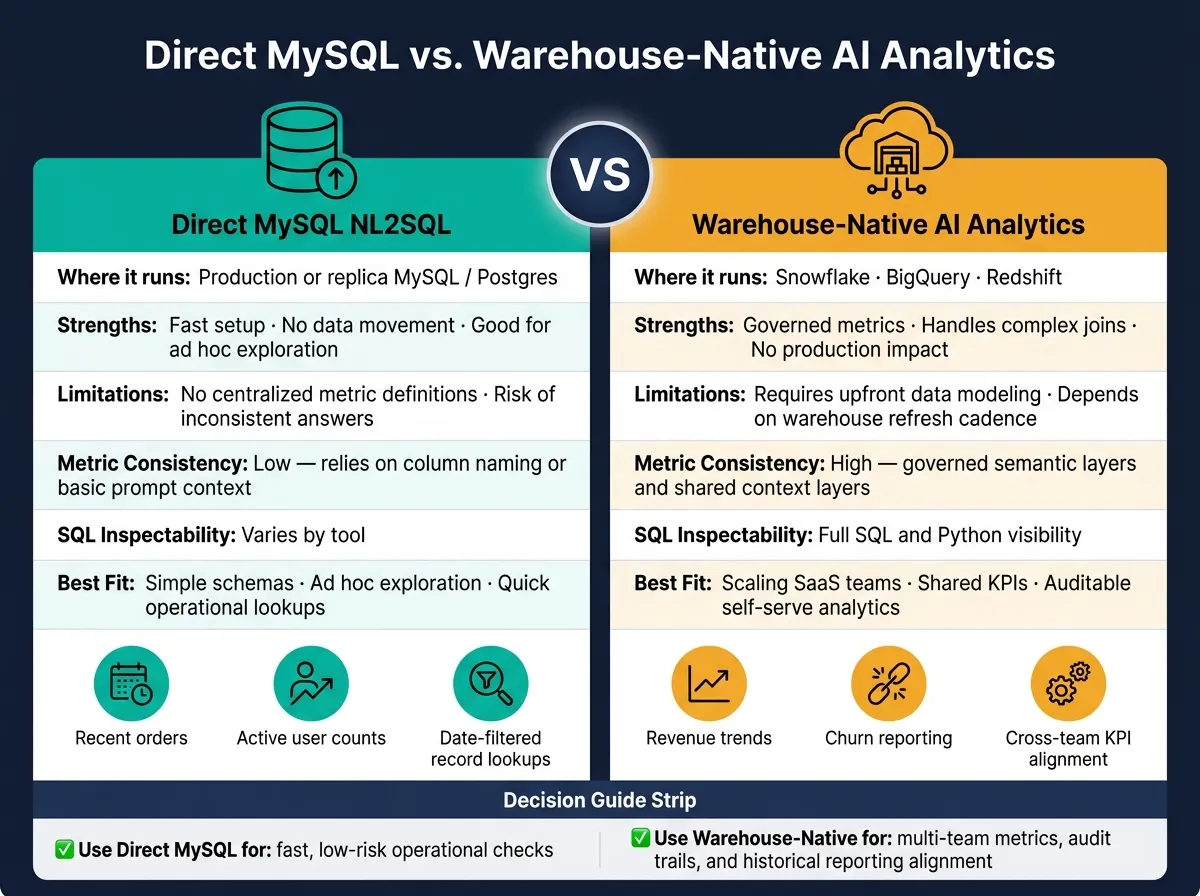
Once you can verify AI-generated SQL, the next step is deciding where that query should run.
Use direct MySQL for simple operational questions. Use warehouse-native analytics when metric consistency and governance matter. At a basic level, the choice comes down to this: are you doing a quick operational lookup, or do you need governed metrics that stay the same across teams?
Direct MySQL NL2SQL is a good fit for straightforward operational checks. Think: listing recent orders, counting active users, or filtering records by date. It’s fast and simple. But there’s a catch. If your team doesn’t share the same definitions, the AI can misread terms like revenue or churn. That can lead to different answers for the same question once more people start using it.
Warehouse-native AI analytics runs queries against Snowflake, BigQuery, or Redshift through a governed layer. This setup is better for shared KPIs, historical trends, and metrics that need to match across marketing, finance, product, and ops. It also keeps extra query load off your production database, which matters more than people think.
Comparison Table: Direct MySQL Querying vs. Warehouse-Native AI Analytics
| Direct MySQL NL2SQL | Warehouse-Native AI Analytics | |
|---|---|---|
| Where it runs | Production or replica MySQL/Postgres | Snowflake, BigQuery, Redshift |
| Strengths | Fast setup; no data movement; good for ad hoc exploration | Governed metrics; handles complex joins; no production impact |
| Limitations | No centralized metric definitions; risk of inconsistent answers | Requires upfront data modeling; depends on warehouse refresh cadence |
| Metric consistency | Relies on clear column naming or basic prompt context | High - uses governed semantic layers and shared context layers |
| SQL inspectability | Varies by tool | Full SQL and Python visibility |
| Best fit | Simple schemas; ad hoc exploration | Scaling SaaS teams needing governed, auditable self-serve analytics |
Key Takeaways for Governed Self-Serve Analytics
Use direct MySQL for fast, low-risk checks.
Use warehouse-native analytics when:
- multiple teams need the same metric definition
- you need an audit trail
- historical reporting has to line up across the company
The FAQ below covers the most common setup and governance questions.