Business Intelligence
Deepnote vs Google Colab for Analytics Teams
Compare Deepnote and Colab for analytics teams: collaboration, warehouse connections, scheduling, permissions, and runtimes.

If I’m picking for an analytics team, I’d start with Deepnote. For shared notebook review, live warehouse queries, recurring KPI reports, and access controls, it usually fits team work better than Google Colab.
Here’s the short version:
- Deepnote is better for teams that work in Snowflake, BigQuery, Redshift, or Postgres
- Google Colab is better for solo notebook work and some GPU-focused tasks
- The biggest gaps are collaboration, scheduling, permissions, and warehouse connections
- Deepnote supports Python, SQL, and R in one place
- Colab is still a solid pick if you mostly need a simple Python notebook
For most 100–500 employee analytics teams, the choice comes down to one question: Are you running shared, repeatable analysis on warehouse data, or are you mostly working alone?
Quick Comparison
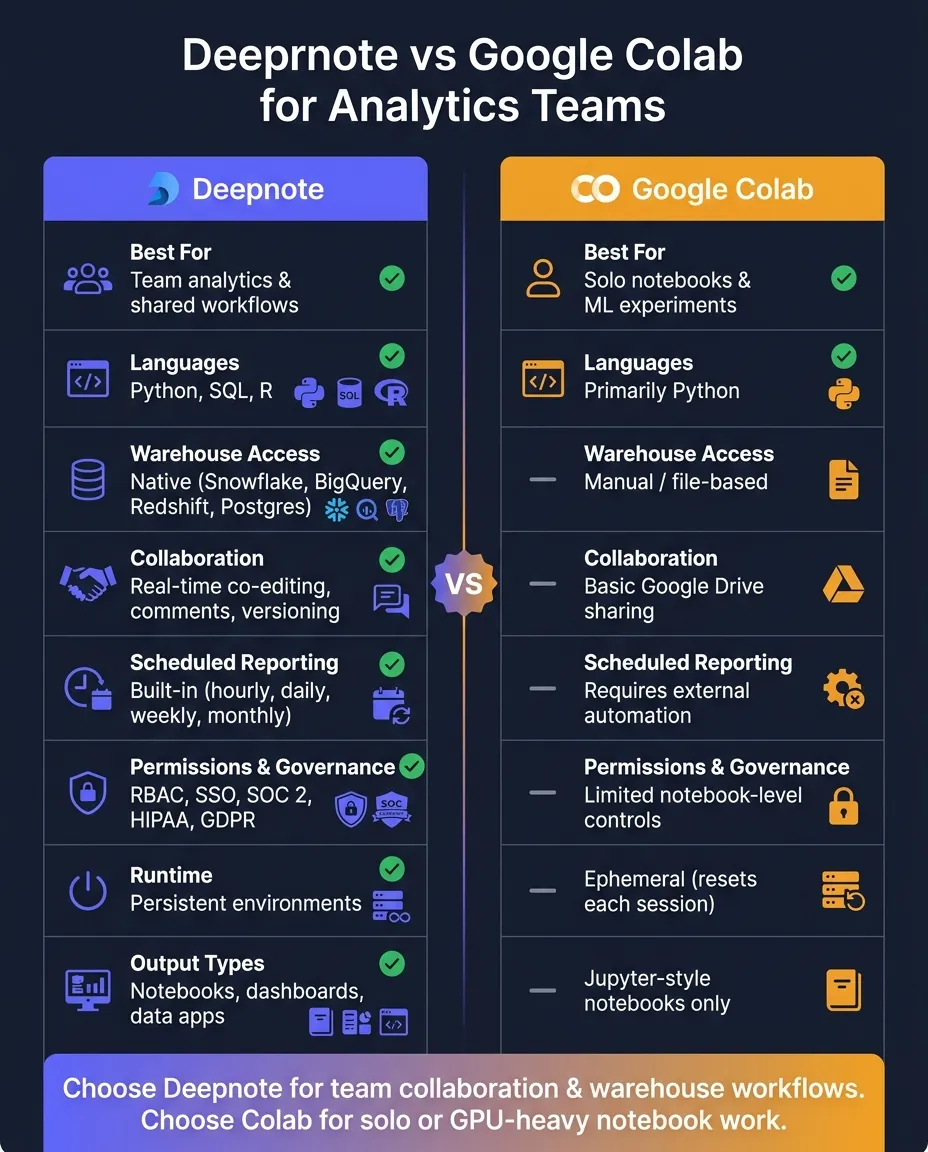
| Criteria | Deepnote | Google Colab |
|---|---|---|
| Best for | Team analytics | Solo notebooks and ML-style experiments |
| Core languages | Python, SQL, R | Python |
| Warehouse access | Native connections to Snowflake, BigQuery, Redshift, Postgres | Often more manual |
| Team review | Comments, shared workspaces, version history | Basic file sharing |
| Scheduled reporting | Built in | Needs outside setup |
| Access control | RBAC, SSO, directory sync | More limited |
| Runtime behavior | Persistent environments | Ephemeral sessions |
| Output | Notebooks, dashboards, data apps | Notebooks |
A simple way to think about it: Deepnote is built for shared analytics work. Colab is built for easy notebook use. If your team needs live data access, repeat runs, and governed sharing, Deepnote is usually the better match.
Deepnote vs Google Colab at a glance
Deepnote is built for team-based analytics on live warehouse data. Google Colab fits better when you need a simple notebook for one-off work or GPU-heavy experiments.
| Feature | Deepnote | Google Colab |
|---|---|---|
| Primary focus | Team-based collaborative analytics | Lightweight ad hoc analysis and ML compute |
| Languages | Python, SQL, and R in one environment | Primarily Python |
| Data connectivity | Native Snowflake, BigQuery, Redshift, and Postgres connections [1] | Often depends on manual file uploads or Drive-based sharing |
| Collaboration | Real-time co-editing, commenting, shared workspaces, and versioning [1] | Basic sharing via Google Drive |
| Governance | RBAC, SSO, and enterprise compliance support [1] | Limited permissions, governance, and automation for recurring team workflows |
| Output types | Notebooks, interactive dashboards, and data apps [1] | Standard Jupyter-style notebooks |
You see the gap most clearly in day-to-day analytics work. On paper, both are notebook tools. In practice, they serve pretty different jobs.
Where Deepnote fits best
Deepnote works best for analytics teams that spend their time in warehouse data. You can query Snowflake or BigQuery in Python, SQL, or R without jumping between tools. That matters more than it sounds. When the data, code, and team all live in one place, reviews get easier and reporting gets less messy.
Shared workspaces keep people in the same project, while real-time co-editing makes it simple to review work, leave comments, and track versioned edits. The same project can also power interactive dashboards and recurring KPI reporting. For teams in regulated settings, RBAC, SSO, and compliance support make Deepnote a better fit for controlled collaboration. [1]
This is where Deepnote starts to pull away: shared review, repeatable reporting, and work that needs guardrails.
Where Google Colab fits best
Google Colab shines when you want to open a notebook and start working fast. It's a good match for ad hoc analysis, quick tests, and compute-heavy experimentation where GPU access is the main draw.
For analytics teams, though, Colab is less suited to recurring warehouse work. It doesn't offer the same level of collaboration, permissions, or scheduling that teams often need when reports are shared, reviewed, and reused.
That tradeoff becomes pretty obvious once the work moves from solo experimentation to shared analytics.
Side-by-side comparison for analytics team workflows
Here’s how the two platforms stack up across collaboration, warehouse access, reproducibility, permissions, and scheduling.
| Workflow | Deepnote | Google Colab |
|---|---|---|
| Collaboration | Built-in commenting, code review, and versioning [1] | Limited collaboration and no structured review workflow |
| SQL support | First-class SQL cells alongside Python and R [1] | Less direct; often depends on libraries or magic commands |
| Warehouse connectivity | Native Snowflake, BigQuery, Redshift, and Postgres integrations [1] | Often relies on file uploads or exported data |
| Runtime persistence and reproducibility | Persistent cloud environments; versioned notebooks and scheduled runs [1] | Ephemeral runtimes that reset between sessions; requires external tooling to automate |
| Permissions | RBAC, SSO, and directory sync [1] | Notebook-level access controls are limited |
| Scheduling | Built-in hourly, daily, weekly, or monthly runs [1] | Requires external automation |
| AI assistance | AI assistance for code generation, refactoring, and debugging [1] | Gemini-integrated assistance |
The biggest differences show up in shared review, warehouse-native analysis tools, and repeatable reporting.
Collaboration, review, and sharing
For something like a Monday business review, Deepnote keeps the whole process in one place. Analysts can comment on cells, track edits, and build live dashboards from the same workspace. [1] Once the notebook is ready, finance or product teams can open it without digging through code.
Google Colab is solid for solo notebook work. But for team-based analysis, it falls short on the comment-and-review flow many analytics groups rely on. Over time, that extra friction can slow recurring reporting.
Warehouse connectivity, SQL workflows, and reproducibility
Another big split comes down to whether the notebook stays tied to the warehouse and keeps the same runtime state over time.
Deepnote puts SQL cells right next to Python and R in the same notebook, with direct connections to Snowflake, BigQuery, Redshift, and Postgres. [1] That means queries and analysis live together, instead of sending teams into file exports and disconnected steps.
Colab’s ephemeral runtime resets packages and state after restarts, which makes reproducibility harder. Deepnote uses persistent environments, so notebook runs stay more consistent across teammates and scheduled jobs. [1]
Permissions, scheduling, and AI-assisted analysis
This is where team notebooks and solo notebooks start to look like two different tools.
Governance matters a lot for healthcare and finance teams. Deepnote offers RBAC, SSO, and directory sync, and it is compliant with SOC 2, HIPAA, GDPR, and CCPA. [1] Colab does not offer the same notebook-level RBAC, SSO, and directory sync.
Scheduling is another day-to-day difference. Deepnote supports built-in hourly, daily, weekly, or monthly runs, so reports don’t depend on someone leaving a browser tab open. [1] Colab has no native scheduling, which means teams need outside automation if they want notebooks to run on a set cadence.
On the AI side, Deepnote’s AI Copilot is built for analytics workflows, while Colab integrates Gemini. [1]
Which platform should your analytics team choose?
For most analytics teams, Deepnote is the better choice.
Choose Deepnote for collaborative, warehouse-native analytics
If your team handles recurring reports, reviews notebooks together, or shares results with non-technical stakeholders in finance or healthcare, Deepnote is the stronger fit.
The biggest tell is warehouse use. If your team works in Snowflake, BigQuery, or Redshift every day and wants those queries right next to Python, SQL, and R, Deepnote usually makes more sense. Its built-in scheduling and interactive dashboards also help with recurring reporting, so people don’t have to rerun work by hand each time. [1]
Governance needs make the choice even clearer. Teams in healthcare and finance that need HIPAA or SOC 2 alignment, plus role-based access control and SSO, should treat those features as core requirements. [1]
If you don’t need those controls or warehouse connections, Colab still works well for solo notebook tasks.
Choose Google Colab for lightweight or compute-heavy notebook work
Google Colab fits best for individual notebooks, quick analysis, or occasional compute-heavy work that doesn’t need shared review, scheduling, or governed warehouse access.
If your work includes dashboard prototypes, team notebook reviews, recurring KPI reporting, and live warehouse analysis, it’s better to think of Colab as a personal notebook tool, not the default for the whole team.
Conclusion: the better notebook depends on whether your team needs collaboration and governance
For analytics teams that work in Snowflake, BigQuery, or Redshift every day, Deepnote is usually the better fit. It brings live warehouse connections, scheduling, and team collaboration into one workspace. That makes the choice pretty clear: if your work depends on collaboration and governed warehouse workflows, Deepnote makes more sense. If you're mostly working alone in a notebook, Colab is the better match.
Choose Deepnote when collaboration and governance matter. Choose Colab when you mainly need a simple notebook for individual code execution. The deciding factor is straightforward: pick the tool that lines up with how your team actually works.
If your team is choosing between the two, start with Deepnote unless your workflow is mostly solo notebook work.
FAQs
Can Colab work for a small analytics team?
Yes. Google Colab can work well for a small analytics team, especially when the goal is rapid prototyping, quick tests, and ad hoc analysis. If your team already uses the Google Cloud ecosystem, Colab fits in with less friction. Its zero-setup environment and built-in AI features can also help people move from idea to analysis fast.
That said, Colab has clear limits. The 12-hour session cap makes it a weaker fit for longer-running workflows or jobs you need to keep alive without babysitting them. It leans more toward fast experiments than the governance controls and warehouse-native connectivity that many growing B2B SaaS, healthcare, and finance teams tend to need.
How important is runtime persistence for repeatable reporting?
Runtime persistence is very important if you want reporting you can repeat and trust. Without it, teams can wind up with stale output or hidden-state drift when upstream tables or logic change.
Reactive notebooks help here. They automatically refresh downstream cells and visualizations, which keeps reports current and makes each run easier to reproduce and trace.
When do governance features become a must-have?
Governance features shift from “nice to have” to must-have when teams need consistent, trusted metrics, tighter control over sensitive data like PII or financial records, and fewer manual steps that lead to mistakes or metric drift.
They matter most when you need:
- Role-based access
- Compliance with standards such as SOC 2 or HIPAA
- Shared definitions for metrics like ARR or active users
Without those guardrails, teams can end up looking at different numbers and making calls based on mismatched definitions.