Business Intelligence
Can ChatGPT Analyze Data in Your Warehouse Safely?
ChatGPT can query your warehouse safely only with read-only roles, SQL guardrails, PII masking, audit logs, and a semantic layer.

Yes - but only if you lock it down first. If ChatGPT can query your warehouse, it needs read-only roles, SQL checks, audit logs, PII masking, and a semantic layer before it touches live data.
Here’s the short version: a direct AI-to-database setup may look fine in a demo, but it can create data exposure, bad metrics, and audit gaps in production. That matters even more when general-purpose LLMs solve only 10%–21% of complex enterprise data tasks correctly and 81.2% of AI query failures come from semantic mistakes, not SQL syntax.
If I were evaluating this setup, I’d use a simple checklist:
- Limit access to approved schemas and views only
- Use read-only credentials tied to user identity
- Block risky SQL like
DELETE,UPDATE,DROP, andTRUNCATE - Mask PII before the model can see it
- Log the full trail: prompt, SQL, user, model version, and result
- Route queries through a semantic layer so metrics stay consistent
The core idea is simple: ChatGPT is not safe with raw, broad warehouse access. It is much safer when it sits inside a governed analytics flow with clear controls and traceability.
| Setup | What happens |
|---|---|
| Direct access to raw tables | Higher risk of data leaks, wrong joins, wrong metrics, and missing audit history |
| Governed access with controls | Safer querying, cleaner metric logic, and a full record of what happened |
So if you want AI over Snowflake, BigQuery, Redshift, or Postgres, I’d treat it like any other data access path: tight permissions, checked SQL, and clear logging from day one.
The risks of giving ChatGPT direct access to your warehouse
The biggest mistake is giving ChatGPT a direct line to raw warehouse tables with no guardrails. It seems like a fast path. In practice, it can break security, compliance, and metric consistency all at once.
Why broad credentials and raw table access bypass governance
A sales-scoped agent can still reach HR compensation or finance tables if the service account or role is too broad.[1][3] That undercuts the row-level security (RLS) and role-based access control (RBAC) you already depend on in Snowflake, BigQuery, Redshift, or Postgres. If the agent's credential has broad reach, the model can operate outside the limits users are supposed to have.
Raw tables create another problem: they don't carry business definitions. So the model fills in the blanks from column names. One query might sum gross_amount. Another might sum net_amount. Same question, different metric. That's semantic drift, and 81.2% of AI query failures come from it, not syntax errors.[4]
Even when a query fails, it can still leak useful details. Table names, column names, and relationships may show up in error paths or generated SQL. That gives an attacker - or even a careless user - a rough map of the warehouse.[5]
Why unlogged prompts and unreviewed SQL raise compliance risk
SOC 2, HIPAA, and GDPR all expect you to show who accessed what data, when, and why. Direct chatbot access makes that tough because the prompt, the SQL, and the result may not be stored together. If you don't keep the prompt, SQL, and output in one trail, analysts can't reproduce the answer later or back it up during an audit.
Without human review, the agent can run a DELETE, kick off an unbounded scan, or expose PII through a calculated field that simple keyword filters fail to catch.[2][5]
These risks tend to show up in four governance failure modes:
| Risk Class | Governance Impact |
|---|---|
| Over-broad access | Sensitive data exposed through generated answers (OWASP LLM02) |
| Prompt injection | Agent treats malicious data instructions as valid task context (OWASP LLM01) |
| Unbounded queries | Operational degradation and unexpected warehouse costs |
| Missing provenance | Inability to satisfy GDPR, HIPAA, or SOC 2 logging requirements |
The hard part is that these issues stack on top of each other. Tightening permissions alone won't fix missing logs. Logging alone won't stop bad SQL. Safe analysis needs permissions, SQL controls, audit trails, and a semantic layer working together. Once that's clear, the next step is figuring out which controls make warehouse access safe.
What safe ChatGPT warehouse analysis actually requires
Safe AI-driven warehouse analysis needs layers of control: warehouse permissions, SQL checks, logging, and a semantic layer. That’s the line between safe analysis and handing direct database access to a model.
Scoped permissions, read-only roles, and PII masking at the warehouse layer
To close the access and masking gaps described above, warehouses like Snowflake, BigQuery, Redshift, and PostgreSQL can enforce access through RBAC, IAM, and schema permissions. The AI should run under a dedicated read-only role that’s limited to approved schemas and views.
You’ll also want row-level security for tenant boundaries and column masking for PII before the model sees any data. Put simply: the model can’t leak what it never had access to in the first place.
SQL guardrails and audit logs before any query runs
Even with tight permissions, a model can still generate harmful SQL. That’s why a validation layer needs to sit between the LLM and the database before any query reaches the warehouse.
At a minimum, that layer should enforce:
- SELECT-only statements
- Allowlisted schemas and tables
- Blocked destructive commands like
DROP,DELETE,UPDATE, andTRUNCATE
You also need a single audit trail that logs each prompt, generated SQL statement, user identity, AI agent version, and result. That trail should meet your retention and audit requirements.
A trusted semantic layer for consistent metrics
Permissions and SQL guards protect access. A semantic layer protects meaning.
A semantic layer - whether that’s dbt, Looker, or Cube - gives the AI governed definitions to work from. It knows which metric definitions and join paths are approved. When a business definition changes, you update it once in the semantic layer, and every AI client inherits the new logic right away [6]. The result is consistent, auditable answers.
With the control stack defined, the next section shows how safe and unsafe workflows differ.
Safe vs. unsafe ChatGPT warehouse workflows
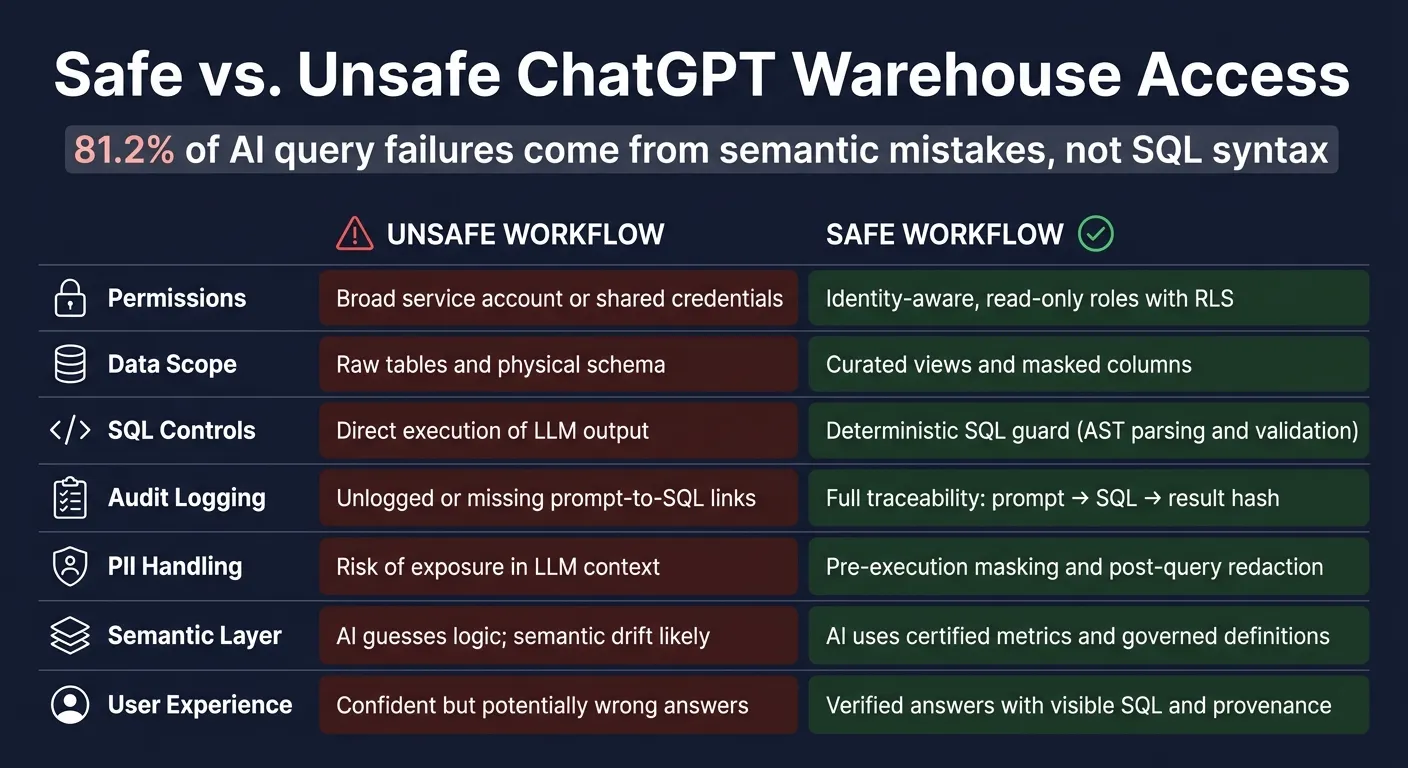
Unsafe workflow: direct chatbot access to raw warehouse data
The main issue isn’t the model itself. It’s the setup around it.
Here’s the unsafe version: a team plugs a generic AI tool straight into Snowflake or BigQuery with a shared service account that has broad read access, then lets people ask questions in plain English. On paper, that sounds simple. In practice, it can go sideways fast.
Because the model is working from raw table names, join mistakes and metric mistakes become more common. And if schemas or sample rows get sent to an external LLM API, that can break data processing agreements. On top of that, if there’s no central log, compliance reviews turn into guesswork.
"The easiest way to connect an LLM to company data is also the riskiest: point the model at the warehouse and hope prompts will do the rest." - Luca Martial, CEO at Kaelio [1]
The safer setup deals with these weak spots by putting control directly in the request path.
Safe workflow: curated views, governed metrics, validated SQL, and full traceability
In the safe flow, a user asks a question in natural language. The system first authenticates that user through SSO. Then it cuts the schema context down to only what that user’s role allows. After that, the request moves through a semantic layer like dbt or Looker, so the AI works from certified metric definitions instead of guessing.
Next, the generated SQL goes through a deterministic SQL validator. That validator checks the query structure, confirms that it’s read-only, and blocks forbidden statements before anything runs against scoped credentials. PII is masked, and every step is logged. In production, this validation step adds under 50 ms.
Here’s how those controls change the outcome:
| Aspect | Unsafe Workflow | Safe Workflow |
|---|---|---|
| Permissions | Broad service account or shared credentials | Identity-aware, read-only roles with RLS |
| Data Scope | Raw tables and physical schema | Curated views and masked columns |
| SQL Controls | Direct execution of LLM output | Deterministic SQL guard (AST parsing and validation) |
| Audit Logging | Unlogged or missing prompt-to-SQL links | Full traceability: prompt → SQL → result hash |
| PII Handling | Risk of exposure in LLM context | Pre-execution masking and post-query redaction |
| Semantic Layer | AI guesses logic; semantic drift likely | AI uses certified metrics and governed definitions |
| User Experience | Confident but potentially wrong answers | Verified answers with visible SQL and provenance |
That’s the operating model Querio is built around, and ChatGPT can work inside it through Querio's MCP server.
How to use Querio to analyze warehouse data safely with AI
How Querio maps to each safety requirement
Here’s what that safe workflow looks like in Querio.
Querio connects live to Snowflake, BigQuery, Redshift, or PostgreSQL, with no extracts or copied data. On Snowflake and BigQuery, each person signs in with their own OAuth, so queries run as them and the warehouse's access rules apply. On Redshift and PostgreSQL, Querio uses a service account plus its own permission policies. ChatGPT and Claude connect through the MCP server and see only what their user may see.
But access alone isn’t enough. Metric definitions matter just as much. Querio keeps context and metric definitions as files in a git repo your team owns. Your data team sets metrics, table docs, and business terms once, and every change goes through a pull request your reviewers approve. Then, when a non-technical user asks, “What was net revenue last quarter?”, Querio's agent, or ChatGPT through MCP, uses that same definition. That helps keep metrics, joins, and filters aligned across users.
Each answer comes with SQL and Python in a reactive notebook. Analysts can check the logic, adjust it, and run it again before anyone acts on it. Notebooks run in a sandbox with no internet access, and every query and agent action is logged.
A practical rollout plan for BI teams
BI teams should roll this out in this order:
- Create scoped, read-only roles in Snowflake, BigQuery, Redshift, or PostgreSQL, tied to individual user identities.
- Expose curated views only, and mask or leave out PII columns like
emailorphoneat the view layer. - Define your semantic layer first, with core metrics and business definitions in place before opening access.
- Start with low-risk use cases like product analytics or pipeline reporting to test the setup.
- Log every prompt, SQL statement, result, and policy decision from day one.
Conclusion: a decision framework for safe AI-driven warehouse access
The choice is simple: direct access is unsafe; governed access can work.
ChatGPT is safe for warehouse analysis only inside a governed setup with read-only access, validated SQL, audit logs, PII protection, and a semantic layer. In that setup, AI becomes governed self-serve analytics, with traceable answers and controlled access.
FAQs
Can read-only access still create risk?
Yes. Read-only access can still create security, privacy, and operational risks if you don’t govern it well.
The risks are pretty straightforward:
- Unauthorized access to specific rows or columns
- Expensive queries that scan too much data
- Inconsistent logic when there’s no governed semantic layer
- Unexpected behavior from dialect-specific statements
To cut down the risk, enforce role-based access, validate SQL against governed metrics, and make sure execution inherits warehouse permissions.
What should a SQL guardrail block?
A SQL guardrail should treat LLM-generated SQL as untrusted and block any query that breaks policy.
That includes SQL that:
- references unauthorized tables, schemas, or columns
- bypasses the semantic layer or approved joins and metrics
- exceeds read-only, row-volume, or resource limits
- risks invalid results or lacks proper audit logging
Safe use also depends on a few non-negotiables: inspectable SQL, live warehouse access, and clear policy enforcement before execution.
How does a semantic layer reduce wrong answers?
A semantic layer cuts wrong answers by replacing AI guesswork with governed business logic. Instead of trying to read raw schemas or making up metric definitions on the fly, the AI works from a predefined catalog of approved dimensions, filters, and join paths.
That keeps metric definitions consistent, limits semantic drift, and helps avoid errors like hallucinated columns or bad joins.