Business Intelligence
The Best AI Platforms for Data Driven Decisions
Compare Querio, Power BI, Tableau, and Google Cloud AI/Looker on AI features, integration, governance, and scalability to find the right analytics platform.

AI platforms are transforming business analytics by turning raw data into actionable insights. This article compares four leading platforms - Querio, Microsoft Power BI, Tableau, and Google Cloud AI/Looker - based on their AI features, data integration, governance, and scalability. Each platform offers unique strengths, from natural language querying to advanced data governance, catering to different business needs.
Key Takeaways:
- Querio: Built for natural language queries with transparent outputs, ideal for organizations prioritizing explainable AI and consistent metrics.
- Microsoft Power BI: Affordable and integrates well with Microsoft tools, offering AI assistance for reporting and calculations.
- Tableau: Excels in visual storytelling and real-time insights but lacks a strong semantic layer for consistent metrics.
- Google Cloud AI/Looker: Best for large-scale governance with its semantic layer but has a steeper learning curve and higher costs.
Quick Comparison:
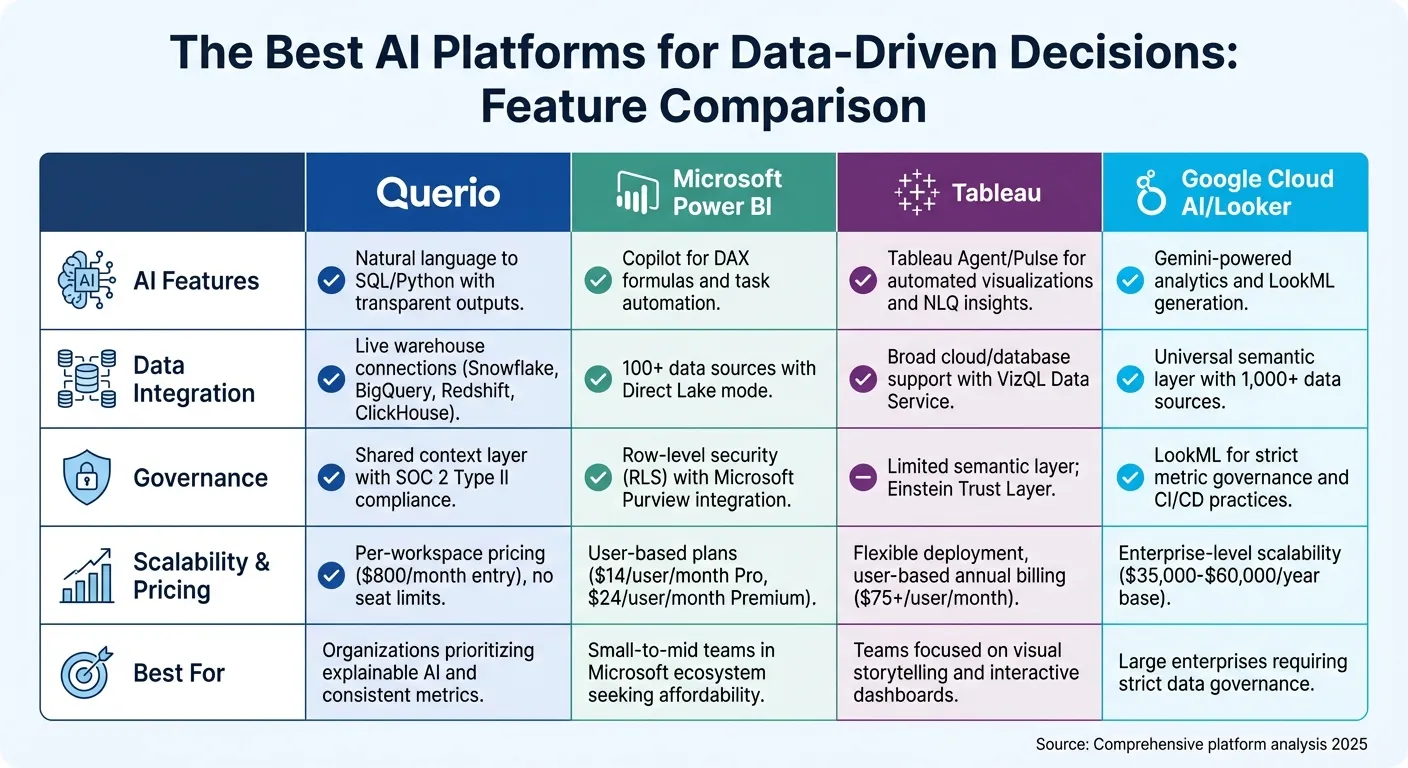
| Feature | Querio | Microsoft Power BI | Tableau | Google Cloud AI/Looker |
|---|---|---|---|---|
| AI Features | Natural language to SQL/Python | Copilot for DAX and tasks | Automated visualizations | Gemini-powered analytics |
| Data Integration | Live warehouse connections | Over 100 data sources | Broad cloud/database support | Unified semantic layer |
| Governance | Shared context layer | Row-level security | Limited semantic layer | LookML for strict governance |
| Scalability | No per-seat pricing | User-based plans | Flexible deployment options | Enterprise-level scalability |
Each platform serves different priorities, from cost-effectiveness to advanced AI capabilities. Querio and Looker are ideal for enterprises with complex needs, while Power BI and Tableau cater to smaller teams or those focused on visualization.
1. Querio
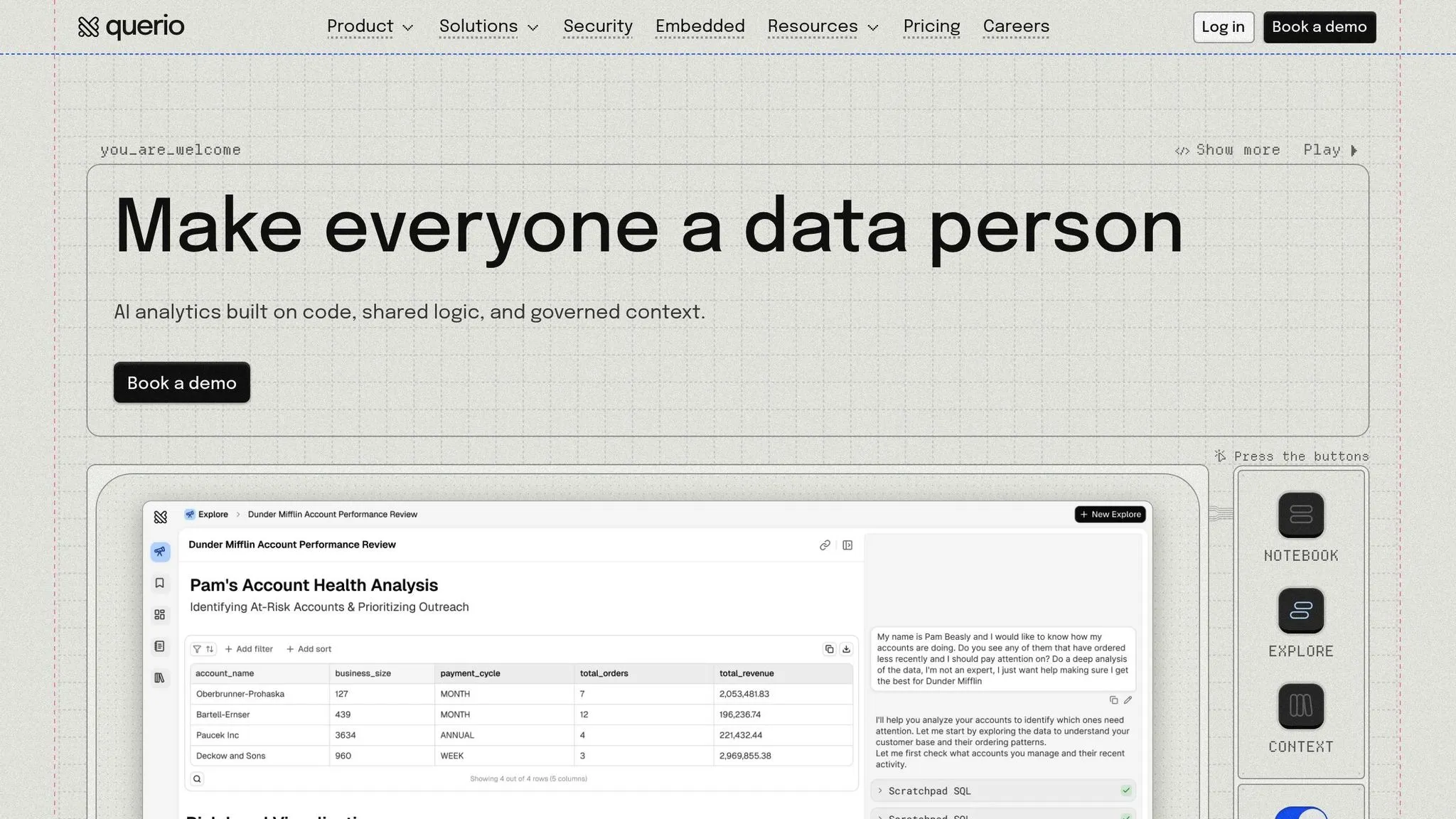
Querio is an AI-powered workspace designed to turn natural language questions into precise data insights. Unlike traditional BI tools that bolt on AI features, Querio is built from the ground up to work with plain English queries while maintaining full transparency. Let’s dive into what makes Querio stand out.
AI Capability
Querio translates natural language queries into verifiable SQL and Python code that runs directly on your data warehouse. What sets it apart is the ability to inspect every result - users can view the exact SQL or Python code executed, eliminating any mystery around how answers are generated. The system’s AI agents operate within a shared context layer, ensuring consistent logic across all queries.
Data Integration
Querio connects seamlessly to modern data warehouses like Snowflake, Google BigQuery, Amazon Redshift, and ClickHouse, as well as relational databases such as PostgreSQL, MySQL, MariaDB, and Microsoft SQL Server. Importantly, these connections use encrypted, read-only credentials and query live data, so there’s no need for data duplication or reliance on outdated snapshots.
Governance and Context
Consistency is key when it comes to analytics, and Querio’s shared context layer helps achieve just that. Data teams can define joins, metrics, and business terms once, ensuring that terms like "revenue" mean the same across departments - whether it’s marketing, finance, or operations. The platform also supports role-based access controls and meets SOC 2 Type II compliance for security. Standard SSO integrations make user management straightforward.
Scalability
Operating directly on your data warehouse, Querio scales effortlessly with platforms like BigQuery and Snowflake. Querio has no per-seat pricing: unlimited users on every plan. Teams can deploy dashboards, schedule reports, and embed analytics via APIs without needing additional infrastructure. For organizations with strict security needs, Querio offers on-prem deployment as an Enterprise add-on alongside its cloud service, ensuring flexibility as your data environment grows.
2. Microsoft Power BI
Microsoft Power BI is a business intelligence platform that blends traditional reporting with AI-driven tools. At its core is Copilot, a generative AI assistant that helps users craft reports, create DAX calculations, and summarize data using natural language prompts. Microsoft earned the top spot for "Ability to Execute" in the June 2025 Gartner Magic Quadrant for Analytics and Business Intelligence Platforms [4]. Let’s dive into how Power BI's AI features enhance its capabilities.
AI Capability
Power BI's Copilot simplifies complex tasks by interpreting natural language queries and generating DAX formulas automatically. However, its accuracy depends on a well-prepared semantic model. This means data teams must add clear descriptions to measures and use intuitive naming conventions. Without these, the AI might deliver generic or incorrect results [5][6]. Additionally, Copilot's responses can vary even when using identical prompts [6]. To access these features, organizations need at least F2 Fabric capacity or P1 Power BI Premium capacity [5]. These AI tools are designed to streamline workflows and improve efficiency.
Data Integration
Power BI supports connections to more than 100 data sources and works seamlessly with Microsoft Fabric's OneLake. The Direct Lake mode is a standout feature, allowing users to query massive datasets without the need for importing or caching, resulting in faster data access [7][8]. In 2024 alone, this automation reportedly saved nearly 10,000 hours of manual work [4]. Power Query further enhances the process by simplifying data transformation. Together, these tools provide a strong foundation for managing and integrating data effectively.
Governance and Context
Power BI ensures data security and organization through its integration with Microsoft Purview for cataloging and row-level security, which restricts data access based on user roles [4][7]. However, administrators must dedicate time to refining semantic models by including detailed descriptions and business terms. This preparation is crucial to achieving consistent and reliable results across the organization [5][6]. With proper governance in place, Power BI becomes a scalable and dependable solution.
Scalability
Power BI caters to both small teams and large enterprises, offering plans that scale from $14 per user per month (Power BI Pro) to higher-tier enterprise solutions. Organizations can start with Pro licenses and later upgrade to Premium ($24 per user per month) or opt for Fabric capacity-based pricing as their needs expand [4].
Melbourne Airport's Head of Data & Analytics, Irfan Khan, highlighted a 30% boost in performance efficiency after adopting Microsoft Fabric and Power BI in 2024 [8].
3. Tableau
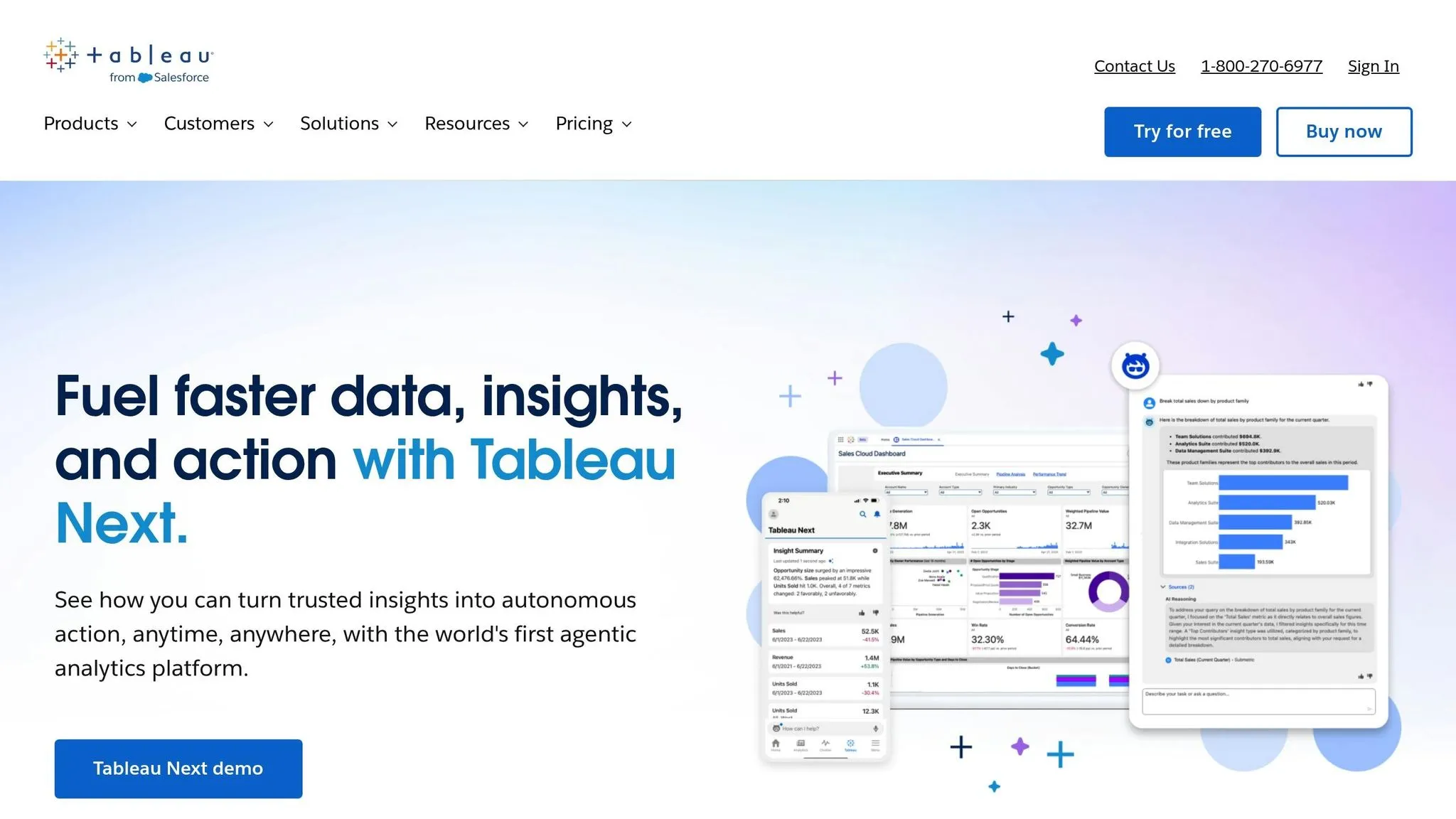
Tableau stands out among AI platforms for its ability to transform data into actionable insights, largely thanks to its powerful visualizations. With the addition of Tableau Agent, the platform now supports the entire analytics process - from natural language data preparation to automated visualizations. Recent updates include the ability to create data cleaning workflows in Tableau Prep. However, to unlock AI features, administrators need to enable them in Tableau Cloud or Server using a Tableau+ license [10]. Let’s dive deeper into Tableau’s AI capabilities.
AI Capability
Tableau Pulse is an insights engine designed to deliver real-time, personalized metric summaries via tools like Slack, Microsoft Teams, and email. It continuously monitors data, providing explanations for changes as they happen. Its fast-inferencing model reduces latency and minimizes errors like hallucinations [13]. Tableau’s goal is to empower the 70% of marketing, sales, and service employees who are often underserved when it comes to accessing autonomous insights [13].
Data Integration
Tableau seamlessly connects to a variety of data sources, including databases, cloud platforms like AWS and Microsoft Azure, and even unstructured data. Features like the VizQL Data Service and Model Context Protocol (MCP) allow organizations to integrate AI models while maintaining governed business logic [11]. Additionally, the Tableau Catalog now auto-generates data source descriptions starting with version 2024.2, streamlining workflows [10][12].
Governance and Context
To ensure secure AI interactions, Tableau employs the Einstein Trust Layer, which safeguards data integrity [10][11]. By focusing on a metrics-first approach, Tableau reuses established business logic to deliver consistent, reliable results.
Wes Gelpi, BI Manager at Red Hat, highlighted how Tableau Cloud has been instrumental in unifying organizational functions [15].
Scalability
Tableau offers flexible deployment options, including Cloud, Server, and Tableau Next. Its Hyper data engine enhances query performance, making it suitable for organizations of all sizes. Pricing is based on annual subscriptions, with tiers like Creator, Explorer, and Viewer. For advanced capabilities, Enterprise and Tableau+ packages are available [15][16][17].
4. Google Cloud AI/Looker
Google Cloud AI/Looker combines Gemini 3 models with a powerful semantic layer to deliver Conversational Analytics. This setup allows users to ask questions in plain English and get visual answers - no SQL required. For the second year in a row, the platform was named a Leader in Gartner's 2025 Magic Quadrant for Analytics and Business Intelligence Platforms [21].
AI Capability
Looker’s AI tools are built around Gemini-powered assistants. These assistants handle tasks like LookML coding and even generate text summaries for Google Slides. The Code Interpreter translates natural language into Python code, enabling advanced tasks like forecasting and anomaly detection. Developers can also use the Conversational Analytics API to embed natural language interfaces directly into their applications [19].
"By building with Looker's semantic layer, data errors in gen AI natural language queries are reduced by as much as two thirds."
- Yasmeen Ahmad, Managing Director of Data Cloud at Google Cloud [21]
Data Integration
Looker’s in-database architecture ensures real-time data access while maintaining security. It connects with over 1,000 data sources - including Microsoft Excel and Google Sheets - and uses LookML to create a universal semantic layer. This layer translates raw data into business-friendly terms, providing a consistent "single source of truth." In April 2025, Looker and Looker Studio unified their data connections, allowing seamless integration under a governed framework [18][19]. These features ensure data practices are aligned with governance needs.
Governance and Context
The LookML semantic layer plays a critical role in governance by enforcing centralized business rules and metrics. This ensures that everyone operates from the same set of standards, reducing inaccuracies in AI outputs. After acquiring Spectacles.dev, Looker introduced native CI/CD practices to automate testing and validation of LookML changes, further improving the reliability of data models [19].
Scalability
Looker is built to handle massive datasets, leveraging BigQuery to provide up to 54% lower total cost of ownership compared to other cloud-based enterprise data warehouses [14]. It also supports multi-cloud and hybrid environments. For smaller teams (under 50 users), the Standard edition offers 1,000 API calls per month. The Enterprise edition supports up to 100,000 calls, while the Embed edition handles up to 500,000 monthly calls. Pricing starts at no cost for Looker Studio, with Looker Studio Pro available for $9 per user per month [18][20].
Advantages and Disadvantages
Each platform brings its own strengths and trade-offs, making the choice highly dependent on specific organizational needs.
Querio stands out with its AI-native architecture and Git-based semantic modeling, ensuring consistent analytics across the board[22]. It has a free plan, and Core is $2,499 per month (or $25,000 a year billed annually).
Microsoft Power BI provides an affordable entry point, with Pro licenses priced at just $14 per user per month - perfect for small to mid-sized teams[4]. Its integration with Microsoft Fabric and OneLake enables a "Direct Lake" mode, allowing live data queries without the need for importing or caching[9]. On the downside, some users find its interface clunky and its visual capabilities less polished compared to competitors.
"In the last year alone, we've eliminated almost 10,000 manual hours through Microsoft-powered automation." - Jerod Ridge, Director of Data Engineering at Lumen[4]
Tableau shines when it comes to creating interactive, complex visualizations and storytelling. However, it lacks a robust native semantic layer, which can lead to inconsistent metrics. Additionally, its high licensing costs could be a barrier for smaller organizations[23].
Google Cloud AI/Looker is known for its strong data governance, thanks to the LookML modeling layer that provides a single source of truth for organizational metrics[18]. However, its steep learning curve and base package pricing starting around $40,000 per year make it challenging for smaller companies to adopt[23].
The table below provides a quick comparison of essential features of modern BI tools across these platforms:
| Feature | Querio | Microsoft Power BI | Tableau | Google Cloud AI/Looker |
|---|---|---|---|---|
| AI Capability | AI-native with AQL for complex calculations[22] | Copilot for DAX, reports, and summaries[9] | Tableau Agent/Pulse for NLQ insights[23] | Gemini-powered analytics and LookML generation[18] |
| Data Integration | Live warehouse connections, no duplication[22] | Direct Lake mode with Microsoft Fabric[9] | Limited native transformation layer[23] | Universal semantic layer[18] |
| Governance | Git-backed AML semantic modeling[22] | RLS/CLS with Microsoft Purview[9] | Weak semantic layer; inconsistent metrics[23] | LookML for strict metric governance[18] |
| Scalability | No per-seat pricing: unlimited users on every plan | Variable costs based on Fabric capacity[5] | User-based annual billing[23] | Pricing ranges from $35,000–$60,000/year[23] |
For organizations prioritizing consistent metrics and advanced AI capabilities, Querio and Looker are strong contenders. Meanwhile, teams heavily invested in the Microsoft ecosystem may lean toward Power BI, even if it comes with some interface challenges.
Conclusion
When choosing an AI platform, factors like accuracy, transparency, and control play a critical role in determining success. This analysis highlights how different platforms balance AI capabilities, pricing, and governance to meet various business needs.
Querio stands out for its AI-native architecture, which creates context-aware agents with outputs that are both transparent and explainable. This allows teams to audit and fine-tune AI reasoning without the frustration of dealing with a "black box" system[1]. On the other hand, Microsoft Power BI automates about 80% of DAX tasks using Copilot but still requires manual intervention for edge cases[1]. Tableau, while excelling in visualization, lacks the deep transparency needed for handling complex analytical models[1][2]. Meanwhile, Google Cloud AI/Looker and its LookML framework are strong for data modeling but fall short in offering real-time control over AI agents[2].
For startups and SMEs, Querio offers an appealing mix of affordability and functionality. It has a free plan, Core is $2,499 per month, and there is no per-seat pricing (unlimited users on every plan). That is perfect for rapid prototyping without the risk of vendor lock-in. In comparison, Power BI’s $14 per user per month and Tableau’s $75+ per user per month can become costly when scalability and deep inspectability are priorities. Looker’s LookML provides strict governance, but its pricing structure makes it less attractive for enterprises looking for cost-effective control over custom machine learning deployments[1][2].
The rise of "Agentic Analytics" in 2026 highlights the growing demand for platforms that go beyond generating charts to proactively deliver insights while remaining fully auditable[3]. In this evolving landscape, Querio positions itself as the go-to solution for both rapid prototyping and robust enterprise use. With live warehouse connections, versioned semantic modeling, and no per-seat pricing, Querio is built for a future where consistent metrics and transparent AI are no longer optional but essential.
FAQs
What makes Querio's natural language querying stand out for data-driven decision-making?
Querio's natural language querying takes the complexity out of data analysis. Instead of requiring expertise in SQL or other query languages, it lets users interact with their data by simply typing in plain English. This means that even team members without technical backgrounds can quickly create reports and uncover insights - no need to wait for help from data specialists.
What really stands out about Querio is its ease of use and speed. It integrates smoothly with a variety of databases and delivers real-time analytics, enabling teams to access insights almost instantly. Traditional tools often come with steep learning curves or complicated setups, but Querio focuses on simplicity, making it easy for anyone to dive right in. For modern organizations that rely on data to drive decisions, Querio offers a straightforward and efficient solution.
How does Querio protect data and ensure compliance in its AI-powered analytics?
Querio takes data security seriously, implementing strong protection measures and following recognized industry standards. Features like encryption, user access controls, and compliance with relevant data privacy laws are likely part of the platform's approach to safeguarding your information.
Beyond security, Querio is built for smooth collaboration and ease of use, ensuring sensitive data remains protected during analysis and sharing. By prioritizing data integrity and confidentiality, Querio allows organizations to harness AI-driven insights with confidence, all while staying aligned with compliance requirements.
What should organizations consider when evaluating Querio's pricing?
Organizations considering Querio's pricing should weigh its cost-efficiency alongside the benefits it brings to non-technical teams. With a free plan and Core at $2,499 per month (or $25,000 a year billed annually), Querio caters to businesses looking for a straightforward way to perform natural language queries and access real-time analytics - no deep technical knowledge or extensive training required.
Though Querio's pricing may appear higher than some competitors, it stands out with features like plain-English querying and strong governance tools. These perks can help cut down on training time and reduce overall implementation costs. However, it’s essential to account for potential additional costs, such as those for data integration, customization, or scaling, depending on your organization's specific requirements. Querio is tailored for teams aiming to streamline data analysis and make quicker, AI-driven decisions.