Business Intelligence
10 Data Analytics AI Tools Transforming Workflows in 2026
Ten AI analytics tools that automate data cleaning, NLQ, anomaly detection, and governance to speed decision-making.

AI is transforming data analytics in 2026. Analysts now save up to 3 hours daily by automating tasks like data cleaning and anomaly detection. These tools go beyond reporting, answering "why" metrics change and offering actionable insights. With 330 million terabytes of data generated daily, AI handles 60–80% of routine tasks, enabling faster decisions and better governance.
Here are 10 standout tools reshaping workflows:
- Querio: Simplifies queries with natural language and live SQL/Python code transparency.
- Domo: Integrates conversational AI for structured and unstructured data.
- Power BI: Adds AI-driven automation and robust governance with tools like Copilot.
- Tableau: Automates workflows with agents for preparation, exploration, and alerting.
- ThoughtSpot: Replaces dashboards with a search-based interface for instant insights.
- Qlik: Focuses on predictive analytics and anomaly detection.
- IBM Cognos Analytics: Automates reporting with AI-powered agents.
- AnswerRocket: Uses generative AI for conversational analytics.
- Polymer: Works directly with files and SaaS connectors for quick insights.
- Talend: Streamlines large-scale data integration and transformation.
Quick Comparison
| Tool | NLQ Capability | Warehouse Connections | Governance Features | Starting Price |
|---|---|---|---|---|
| Querio | High (SQL/Python) | Snowflake, BigQuery, Redshift | SOC 2 Type II, Semantic Layer | Free plan; Core $2,499/mo |
| Domo | Conversational AI | Snowflake, AWS, Databricks | Personalized Permissions | Custom Enterprise |
| Power BI | Copilot (DAX) | Azure, Snowflake, 1,000+ sources | RLS/CLS, Purview | $10–$14/user/month |
| Tableau | Einstein Copilot | Salesforce, Snowflake, BigQuery | Einstein Trust Layer | $75/user/month |
| ThoughtSpot | Search-based | Snowflake, Databricks, BigQuery | SOC 2, HIPAA | $1,250/year |
| Qlik | Insight Advisor | Multi-cloud, SAP, Salesforce | Audit Trails, SOC 2 | $30/user/month |
| Polymer | AI Assistant | Spreadsheets, CSV, SQL | Basic | $25/user/month |
Each tool caters to specific needs, from self-service analytics to large-scale enterprise integration. The key is selecting one that aligns with your team's expertise and existing systems.
::: @figure 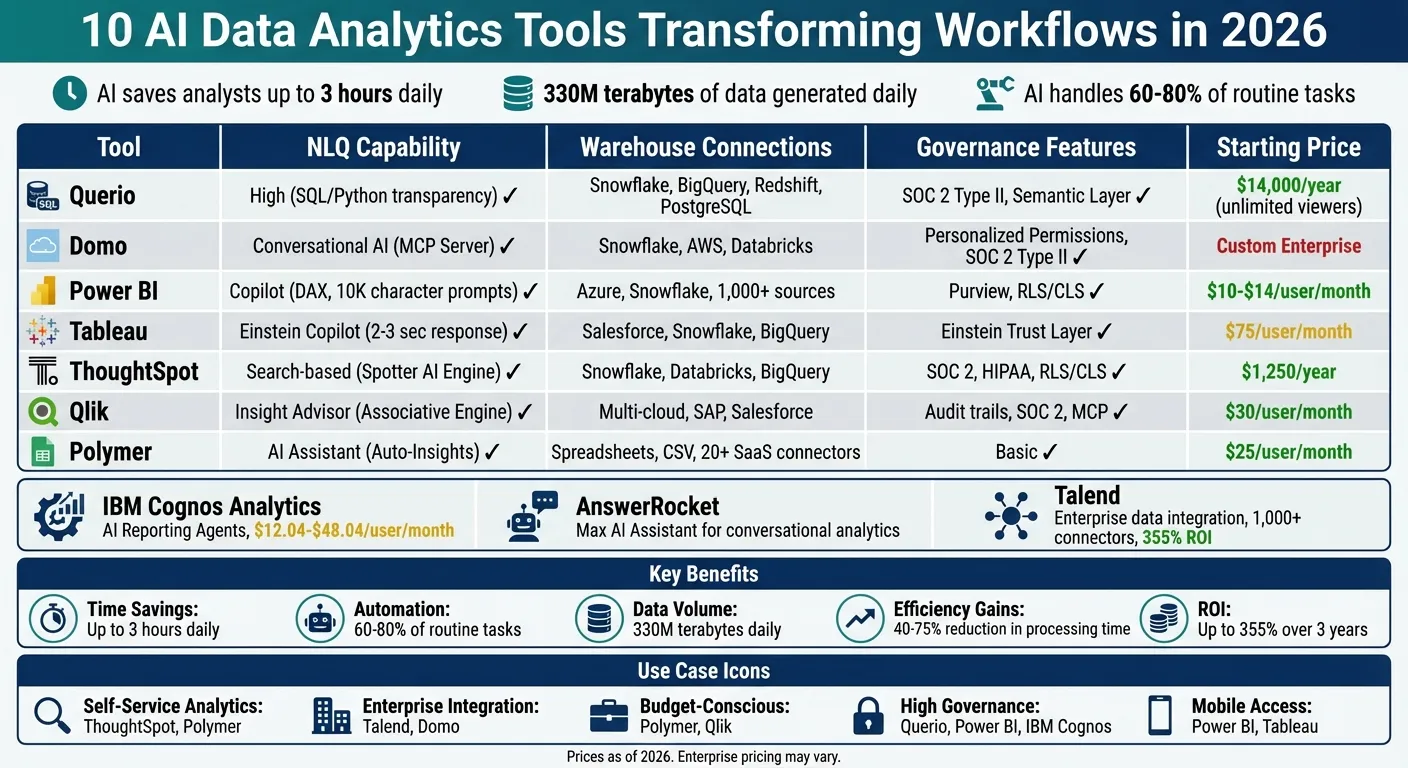 {AI Data Analytics Tools Comparison: Features, Pricing & Capabilities 2026}
:::
{AI Data Analytics Tools Comparison: Features, Pricing & Capabilities 2026}
:::
I Tested 53 AI Tools for Data Analysis - THESE 5 ARE THE BEST!
::: @iframe https://www.youtube.com/embed/RYTjU_x6fAQ :::
sbb-itb-284a532
1. Querio
Querio is an AI-powered analytics workspace designed to simplify data exploration. It connects directly to your data warehouse and translates natural language queries into SQL or Python code. This means business users can skip the wait for data teams or the need to learn complex query languages. For example, you can ask, "What caused our conversion rate to drop last week?" and get an answer based on live data. Every query runs directly on your data warehouse - whether it's Snowflake, BigQuery, Amazon Redshift, ClickHouse, or PostgreSQL - so there's no need for data exports or duplicate datasets. Let’s dive into how Querio’s natural language capabilities make query validation effortless.
Natural Language Query (NLQ) Capabilities
Querio uses a "glass box" approach, offering complete transparency. When the platform generates an answer, it reveals the exact SQL or Python code behind it. This allows analysts to inspect and validate the logic, ensuring accuracy and catching potential edge cases. Non-technical users get quick, reliable answers, while data teams retain oversight of the process, maintaining both accuracy and data integrity.
Integration with Data Warehouses and Databases
Querio integrates seamlessly with popular cloud data warehouses and relational databases, including PostgreSQL, MySQL, MariaDB, and Microsoft SQL Server. It uses encrypted, read-only credentials, so your data remains secure within your infrastructure. This live-query setup ensures real-time insights without the delays and complications of ETL pipelines or static data copies.
Governance and Security Features
A centralized semantic layer ensures consistent definitions for business metrics and terms across all queries and dashboards. Data teams can set up joins, metrics, and terminology just once, and these definitions are automatically applied to every query. Querio is SOC 2 Type II compliant, guaranteeing that customer data stays private and is never used to train external AI models. Enterprise-grade security features, like role-based access controls and SSO integrations, further enhance data protection.
AI-Driven Insights and Automation
Querio goes beyond answering one-off queries. It offers automated anomaly detection and delivers scheduled insights straight to tools like Slack or email, helping teams catch issues early. Its dynamic analysis workspace ensures that SQL and Python analyses automatically adapt to changes in schema or metrics, reducing manual updates. Dashboards and reports pull from the same governed logic, so everyone across the organization works with consistent, accurate data.
2. Domo
Domo brings AI into data workflows through interactive data apps and conversational AI tools, allowing users to ask questions and get real-time answers. It handles both structured and unstructured data, making it flexible for organizations dealing with diverse data types. Below, we’ll dive into Domo’s standout features, including natural language querying, data integration, governance, and automation.
Natural Language Query (NLQ) Capabilities
Domo’s interactive interface is powered by advanced NLQ features like the Model Context Protocol (MCP) Server. This tool bridges Domo’s AI capabilities with external large language models like ChatGPT, Gemini, and Claude, ensuring the data's context stays intact[2]. This integration allows users to interact with their data through familiar AI chat interfaces. Michael Ni from Constellation Research highlights this benefit:
"These tools ensure that workflow and AI capabilities remain consistent, governed, and reusable across the enterprise"[2].
Integration with Data Warehouses and Databases
Domo simplifies data integration with native connectors for major cloud data warehouses, including Snowflake, Databricks, Google BigQuery, and AWS. For unstructured data, Domo Documents supports files from sources like Amazon S3, SFTP, Google Drive, and GitHub[3]. Additionally, the platform’s AI Assistant for the JSON No Code connector uses natural language to interpret API documentation and automatically generate configurations[3]. Andrea Henderson, Senior Product Manager at Domo, explains:
"Behind every dashboard is a data pipeline someone had to design and maintain. Our goal is to make that work faster and more dependable while preserving the governance organizations require"[3].
Governance and Security Features
Domo ensures consistent metric definitions across teams with its centralized semantic layer. Sensitive data is protected through column masking, while visual dataset badges identify trusted data sources. The platform also provides audit trails for every data interaction, simplifying compliance and troubleshooting. To maintain model performance, AI drift alerts monitor and address issues before they impact users.
AI-Driven Insights and Automation
Domo’s autonomous AI agents go beyond reporting by acting on patterns in the data. Magic ETL automates data transformation tasks and includes debugging tools like "Run to Here" and "Disable Tiles"[3]. These features cut down manual work while maintaining governance controls, making analytics workflows smoother and helping users uncover insights more efficiently.
3. Microsoft Power BI
Microsoft Power BI has come a long way from being a simple reporting tool. It’s now a full-fledged operational analytics platform that leverages AI to handle tasks like data preparation and even automated decision-making. With features like Copilot and Direct Lake, Power BI is reshaping how businesses work with data, offering automation while maintaining strong security.
Natural Language Query (NLQ) Capabilities
Power BI’s Q&A feature now supports prompts of up to 10,000 characters, making it easier for users to ask complex questions without needing technical query languages[6]. The Input Slicer, which is available today, allows users to filter reports or pass parameters by simply typing free-form text, adding more interactivity to dashboards[6]. Copilot takes these capabilities mobile, enabling both voice and text queries for instant insights wherever you are[7]. By defining synonyms and relationships in the linguistic schema, users can ensure their queries are interpreted accurately[4]. These tools integrate seamlessly with Power BI’s advanced data storage solutions.
Integration with Data Warehouses and Databases
Power BI’s Direct Lake in OneLake uses Delta Lake and Parquet formats to deliver high-speed performance for massive datasets, eliminating the need for manual data refreshes[5][7]. This capability allows data to be queried directly from OneLake, cutting out the delays and costs associated with traditional ETL pipelines. Additionally, the Translytical Task Flows feature, now generally available, lets users take actions like updating records or triggering workflows directly from reports, linking seamlessly with Fabric SQL databases and warehouses[5][8].
Paul Wellman, Vice President of Enterprise Data & Analytics Platforms at TD Bank Group, highlights the impact:
"Power BI Copilot coupled with trusted data products have become the common language of insight across the enterprise - connecting teams, data, and decisions through a single, trusted analytics platform."[7]
This deep integration is supported by strong governance and security measures.
Governance and Security Features
Power BI ensures that security and governance remain front and center. The platform integrates Microsoft Information Protection sensitivity labels, so AI-generated summaries inherit the same security classification as the data they’re based on[4]. Administrators can manage AI feature rollouts - like Copilot, Q&A, and AutoML - through tenant-level settings, ensuring control over how these tools are used across workspaces. Data from features like Copilot and Cognitive Services is processed within the Power BI tenant’s geographic region, ensuring compliance with regulations like GDPR and HIPAA. Row-Level Security (RLS) is applied to AI-powered visuals, such as Key Influencers and Anomaly Detection, ensuring users only see data they’re authorized to access[4]. Additionally, all AI interactions, including prompts and training, are logged and can be exported to tools like Azure Monitor or Microsoft Sentinel.
AI-Driven Insights and Automation
Power BI doesn’t just handle data - it optimizes it. AI-driven automation can reduce report optimization time by up to 90%, identifying slow visuals and suggesting improvements in DAX or Power Query M code. AutoML makes building models for classification, regression, and sentiment analysis quick and easy, all within Dataflows[4][9]. Features like AI Narrative Auto-Refresh ensure that natural language summaries update automatically when slicer selections change, keeping insights relevant without requiring manual updates[5][8]. Meanwhile, AI-powered data preparation can cut cleaning time by as much as 60%, letting analysts spend more time focusing on what really matters - extracting insights[4].
4. Tableau
Tableau is making waves in the analytics world by integrating intelligent automation into its platform. With the help of three specialized agents - Data Pro (for data preparation), Concierge (for exploration), and Inspector (for alerting) - Tableau simplifies workflows and delivers insights without requiring users to have technical expertise [1][13].
Natural Language Query (NLQ) Capabilities
Tableau's AI-powered agent allows users to interact with their data in plain English, generating visualizations, calculations, and data preparation steps almost instantly. For medium-sized datasets, responses are delivered in just 2–3 seconds [10][11]. Tableau Pulse further enhances this experience by creating visualizations within insight briefs using precise logic [12]. Users can subscribe to key metrics and receive updates through Slack, Teams, or email. However, administrators must enable the "Turn On AI" setting in Tableau Cloud and connect the platform to a Salesforce organization to activate these features [10].
Integration with Data Warehouses and Databases
Tableau Prep now supports in-database processing for Snowflake (currently in beta), allowing operations to run directly within the database, which reduces memory usage and improves processing efficiency [12]. The Private Connect feature establishes secure network connections to Snowflake and Redshift on AWS, ensuring both high performance and strong security [12]. Tableau has also introduced new connectors, including:
- Native support for Amazon S3 (handling CSV and Parquet files)
- A no-code REST API connector for easier data access
- A Google Looker connector for pre-modeled governed data [12]
Additionally, the Bring Your Own Connector (BYOC) pilot program enables organizations to deploy custom drivers for proprietary databases, making it easier to migrate to Tableau Cloud [12].
Governance and Security Features
Tableau Semantics provides a centralized, rules-based environment to standardize metric definitions and manage data relationships across an organization, minimizing calculation errors and ensuring consistency [1][12]. For enhanced data protection, Tableau Cloud users can use External Key Management to encrypt data extracts with their own AWS KMS encryption keys [12]. Administrators can also restrict access to approved IP ranges using IP Filtering Self-Service, which is particularly useful for industries with strict security requirements [12]. All of these AI features operate within the Einstein Trust Layer, leveraging Salesforce's robust security and governance framework [14]. Tableau Bridge adds another layer of oversight by logging client status events in its Activity Log, providing a detailed audit trail for monitoring purposes [12].
AI-Driven Insights and Automation
Tableau Pulse takes the guesswork out of monitoring performance metrics by automating alerts and plain-language summaries whenever key indicators deviate from expected ranges or hit certain thresholds [10][12]. Einstein Discovery goes a step further by embedding predictive modeling and "what-if" scenario analysis directly into dashboards. This allows users to forecast outcomes like revenue trends or customer churn and receive actionable recommendations [10].
Real-world examples highlight Tableau's impact. A Regional Medical Center used Tableau to analyze data from 12 facilities, identifying patterns that led to a 23% drop in readmissions and improved patient satisfaction [15]. Similarly, RetailMax Inc., a mid-market fashion retailer, used Tableau to study customer journeys. According to James Chen, their Head of Analytics, Tableau revealed that mobile users visiting physical stores within 48 hours had a 3× higher lifetime value. By redesigning their store locator, RetailMax achieved a 28% increase in conversion rates [15].
5. ThoughtSpot
ThoughtSpot transforms traditional reporting by replacing drag-and-drop interfaces with a user-friendly search bar. Instead of navigating complex dashboards, users can simply type questions in plain English - like "revenue by region last quarter" - and instantly receive visualizations. Its Spotter AI Engine combines Retrieval-Augmented Generation (RAG) with the BARQ reasoning layer to interpret user intent and generate accurate SQL queries.
Natural Language Query (NLQ) Capabilities
With its intuitive search functionality, ThoughtSpot allows business users to handle up to 60% of their own data queries, significantly reducing the need for IT intervention. One G2 reviewer, BIManager_Global, highlighted this benefit:
"ThoughtSpot has significantly reduced our 'data request' backlog. Business users are now self-serving about 60% of their own queries without needing SQL help" [16].
The platform also delivers sub-second response times, even when working with billions of rows stored in cloud data warehouses [16]. This speed, combined with its ease of use, ensures users can quickly access live data without delays.
Integration with Data Warehouses and Databases
ThoughtSpot’s performance is further enhanced by its direct integration with warehouse-native data analysis tools and cloud data platforms. It connects seamlessly to Snowflake, Databricks, Amazon Redshift, Google BigQuery, and Azure Synapse, allowing users to query live data without the need for duplication or migration [16][17]. A Capterra reviewer remarked:
"The integration with Snowflake is seamless. We're seeing sub-second response times on massive datasets which is impressive compared to our old legacy stack" [16].
Additionally, ThoughtSpot supports the Model Context Protocol (MCP) Server, enabling smooth integration with external AI tools and large language models (LLMs) within analytics workflows [16]. For advanced users, the Analyst Studio offers tools for data preparation, modeling, and blending, with support for SQL, R, and Python [16].
Governance and Security Features
To meet enterprise needs, ThoughtSpot adheres to stringent security standards, including SOC 1/2/3, ISO 27001, HIPAA, GDPR, and CCPA [16]. However, setting up the platform requires a significant initial investment in data modeling and metadata configuration to ensure consistent definitions across the organization. Administrators have noted that mastering the ThoughtSpot Modeling Language (TML) is essential for maintaining governance but comes with a steep learning curve [16]. Pricing is adjusted based on features and data usage. This infrastructure is a core component of the modern analytics stack, which integrates warehouses with AI-driven analysis.
6. Qlik
Qlik's Associative Engine stands out by maintaining dataset relationships, uncovering patterns that traditional query-based systems might overlook [19].
Natural Language Query (NLQ) Capabilities
With Qlik Answers, users can ask questions in plain English and receive insights backed by explanations from curated data sources. This feature ensures transparency, allowing users to trace how conclusions were drawn [19].
AI-Driven Insights and Automation
Qlik enhances its analytics with AI-driven tools that go beyond simple reporting. Its Discovery Agents actively monitor key business metrics, identifying anomalies and enabling a shift from reactive to predictive analytics [18][1]. As Mike Capone, Qlik's CEO, emphasized:
"Enterprise AI must be auditable, governed and capable of acting within operational workflows." [19]
Governance and Security Features
Qlik incorporates the Model Context Protocol (MCP), a secure server protocol designed to let external AI tools access enterprise data while maintaining strict governance standards [19]. Highlighting the importance of this approach, Mike Krut, Senior Vice President of Information Technology at Penske Transportation Solutions, noted:
"AI delivers value when built on curated and governed data." [19]
For businesses looking for powerful analytics solutions, Qlik Sense pricing starts at approximately $200 per month. This cost reflects its enterprise-level functionality, making it a key player in transforming data workflows in 2026 [20].
7. IBM Cognos Analytics
IBM Cognos Analytics 12.1.2, launched in March 2026, takes a major step forward with the introduction of Reporting Agents. These agents automate reporting tasks, transforming what used to be manual processes into intelligent, autonomous operations [21][22]. Priya Srinivasan, General Manager at IBM Software, summed it up perfectly:
"IBM's strategy is simple: bring AI to where enterprise work already happens." [22]
Natural Language Query (NLQ) Capabilities
The AI Assistant is a standout feature, letting users interact with their data in plain English. By simply asking questions, users can generate visualizations and dashboards without needing technical know-how. Specialized agents further enhance this functionality:
- Report Recommendation Agent: Finds the most relevant reports using natural language.
- Report Summarization Agent: Breaks down complex datasets into easy-to-understand summaries.
- Report Sharing Agent: Automates secure report distribution to stakeholders.
Cognos also makes it easier to integrate data from various sources, building on its strength in natural language query capabilities [21][22].
Integration with Data Warehouses and Databases
Cognos seamlessly connects with major enterprise data sources [23]. By pasting JDBC or ODBC strings, users can load metadata from platforms like Amazon Redshift, MongoDB, MySQL, PostgreSQL, and Snowflake [25][27]. Its data modules allow users to link tables from different sources, enabling self-service modeling without needing extensive manual preparation [25][26]. One client reported an 86% improvement in reporting speed after using Cognos to modernize siloed financial systems [21].
AI-Driven Insights and Automation
Cognos doesn’t just stop at reporting - it incorporates AI to provide predictive insights and automate data tasks. Features like AI-powered forecasting and automated data modeling help organizations make better decisions faster [21][23]. For instance:
- Mohegan Sun saved about one hour per supervisor daily by equipping housekeeping and front-desk teams with real-time data access.
- The UK Ministry of Defence consolidated four outdated systems into a single Cognos platform, supporting 190,000 armed forces personnel [21].
Governance and Security Features
Cognos goes beyond performance by embedding advanced governance and security measures. It complies with SOC 2, HIPAA, GDPR, and ISO 27001 standards, offering centralized audit trails, detailed access controls, and certified compliance models [21][23]. Ray Beharry, Senior Product Marketing Manager at IBM, highlighted this approach:
"With watsonx, governance controls are embedded, automated and auditable - not manual, not bolted on, and not applied after the fact." [24]
The Reporting Agents showcase how Cognos integrates AI into data workflows, automating complex tasks while ensuring top-tier governance. Pricing starts at $12.04 USD per user per month for the Standard Plan, with the Premium Plan at $48.04 USD per user per month, which includes the Reporting Agents. Early adopters can take advantage of a 30% discount on first-year subscriptions until April 15, 2026 [21].
8. AnswerRocket
AnswerRocket is built around Max, its generative AI assistant, designed to simplify analytics through a conversational approach. Forget about SQL queries or complex dashboards - users can interact with their data by simply typing in plain English. Powered by large language models, Max translates everyday language into actionable insights, making advanced analytics approachable for teams across an organization [28].
Natural Language Query (NLQ) Capabilities
Max's chat-based interface removes many of the barriers that typically come with exploring data. It offers built-in features like starter questions and automated suggestions to help users navigate even the most complex datasets. Whether the data is structured (like databases) or unstructured (like PDFs or emails), Max can process it all seamlessly. Through the same conversational interface, it generates charts, visualizations, and text-based answers. For companies with unique needs, Skill Studio allows them to create custom AI capabilities that align with their specific business requirements [28].
Integration with Data Warehouses and Databases
AnswerRocket’s Max AI doesn’t just simplify analytics; it integrates effortlessly with existing corporate data systems. This connection enables users to access and analyze data from multiple sources, supporting everything from initial exploration to generating automated business reports and presentations. The platform ensures compatibility with various formats, making it a versatile tool for enterprise environments [29].
AI-Driven Insights and Automation
Beyond basic queries, Max delivers more advanced analytics, including diagnostic, predictive, and prescriptive insights. Companies can design AI Assistants tailored to specific roles, ensuring that each team member gets the most relevant insights. To handle enterprise-scale operations, the platform uses caching and containerization, ensuring smooth performance even with large datasets. AnswerRocket transforms how businesses interact with data, making analytics not only more accessible but also more efficient [28].
9. Polymer
Polymer skips the need for traditional data warehouses by directly working with CSV files, Google Sheets, and over 20 SaaS connectors like Shopify, Google Analytics 4, Facebook Ads, and Zendesk. Once you upload your data, the platform automatically profiles it and suggests relevant charts, making it easy to create interactive dashboards right away [30][34].
Natural Language Query (NLQ) Capabilities
Polymer’s conversational AI chat allows users to ask straightforward questions - like “What is my ROAS in the last 30 days?” - and instantly receive visualizations [31][34]. As Erik Fogg, Co-founder of ProdPerfect, explains:
"You can literally ask any question about a dataset and get an answer. I think the world's been waiting for this for a long time" [33].
To make things even easier, Polymer comes with over 20 pre-built dashboard templates tailored for e-commerce, marketing, and sales teams, helping users hit the ground running [31][34]. This user-friendly approach enhances the platform's AI-powered analytics platforms.
AI-Driven Insights and Automation
Polymer’s Auto-Insights engine works behind the scenes to uncover patterns, trends, and anomalies that might go unnoticed during manual analysis. For example, in 2026, Craig Belcher from YourPPCpro used this feature to identify top-performing demographics, boosting ad conversions by 19% in just a few days [33]. Similarly, Mark Myers, Senior Safety Manager at Baldwin Aviation, shared that Polymer reduced the time spent on manual data processing in Excel by 40% [33].
The platform also supports scheduled data syncing - whether you need updates hourly, daily, or in real time - and can automatically send reports to stakeholders’ inboxes, streamlining the reporting process [33][34].
Governance and Security Features
Polymer doesn’t just handle analytics; it also keeps an eye on sensitive data across platforms like Slack, Google Drive, and Jira. Using AI, the platform identifies risks, contextualizes them, and triggers security workflows. For example, it can redact PII/PHI or revoke file access in real time [35][36]. Mark Magpayo, Sr. Director of Security Operations at Signify Health, highlighted the efficiency:
"Our prior solution required 8 hours per week of FTE time to manage alerts. With Polymer, we are down to 0" [35][36].
Polymer achieves 99% accuracy in identifying sensitive data and ensures compliance with major frameworks like HIPAA, SOC 2 Type II, CCPA, GDPR, and FINRA [35][36].
Performance and Pricing
While Polymer offers impressive features, users have reported performance issues with datasets exceeding 100,000 rows. Ensuring your data is clean and well-formatted before uploading can help avoid these challenges [34].
Pricing is tiered to suit different needs:
- Basic: $5/month (manual uploads)
- Pro: $50/month (hourly auto-syncing)
- Enterprise: $500/month (embedded analytics tools via API) [32][34].
10. Talend
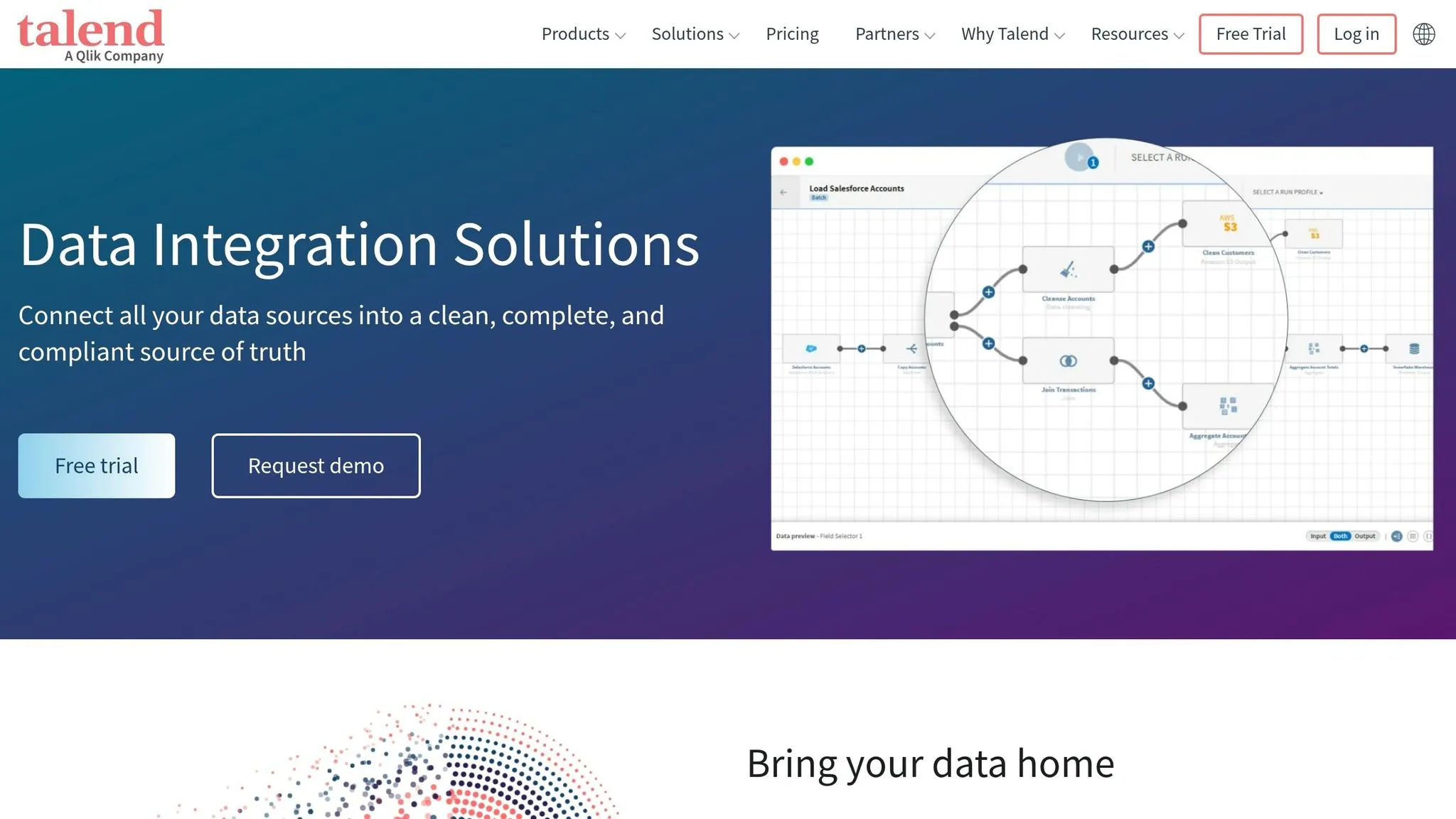
Talend delivers enterprise-grade tools for data integration and transformation, illustrating how AI is transforming data analytics within modern workflows. Since its acquisition by Qlik in May 2023, Talend has expanded its capabilities within the Qlik ecosystem. By early 2026, it remains a robust solution for managing large-scale data across both cloud and on-premises environments [17][38].
Integration with Data Warehouses and Databases
Talend connects to more than 1,000 data sources, including certified connectors for SAP S/4HANA, SAP Business Warehouse on HANA, and modern cloud databases such as Amazon Keyspaces, Azure SQL, and Google Bigtable. Through its integration with the Qlik ecosystem, it also supports over 100 major cloud platforms like AWS, Microsoft Azure, and Google Cloud Platform [17][38].
The platform works seamlessly with data warehouses like Snowflake, BigQuery, Oracle, and SQL Server, supporting a variety of workflows, including batch, real-time, ETL, ELT, and API-based processes - all within a single scalable infrastructure [37].
AI-Driven Insights and Automation
Talend’s no-code pipelines simplify data integration, cleansing, and transformation, delivering substantial efficiency gains [38]. For example, companies using Talend reported a 355% return on investment (ROI) over three years, with development teams cutting their workload by up to 40% thanks to automated workflows [38]. Features like Smart Services further streamline operations by automating tasks such as timeouts and pause/resume functions. Additionally, the Talend Trust Score™ provides instant assessments of dataset reliability using contextual quality rules [38].
Real-world examples highlight its impact. In October 2023, Palladium Hotel Group adopted Talend Data Fabric on an AWS and Snowflake architecture, spearheaded by CIO Marcel Alet and Head of Data Gustavo Cueva. This implementation cut report generation time by 75% and significantly improved forecasting accuracy across their 40 hotels [38]. Similarly, Getlink, a French-British mobility group, used Talend Data Fabric in September 2023 to build its "One Getlink" central data platform. This system automated predictive maintenance and enabled secure, scalable data access [38].
Talend’s automation capabilities are paired with strong governance measures, ensuring both efficiency and security.
Governance and Security Features
Talend prioritizes governance through features like audit trails, which log every AI-generated query and recommendation, and transparent models that simplify compliance reviews [17]. Its automated systems have reduced incidents by 65% and decreased the likelihood of data breaches by 5% through built-in compliance and security protocols [38]. Additionally, streamlined data infrastructures powered by Talend can lower server requirements by up to 80% [38].
For businesses of all sizes, Talend offers a range of subscription models tailored to enterprise needs. For basic integration tasks, Talend Open Studio is available as a free option [39]. At Palladium Hotel Group, internal teams rated the quality and usability of Talend-generated reports an impressive 9.5 out of 10 [38].
Feature Comparison Table
When picking the best analytics tool, it's all about balancing features like natural language querying (NLQ), warehouse connections, governance, and cost. Here's how seven popular tools stack up:
| Tool | NLQ Capability | Direct Warehouse Connections | Governance Features | Starting Price (USD) |
|---|---|---|---|---|
| Querio | High (SQL/Python) | Snowflake, BigQuery, Redshift, Postgres | SOC 2 Type II, Semantic Layer | Free plan; Core $2,499/mo; no per-seat pricing (unlimited users on every plan) |
| Domo | Agentic AI | Snowflake, AWS, Databricks | Personalized Data Permissions, SOC 2 Type II | Custom Enterprise |
| Power BI | Copilot (DAX) | Azure, Snowflake, 1,000+ sources | Purview, RLS/CLS | $10–$14/user/month |
| Tableau | Einstein Copilot | Salesforce, Snowflake, BigQuery | Einstein Trust Layer | $75/user/month |
| ThoughtSpot | Sage AI | Snowflake, Databricks, BigQuery | SOC 2, HIPAA, RLS/CLS | $1,250/year (Essentials) |
| Qlik Sense | Insight Advisor | Multi-cloud, SAP, Salesforce | Audit trails, SOC 2 | $30/user/month |
| Polymer | AI Assistant | Spreadsheets, CSV, SQL | Basic | $25/user/month |
Querio emerges as a standout option by combining strong governance with exceptional transparency. One of its defining features is the ability to expose live SQL/Python code, giving analysts full control and visibility. It also connects directly to data warehouses, avoiding duplication and maintaining security with encrypted, read-only credentials.
Cost is another area where Querio shines. Its lack of per-seat pricing compares well with per-user pricing models, which can escalate quickly. For example, while Polymer is budget-friendly at $25/user/month, it offers only basic governance. On the other hand, Domo's custom enterprise pricing often comes with a hefty price tag. Querio's combination of governance, cost efficiency, and transparency makes it the top choice for enterprise-grade analytics.
Conclusion
AI tools are reshaping how data workflows operate in 2026. The move from static dashboards to autonomous agents is cutting down manual tasks and saving professionals a substantial amount of time every day [40]. These tools take over routine jobs like cleaning data, performing joins, and identifying anomalies, allowing experts to dedicate their energy to predictive modeling and strategic decision-making.
However, success with AI doesn’t start with the fanciest tool - it starts with data quality. AI can only provide accurate insights if the underlying data is clean and well-organized. Before adopting any platform, it's crucial to assess your data readiness and establish a semantic layer to define key metrics like "churn" or "revenue" consistently across all reports. This groundwork avoids the risks of poor data quality, which can derail even the most advanced AI solutions.
Choosing the right platform is equally important. Look for tools that align with your team’s technical expertise and integrate smoothly into your existing systems to minimize disruptions and avoid being locked into a single vendor. Features like natural language interfaces enable non-technical users to engage with the system, while more advanced users can dive into the underlying code for verification.
Start small by running a pilot program focused on a high-impact issue. Use this to demonstrate clear results and build trust, encouraging gradual adoption across your organization. Always double-check AI-generated insights for crucial decisions, as even the most sophisticated systems can miss nuances or make errors. The ultimate aim is to establish collaborative workflows, where AI handles rapid analysis and humans apply strategic judgment.
FAQs
::: faq
How do I know an AI-generated insight is correct?
To ensure the accuracy of AI-generated insights, there are a few practical steps you can take:
- Spot-check a sample: Review around 10% of the insights by comparing them directly with the original source data.
- Test alignment with business logic: Make sure the insights make sense within the context of your organization's goals and operations.
- Collaborate with peers: Involve colleagues in peer reviews to get additional perspectives and verify findings.
Additionally, focus on maintaining high-quality input data, rerun analyses when needed, and compare AI outputs with feedback for consistency. When working with AI models, assess their reliability by testing them on unseen data and using evaluation metrics to monitor performance. These methods help ensure the insights you rely on are both accurate and actionable. :::
::: faq
What data prep should I do before using AI analytics tools?
Preparing your data for AI analytics tools requires careful attention to detail to ensure accuracy and usability. Start by cleaning your data - this means removing duplicates, addressing missing values, and standardizing formats. These steps help maintain consistency and reliability in your analysis.
For unstructured data, take the time to convert it into formats that AI tools can analyze, such as structured tables or tagged datasets. Once transformed, validate the quality of your data to ensure it meets the necessary standards for analysis.
To make the process more efficient, consider connecting directly to your data warehouse. This approach not only streamlines workflows but also allows for real-time analysis and improved data governance. Plus, it eliminates the need for manual uploads, saving time and reducing errors. :::
::: faq
Which features matter most when picking a tool for my team?
When picking a data analytics AI tool, prioritize a user-friendly interface to make adoption straightforward. Look for tools with natural language processing (NLP) that allow you to ask plain-language questions and get clear insights. Automation features are also key - they can simplify workflows and save time.
Make sure the tool can handle scaling up as your data grows and offers integration options to connect seamlessly with your current systems. Additionally, strong governance and security features are essential to ensure compliance with data regulations. Ultimately, the right tool should fit your team’s size, specific needs, and budget. :::