Business Intelligence
ai data analytics tools list comparison 2026
Compare AI analytics platforms by AI features, warehouse integration, governance, and pricing to find the best fit.

AI-driven analytics tools are transforming decision-making in 2026. Businesses are adopting platforms with advanced AI features to analyze data, predict trends, and automate insights. This article compares five popular tools: Microsoft Power BI, Tableau, Querio, Excel Copilot, and Domo, focusing on their AI capabilities, integration with data warehouses, governance features, and pricing.
Key Takeaways:
- Microsoft Power BI: Offers predictive models, anomaly detection, and seamless Microsoft integration. Pricing starts at $14/user/month.
- Tableau: Known for advanced visualizations and AI agents but comes with higher costs ($70–$115/user/month).
- Querio: Excels in SQL/Python code generation, with a free plan and Core at $2,499/month.
- Excel Copilot: Budget-friendly ($30/user/month add-on) for Microsoft 365 users, ideal for basic analytics.
- Domo: Strong SaaS integration and autonomous workflows, with enterprise pricing averaging $134,000/year.
Quick Comparison:
| Tool | AI Features | Data Integration | Governance | Pricing |
|---|---|---|---|---|
| Microsoft Power BI | Predictive models, anomaly detection, natural language queries | Deep Microsoft ecosystem integration | Strong enterprise controls | $14–$24/user/month |
| Tableau | Visualizations, predictive modeling, AI agents | Live connections to major platforms | Moderate governance | $70–$115/user/month |
| Querio | SQL/Python generation, transparent logic | Native, zero-ETL warehouse connections | SOC 2 compliance, semantic layer | Free plan; Core $2,499/mo |
| Excel Copilot | Natural language formula/chart creation | Limited warehouse connectivity | Microsoft 365 permissions | $30/user/month add-on |
| Domo | Autonomous workflows, conversational AI | 1,000+ pre-built connectors | HIPAA compliance, semantic layer | $134,000/year average |
Choosing the right tool depends on your data needs, team workflows, and budget. Dive deeper to find the best fit for your organization.
::: @figure 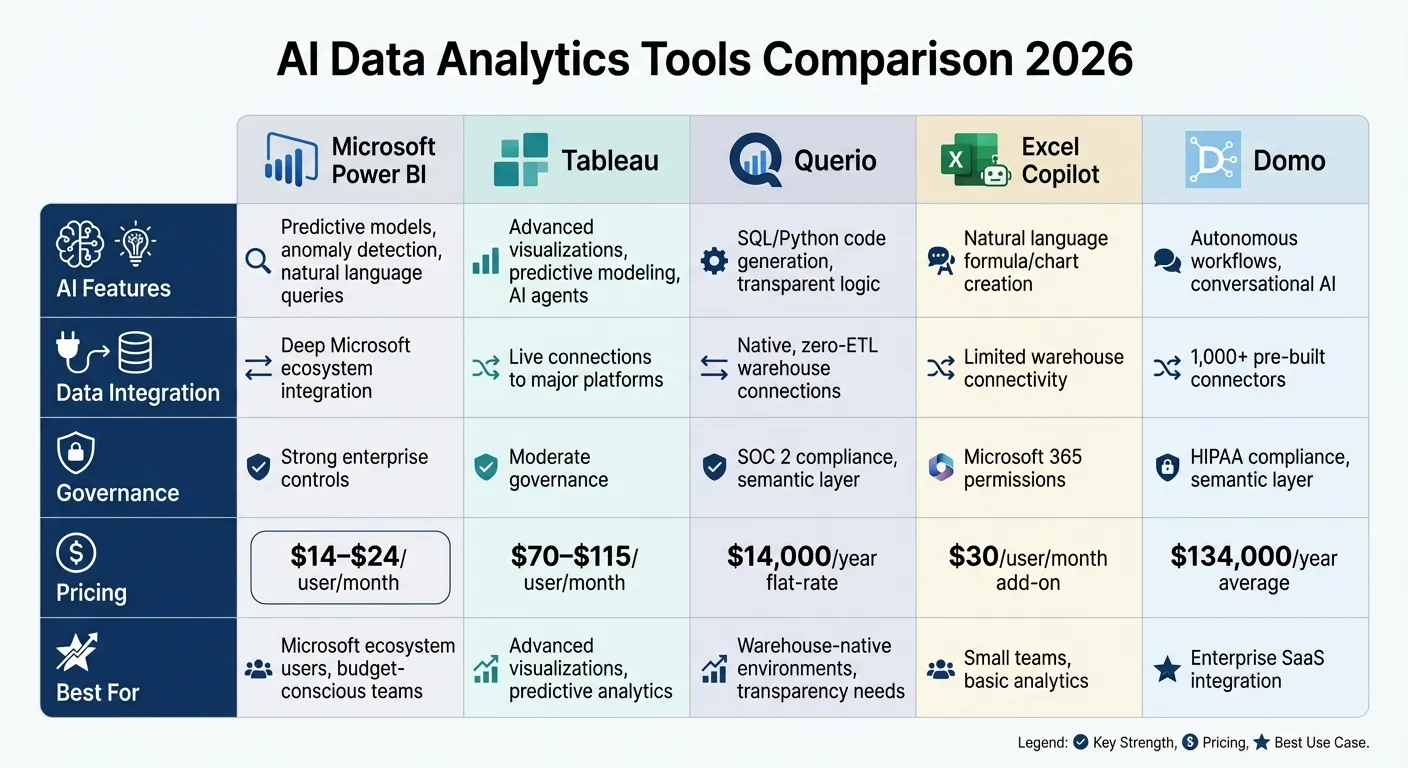 {AI Data Analytics Tools Comparison 2026: Features and Pricing}
:::
{AI Data Analytics Tools Comparison 2026: Features and Pricing}
:::
1. Microsoft Power BI
AI Capabilities
Power BI has stepped up its game by not just showing what happened in your data but also explaining why. Tools like Key Influencers, Decomposition Trees for root cause analysis, and Smart Narratives simplify data insights by automatically generating plain-language summaries from your data [5].
For those without coding experience, Power BI offers AutoML in Dataflows, allowing users to create binary prediction, classification, and regression models directly within the platform [5]. It also uses STL decomposition to automatically detect anomalies in time-series data, flagging any outliers [5]. With Cognitive Services integration, you can perform tasks like sentiment analysis, extract key phrases, or tag images during data prep - perfect for analyzing customer feedback or social media data [5].
These features make it easier to connect with modern data warehouses and uncover deeper insights.
Integration with Data Warehouses
Power BI commands a 36% market share in the business intelligence sector as of early 2026 [8]. Its deep integration with Microsoft's ecosystem makes it a go-to choice for organizations managing large datasets. For instance, Direct Lake mode simplifies working with massive datasets stored in OneLake [8]. This feature aligns with the trend toward headless semantic layers, where metric definitions are standardized across platforms using tools like dbt or AtScale [8].
Governance Features
Power BI doesn't just focus on insights - it also ensures strong data governance implementation. With tenant-level controls, administrators can manage the rollout of features like Copilot while maintaining data sensitivity [5]. This governance-first approach supports the broader move toward data autonomy, where AI agents independently manage data joins and generate insights [6].
Pricing Models
| License Type | Price | Model Size Limit | Best For |
|---|---|---|---|
| Power BI Free | $0 | Personal use | Individuals, learning [7] |
| Power BI Pro | $14/user/month | 1 GB | Small teams, basic sharing |
| Premium Per User | $24/user/month | 100 GB | Advanced AI, larger models |
| Fabric Capacity | ~$5,000/month (F64) | 25-400+ GB | Enterprise-wide AI & Copilot |
Power BI delivers an impressive 265% ROI over three years, with an average payback period of just six months [7]. It holds a 4.4/5 rating for AI productivity thanks to its seamless integration with Microsoft's ecosystem and its reasonable pricing. However, some users mention the steep learning curve for DAX and the high costs associated with Copilot features that require Fabric capacity [7][8].
sbb-itb-284a532
2. Tableau

AI Capabilities
Tableau has stepped up its game by introducing agentic analytics, a feature designed to streamline data processes using specialized AI agents like Data Pro, Concierge, and Inspector. These tools handle tasks such as data preparation and exploration. Tableau Pulse is another standout feature, shifting away from traditional dashboards by enabling proactive metric monitoring. It integrates with platforms like Slack and Teams to flag anomalies and deliver insights automatically.
For predictive modeling and recommendations, Tableau relies on Einstein Discovery, which works through its calculation engine. Meanwhile, Tableau Prep Builder simplifies data cleaning with AI assistance. Another key feature is Tableau Semantics, a governed semantic layer that ensures consistent metric definitions across an organization. However, many of these advanced tools require integration with Salesforce Data Cloud, which could lead to ecosystem dependency and increased complexity.
Integration with Data Warehouses
Tableau connects seamlessly to major data warehouses like Snowflake, Google BigQuery, and Databricks through its Zero Copy Partner Network. This allows for both live queries and in-memory extracts, ensuring flexibility and performance. Additionally, Tableau integrates with MuleSoft, making it possible to surface insights within external enterprise applications. Developers can also embed analytics into custom AI agents using the Model Context Protocol (MCP). Understanding the ways of building AI agents can help developers maximize these integrations.
That said, to unlock its full AI capabilities, Tableau often requires Salesforce Data Cloud or Agentforce credits. This adds an extra layer of cost and potential lock-in, so it's wise to conduct a pilot test to ensure the platform aligns with your data workflows.
Pricing Models
| License Tier | Monthly Cost (Per User) | Notable Features |
|---|---|---|
| Tableau+ | $115 | Full AI capabilities, up to 50 sites, Enterprise Creator tier |
| Creator | $70 | Full authoring and administration |
| Explorer | $35 | Limited authoring; interaction with published content |
| Viewer | $15 | View and interact with dashboards only |
| Resource Blocks | $350 | Supports concurrent Prep flows and scaling |
Tableau has been recognized as a Gartner Magic Quadrant Visionary for four years straight (2022–2025)[1]. However, for larger teams, costs can escalate quickly, and some users feel the AI features don’t integrate as smoothly as native AI solutions[4]. When planning your budget, keep in mind the potential additional costs for Salesforce Data Cloud or Agentforce credits needed to access the platform's full range of AI tools.
3. Querio
AI Capabilities
Querio prioritizes clarity and precision by generating SQL and Python code from plain-English queries. This ensures full visibility into how results are derived - no black-box operations here. Benchmark tests show an impressive accuracy rate of over 95% on large datasets [12,13].
The platform's AI agents allow users to turn everyday language into SQL and Python code that can be reviewed and refined by data teams. This ensures that the logic behind each query is both transparent and adaptable. For instance, a retail client used Querio to analyze 1TB of sales data, leading to a 15% improvement in inventory management through predictive forecasting. Similarly, a healthcare organization reduced the time needed for patient trend analysis from days to just minutes by integrating Querio with Epic systems [13,17]. This focus on clarity and precision makes Querio a reliable choice for integrating with existing data infrastructures.
Integration with Data Warehouses
Querio connects directly to your data warehouse using native, zero-ETL integrations. It supports major data warehouses through live, read-only connections authenticated via APIs. This approach eliminates data duplication or extraction, with queries running directly on your warehouse at lightning-fast speeds - sub-second latency, to be exact [14,17].
The setup process is streamlined: 5 minutes to configure an API key, 10 minutes for schema mapping, and a full rollout in just one day. Compared to manual pipeline setups, this reduces configuration time by 70% [15,17]. Plus, the platform ensures 99.99% availability even when handling large datasets, making it a dependable choice for real-time analytics [12,14].
Governance Features
Security and compliance are baked into Querio's design. The platform includes row-level security, automated GDPR/CCPA compliance reporting, and detailed audit logs for every query. Role-based access controls ensure sensitive data is masked while maintaining analytics functionality. Querio is also SOC 2 Type II certified, with 99.9% uptime for compliance reporting [15,16].
Querio's Semantic Layer adds another layer of consistency. By defining joins, metrics, and business terminology upfront, data teams can ensure these definitions are applied uniformly across dashboards, ad-hoc analyses, and AI-generated responses. This version-controlled logic prevents the metric inconsistencies that often plague analytics projects.
Pricing Models
| Tier | Monthly Cost | Key Features |
|---|---|---|
| Free | $0 | Unlimited users and data connections, 500 AI credits a month, dashboards, Slack agent |
| Core | $2,499 ($25,000/year billed annually) | 10,000 AI credits a month, SSO, API access, SSH tunneling and VPN, unlimited automations |
| Enterprise | Custom | Custom AI credit allowance, single-tenant hosting, on-prem deployment as an add-on |
Querio's pricing is designed for scalability, with unlimited users included on every plan. Annual billing brings Core to $2,099 a month. For organizations needing on-premise deployment, Enterprise offers it as an add-on, with complete control over data residency and infrastructure.
4. Excel Copilot

AI Capabilities
Excel Copilot brings natural language queries into the mix, allowing users to create formulas, charts, and table summaries with ease. In early 2026, Microsoft introduced "Agent Mode" alongside a specialized "Analyst tool" designed for handling more advanced queries [3].
The 2026 Copilot Pro version takes things further with deep Python integration, which supports enterprise-level data science workflows. Features like "Analyze Data" and "Ideas" automatically highlight trends, spot anomalies, and even generate narratives from raw data. This makes it easier for non-technical users to understand the reasons behind shifts in numbers by learning how to use ai for performance data analytics. By combining natural language processing with Python capabilities, Excel Copilot stands out as a key component of the Microsoft ecosystem.
Integration with Data Warehouses
Within the Microsoft 365 ecosystem, Excel Copilot works seamlessly with Office 365 data. However, it does have limitations. It can't directly query external data warehouses like Amazon Redshift or S3 due to Excel's native capacity constraints. To work with warehouse-scale analytics, users need to use tools like Power BI or Microsoft Fabric as intermediaries. This highlights the need for warehouse-native data analysis tools when dealing with large-scale cloud datasets. Another limitation is that Copilot often cannot "cross tool boundaries", meaning it may fail to recognize data models or measures already defined in Power BI environments [4].
Governance Features
Excel Copilot's security is tightly managed through Microsoft 365, incorporating Microsoft Purview and Power Platform DLP. For added protection, the E7 bundle offers advanced identity management and agent tools to ensure that AI-generated insights meet enterprise compliance standards. Microsoft also includes "Customer Lockbox", providing strict controls over customer data access [3].
Pricing Models
Excel Copilot is available as an add-on for $30 per user, per month on top of existing Microsoft 365 subscriptions. For those seeking additional features, the E7 bundle - launched in early 2026 - costs $99 per user, per month. This bundle includes Copilot along with advanced identity management tools. The pricing reflects the tool's advanced analytics capabilities and its ease of integration into Excel-heavy workflows [3].
5. Domo
AI Capabilities
Domo is a comprehensive BI platform tailored for executive decision-making. Its standout feature, Agent Catalyst, allows users to create autonomous business processes - like optimizing sales pipelines or staff scheduling - in as little as 30 minutes [9][10]. These no-code AI agents can manage tasks such as staff optimization, customer support workflows, and SWOT analysis independently [9].
In addition to Agent Catalyst, Domo's Magic ETL integrates AI-driven tools like Tile-Ahead, Text Gen, and SQL Assistant to simplify data preparation. The platform also includes conversational AI, enabling users to query data using plain language. This capability is a cornerstone for organizations looking to build AI self-serve analytics for their internal teams and customers. Organizations using Domo report impressive results, with an average ROI of 536% over three years, translating to $6.93 for every dollar spent [9]. Real-world examples include Manulife saving over 5,000 hours annually through automation and Origin Bank cutting costs by $200,000 in its first year [9]. These AI tools seamlessly connect to a vast ecosystem of data sources, enhancing overall efficiency.
Integration with Data Warehouses
Domo’s integration capabilities are equally impressive, offering over 1,000 pre-built data connectors for platforms like Salesforce, Snowflake, and NetSuite [9]. These connectors allow businesses to link more than 15 data sources in under two hours. Its cloud-native architecture, powered by the Adrenaline engine, supports live querying, giving users access to real-time operational data without needing separate ETL tools. Additionally, Domo’s mobile-first design ensures executives can monitor real-time metrics directly from their phones, making it a practical choice for on-the-go decision-makers [11].
Governance Features
Domo emphasizes data governance with features like a governed semantic layer, content certification, and RBAC (role-based access control). Its security suite includes SSO, SAML, and AWS Private Link, along with a HIPAA-compliant Business Critical tier. These measures ensure that AI-generated insights align with enterprise compliance standards while maintaining strict data access controls [9].
Pricing Models
Domo uses a credit-based consumption model instead of traditional per-seat licensing. Costs depend on factors like data volume, refresh frequency, and API calls [9]. The platform is divided into three tiers: Standard, Enterprise (which includes Agent Catalyst), and Business Critical (offering advanced security).
- Average annual contracts for Domo in 2026 are estimated at $134,000.
- Mid-sized deployments (20–100 users) typically cost between $20,000 and $50,000 annually.
- Enterprise deployments (100+ users) start at $50,000 annually.
For example, a 50-user deployment managing 250 million rows of data costs around $75,000–$85,000 per year, with payback achieved in approximately 8.4 months [9]. However, some users note challenges such as a steep learning curve (onboarding takes 2–4 weeks) and difficulties with budgeting due to the credit-based pricing model [9].
I Tested 53 AI Tools for Data Analysis - THESE 5 ARE THE BEST!
::: @iframe https://www.youtube.com/embed/RYTjU_x6fAQ :::
Strengths and Weaknesses
When comparing analytics platforms, it’s clear that each has its own set of perks and drawbacks across four main areas: AI capabilities, data warehouse integration, governance, and pricing. The table below provides a snapshot of how these tools measure up as of 2026.
| Tool | AI Capabilities | Integration with Data Warehouses | Governance Features | Pricing Models |
|---|---|---|---|---|
| Microsoft Power BI | Copilot for DAX queries, AutoML for predictions, and strong anomaly detection | Direct Lake mode with Azure/Fabric; broad connector library | Enterprise-grade RBAC and certification workflows | $14/user/month (Pro tier); Fabric capacity pricing for larger deployments |
| Tableau | Einstein Copilot for visualizations, ML modeling, and narrative summaries | Live connections to Snowflake, Salesforce, and major cloud platforms | Moderate governance with content certification and user permissions | $75–$115/user/month subscription-based |
| Querio | Plain English to SQL/Python generation, inspectable code, and deep analysis | Warehouse-native with live, read-only connections to major platforms | Strong semantic layer, versioned logic, SOC 2 Type II compliance | Free plan; Core $2,499/mo ($25,000/yr); no per-user fees |
| Excel Copilot | Formula generation, chart creation from natural language, and basic forecasting | Limited direct warehouse connectivity; mostly works with imported data | Basic governance through Microsoft 365 permissions | $30/user/month add-on for enterprise Microsoft 365 users |
| Domo | AI Chat, autonomous workflows, and "Bring Your Own Model" flexibility | Over 1,000 pre-built connectors; reduces engineering ETL workload by ~40 hours/month | Governed semantic layer with RBAC, SSO, and HIPAA compliance | Credit-based consumption model; average $134,000/year for enterprise |
Here’s how these tools perform when applied to real-world scenarios:
Microsoft Power BI stands out for its affordability, especially in Microsoft-heavy environments. For example, a mid-sized company slashed its monthly costs by 69% by combining 50 Power BI Pro licenses with Fabric F8 capacity[12]. This makes it an appealing option for organizations seeking cost-effective analytics without sacrificing functionality.
Querio shines in warehouse-native environments, offering transparent analytics and a pricing model that avoids per-user fees. Its inspectable code and robust semantic layer vs. traditional data models ensure definitions remain consistent and audit-ready, making it ideal for businesses prioritizing transparency and scalability.
Domo simplifies multi-SaaS integration with its vast library of connectors, saving engineering teams significant time on ETL maintenance. However, its credit-based pricing model can make budgeting more complex, especially for enterprises with fluctuating usage.
Excel Copilot provides a budget-friendly option for smaller businesses or teams already using Microsoft 365. While it lacks advanced warehouse integration, its natural language tools for formulas and charts make it a practical choice for basic analytics tasks.
Tableau delivers top-tier visual analytics and machine learning capabilities, but its higher subscription costs may deter smaller organizations. It’s a strong contender for businesses that prioritize cutting-edge visualizations and predictive modeling, especially with its seamless integration into platforms like Snowflake and Salesforce.
Conclusion
Choosing the right analytics tool in 2026 depends on where your data is stored, how your team operates, and your budget. Tools powered by AI can speed up data-driven decisions by up to three times compared to traditional business intelligence platforms [2].
Here’s a quick breakdown of how the tools stack up: Querio is a standout for warehouse-native environments, offering transparency and governance, making it a scalable and audit-ready choice. Microsoft Power BI works well for organizations deeply embedded in the Microsoft ecosystem, providing a budget-friendly option. Tableau excels in visualizations and predictive modeling, appealing to teams focused on advanced analytics. Excel Copilot is better suited for smaller teams handling basic analytics within the Microsoft 365 suite. For enterprises needing extensive SaaS integration, Domo fits the bill.
However, keep in mind that lower monthly fees can sometimes translate to higher overall costs if additional engineering or implementation is required. Interestingly, companies that integrate analytics into collaboration tools like Slack or Teams report 2.4x higher adoption rates compared to those relying solely on dashboards [2].
FAQs
::: faq
Which tool is best for a warehouse-first analytics setup?
Querio has positioned itself as a standout option for businesses looking to build a warehouse-first analytics setup. Tailored specifically for modern data warehouses, it combines several features that simplify and enhance analytics workflows.
Here’s what makes Querio a strong choice:
-
Transparent AI Outputs: Querio delivers AI-driven insights in a clear and understandable way, so users can trust and act on the results with confidence.
-
Clear Pricing: No surprise costs here. Querio’s free plan and spending caps on AI credits keep costs predictable, which is especially useful for businesses managing tight budgets.
-
Live Data Connections: Querio integrates seamlessly with data warehouses, enabling real-time access to data without delays or cumbersome processes.
-
Plain English Queries: Forget complex coding. With Querio, users can interact with their data using simple, natural language queries, making analytics accessible to everyone on the team.
-
Centralized Semantic Layer: This feature brings consistency and governance to analytics by standardizing data definitions and ensuring security across the board.
Querio’s combination of scalability, security, and user-friendly design makes it a prime choice for warehouse-centric analytics setups in 2026. Whether you’re prioritizing ease of use or robust governance, Querio ticks all the boxes. :::
::: faq
What hidden costs should I budget for beyond list pricing?
Beyond the list price, it's important to account for additional expenses like data source integrations, user training, ongoing maintenance, and any potential customization or support services. These investments are crucial to ensure your AI data analytics tools operate efficiently and align with your business goals. :::
::: faq
How do these tools handle security, compliance, and audit logs?
By 2026, AI data analytics tools are all about enterprise-grade security, compliance, and audit logging. These tools are designed to handle sensitive data with care, ensuring both transparency and accountability.
Some standout features include:
- Secure data connections: Protecting data during transmission to prevent unauthorized access.
- Role-based access controls: Restricting access based on user roles to maintain security.
- Detailed audit trails: Keeping a record of every action for better oversight.
Take Querio, for example. This platform focuses on live data connections and strong governance practices. Meanwhile, other tools are stepping up with advanced security measures and compliance certifications. These features help organizations stick to regulatory requirements and safeguard data integrity in enterprise settings. :::