Ad hoc report definition: A clear guide (ad hoc report definition)
Discover the ad hoc report definition, with real-world examples, how it differs from standard reports, and why it powers agile decision-making.
https://www.youtube.com/watch?v=0V84VgTyGoQ
published
Outrank AI
ad hoc report definition, ad hoc reporting, business intelligence, self service analytics, data analysis
59bbb32d-f715-458c-9d63-13766567982f

Ever had a business question so urgent you couldn’t wait for the weekly sales summary to get an answer? That’s where ad hoc reporting comes in.
Think of it like this: a standard report is your daily weather forecast—predictable and scheduled. An ad hoc report, on the other hand, is like opening a real-time weather app to see if the sudden storm cloud overhead is going to rain on you in the next ten minutes. It’s built for a specific, immediate need.
What Exactly Is an Ad Hoc Report?
At its heart, an ad hoc report is a custom-built analysis created on the fly to answer a single, pressing business question. Instead of relying on pre-canned, static reports that arrive on a fixed schedule, teams can dive into their data to get answers right now.
This is a fundamental shift from passively consuming data to actively investigating it. You’re no longer just looking at what happened last month; you’re digging into why it happened. This could mean asking questions like, “Which marketing campaigns drove the most qualified leads last quarter?” or “What was the real ROI on our new feature launch?”
Getting these answers quickly, without getting stuck in a long queue for the data team, is what makes this approach so powerful. For a deeper dive, check out our complete guide on the ad hoc report definition.
To give you a quick snapshot, here’s a table breaking down the core concepts.
Ad Hoc Reporting at a Glance
Attribute | Description |
|---|---|
Purpose | To answer a single, specific business question that isn't covered by standard reports. |
Timing | Generated on-demand, as needed, rather than on a recurring schedule. |
Creator | Often created by business users (product, ops, finance) directly, not just data analysts. |
Format | Highly flexible and customized to the specific question being asked. |
Lifespan | Typically used once to inform an immediate decision and then discarded. |
This table shows how ad hoc reporting is designed for speed and specificity, giving teams the agility to react to business needs in the moment.
What Makes an Ad Hoc Report Different?
So, what are the defining traits? It really comes down to its purpose-driven nature and its immediacy. It isn't part of a routine schedule; it’s created for a one-off purpose.
Here are the key characteristics that set it apart:
Highly Specific: Each report is built to answer one particular question, nothing more.
User-Driven: Business users are in the driver's seat, creating the reports they need themselves.
On-Demand: They’re generated in real-time to support fast, in-the-moment decisions.
Exploratory: They often act as a starting point for a deeper investigation, revealing trends that standard reports would completely miss.
An ad hoc report is like having a direct conversation with your data. You ask a question, and it gives you a precise answer, allowing for a much more agile and responsive way to make decisions.
Ad Hoc vs. Standard Reports: Understanding the Key Differences
To really get a feel for what makes an ad hoc report so useful, it helps to see it next to its more traditional cousin: the standard report. They might both pull from the same data, but they serve completely different—though equally important—roles in a company's strategy.
Think of a standard report like your car's dashboard. It gives you the essentials—speed, fuel level, engine temperature—at a glance. It's consistent, predictable, and crucial for monitoring the basics of your journey. You need it for the day-to-day.
An ad hoc report, on the other hand, is what happens when a warning light flashes. You're not just looking at the dashboard anymore; you're pulling over, popping the hood, and digging in to figure out what that specific light means right now. It’s a one-off investigation to solve an immediate, unexpected problem.
Side-by-Side Comparison
At their core, the biggest difference is between routine monitoring and targeted investigation. Standard reports are designed to track key metrics you already know are important. Ad hoc reports are all about exploring the unknown and answering questions you didn't know you had yesterday.
This is a great visual representation of how an ad hoc report moves from a simple question to a powerful insight.
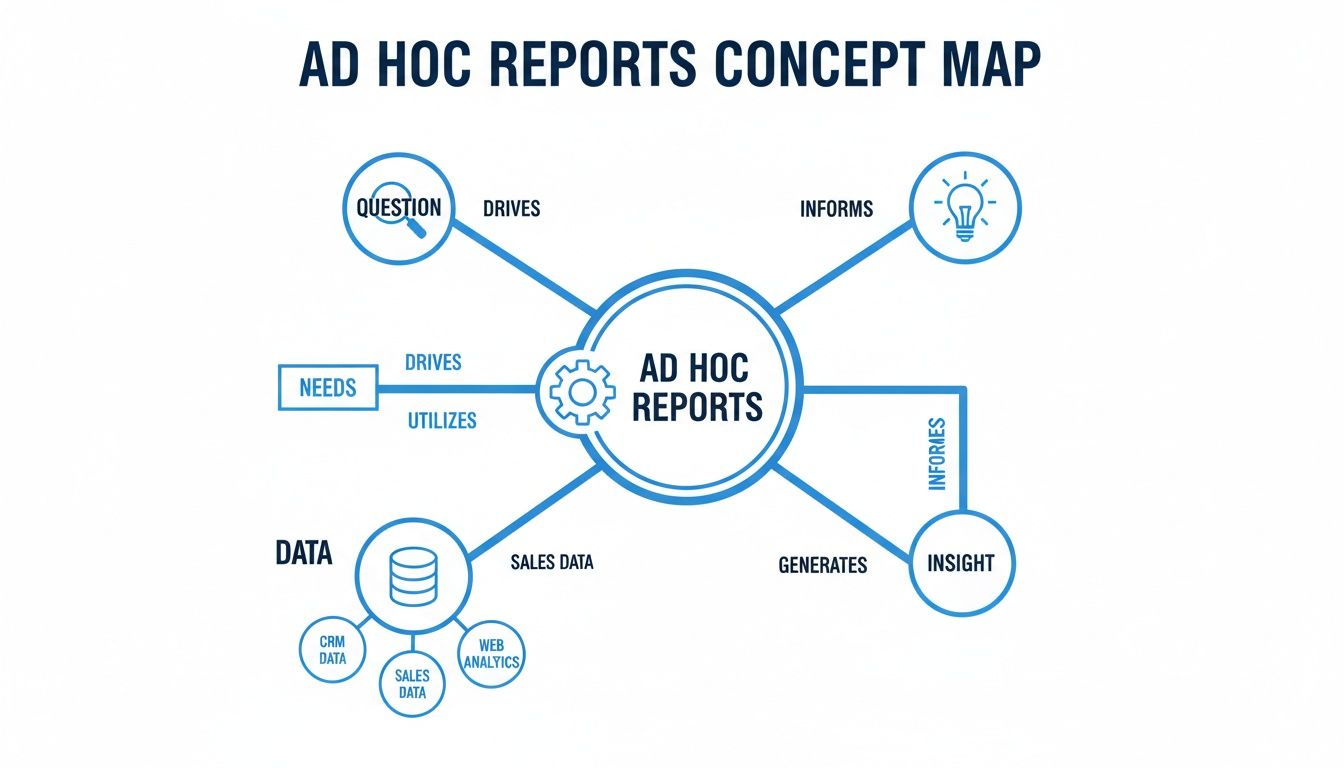
As you can see, the whole process starts with a moment of curiosity, sparking a journey into the data to find a specific answer. If you want to get into the technical side of this process, you can learn more about running ad hoc queries and what makes them tick.
To put it simply, here’s a quick breakdown of how these two types of reports stack up against each other.
Comparison of Ad Hoc Reports vs Standard Reports
This table really highlights the unique purpose and function of each reporting style.
Characteristic | Ad Hoc Report | Standard Report |
|---|---|---|
Purpose | To answer a specific, one-time question and explore data. | To monitor key performance indicators (KPIs) on a regular basis. |
Frequency | Generated on-demand as needed. | Delivered on a fixed schedule (daily, weekly, monthly). |
Creator | Typically business users or analysts. | Often created by IT or a dedicated data team. |
Format | Highly flexible and customized to the specific query. | Static, with a predefined layout and fixed metrics. |
Lifespan | Often used once for an immediate decision. | Used repeatedly for ongoing performance tracking. |
Ultimately, one isn’t better than the other; they’re two sides of the same coin. You need standard reports for a stable, consistent view of performance, but you need ad hoc reports to stay agile and solve problems as they arise.
Practical Examples of Ad Hoc Reports in Action

It’s one thing to understand the definition of an ad hoc report, but seeing one in the wild, solving a real problem? That's when the lightbulb goes on. These reports aren’t just abstract tools; they’re the first thing teams reach for when an urgent, specific question pops up that their standard dashboards just can't answer.
Instead of waiting around for the weekly summary, a team can dive right into the live data to get to the "why" behind a sudden change. That kind of agility is what keeps a business ahead of the curve.
For Product Management Teams
Let's say a product manager sees a sudden 15% drop in user engagement on a brand-new feature. The regular dashboard flags the drop, but it doesn't explain it.
The Question: "Which specific user groups are ditching this feature, and where in the process are they bailing?"
The Ad Hoc Report: The PM quickly generates a one-off report that slices the data by user plan, location, and how they were acquired. It then maps this against session recordings to find the exact point of friction.
The Action: The report makes it crystal clear: users on older mobile devices are hitting a show-stopping bug. The product team immediately pushes a hotfix, stopping the churn and saving the feature's launch from disaster.
For Marketing and Sales Teams
Picture this: a marketing team just kicked off a big two-day flash sale. They need to know right now if the campaign is bringing in actual revenue, not just a bunch of clicks.
The Question: "What's our real-time return on ad spend (ROAS) for this flash sale, and which specific ads are driving it?"
The Ad Hoc Report: They spin up an on-the-spot report that pulls data directly from their ad platforms and CRM. It instantly visualizes which ad creatives are leading to actual sales.
The Action: The data is glaring—one video ad is outperforming everything else by 300%. The team immediately shifts the rest of their budget to that winner, squeezing every last drop of profit out of the sale. If you want to see more about how data shapes strategy, check out this example of sales forecasting.
An ad hoc report is the bridge between a surprising data point and a decisive business action. It turns a vague concern like "sales are down" into a specific, solvable problem like "sales are down in the Midwest because of a competitor's promotion."
These examples show how ad hoc reports help different departments shift from just reacting to problems to making smart, proactive decisions. They connect a need for immediate insight directly to a positive business outcome.
When Your Team Should Use Ad Hoc Reporting
Knowing when to reach for an ad hoc report is just as important as knowing what one is. Think of them as your business’s special investigative unit. They aren't meant for your daily, run-of-the-mill check-ins; they’re the tool you pull out when you need to dig deep into a specific question or problem.
Your standard dashboards are great for giving you the "what"—what happened to sales this week, what's our user engagement rate. But they often can't tell you the "why." When a key metric on your weekly dashboard suddenly tanks or skyrockets with no obvious explanation, that’s your cue. An ad hoc report lets you drill down past the surface to find the real story.
Investigating Unexpected Trends
Let’s say your monthly sales numbers look fantastic overall. Great news, right? But then a standard dashboard shows that one of your star product lines is mysteriously underperforming in a specific region. This is the perfect time for an ad hoc report.
You can instantly spin up a one-off analysis to dissect that anomaly, slicing the data by different variables to see what's going on.
Sales Representative: Is the problem isolated to a few team members?
Marketing Campaigns: Did a recent regional promotion completely miss the mark?
Customer Demographics: Has our target audience in that area changed?
This kind of targeted analysis lets you stop just looking at the problem and start actively figuring out how to solve it.
Ad hoc reporting is what allows your team to go from being reactive—waiting for the next scheduled report to come out—to being proactive, chasing down answers the second a question pops into their heads.
It's also incredibly useful for testing a hunch before you invest a ton of time and money. Imagine a product manager has a brilliant idea for a new feature. Instead of just going on a gut feeling, they could run a quick ad hoc analysis on user behavior data to see if people are actually struggling with the problem this feature aims to solve. It’s a fast, data-backed way to validate an idea.
How to Empower Your Team with Self-Serve Analytics
Let's be honest: the old way of doing business intelligence is broken. Your business teams have urgent questions, but to get answers, they have to file a ticket and get in line behind everyone else. Your data team is swamped, and a major bottleneck forms, grinding decisions to a halt and killing curiosity.
This reactive, ticket-based system just can't keep up anymore. In today's market, waiting days—or even weeks—for a report means you're already behind. The fix isn't just a new tool; it's a cultural shift toward self-serve analytics, where every person on your team has the power to find their own answers.

The Shift from Dependency to Empowerment
Picture a product manager who needs to know how a new feature is performing. Instead of writing a detailed spec for an analyst and waiting, they can just ask a question in plain English: "What is the adoption rate of our new feature among enterprise users?" Seconds later, they get a clear, accurate answer.
That's the real power of modern BI. It changes the entire dynamic from passively waiting for information to actively investigating it in real time. We dive deeper into this in our guide to self-service analytics best practices.
When your teams can explore data on their own, a few amazing things start to happen:
Decisions Get Faster: Answers arrive in minutes, not weeks. This allows teams to jump on opportunities and solve problems as they appear.
Innovation Spikes: People can test theories and validate ideas with hard data on the spot, building a culture of smart experimentation.
Data Teams Get Unstuck: Analysts are freed from the never-ending queue of routine report requests. They can finally focus on the strategic, high-impact projects that move the needle.
By removing the technical barriers to data, you unlock the collective intelligence of your entire organization. The people closest to the business problems can now use data directly to solve them, leading to smarter, faster outcomes.
Ultimately, giving your teams self-serve tools for ad hoc analysis is about building a truly data-driven organization from the ground up. It’s a shift that doesn't just improve efficiency—it creates a more engaged, proactive, and insightful workforce.
A Few Common Questions About Ad Hoc Reporting
Even once you understand what ad hoc reporting is, a few practical questions always pop up when teams first start digging into their own data. Getting these sorted out early is a huge step toward building a team that's confident and self-sufficient with analytics.
Here are the answers to the questions we hear most often about the tools, security, and data consistency involved.
What Are the Best Tools for Ad Hoc Reporting?
You need tools that let people who aren't data analysts build their own reports without a headache. Sure, you can technically use a spreadsheet, but that's a manual, error-prone process that doesn't scale. Modern business intelligence (BI) platforms were built to solve this exact problem.
The best ones usually have a few things in common:
User-Friendly Interfaces: Think drag-and-drop report builders and intuitive ways to create charts, not code.
Natural Language Querying: The most advanced tools let you ask questions in plain English, just like you'd ask a colleague.
Direct Data Connections: They plug right into your databases, so you're always working with real-time, accurate information.
This combination gets rid of the technical roadblocks and lets anyone on the team get the answers they need, fast.
Is Ad Hoc Reporting Secure?
Absolutely—as long as you’re using a modern BI platform. Any enterprise-ready tool is built with robust security baked in from the start. The goal is to open up access to insights, not to sensitive information.
Security and access don't have to be at odds. The right platform uses granular permissions to ensure people only see the data they're supposed to, which keeps governance tight even when everyone is serving themselves.
Look for features like read-only database access, row-level security (which filters data based on who is looking at it), and compliance with standards like SOC 2.
How Can We Prevent Inconsistent Data?
This is a classic fear—the dreaded "data chaos" where everyone has a different number for the same metric. You solve this by using a centralized platform that connects to a single source of truth.
Instead of having everyone export data to their own spreadsheets and calculate metrics differently, a single, unified tool ensures everyone is pulling from the same playbook. When someone asks for "monthly recurring revenue," they get the one, official, correct number. Every single time. This creates consistency across every report and every team.
Ready to clear out those data bottlenecks and give your team the power of true self-serve analytics? Querio’s AI-powered platform lets anyone ask questions in plain English and get trusted answers in seconds. Discover how Querio makes ad hoc reporting fast, reliable, and secure.

